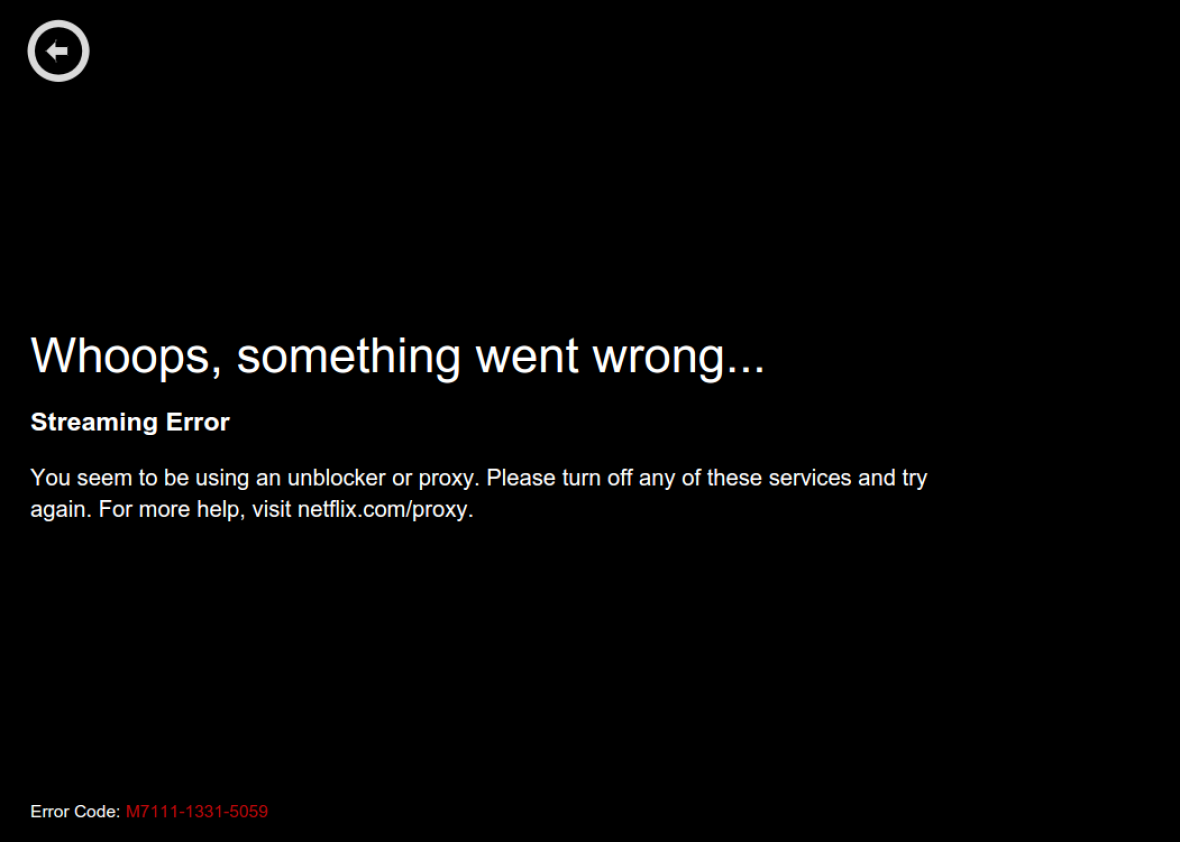
Netflix is a giant in the world of streaming, offering movies, TV shows, documentaries, and original content to millions of viewers worldwide. But not everyone gets the same Netflix library. Your location decides what you can watch. Many people try to use a VPN (Virtual Private Network) to change their location and access shows from other countries. However, in recent years, Netflix has become very good at blocking VPNs. For many users, the message “You seem to be using an unblocker or proxy” appears, and the VPN stops working. If you are frustrated because your Netflix VPN is not working, you’re not alone. This guide will help you understand why this happens, what you can do about it, and how to make smart choices if you want to access Netflix through a VPN.
Why Netflix Blocks Vpns
Netflix must follow strict licensing agreements. Movie studios and TV networks sell rights to their content by country. For example, a film may be available in the US, but not in the UK, or vice versa. When Netflix buys content, it often agrees to show it only in certain regions.
If people use VPNs to bypass these restrictions, Netflix violates those agreements.
To protect these deals, Netflix uses advanced technology to detect and block VPNs. This is called geo-blocking. If too many users from different countries access Netflix with the same IP address (the address given by a VPN), Netflix flags that address and blocks it. This is why you often see the error message when using a VPN.
How Netflix Detects And Blocks Vpns
Netflix uses several tools and methods to spot VPNs. Here are the most common ways:
- IP Address Analysis: Netflix tracks IP addresses with unusually high traffic or those known to belong to VPN services. If many users watch Netflix from the same IP, it’s likely a VPN.
- DNS Filtering: Netflix checks if your DNS (Domain Name System) matches your IP address’s location. VPNs sometimes fail to change your DNS, making it easy for Netflix to see the mismatch.
- Port Blocking: Some VPNs use specific internet ports. Netflix can block these ports to stop VPN traffic.
- Known VPN Provider Lists: Netflix updates lists of IPs owned by popular VPN companies. These are blocked regularly.
- User Reports: Sometimes, Netflix users report problems or strange access patterns, leading to more blocks.
Netflix’s detection methods are always improving. VPN providers try to keep up, but it’s a constant game of cat and mouse.
Common Reasons Why Your Netflix Vpn Is Not Working
Many people wonder why their VPN suddenly stopped working with Netflix. Here are the most frequent causes:
1. The Vpn’s Ip Address Is Blocked
Netflix blocks IP addresses once they are detected as VPNs. If your VPN uses shared IP addresses, there is a higher chance they will be blocked.
2. Outdated Vpn Servers
VPN providers often update their servers to bypass Netflix’s blocks. If you use an old server, it may no longer work.
3. Dns Leaks
If your device’s DNS is not changed by the VPN, Netflix sees your real location. This is called a DNS leak and is a common issue.
4. Weak Or Free Vpn Services
Free VPNs usually have fewer servers and worse technology. They are easy for Netflix to detect and block.
5. Browser Or Device Issues
Sometimes, the browser or device you use causes problems. For example, if your browser stores cookies, Netflix may see your real location even with a VPN.
6. Multiple Device Problems
If you use Netflix on more than one device, and only some use the VPN, Netflix may detect the mismatch.
Which Vpns Work With Netflix? (and Which Don’t)
Not all VPNs can bypass Netflix’s blocks. Here’s a comparison of some popular VPNs and their success with Netflix:
| VPN Provider | Netflix Access Success | Key Features |
|---|---|---|
| ExpressVPN | High | Fast servers, reliable, many countries |
| NordVPN | High | Obfuscated servers, strong encryption |
| Surfshark | Medium-High | Unlimited devices, affordable |
| CyberGhost | Medium | Specialized streaming servers |
| Private Internet Access | Low | Good privacy, but often blocked |
| Free VPNs | Very Low | Few servers, easily detected |
ExpressVPN, NordVPN, and Surfshark are most likely to work with Netflix. However, even these can be blocked sometimes. Free VPNs almost never work.
Step-by-step Solutions When Your Netflix Vpn Is Not Working
If your VPN stops working with Netflix, don’t panic. Try these steps to fix the problem:
1. Switch Vpn Servers
Most VPNs offer several servers in each country. Choose another server. This often solves the issue.
2. Clear Browser Cookies And Cache
Cookies can reveal your real location. Clear them before accessing Netflix.
3. Change Vpn Protocol
VPNs use protocols like OpenVPN, WireGuard, or IKEv2. Switch protocol in the VPN settings. Some protocols are harder for Netflix to detect.
4. Enable Dns Leak Protection
Most premium VPNs offer DNS leak protection. Make sure it’s on.
5. Use Obfuscated Servers
Some VPNs have special obfuscated servers that hide VPN traffic. These are designed to bypass blocks.
6. Try Incognito Or Private Browsing Mode
Incognito mode stops your browser from storing cookies. This helps prevent location leaks.
7. Update Your Vpn App
Old apps may not have the latest fixes. Update your VPN to the newest version.
8. Contact Vpn Support
Many VPNs have live chat or email support. Ask them which server works with Netflix.
9. Restart Your Device
A simple restart can clear hidden issues and refresh connections.
10. Test On Another Device
Sometimes, the problem is with your device, not the VPN. Try Netflix on another computer or phone with the VPN.
How To Choose The Best Vpn For Netflix
Picking a VPN is not just about price or speed. If you want Netflix access, look for these features:
| Feature | Why It Matters for Netflix |
|---|---|
| Server Network Size | More servers mean more chances to bypass Netflix blocks. |
| Streaming-Optimized Servers | Some VPNs have servers made for streaming. These are less likely to be blocked. |
| DNS Leak Protection | Stops Netflix from seeing your real location. |
| Obfuscation | Hides VPN traffic. Makes it harder for Netflix to detect. |
| Speed | High speed prevents buffering and lag. |
| Customer Support | Helps you find working servers quickly. |
Look for these features in the VPN’s product page or ask their support team. Avoid VPNs that don’t mention streaming or Netflix.

Credit: www.youtube.com
Risks And Limitations Of Using A Vpn With Netflix
It’s important to know the risks before using a VPN for Netflix. Here are things to consider:
1. Account Suspension
Netflix’s terms of use forbid VPNs to access content outside your region. While rare, Netflix can suspend your account for breaking rules.
2. Quality Issues
VPNs may slow your connection. Some servers are crowded, causing buffering, lower video quality, or frequent disconnections.
3. Legal Concerns
In some countries, using a VPN to bypass geo-blocks is illegal. Check your local laws before using a VPN.
4. Privacy Problems With Free Vpns
Free VPNs may log your data or sell your browsing history. Always use reputable providers.
5. Changing Libraries
Netflix updates its library often. The show you want may disappear even if your VPN works.
6. Device Compatibility
Some VPNs don’t work on smart TVs or streaming devices like Roku and Apple TV. Make sure your VPN supports your device.
How Netflix’s Vpn Blocks Are Getting Smarter
Netflix invests in new technologies to block VPNs. Here are some advanced methods:
Machine Learning
Netflix uses machine learning to track patterns in VPN traffic. If it sees unusual viewing habits from one IP, it blocks that address.
Deep Packet Inspection
This technology looks inside internet packets to see if they match VPN traffic. It’s harder for VPNs to hide.
Automated Ip Blacklists
Netflix updates its IP blacklist daily. This makes it difficult for VPNs to stay ahead.
Collaboration With Isps
Netflix sometimes works with internet service providers to detect VPN traffic. This is rare, but possible in some countries.
Netflix’s blocks are not perfect. Sometimes, real users get blocked by mistake. But overall, the company is winning the fight against VPNs.

Credit: www.reddit.com
Real-world Examples: Netflix Vpn Problems
Many users have shared their struggles online. Here are some examples:
- Traveling abroad: A student from Brazil used a VPN to watch US Netflix while studying in Germany. After a week, Netflix blocked her VPN, and she could only access German content.
- Shared IPs: A family in India used the same VPN server for Netflix. After a few days, everyone got the proxy error message.
- Free VPNs failing: An American user tried three free VPNs, but none worked. Only after switching to a paid service did he access Netflix US.
- Obfuscated servers succeeding: A tech worker in Canada found that regular VPN servers stopped working, but obfuscated servers from NordVPN allowed her to stream Netflix UK.
These stories show that VPN success with Netflix is often temporary and depends on the technology used.
Alternatives To Using A Vpn For Netflix
If your VPN stops working, you have a few other options. These are not guaranteed, but may help:
1. Smart Dns Services
Smart DNS changes only your DNS, not your IP. Some Smart DNS providers can bypass Netflix blocks, but they are less secure than VPNs.
2. Proxy Servers
Proxies can hide your location, but Netflix blocks most proxies. They are less reliable than VPNs.
3. Download Content
If you travel, download shows before leaving your home country. You can watch them offline without a VPN.
4. Wait For Content To Arrive
Sometimes, Netflix releases shows globally after a few weeks. Waiting may be easier than fighting VPN blocks.
5. Use Legal Alternatives
Check other streaming platforms in your region. Sometimes, shows blocked on Netflix are available elsewhere.
What To Do If You Get The Netflix Proxy Error
The Netflix proxy error is a clear sign your VPN is blocked. The message usually says: “You seem to be using an unblocker or proxy. Please turn it off and try again.” Here’s what you can do:
- Disconnect your VPN and reload Netflix. If it works, your VPN was the problem.
- Switch to another VPN server. Sometimes, a fresh IP address solves the issue.
- Clear cookies and cache in your browser or app.
- Enable DNS leak protection in your VPN settings.
- Contact your VPN’s support for help.
If none of these steps work, your VPN provider may not support Netflix anymore.
Vpns And Netflix: Data And Statistics
Understanding the numbers behind Netflix and VPNs helps you see the bigger picture.
- Over 220 million people subscribe to Netflix worldwide.
- About 30% of VPN users report using VPNs for streaming, according to surveys.
- Netflix blocks thousands of IP addresses daily.
- Paid VPNs like ExpressVPN and NordVPN have success rates of about 70–80% for accessing Netflix, based on user reviews.
- Free VPNs have success rates below 5% for Netflix streaming.
These statistics show that VPN use for Netflix is common, but success is limited.
How To Avoid Common Mistakes When Using A Vpn For Netflix
Many beginners make mistakes that lead to frustration. Here are some tips to avoid problems:
- Don’t use free VPNs: They are slow, unsafe, and rarely work.
- Don’t ignore DNS leaks: Always check if your VPN offers DNS leak protection.
- Don’t use the same server all the time: Rotate servers to avoid detection.
- Don’t forget to clear cookies: Old cookies can reveal your location.
- Don’t expect permanent access: Netflix may block your server at any time.
If you follow these tips, you increase your chances of success.
Comparing Vpns For Netflix Access
To help you choose, here’s a comparison of three top VPNs for Netflix:
| VPN | Netflix Libraries Unlocked | Speed | Customer Support | Price (Monthly) |
|---|---|---|---|---|
| ExpressVPN | US, UK, Canada, Japan, Australia | Very Fast | 24/7 Live Chat | $12.95 |
| NordVPN | US, UK, Germany, France, Japan | Fast | 24/7 Live Chat | $11.99 |
| Surfshark | US, UK, India, Australia, Italy | Fast | 24/7 Live Chat | $12.95 |
All three offer good speed, support, and access to multiple libraries. Prices are similar, so look at features and your needs.
Tips For Streaming Netflix Safely And Smoothly With A Vpn
If you get your VPN working with Netflix, make sure you stream safely and smoothly:
- Pick a server close to your real location for better speed.
- Use wired connections if possible. Wi-Fi can be unstable.
- Test video quality before watching a long film.
- Keep your VPN app and Netflix app updated.
- Monitor your VPN’s bandwidth limits. Some plans restrict streaming.
Also, remember that Netflix’s catalog changes often. If your favorite show disappears, it may return later.
Frequently Asked Questions
What Does The Netflix Proxy Error Mean?
The Netflix proxy error means Netflix has detected that you are using a VPN or proxy to access its service. It blocks you from watching content until you turn off the VPN or proxy.
Can Netflix Ban My Account For Using A Vpn?
Netflix’s terms do not allow VPNs for bypassing location restrictions. While account bans are rare, Netflix can suspend or limit your account if you break the rules.
Why Do Some Vpns Work With Netflix And Others Don’t?
VPNs that work with Netflix have special servers and technology to hide VPN traffic. Most free VPNs and smaller providers don’t have these features, so they get blocked.
How Can I Watch Netflix In Another Country Without A Vpn?
You can use Smart DNS services, download shows before traveling, or wait for global releases. Legal streaming platforms in your region may also carry the same shows.
Are There Any Legal Risks In Using A Vpn For Netflix?
In most countries, using a VPN is legal. However, bypassing Netflix’s geo-blocks may violate their terms. Some countries restrict VPN use, so check your local laws.
Netflix’s battle with VPNs is ongoing. Sometimes, even the best VPNs fail. But with the right knowledge, you can improve your chances of unlocking new content. Always use a reputable VPN, protect your privacy, and stay aware of Netflix’s policies. If you need more information on VPNs and streaming, visit Wikipedia’s VPN page for trusted details. Streaming should be fun, not stressful—so make smart choices and enjoy your favorite shows wherever you are.
Credit: slate.com