If your GE microwave display suddenly goes dark or stops working, it can feel like your kitchen routine has hit a wall. The digital display is more than just a convenience—it’s how you set cooking times, monitor progress, and even see error codes. When it fails, you’re left guessing and often frustrated. The good news is, a non-working microwave display usually doesn’t mean you need to buy a new appliance. Often, the problem is fixable, sometimes even without calling a technician.
This guide is for anyone facing a GE microwave display not working issue. Whether you’re a homeowner, renter, or property manager, you’ll learn what causes the display to stop, how to troubleshoot, and when you need expert help. The explanations use clear language, with real-life examples and practical steps. By the end, you’ll feel more confident about dealing with this common kitchen headache.
How The Ge Microwave Display Works
Understanding how your microwave display functions can help you find the problem faster. Most GE microwaves use a Vacuum Fluorescent Display (VFD) or an LED display. These screens show numbers, cooking modes, and sometimes error codes. The display gets power and information from the microwave’s control board.
When you press a button, the control board sends a signal to the display, telling it what to show. If power, signals, or the display itself fails, you’ll see a blank screen or garbled numbers.
A healthy display lets you:
- Set cooking times and power levels
- Use preset programs
- See the clock and timer
- Read error codes if something goes wrong
If the display is completely dark, flickering, or shows only parts of numbers, it’s a sign that something in this chain is broken.
Common Symptoms Of A Ge Microwave Display Problem
Not all display failures look the same. Here’s what you might see:
- Completely blank display: No numbers, clock, or response when pressing buttons.
- Dim or flickering display: Numbers or symbols are hard to see, especially in bright light.
- Partial numbers or missing segments: Only parts of digits appear.
- Display comes on and off randomly: Sometimes it works, sometimes it doesn’t.
- Display is on, but buttons don’t work: Screen lights up, but you can’t set the microwave.
Knowing your exact symptom helps narrow down the cause.
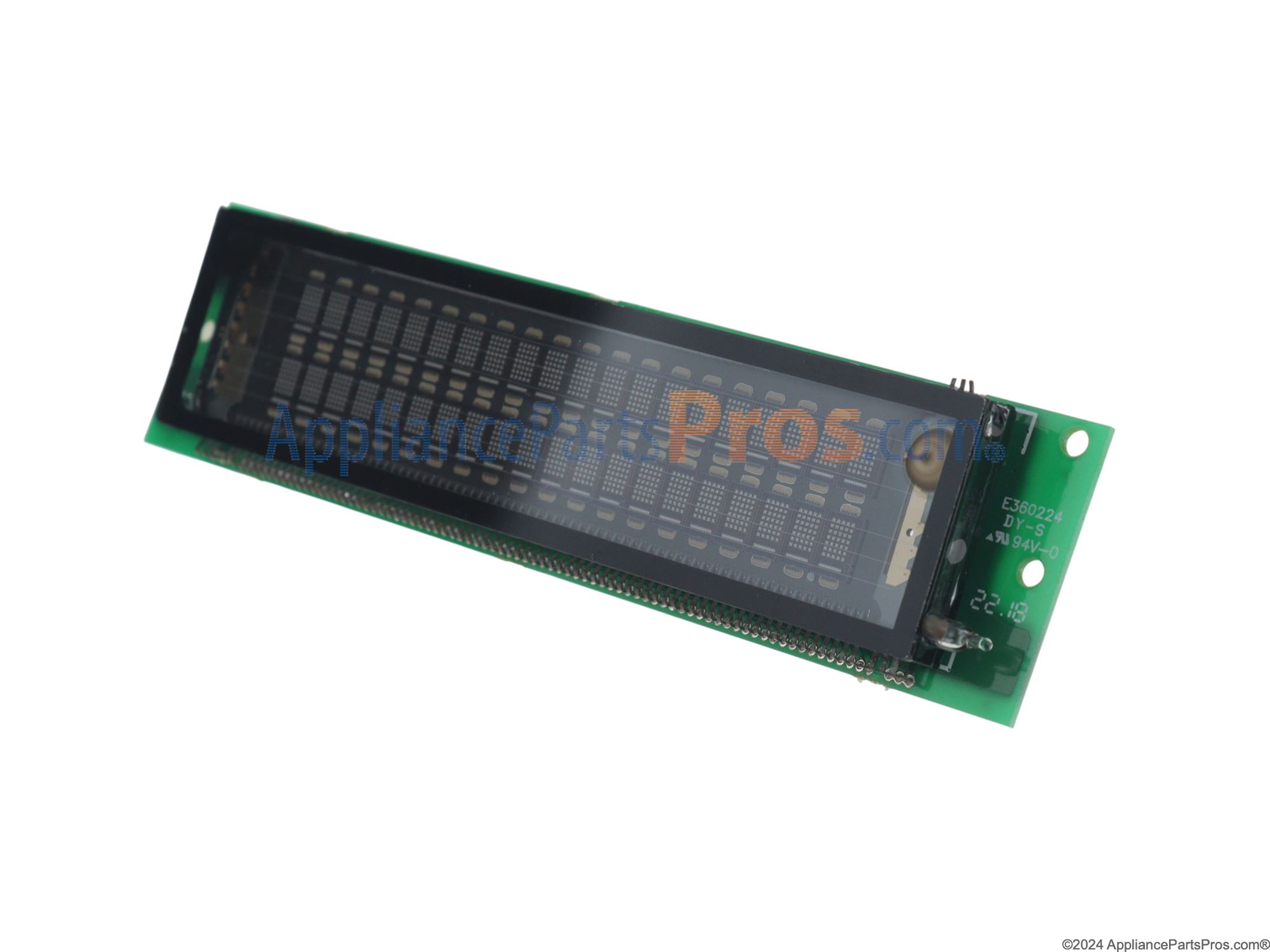
Credit: www.appliancepartspros.com
Why Does The Ge Microwave Display Stop Working?
Several things can cause the display to stop working. Here are the most common reasons:
- Power supply issues: If the microwave isn’t getting enough power, the display won’t light up. Sometimes, only the display is affected, not the whole microwave.
- Blown fuse: Most microwaves have a fuse or thermal fuse to protect against power surges. If the fuse blows, the display may go dark.
- Faulty control board: The control board is like the microwave’s brain. If it fails, the display can stop working even if the rest of the microwave is fine.
- Loose or damaged wiring: Wires inside the microwave can come loose or get damaged, breaking the connection to the display.
- Failed display module: Sometimes, the display itself (VFD or LED) goes bad after years of use.
- Moisture or steam damage: If steam from cooking gets inside, it can corrode display components.
- Old age: Most microwave displays last 7-12 years. If yours is older, wear and tear is a likely cause.
Quick Initial Checks Before Troubleshooting
Before you take apart your microwave or call a technician, do these simple checks:
- Check the power outlet: Plug another device (like a phone charger) into the same outlet. If it doesn’t work, the problem is your kitchen outlet, not the microwave.
- Try another outlet: Move the microwave to a different, working outlet.
- Reset the microwave: Unplug the microwave for 60 seconds, then plug it back in. This can reset the control board.
- Check the circuit breaker: Make sure the kitchen breaker hasn’t tripped.
- Look for obvious damage: Burn marks, a burning smell, or visible cracks are signs of bigger electrical issues.
If these steps don’t solve the problem, you’ll need to look deeper.
Step-by-step Troubleshooting For Ge Microwave Display
Let’s break down the troubleshooting process. Most steps require only basic tools like a screwdriver and a flashlight. If you’re not comfortable, stop and call a professional—microwaves store high voltage, even when unplugged.
1. Unplug And Wait
Always unplug your microwave before opening it. Microwaves can hold a dangerous electrical charge in their capacitors. Wait at least 10 minutes after unplugging.
2. Check Internal Fuses
GE microwaves often have one or more fuses inside, usually near where the power cord connects to the control board.
- Remove the outer case (usually a few screws in the back).
- Locate the fuse (it looks like a small glass tube with metal ends).
- Use a multimeter to check for continuity. If the fuse is blown (no continuity), replace it with the exact same type and rating.
Important: If the new fuse blows again, there’s a deeper electrical problem.
3. Inspect The Display Module
Carefully check the display board for signs of damage:
- Look for burn marks, bulging capacitors, or loose wires.
- Gently press on connectors to make sure they’re seated.
- If you see corrosion or a white residue, moisture may have gotten inside.
4. Examine The Control Board
The control board is usually a green or brown circuit board behind the keypad.
- Check for obvious damage, such as burnt spots or cracked solder joints.
- If you have a similar, working microwave, try swapping control boards (if you’re comfortable).
5. Test The Display
If you have a multimeter, you can test the voltage at the display connector. It should match the label on the display board (often 5V or 12V). No voltage means a control board or wiring issue.
6. Check Door Switches
Surprisingly, a faulty door switch can sometimes cause the display to turn off. If the microwave thinks the door is always open, it may not show anything.
- Open and close the door several times. Listen for a clear “click.”
- If the switches don’t click or feel loose, they may need replacing.
7. Look For Moisture Damage
If your microwave is above a stove, steam from cooking can get inside. Over time, this can cause the display to fail.
- Check for condensation or rusty parts near the display.
- Let the microwave dry out for a few hours, then try again.
8. Consider Old Age
If your microwave is over 10 years old and none of these steps help, the display may simply be worn out.
When To Repair Vs. Replace Your Microwave
Not every display problem means you need a new microwave. Here’s how to decide:
- Replace fuses or door switches: These are cheap and easy for most people.
- Replace the display module: If you can find the part for under $50 and install it yourself, it’s often worth it.
- Replace the control board: Costs $80–$200 for parts and labor. For microwaves over 5 years old, replacement may be smarter.
- Whole microwave replacement: If repairs cost more than half a new microwave, or if your model is over 8 years old, buy new.
Here’s a quick comparison:
| Repair Option | Average Cost | DIY Level | Worth It? |
|---|---|---|---|
| Fuse Replacement | $5–$20 | Easy | Yes |
| Display Module | $30–$80 | Medium | Sometimes |
| Control Board | $80–$200 | Hard | Maybe |
| Buy New Microwave | $100–$400 | Easy | Often Best |
How To Replace A Ge Microwave Display
If you’re handy and want to try replacing the display, follow these steps. Remember, if you’re unsure, safety comes first—call a professional.
Tools And Parts Needed
- Screwdriver (usually Phillips)
- Multimeter (for testing fuses)
- Replacement display module (order by model number)
- Safety gloves
Step-by-step Process
- Unplug the microwave and let it sit for 10 minutes.
- Remove the outer case (several screws on the back and sides).
- Locate the display module—it’s behind the control panel.
- Take a clear photo of all wire connections before disconnecting anything.
- Disconnect the wiring harness from the display.
- Unscrew and remove the old display.
- Install the new display, reattach wires, and check connections.
- Reassemble the case, plug in, and test.
Tip: Always double-check your microwave model number before ordering parts.
Real-world Examples
Let’s look at some cases where the GE microwave display stopped working.
- Case 1: A homeowner’s 5-year-old GE microwave went dark after a thunderstorm. The fuse was blown, likely from a power surge. Replacing the fuse restored the display.
- Case 2: A renter noticed the display would flicker when opening the door. The issue was a loose wire at the door switch. Tightening the wire fixed the problem.
- Case 3: After years above a stove, the display was unreadable due to steam damage. Drying out didn’t help; the display module needed replacement.
- Case 4: In an older microwave (over 10 years), the display faded gradually. This was caused by aging components. The owner chose to buy a new unit.
Preventing Microwave Display Problems
You can reduce the chance of display failure with a few simple habits:
- Avoid power surges: Use a surge protector for your microwave.
- Wipe steam and moisture: If your microwave is over the stove, wipe off condensation after heavy cooking.
- Keep vents clear: Good airflow prevents overheating and moisture buildup.
- Don’t slam the door: Gentle closing prevents damage to internal switches and wires.
- Clean regularly: Food splatters can attract moisture and bugs, which damage electronics.
Ge Microwave Display: Common Myths
There’s a lot of misinformation about microwave repairs. Here are some myths:
- “If the display is dead, the whole microwave is bad.” Not true—often, a fuse or small part is the issue.
- “You can fix any display with a hard reset.” Sometimes, but not if the hardware is broken.
- “Only a technician can fix it.” Many repairs (like fuses) are safe for handy homeowners.
- “Displays go bad only in old microwaves.” Newer models can fail from power surges or moisture too.
Don’t believe everything you hear—many display failures are minor.
When To Call A Professional
Some display problems are too risky for DIY repair. Call a technician if:
- You smell burning or see smoke.
- The microwave hums or buzzes but doesn’t work.
- Fuses blow repeatedly.
- You’re not comfortable opening the case.
Professional repair is safer, especially for high-voltage parts.
How To Find The Right Replacement Parts
Finding the correct part is essential. Here’s how:
- Check the model number: Usually on a sticker inside the door.
- Search GE’s official parts site or reputable appliance parts stores.
- Read reviews to avoid low-quality parts.
- Compare prices before buying.
Genuine GE parts are usually more reliable but can cost more.

Credit: www.youtube.com
Comparing Ge Microwave Models: Are Some More Reliable?
Not all GE microwaves are the same. Some models have better displays and longer life.
Here’s a comparison of three popular models:
| Model | Display Type | Average Lifespan | Reported Display Issues |
|---|---|---|---|
| GE JVM3160RFSS | VFD | 8–10 years | Low |
| GE JES2051SNSS | LED | 7–9 years | Moderate |
| GE Profile PVM9005SJSS | VFD | 9–12 years | Low |
VFD displays usually last longer but are harder to replace. LED displays are brighter but may fail sooner in high-moisture kitchens.
Hidden Causes Beginners Often Miss
Two causes often surprise people:
- Voltage drops in old homes: If your house has old wiring, the microwave display may flicker or turn off when other appliances run. This isn’t a microwave fault but a wiring issue.
- Bug infestation: In humid climates, tiny bugs can get inside the control panel. They short out circuits and cause display failures. Regular cleaning helps prevent this.
The Importance Of Model-specific Troubleshooting
Not all GE microwaves are built the same. Some use different display types or have unique wiring. Always check your manual or search online for your exact model. For example, some over-the-range models have special fuses hidden behind panels, while countertop models make parts easier to reach.
Searching “[Your Model Number] display not working” online can lead to model-specific guides and videos.
Can A Ge Microwave Work Without The Display?
Surprisingly, yes—sometimes. If only the display is out but the buttons beep and the microwave runs, you can use it by counting seconds or listening for the end beep. But you lose all preset functions and can’t see errors. It’s not a long-term solution, but it works in emergencies.

Credit: smartapplianceservices.com
Quick Reference: What To Do If Your Ge Microwave Display Stops Working
If you need a fast summary, here it is:
- Check power and outlet.
- Unplug, wait 10 minutes, and reset.
- Test and replace the fuse if needed.
- Inspect wiring and control board.
- Consider display module replacement.
- Call a technician if unsure.
Resources For Further Help
For more details, visit the official GE Appliances Support page. You’ll find manuals, part numbers, and troubleshooting videos.
Frequently Asked Questions
Why Does My Ge Microwave Display Go Blank But The Microwave Still Runs?
This usually means the display module or its wiring is faulty, but the rest of the microwave is still getting power. Try resetting the microwave. If that fails, check for loose wires or a failed display board.
How Much Does It Cost To Fix A Ge Microwave Display?
Costs range from $10 for a fuse to $200 for a control board repair. If you can replace the part yourself, you’ll save on labor. For older microwaves, replacement might be more economical.
Can I Use My Microwave If The Display Doesn’t Work?
Yes, in some cases. If the buttons still beep and the microwave runs, you can cook by timing with a phone or clock. But you won’t be able to see error codes or set precise times.
What Causes A Microwave Display To Flicker?
Flickering displays are often caused by voltage fluctuations, aging display modules, or loose connections inside. Try plugging the microwave into a different outlet and check for loose wires.
Is It Safe To Repair A Microwave Display Myself?
Replacing fuses or display modules is safe for someone comfortable with small electronics. Always unplug the microwave first and wait before opening. If you see burning, or don’t feel confident, call a professional.
Dealing with a GE microwave display not working can be stressful, but it’s usually not the end of your appliance. Many problems have simple solutions, from checking power to replacing a fuse or display module. With the right approach, you can often save money and avoid buying a new microwave. If you run into trouble, don’t hesitate to reach out to an expert—your safety matters most.