When your Samsung oven display suddenly stops working, cooking can become difficult and frustrating. You might not see the temperature, timer, or error messages. For many users, the oven may still heat, but without a working display, using the oven safely and correctly is a challenge. This situation is more common than you might think, and it can happen to both new and older Samsung ovens.
A non-working display can have different causes. Sometimes it’s a simple problem, like a tripped breaker or loose connection. In other cases, it may point to a faulty part, such as the control board or display panel. Knowing how to find the cause and fix it can save you time, money, and stress.
In this guide, you’ll learn how to troubleshoot a Samsung oven display not working, step-by-step. You’ll understand the common reasons, how to check each one, and what you can do to solve the problem. Whether you want a quick DIY fix or need to know when to call for help, this article gives you the clear, practical advice you need.
Understanding Your Samsung Oven Display
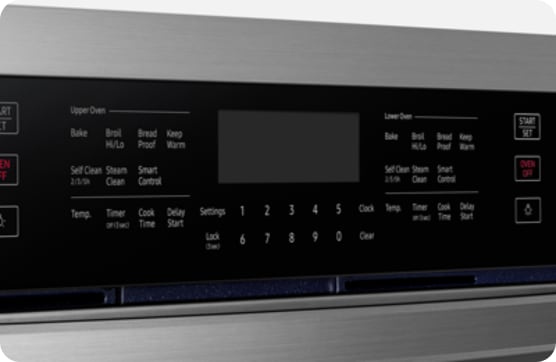
The oven display panel is the screen that shows important information like temperature, time, and cooking mode. Modern Samsung ovens use LED or LCD displays with touch controls or physical buttons. The display is connected to the main control board, which acts as the oven’s “brain.” If either of these parts has a problem, the display may stop working.
Most Samsung ovens have a digital display for easy reading. Depending on your model, the display may be a simple numeric panel or a larger touch screen. Newer models might include Wi-Fi connectivity and smart features. If your oven display goes blank, doesn’t light up, or shows strange characters, it means something is wrong with the display system or its power supply.
Common Reasons Your Samsung Oven Display Stops Working
When troubleshooting, it’s important to know the main reasons why the display fails. Here are the most frequent causes:
- Power supply issues – No electricity or unstable power can cause the display to go blank.
- Tripped circuit breaker – If the oven’s breaker is off or partially tripped, the display will not work.
- Loose wiring or connectors – Internal wires or connections may be loose, broken, or burned.
- Failed control board – The main circuit board might have failed or developed a fault.
- Defective display panel – The LED or LCD panel itself can fail after years of use.
- Blown fuse – Some ovens have internal fuses that protect the electronics; if blown, the display will not work.
- Moisture or liquid damage – Spills or steam can damage electronic components over time.
- Software glitches – In smart ovens, software or firmware bugs can sometimes freeze the display.
- User error – Accidental activation of the “demo mode” or child lock can make the display appear dead.
Most display problems are linked to power supply, wiring, or the control board. Rarely, the issue is with the display alone.
Quick Checks Before You Start
Before opening up your oven or calling a technician, try these quick checks. Many users overlook simple issues that can be fixed in minutes.
- Make sure the oven is plugged in fully.
- Check that your kitchen outlet is working (plug in another device to test).
- Look at your home’s circuit breaker panel and reset the oven’s breaker if it has tripped.
- Try pressing the “Power,” “Clear,” or “Start” buttons for several seconds.
- If your oven has a “child lock” or “demo mode,” check the manual to disable these features.
If the display lights up or responds after these steps, the problem was minor. If not, continue with the detailed troubleshooting below.
Step-by-step Troubleshooting
Solving a Samsung oven display not working problem often involves eliminating possible causes one by one. Follow these steps to find and fix the issue.
1. Check The Power Source
The first thing to check is whether the oven is receiving power.
- Unplug the oven from the wall and plug it back in after 30 seconds.
- Test the wall outlet with a different appliance (like a toaster).
- Check your home’s electrical panel for tripped breakers. Samsung ovens often use a dedicated 240V breaker. Flip it fully off, then on again.
- If your oven is hardwired (not plugged into a socket), you may need a qualified electrician to test the supply.
Non-obvious tip: Some outlets have a “reset” button (GFCI). If the outlet near your oven has this, press “reset” to restore power.
2. Inspect The Oven Fuse
Many Samsung ovens have an internal thermal fuse or line fuse to protect the electronics. If this blows, the display won’t turn on.
- Unplug the oven or turn off the breaker before opening any panels.
- Remove the back panel (for freestanding ovens) or the top control panel (for wall ovens).
- Look for a small, cylindrical glass or ceramic fuse. If it looks blackened or the filament is broken, it’s blown.
- Replace with a fuse of the same rating (check the manual or the old fuse’s label).
Warning: Never bypass the fuse, as this is a fire risk.
3. Examine The Display Panel And Connections
Sometimes, the display panel itself is faulty, or a connector has come loose due to vibration or age.
- Remove the control panel (follow your user manual or a trusted online video for your model).
- Check for loose ribbon cables or wire connectors between the display and the main board.
- Inspect connectors for signs of burning, corrosion, or breaks.
- Gently reseat all connections (unplug and replug them).
Non-obvious tip: Use a flashlight to check for tiny cracks on the display’s circuit board or burnt smell, which suggests a failed part.
4. Test The Control Board
If the wiring and display look fine, the problem may be the main control board (also called PCB or ERC).
- The control board is usually a green circuit board with many wires and chips.
- Check for burned spots, swollen capacitors, or melted areas.
- If you have a multimeter, test for voltage coming into the board. No power means a supply issue; power in but no display means a board problem.
If the control board is faulty, it usually needs replacement. This is a common repair for Samsung ovens over 5 years old.
5. Look For Error Codes
Some Samsung ovens show error codes, even if the display is partly working (flashing lights, beeps, or partial numbers).
- Check the manual for the meaning of any codes.
- Common codes for display problems include C-21, E-27, or E-OE (codes may vary by model).
- If the display shows random or unreadable characters, it usually means a control board or display failure.
6. Software Issues (for Smart Ovens)
If your oven has Wi-Fi or smart features, a software glitch can cause the display to freeze or go blank.
- Try a “soft reset” by turning off the oven at the breaker for 5 minutes, then turning it on again.
- Check the Samsung SmartThings app for error messages or firmware updates.
- If the display works after a reset, update the oven’s firmware using the official app.
Insight: Samsung sometimes releases software updates to fix display bugs. Keeping your oven updated can prevent future problems.
When To Call A Professional
Some repairs, like changing a fuse or reseating a connector, are safe for most users. But if you suspect a failed control board or display panel, or if you see burned wiring, it’s safer to call a trained technician. Modern ovens contain high-voltage parts and sensitive electronics.
The following situations require a professional:
- You smell burning plastic or see smoke inside the oven.
- The oven trips the breaker repeatedly.
- The display works sometimes, but buttons or touch controls do not respond.
- You’re not comfortable opening the oven’s back or control panel.
A typical repair visit costs between $120–$350, depending on the part and labor. Replacing the display or control board can cost more, especially for newer, smart ovens.
Comparing Samsung Oven Display Problems With Other Brands
Samsung is a popular oven brand, but display issues are not unique to them. Many major brands have similar problems. Here is a comparison of display issue frequency and repair cost among popular oven brands:
| Brand | Common Display Problems | Average Repair Cost | Repair Difficulty |
|---|---|---|---|
| Samsung | Control board, loose wiring, display failure | $150–$350 | Medium |
| LG | Display flicker, touchpad failure | $180–$400 | Medium |
| GE | Clock not showing, power supply issues | $130–$320 | Medium |
| Whirlpool | Blank display, keypad not working | $120–$300 | Medium |
| Bosch | Partial display, error codes | $200–$500 | High |
As you can see, Samsung’s repair cost is in the middle of the range. The difficulty level is “medium” because most parts are accessible, but diagnosis can be complex.

Credit: www.youtube.com
How To Replace A Samsung Oven Display Panel
If you’ve confirmed the display panel is faulty, you can replace it yourself if you have some DIY skills. Here’s a basic guide:
- Unplug the oven or turn off the breaker.
- Remove the screws holding the control panel (usually at the back and bottom).
- Gently pull the panel forward to expose the wiring.
- Disconnect the ribbon cables carefully (note their positions for reassembly).
- Remove the display panel (usually attached with small screws).
- Install the new display panel, reconnect all cables, and reattach the control panel.
- Power the oven and test the display.
Practical tip: Take photos of each step, especially wiring, to avoid mistakes when putting everything back.
This repair takes about 30–60 minutes. Most replacement panels cost $70–$200, depending on the model.
Control Board Vs. Display Panel: What’s More Likely To Fail?
Both the control board and display panel are important for the oven’s display. Here’s a comparison to help you decide which is more likely to be the problem:
| Part | Symptoms | Failure Rate | Repair Cost |
|---|---|---|---|
| Control Board | No display, oven unresponsive, random beeps | High (especially over 5 years) | $120–$350 |
| Display Panel | Faint display, missing segments, flickering | Medium | $70–$200 |
Insight: If the display is completely blank and no buttons work, the control board is the likely cause. If only parts of the display are missing or faint, the display panel is probably at fault.

Credit: www.reddit.com
Preventing Future Samsung Oven Display Issues
To avoid repeat problems, follow these maintenance tips:
- Clean the control panel with a damp (not wet) cloth. Never spray cleaner directly on the display.
- Don’t slam the oven door; vibration can loosen connectors.
- Avoid using the oven during power surges or thunderstorms.
- Keep the oven’s firmware updated using the Samsung SmartThings app, if available.
- Have a professional check the wiring if your home has frequent power issues.
Non-obvious tip: If your oven is near a window, protect it from direct sunlight. Extreme heat can damage electronic displays over time.
How Long Should A Samsung Oven Display Last?
Most Samsung oven displays last 5–10 years with normal use. Display panels can fail sooner if exposed to moisture, power surges, or rough cleaning. The control board may last longer but is also more sensitive to voltage problems.
Industry data shows that about 15% of oven display failures happen within the first 5 years, and nearly 40% by year 10. Regular maintenance can stretch the lifespan.
Real User Experiences
Many users have shared their experiences with Samsung oven display problems:
- Karen W. (Dallas, TX): “My oven went blank after a power outage. I reset the breaker and it worked again.”
- Mike R. (San Diego, CA): “The display flickered for weeks, then died. Replacing the control board fixed it.”
- Jin L. (Seattle, WA): “I thought the oven was broken, but it was just the child lock! The manual saved me.”
These stories show that sometimes the fix is simple, but other times a part replacement is needed.
Warranty And Repair Options
Samsung ovens usually come with a one-year warranty for parts and labor. Some models have extended coverage for the control board or display. If your oven is under warranty, contact Samsung support before trying repairs yourself.
If your oven is out of warranty, compare the cost of repair vs. replacement:
- If the oven is over 7 years old and the repair is more than half the cost of a new oven, replacing may be smarter.
- For high-end or smart ovens, repairs are usually worth it.
Samsung’s official service can be reached via their website or phone support. You can also check the Samsung Service Center for repair locations.
Troubleshooting Summary Table
Here’s a quick reference to help you decide what to check first:
| Symptom | Most Likely Cause | DIY Fix? | When to Call a Tech |
|---|---|---|---|
| Display completely blank | Power, breaker, control board, fuse | Yes, check power/fuse | If fuse/board needs replacing |
| Display flickers or is faint | Display panel, wiring | Yes, check wiring | If panel replacement needed |
| Some buttons don’t work | Touchpad, control board | No | Yes |
| Error codes on display | Software, sensor fault | Try reset | If reset fails |
Frequently Asked Questions
Why Does My Samsung Oven Display Go Blank After Self-cleaning?
The self-cleaning cycle heats the oven to very high temperatures. This can sometimes damage the display panel or control board, especially if the oven is older. It may also trip a thermal fuse. Let the oven cool completely and try a reset.
If the display does not return, a fuse or board may need to be replaced.
Can I Use My Oven If The Display Is Not Working?
If the oven still heats and you can control it with physical knobs, it may work for basic cooking. However, you won’t have accurate temperature or timer information. For safety and best results, it’s better to repair the display before using the oven regularly.
How Do I Reset My Samsung Oven Display?
To reset, turn off the oven at the circuit breaker for 5 minutes, then turn it back on. Some models also have a “reset” button or a combination of keys (check your user manual). A reset can fix software glitches and restore the display.
Is It Expensive To Fix A Samsung Oven Display?
The cost depends on the part that failed. Replacing a display panel usually costs $70–$200 for the part, plus labor. Control board replacement is $120–$350. If the oven is under warranty, repairs may be free. For older ovens, compare repair costs to the price of a new unit.
Where Can I Find Replacement Parts For My Samsung Oven?
You can buy genuine parts from Samsung’s official website, appliance parts stores, or online retailers like Amazon. Always check your oven’s model number to get the correct part. If you’re not sure how to install the part, a professional can help.
A working oven display makes cooking easier, safer, and more enjoyable. If your Samsung oven display is not working, don’t panic—most problems can be fixed with a little patience and the right steps. Start with the simple checks, and work your way up. If you’re unsure, it’s always smart to call a professional. With the right care, your Samsung oven will keep serving you well for years to come.
Credit: www.samsung.com