When you bring home a new baby, you want everything to work smoothly. That includes the gadgets you use to make feeding easier—like the Nuby Rapid Cool. If you’re reading this, you probably have a problem: the light on your Nuby Rapid Cool isn’t working. Maybe it’s not turning on at all, or maybe it’s flashing in a way you don’t understand. When you depend on this device for safe, quick bottle prep, a non-working light can feel stressful and confusing.
You’re not alone. Many parents have faced this issue. Some wonder if the device is broken. Others want to know if it’s still safe to use. The good news is, most problems with the Nuby Rapid Cool light have clear causes and simple fixes. In this guide, you’ll learn why the light might not work, what each light signal means, how to troubleshoot, and when to ask for help. You’ll also see real-world examples, common mistakes, and expert tips for keeping your Nuby Rapid Cool in top shape.
Let’s walk through everything you need to know—step by step—so you can get back to feeding your baby with confidence.
Understanding The Nuby Rapid Cool Light
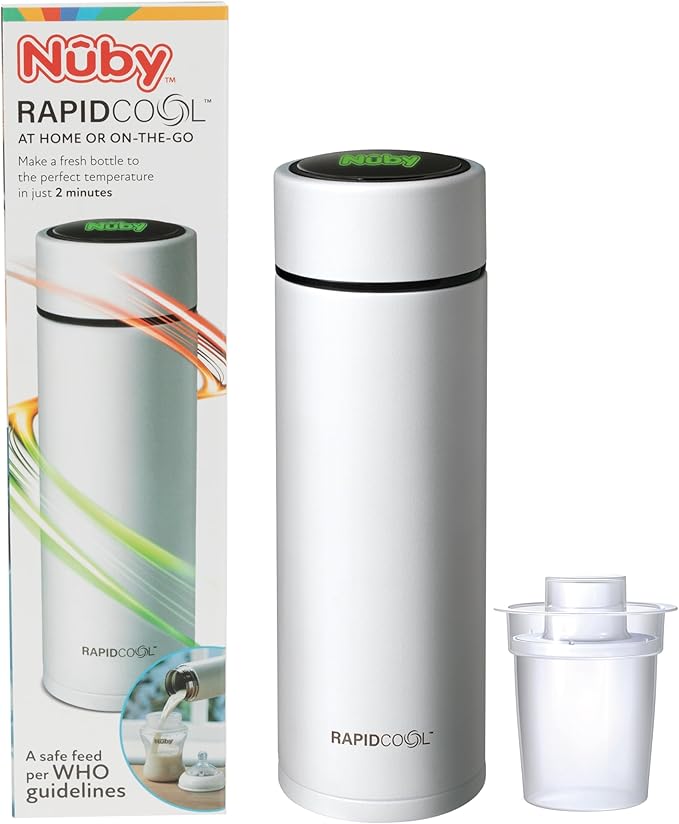
The Nuby Rapid Cool is a popular bottle prep accessory. It quickly cools boiled water to a safe temperature for formula, helping you avoid long waits or dangerous hot spots. The device uses an LED light to communicate with you.
This small light is more than just decoration—it’s your main way to know what’s happening inside.
What Does The Light Indicate?
The LED light on the Nuby Rapid Cool gives you information about:
- Device status (ready, working, error)
- Temperature of the water inside
- Battery level (for rechargeable models)
- Maintenance needs (such as cleaning)
Knowing what each color and pattern means can help you spot problems fast.
Light Colors And Patterns Explained
Here’s a summary of what the Nuby Rapid Cool’s light signals typically mean:
| Light Color | Pattern | Meaning |
|---|---|---|
| Solid Blue | Steady | Cooling in progress |
| Solid Green | Steady | Ready to use (safe temperature) |
| Flashing Red | Blinks repeatedly | Error or issue detected |
| No Light | Off | Device off, battery dead, or light malfunction |
| Flashing Blue/Red | Alternating blinks | Battery low or charging needed |
Note: Check the latest user manual for your specific model. Some versions may have minor differences.
Why Is The Nuby Rapid Cool Light Not Working?
When the light isn’t turning on, it can be caused by several things. Here are the most common reasons:
- Battery is empty (for rechargeable models)
- Device isn’t assembled correctly
- Internal fault (like water damage or a bad circuit)
- Light bulb/LED failure
- Software glitch (rare, but possible)
- Poor contact between parts
- Outdated firmware (for smart models)
Let’s look at each cause in more detail.
1. Battery Issues
If your model is rechargeable and the battery is dead, the light will not come on at all. Even after plugging in, it may take a few moments for the light to appear. Some users forget to charge the unit fully, or the charger is not working properly.
2. Incorrect Assembly
The Rapid Cool has several parts that must fit together perfectly. If the device isn’t assembled correctly, the contact points may not align, and the light won’t turn on. Check all seals, lids, and connections.
3. Internal Fault
Sometimes, moisture gets into the electronics or a part breaks inside. This can cause the LED to fail—even if the rest of the device seems okay.
4. Led Failure
LEDs are usually reliable, but they can burn out or become disconnected. If all other functions work but the light never turns on, this may be the problem.
5. Software Glitch
Some newer Rapid Cool models have a microchip. If the software gets confused, the light might not work until the device is reset.
6. Poor Contact
Even a small bit of dust or a loose ring can stop electricity from reaching the LED. Clean all contacts and make sure everything clicks in place.
7. Firmware Problems
If your device has Bluetooth or connects to an app, an outdated firmware can cause strange light behavior. Check for updates on the official Nuby website.

Credit: www.reddit.com
Step-by-step Troubleshooting Guide
If your Nuby Rapid Cool light isn’t working, don’t panic. Most problems can be fixed at home. Here’s a step-by-step troubleshooting plan.
Step 1: Check The Battery
- Plug in the charger and wait at least 10 minutes.
- Try a different charger or power source if possible.
- Look for signs of charging (such as a faint light or warmth).
If the light comes on after charging, your battery was likely empty.
Step 2: Inspect Assembly
- Take the device apart and reassemble carefully.
- Make sure the lid, seals, and filter (if present) are all in the correct position.
- Listen for “clicks” or a snug fit.
Small misalignments can stop the device from working.
Step 3: Clean Contacts
- Use a dry cloth to wipe all metal contacts.
- Avoid water or harsh chemicals.
- Check for dust, food, or formula residue.
Dirt can block the signal to the light.
Step 4: Test With Water
- Fill the chamber with water as you normally would.
- Start the cooling process.
- Watch for any light activity.
Some units only light up during active use.
Step 5: Reset The Device
- For models with a reset button: Hold it down for 5-10 seconds.
- For others: Unplug and wait 2 minutes, then reconnect.
This can clear software errors.
Step 6: Try Another Location
Sometimes, outlets or USB ports don’t deliver enough power. Move the device to another room or use a different cable.
Step 7: Look For Damage
- Check for cracks, dents, or water inside the device.
- Smell for a “burned” scent, which may mean electrical damage.
If you find signs of damage, stop using the device until it’s checked by a professional.
Step 8: Update Firmware
- Open the Nuby app (if your device supports it).
- Look for “update firmware” in the settings.
- Follow the instructions carefully.
Firmware updates can solve hidden bugs.
Step 9: Contact Support
If none of the above steps work, contact Nuby customer service. Provide your model number, purchase date, and a description of the problem. They can advise further or send a replacement if your device is under warranty.
Common Misunderstandings About The Nuby Rapid Cool Light
Many parents misread the light signals or worry when there’s no real danger. Here are two non-obvious insights most beginners miss:
- The light only stays on during cooling: Some users expect the light to stay on all the time. However, the Rapid Cool LED is designed to turn off once the device is ready. This saves battery and avoids confusion.
- A flashing light doesn’t always mean an error: In certain models, flashing blue or green can mean the device is almost ready—not broken. Only a flashing red usually means a serious problem.
These details are easy to miss, especially if you’re tired or rushed.
Real-world Examples
Example 1: Battery Confusion
A parent plugs in their Rapid Cool and sees no light. They think it’s broken. In reality, the charger cable was loose, so the battery never charged. After switching cables, the light comes back.
Example 2: Cleaning Mistake
After washing the device, water gets into the charging port. The next time the parent tries to use it, the light doesn’t turn on. Drying the device overnight solves the problem.
Example 3: Software Reset Needed
A new model with Bluetooth stops showing any lights after a power surge. The parent finds a reset button on the bottom, presses it, and the lights return to normal.
Comparing Nuby Rapid Cool Models
Not all Nuby Rapid Cool devices are the same. Some are basic, while others have smart features. Here’s a quick comparison:
| Feature | Basic Model | Smart Model |
|---|---|---|
| LED Light | Single color, simple signals | Multi-color, advanced signals |
| Battery | Non-rechargeable or plug-in | Rechargeable, USB charging |
| App Support | No | Yes (firmware updates) |
| Reset Function | Manual reset only | Button or app reset |
Always check your user manual for model-specific guidance.
When To Repair Or Replace
Sometimes, a non-working light means the device is at the end of its life. Here’s how to decide:
Repair
Choose repair if:
- The device is under warranty
- Only the light is broken (everything else works)
- Customer support recommends a fix
Replace
Replace if:
- The device is out of warranty and repair is expensive
- There is water or electrical damage
- The device fails in other ways (won’t cool water, leaks, etc.)
Replacement is often the best choice if your device is several years old.
Safety Tips For Using The Nuby Rapid Cool
A light that doesn’t work can be annoying, but safety comes first. Here are some tips:
- Always test water temperature before feeding, even if the light says “ready.”
- Never use the device if it smells burned or is leaking.
- Keep the device dry—don’t submerge in water.
- Charge only with the correct cable and power source.
- Supervise children near the device.
These steps protect both your baby and your device.
Maintenance And Cleaning Advice
To keep your Nuby Rapid Cool working (and the light shining), regular care is important.
Daily Cleaning
- Rinse all parts that touch water or formula.
- Dry thoroughly before reassembly.
Weekly Deep Clean
- Disassemble all removable parts.
- Use warm soapy water, not harsh chemicals.
- Clean contacts gently with a dry cloth.
Battery Care
- Don’t leave the device plugged in all the time.
- Let the battery run down occasionally before recharging.
- Store in a cool, dry place.
A clean, well-maintained device is less likely to have light problems.
How To Read Light Signals Like A Pro
Over time, you’ll learn to “read” your device’s signals. Here are some expert tips:
- Trust the color code: Blue means cooling, green means go, red means stop.
- Count flashes: Some errors use a “flash code” (e.g., three red flashes = battery low).
- Don’t panic: A short flash sequence is normal during startup.
- Refer to the manual: If you’re unsure, check the official guide.
If you lose your manual, download the latest copy from the Nuby website.
Nuby Rapid Cool Vs. Other Bottle Prep Devices
How does the Nuby Rapid Cool compare to other popular bottle prep tools? Let’s take a quick look:
| Device | Cooling Time | Light Feedback | Ease of Use |
|---|---|---|---|
| Nuby Rapid Cool | 2-5 minutes | LED signals | Simple, portable |
| Tommee Tippee Perfect Prep | 2 minutes | LCD screen, beeps | Stationary, plug-in |
| Chicco NaturalFit | 3-6 minutes | No lights | Manual, more steps |
The Nuby Rapid Cool stands out for its portability and clear light feedback. But every device has its strengths.
When To Seek Professional Help
If you’ve tried all the troubleshooting steps and your light still isn’t working, it’s time to ask for professional help. Here’s when to call for support:
- The device is still under warranty.
- You see sparks, smoke, or melted plastic.
- The device won’t turn on at all.
- The light flickers rapidly for no reason.
Contact Nuby through their official website or customer service line. Have your model number and purchase receipt ready.

Credit: www.cienci.com.br
Preventing Future Light Problems
Prevention is easier than repair. Here’s how to avoid light issues:
- Charge regularly but don’t overcharge.
- Keep contacts clean and free from residue.
- Handle gently—avoid drops or knocks.
- Store safely—away from water and direct sunlight.
- Update firmware when available.
These habits will keep your Nuby Rapid Cool working—and shining—for years.
Myths And Facts About The Nuby Rapid Cool Light
Many parents hear rumors about what the light means. Let’s clear up a few:
- Myth: “No light means it’s broken.”
Fact: Sometimes, no light just means the device is fully charged or idle.
- Myth: “A red light always means danger.”
Fact: Red can also mean “needs charging” or “not ready yet.”
- Myth: “You can fix any problem by resetting.”
Fact: Physical damage or dead LEDs won’t be solved by a reset.
- Myth: “You must use only Nuby chargers.”
Fact: Most standard USB chargers work, but always check the manual.
Knowing the facts helps you avoid unnecessary stress and wasted time.
Extra Tips From Experienced Parents
Here are a few less-obvious suggestions:
- Keep a spare device: If you rely on Rapid Cool for night feeds, having a backup reduces stress if your main device fails.
- Label your charger: Many devices look similar—mixing chargers can cause charging problems.
- Download the app: For smart models, the app can give extra information about errors and updates.
- Keep a log: If your device acts up, write down what happened. This helps if you need to contact support.
Small habits can make a big difference, especially during busy parenting days.
Where To Find More Help
If you need more information, check these resources:
- The official Nuby website and support page
- Parenting forums and review sites (real user experiences)
- YouTube tutorials for visual step-by-step guides
- The user manual (downloadable from the Nuby site)
For technical details, you can also visit the Wikipedia page on LEDs to understand how the technology works.
Credit: tinyexplorers.co.uk
Frequently Asked Questions
Why Does My Nuby Rapid Cool Light Stay Off Even When Plugged In?
This often means the battery is deeply discharged or the charger isn’t making good contact. Try a different charger and outlet. Clean the charging port. If the light stays off, the battery may need replacement.
What Does A Flashing Red Light On My Nuby Rapid Cool Mean?
A flashing red light usually signals an error—such as overheating, a bad connection, or a need for cleaning. Consult your user manual for the exact pattern. If in doubt, reset the device and try again.
Can I Use My Nuby Rapid Cool If The Light Doesn’t Work But It Still Cools Water?
You can, but it’s risky. The light gives important feedback about temperature and safety. Always test the water with a thermometer before feeding your baby. Consider repair or replacement soon.
How Long Should The Nuby Rapid Cool Light Stay On During Use?
Typically, the light stays on only while cooling or charging. Once the water reaches a safe temperature, the light turns off. If the light stays on longer, check for stuck buttons or errors.
Is There A Way To Replace The Led Light In My Nuby Rapid Cool?
For most models, the LED is not user-replaceable. Attempting to open the device may void your warranty. If the light fails and your device is under warranty, contact Nuby for repair or replacement.
Getting the Nuby Rapid Cool light working again is usually straightforward. With careful checks and the right steps, you’ll have reliable, safe bottle prep—and one less thing to worry about during those busy baby days.