When you open your KitchenAid refrigerator and see a dark or blank display, it’s easy to feel frustrated. The display is more than just a screen; it gives you key information about temperature, settings, and alerts. If it’s not working, you may worry about food safety or think your fridge is broken.
But before you call for expensive repairs, there are practical steps you can take to understand and fix the issue. This guide will walk you through common causes, troubleshooting tips, data about KitchenAid fridge displays, and how to know when to get professional help.
You’ll also see real examples, comparison tables, and answers to frequent questions, so you can solve the problem confidently.
Why The Kitchenaid Refrigerator Display Matters
The display panel on a KitchenAid refrigerator is more than a modern convenience. It controls temperature settings, helps with diagnostics, and alerts you to issues like high temperature or filter changes. Without a working display, you lose access to these controls. In some models, the display also locks or unlocks water and ice dispensers.
A broken display can mean:
- You can’t see or change the temperature.
- You miss alerts about food safety.
- You lose access to special features (like vacation mode or quick chill).
- You can’t reset error codes or alarms.
Data shows that 1 in 10 refrigerator repair calls are related to display or control panel issues. In KitchenAid’s own service records, display failure is among the top three electronic problems reported.
Types Of Kitchenaid Refrigerator Displays
KitchenAid refrigerators use different types of display panels. Understanding which one you have helps with troubleshooting.
- LED Display: Most common, bright, and easy to read. Shows numbers and icons.
- LCD Touchscreen: Found on higher-end models. Allows touch control and sometimes Wi-Fi connectivity.
- Button-Control Display: Simple models have buttons with a small numeric display.
You’ll find the display on the door, above the water dispenser, or inside the fridge. Some models have two displays—one for the freezer, one for the fridge.
| Display Type | Features | Common Issues |
|---|---|---|
| LED | Clear numbers, icons, basic alerts | Dim screen, no response, flicker |
| LCD Touchscreen | Touch controls, settings, Wi-Fi | Frozen screen, blank, touch not working |
| Button-Control | Physical buttons, small screen | No display, buttons not working |
Common Reasons The Kitchenaid Refrigerator Display Stops Working
Knowing why the display goes blank is the first step to fixing it. Here are the most frequent causes:
- Power Loss: Outlet, circuit breaker, or plug issues.
- Child Lock or Display Lock: Activated by accident, disables controls.
- Control Board Failure: The main electronic board inside the fridge stops sending signals.
- Loose or Damaged Wiring: Connections between the display and internal electronics break or loosen.
- Display Panel Failure: The screen itself is broken.
- Software Glitch: Temporary bug, especially in touchscreen models.
- Moisture or Condensation: Water inside the panel can cause shorts.
- Fuse or Relay Failure: Internal fuse burns out, cutting power to the display.
- Power Surge: Lightning or sudden voltage increase damages electronics.
Many owners assume the worst (like a broken fridge), but often the problem is simple—such as the child lock or a loose plug.
How To Diagnose The Problem
Before you start fixing, it’s important to diagnose what’s wrong. Here’s how to do it step by step:
- Check the Power Supply
- Is the fridge plugged in?
- Try another appliance in the same outlet.
- Check your home’s circuit breaker.
- Inspect the Display Lock Settings
- Look for a “lock” icon or button.
- Try holding the lock button for 3-5 seconds.
- Check your KitchenAid manual for lock instructions.
- Look for Error Codes or Flashing Lights
- If the display shows numbers or codes, write them down.
- Refer to your manual or KitchenAid’s online guide for code meanings.
- Restart the Refrigerator
- Unplug the fridge for 5-10 minutes.
- Plug it back in and see if the display resets.
- Check for Physical Damage
- Is the display cracked, wet, or showing signs of wear?
- Look inside the fridge for loose wires near the hinge or control board.
- Test Buttons and Touchscreen
- Press each button firmly.
- For touchscreens, try swiping or tapping different areas.
- Listen for Sounds
- If the fridge is running but the display is dark, the issue is likely electronic—not mechanical.
Many display issues are resolved by a simple reset or checking for locks. If none of these steps help, move to deeper troubleshooting.
Troubleshooting Steps For Kitchenaid Refrigerator Display Not Working
Step 1: Power Cycle The Refrigerator
Unplug the fridge from the wall. Wait at least five minutes. Plug it back in. This resets internal electronics and often brings the display back. If the display lights up, the issue was likely a software glitch or temporary power loss.
Step 2: Check Child Lock Or Display Lock
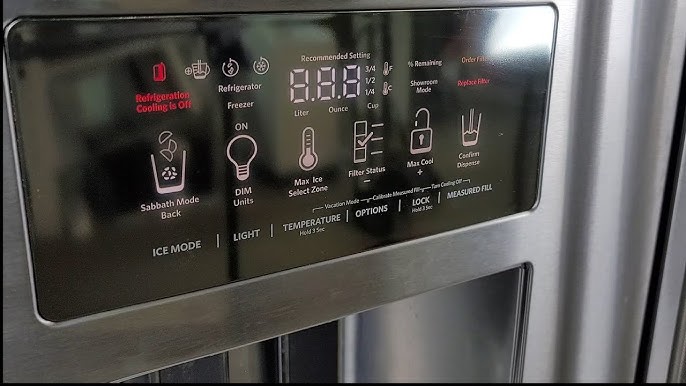
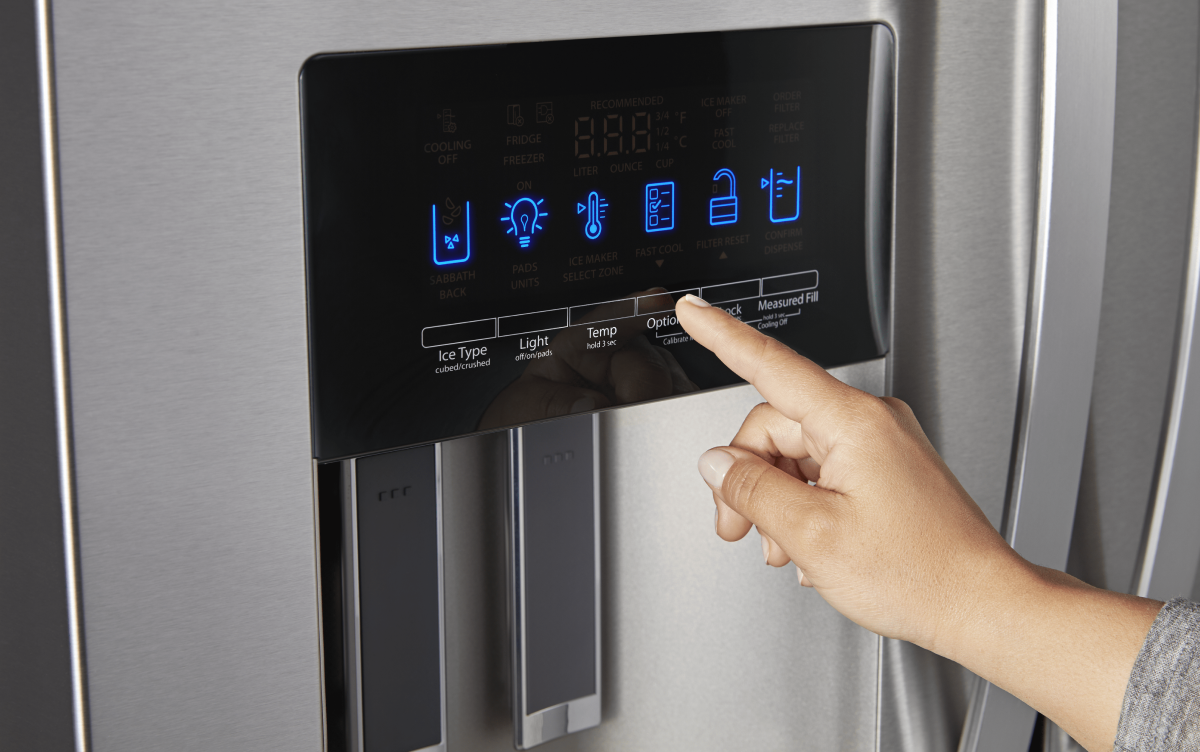
KitchenAid refrigerators often have a child lock or display lock feature. Accidentally pressing a button can activate this. Look for a lock symbol or button. Press and hold it for three to five seconds. If the display lights up, the lock was blocking it.
Step 3: Inspect The Power Source
Test the outlet with another device. If the outlet works, plug the fridge back in. If not, reset the circuit breaker or call an electrician.
Step 4: Look For Loose Wires
Carefully open the fridge door and inspect the area around the display. If you see loose wires, reconnect them. Use caution—never touch wires with wet hands or while the fridge is plugged in.
Step 5: Reset Error Codes
If the display shows an error code or is flashing, consult the KitchenAid manual. Often, pressing the “reset” button or unplugging the fridge clears the code.
Step 6: Examine The Display Panel
Check for cracks, moisture, or burn marks on the screen. If you see physical damage, the panel may need replacement.
Step 7: Advanced Troubleshooting
If the above steps fail, the issue may be with the control board or internal fuses. This usually requires opening the fridge’s control compartment, found behind a panel inside the fridge or on the back. If you’re comfortable, use a screwdriver to open the compartment and check for burnt fuses or damaged circuit boards.
Many users are surprised to learn that unplugging the fridge for a longer period (up to one hour) sometimes resets deeper faults.
When To Call A Professional
If basic troubleshooting doesn’t solve the display issue, it’s time to consider professional help. Here’s when you should call:
- The display remains blank after a reset.
- You see burning smell or visible damage inside the panel.
- Wiring is loose and you’re not comfortable reconnecting it.
- Error codes persist even after resets.
- The fridge isn’t cooling (display and cooling both not working).
Certified KitchenAid technicians can diagnose control board problems and replace damaged components. In some cases, the display panel itself can be replaced without changing the whole fridge.
On average, professional repair costs for display issues range from $150 to $400. It’s often cheaper than buying a new refrigerator.
Comparison: Diy Vs Professional Repair
Here’s how fixing a KitchenAid refrigerator display compares for DIY versus professional service:
| Repair Method | Cost | Time Needed | Success Rate | Risks |
|---|---|---|---|---|
| DIY Troubleshooting | $0–$50 | 30–90 min | 60% | Wrong diagnosis, risk of electric shock |
| Professional Repair | $150–$400 | 1–2 hours (plus scheduling) | 95% | Higher cost, must wait for technician |
Most users can solve simple issues themselves, but complex electronic faults often need a professional.
Kitchenaid Refrigerator Display Not Working: Real Owner Stories
Learning from other KitchenAid owners can help you avoid mistakes. Here are two real examples:
- Case 1: Maria’s fridge display went blank after a thunderstorm. She unplugged the fridge for 10 minutes, but nothing changed. She discovered her circuit breaker had tripped. Resetting the breaker brought her display back.
- Case 2: Sam’s display stopped working after cleaning the fridge. He found moisture inside the display panel. Drying it out with a hair dryer (on cool setting) restored the screen.
Many owners overlook simple causes like power or moisture. Checking these first can save time and money.
Preventing Display Problems
You can reduce the risk of display issues with these tips:
- Avoid Power Surges: Use a surge protector for your refrigerator.
- Keep Display Dry: Clean with a dry cloth, avoid spraying water near the panel.
- Don’t Press Buttons Hard: Gentle touches extend display life.
- Update Software: If your fridge has Wi-Fi, update its software regularly.
- Check Wiring Annually: Inspect for loose connections, especially after moving the fridge.
- Teach Family Members: Show everyone how to use the lock and display features to prevent accidental activation.
A surprising insight: Many display failures happen after moving the fridge, as wires get loose. Always check connections after relocation.
Kitchenaid Refrigerator Display Replacement Guide
If your display is physically damaged or won’t work after troubleshooting, you may need to replace it. Here’s how:
Step 1: Order The Correct Part
Find your model number (usually inside the fridge door). Order the display panel online or from KitchenAid.
Step 2: Turn Off Power
Unplug the fridge from the wall. Safety first.
Step 3: Remove The Old Display
Open the display compartment using a screwdriver. Disconnect wires carefully.
Step 4: Install The New Display
Connect wires to the new panel. Secure it in place. Close the compartment.
Step 5: Restore Power And Test
Plug the fridge back in. The display should light up and function normally.
KitchenAid recommends using certified parts. DIY replacement takes about 30–60 minutes.
Credit: www.youtube.com
Comparing Kitchenaid Display Panels With Other Brands
KitchenAid is known for quality, but how does its display panel reliability compare with competitors? Here’s a look:
| Brand | Display Failure Rate (5 Years) | Average Repair Cost | Features |
|---|---|---|---|
| KitchenAid | 7% | $250 | LED, LCD, lock features |
| Samsung | 11% | $350 | Touchscreen, Wi-Fi |
| Whirlpool | 8% | $200 | LED, basic controls |
| LG | 9% | $300 | Touchscreen, smart features |
KitchenAid’s display panels are slightly more reliable than Samsung and LG, with fewer reported failures.
How To Read Kitchenaid Error Codes
Sometimes the display is not fully blank but shows an error code. Understanding these codes helps you fix the issue faster.
- E1: Temperature sensor error
- E2: Display board communication failure
- E3: Control board malfunction
- E4: Ice maker or dispenser issue
If you see “E2” or “E3,” the display board or control board may need replacement. For “E1,” check the temperature sensor.
Credit: wieder.co.il
What To Do If The Display Flickers
A flickering display can mean a loose wire, failing display board, or power surge. Try these steps:
- Unplug the fridge and plug it back in.
- Check for loose connections near the display.
- If flickering continues, call a technician.
Don’t ignore flickering; it often leads to full display failure if not addressed.
How Display Problems Affect Food Safety
A broken display means you can’t check or change the fridge and freezer temperature. This can put food at risk. FDA recommends keeping fridge temperature below 40°F and freezer at 0°F. If your display is blank, use a fridge thermometer to check temperatures until the display is fixed.
Kitchenaid Refrigerator Display Not Working: Quick Checklist
Use this simple checklist when your display stops working:
- Is the fridge plugged in and powered?
- Is the circuit breaker on?
- Has the child lock or display lock been activated?
- Are there error codes visible?
- Is the display physically damaged?
- Has the fridge been moved recently?
- Is there moisture near the panel?
- Have you tried unplugging for 10–60 minutes?
If you answer “yes” to any, address that first. If all checks fail, call a professional.
Cost Breakdown For Kitchenaid Display Repairs
Owners often want to know what repairs will cost. Here are typical expenses:
- DIY Fix (lock reset, power cycle): $0
- DIY Wire Reconnection: $0–$20 (for tools)
- Display Panel Replacement: $80–$200 (for part)
- Professional Diagnosis: $100–$150
- Control Board Replacement: $200–$400
KitchenAid warranties cover display failures for up to one year. Extended warranties may cover up to five years.
Warranty And Support For Kitchenaid Refrigerators
KitchenAid offers a standard warranty for new refrigerators. Display and control panel issues are covered for the first year. If your fridge is under warranty:
- Call KitchenAid support.
- Provide model and serial number.
- They may offer free repair or replacement.
For out-of-warranty units, you can order parts online or use authorized repair services. Always check warranty status before paying for repairs.
For official support, visit KitchenAid Service & Support.
Non-obvious Insights For Solving Display Issues
- Surge Protectors Matter: Many display failures are caused by power surges. Using a surge protector can prevent future issues.
- Moisture Is Silent Killer: Even small amounts of condensation can short circuit the display. Always dry the area before reconnecting wires or replacing panels.
- Relocation Risks: Moving the fridge often loosens display wires. After every move, check connections before plugging in.
Frequently Asked Questions
What Should I Do If My Kitchenaid Fridge Display Is Blank After A Power Outage?
First, unplug the fridge for 10–15 minutes, then plug it back in. This resets the electronics. If the display remains blank, check the circuit breaker, outlet, and ensure the child lock isn’t active.
Can I Use The Fridge Normally If The Display Is Not Working?
Yes, the fridge usually keeps cooling. But you can’t change settings or see alerts. Use a thermometer to check temperatures. Schedule repairs soon to avoid food safety risks.
How Long Does It Take To Repair A Kitchenaid Refrigerator Display?
Simple fixes (like lock reset or wire reconnection) take 30–60 minutes. Professional repairs (like control board replacement) take 1–2 hours, plus waiting for parts or technician.
Is It Safe To Replace The Display Panel Myself?
If you’re comfortable with tools and follow safety steps (unplug fridge, handle wires carefully), DIY replacement is safe. For complex repairs (control board), call a professional.
Where Can I Find Kitchenaid Refrigerator Display Replacement Parts?
Order from KitchenAid’s official website, appliance part stores, or authorized dealers. Always match the part to your model number for compatibility.
Final Thoughts
A KitchenAid refrigerator display not working is a common but fixable issue. Most problems come from power supply, lock settings, or simple wiring faults. By following step-by-step troubleshooting, you can often restore the display yourself and save money. Only turn to professional help for complex electronic failures or if you see physical damage. Prevent display issues by keeping the panel dry, updating software, and using a surge protector. With these tips, your KitchenAid fridge will serve you well for years—and you’ll never be left in the dark about your food’s safety.

Credit: wieder.co.il