If your Fitbit is not turning on, it can be stressful—especially if you rely on it to track your activity, sleep, or even just the time. Many users experience this problem at some point, and the reasons can range from a simple battery issue to more complex hardware faults. The good news is, most of the time, you can fix the issue yourself without needing advanced technical skills.
This article will guide you through understanding why your Fitbit might not power on, how to troubleshoot it step by step, and what to do if nothing works. We’ll cover the most common Fitbit models, share practical tips, and highlight mistakes beginners often make.
If you’re considering buying a Fitbit or want to avoid this problem in the future, you’ll find useful advice here, too.
Common Reasons Your Fitbit Won’t Turn On
When a Fitbit won’t power up, it’s usually one of a few main causes. Understanding these will help you fix the problem faster.
1. Battery Is Dead
Fitbits have small batteries. If you haven’t charged it in a while, it may be completely drained. Sometimes, batteries can lose their ability to hold a charge after months or years of use.
2. Charger Issues
The charging cable or port can be faulty, dirty, or not connected properly. This is more common than people think, especially if you use the device daily.
3. Software Crash Or Freeze
Sometimes, the Fitbit’s operating system gets stuck. The screen may stay black, but the device could still be alive in the background.
4. Hardware Problems
Drops, water damage, or manufacturing faults can cause the device to stop responding.
5. Button Or Screen Issues
If a button is stuck or the screen is damaged, it might look like the Fitbit is off, when it’s just the display not working.
6. Firmware Update Problems
Interrupted software updates can cause Fitbits to freeze or fail to restart.
Not-so-obvious Causes Beginners Miss
- Temperature Extremes: Leaving your Fitbit in a hot car or outside in the cold can temporarily disable the battery or screen.
- Third-Party Chargers: Using non-official chargers can lead to charging problems, even if they seem to fit.
Quick Checks Before Troubleshooting
Before you start the full troubleshooting process, try these quick checks:
- Plug the Fitbit into the charger and wait 10–15 minutes.
- Try a different USB port, wall adapter, or computer.
- Make sure the contacts on the charger and Fitbit are clean and dry.
- Press the main button (or touch the screen) for a few seconds.
If nothing happens, move on to deeper troubleshooting.

Credit: www.premierwellbeing.ie
Step-by-step Troubleshooting For Fitbit Not Turning On
Here’s a clear process you can follow. It covers most Fitbit models, including Inspire, Charge, Versa, Sense, Ace, and Luxe.
1. Check The Charger And Cable
Often, the issue is with the charger, not the Fitbit.
- Use the original charging cable, if possible.
- Inspect the USB cable for damage, kinks, or fraying.
- Try a different USB power source (such as a wall charger, laptop, or power bank).
- Clean the charging contacts on both the device and charger with a dry, soft brush or rubbing alcohol and a cotton swab.
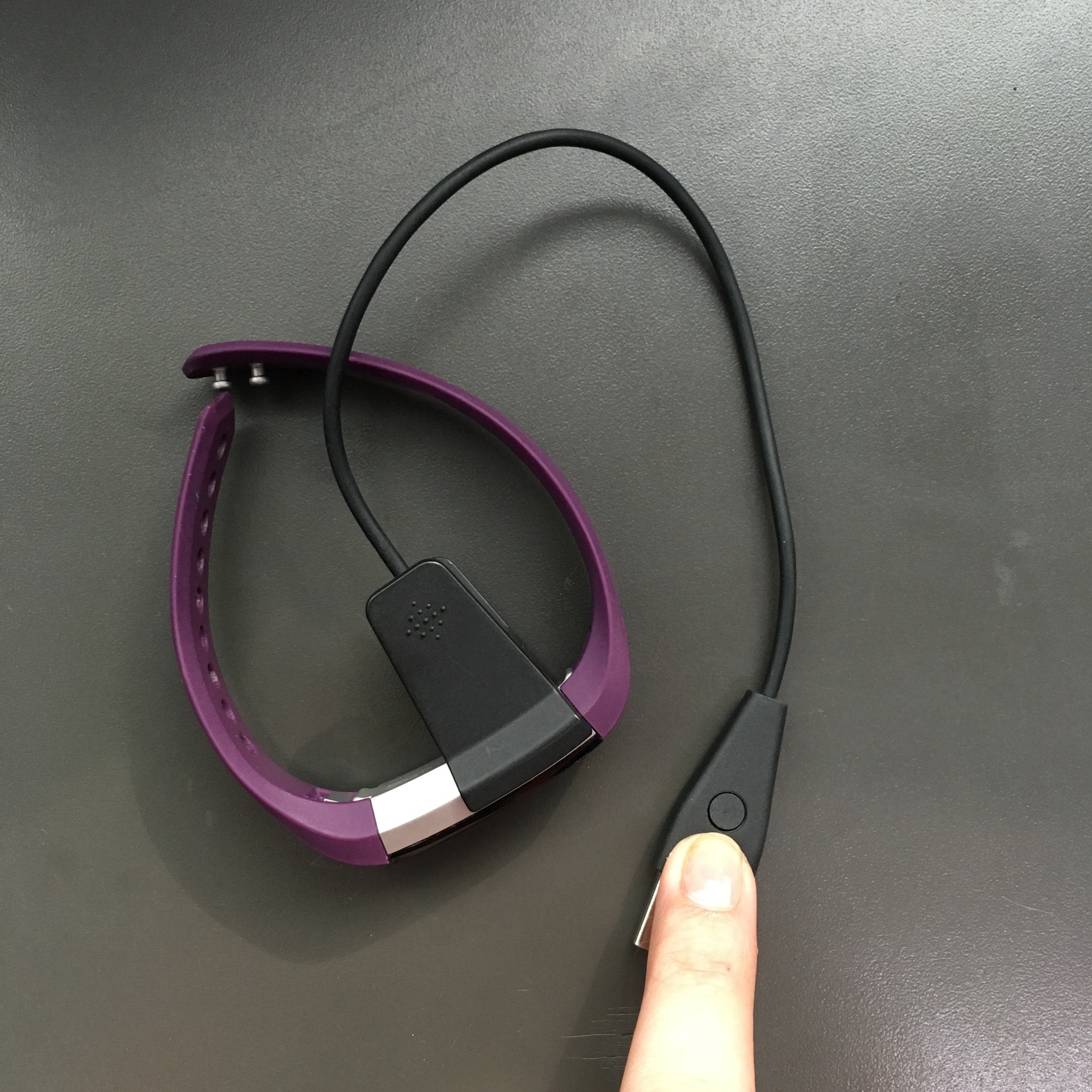
- Make sure the Fitbit is correctly aligned in its charging cradle.
2. Force Restart Your Fitbit
A forced restart can fix many issues, especially if the device’s software is frozen. The method depends on your model:
| Fitbit Model | How to Force Restart |
|---|---|
| Fitbit Inspire series | Press and hold the button for 5 seconds, release when you see the logo |
| Fitbit Charge 4/5 | Press and hold the button for 8 seconds, release on the logo |
| Fitbit Versa, Versa 2, Sense | Press and hold the back button (or both side buttons) for 10 seconds |
| Fitbit Ace, Luxe | Place on charger, press and hold button or tap screen for 10 seconds |
If you see the Fitbit logo, the device is rebooting.
3. Try A Different Power Source
Sometimes, a wall adapter does not provide enough power, or a computer USB port is too weak. Try the following:
- Plug the charger into a different wall outlet.
- Use a different USB port or a certified power adapter.
- Avoid using USB hubs or extension cords.
4. Charge For A Longer Time
If your Fitbit’s battery is deeply discharged, it may take longer to start than usual. Leave it charging for at least 1 hour. Some devices may take up to 2 hours to show any signs of life.
5. Inspect For Physical Or Water Damage
Look for cracks, water inside the screen, or any signs of damage. If the Fitbit has been exposed to water (and it’s not a water-resistant model), internal components could be damaged.
6. Check For Firmware Update Issues
If your Fitbit stopped working right after a software update, it might have failed to install correctly. In this case:
- Leave the device charging for a few hours.
- Try restarting again after charging.
- Use the Fitbit app to check if the device is still recognized.
If the app can “see” the Fitbit, you may be able to restart or update it from there.
7. Try Connecting To The Fitbit App
Open the Fitbit app and see if your device is detected. If the app finds your Fitbit but the screen is blank, the problem might be with the display, not the battery.
8. Replace The Band Or Accessories
Rarely, a faulty band or accessory can interfere with the device’s operation, especially on models with built-in sensors or electrical connections in the band.
Model-specific Fitbit Power Issues
Different Fitbit models have unique problems and solutions. Here’s a quick comparison:
| Model | Common Power Issues | Special Fixes |
|---|---|---|
| Fitbit Charge 4/5 | Charger misalignment, battery drain | Double-check the charger pins, try factory reset if possible |
| Fitbit Versa/Sense | Software freeze, screen won’t wake | Long button press (over 15 seconds), update via app |
| Fitbit Inspire series | Button stuck, battery fails after 1–2 years | Clean button area, consider battery replacement if out of warranty |
| Fitbit Luxe/Ace | Display issues, won’t charge on 3rd-party docks | Use original charger, check for display cracks |
If your model isn’t listed, check the official Fitbit support website for instructions specific to your device.

Credit: www.premierwellbeing.ie
When To Seek Professional Help
Not every Fitbit problem can be fixed at home. Here’s when you should contact Fitbit support or a professional:
- No response after trying all the above steps.
- Obvious physical damage such as a cracked screen or water inside.
- Battery swelling (the device looks bloated or the back is lifting).
- Device heats up while charging.
- Repeated issues after temporary fixes.
If your Fitbit is under warranty (usually 1 year), contact Fitbit customer support. You might be eligible for a free repair or replacement.
Tips To Prevent Fitbit Power Issues
Keeping your Fitbit in good shape can reduce the chance of it not turning on. Here are some practical tips:
- Charge regularly, but avoid leaving it on the charger overnight.
- Use official chargers whenever possible.
- Keep charging contacts clean by wiping them weekly.
- Avoid extreme temperatures (don’t leave it in a hot car or outside during winter).
- Remove the device before swimming if your model is not water-resistant.
- Update firmware through the Fitbit app, but make sure the device is well charged first.
- Store in a cool, dry place when not in use for long periods.
Battery Life And Replacement
Most Fitbits last 4–7 days per charge when new. Over time, battery life will decrease. If your device only lasts a few hours, or won’t turn on even after charging, the battery may need replacement.
Fitbit does not offer battery replacement for most models. You can find third-party repair shops, but this may void your warranty. For older models, it’s often more cost-effective to upgrade to a newer device.
Fitbit Battery Life Comparison
Here’s a quick look at battery life for popular models:
| Fitbit Model | Average Battery Life (Days) | Recharge Time (Hours) |
|---|---|---|
| Charge 5 | 7 | 2 |
| Versa 3 | 6 | 1.5 |
| Inspire 3 | 10 | 2 |
| Luxe | 5 | 2 |
Note: Actual battery life depends on usage, screen brightness, GPS use, and notifications.
What If Your Fitbit Turns On But Won’t Sync?
Sometimes, the device will power up but won’t connect to your phone. This can make it seem like it’s not working. Try the following:
- Restart both the Fitbit and your phone.
- Update the Fitbit app to the latest version.
- Unpair and re-pair the Fitbit in your phone’s Bluetooth settings.
- Try syncing on a different device.
If your Fitbit turns on but won’t sync, it’s usually a software or Bluetooth issue, not a power problem.
Credit: www.avantserveis.com
Real-world Examples And Insights
Many users find that their Fitbit suddenly won’t turn on after a long period of not being used. This is often due to the battery falling into a deep discharge state. In these cases, charging for several hours may revive the device.
Another common scenario is using a third-party charger that fits but does not provide enough current. Even if the light blinks or the device vibrates, it might not actually be charging. Always use the official charger for best results.
One non-obvious issue: Magnetic charging contacts can attract tiny bits of metal or dust, blocking the connection. Cleaning these contacts can often solve “dead” device problems.
Should You Repair Or Replace Your Fitbit?
If your Fitbit is out of warranty and not responding, you have two main options: repair or replace.
- Repair: Some models can be fixed by third-party shops, but this may not be cost-effective due to the price of replacement parts and labor. Also, water resistance can be lost after repairs.
- Replace: Upgrading to a newer model often gives you better battery life, features, and warranty coverage.
Beginner mistake: Spending too much on repair when a new device costs just a little more.
Buyer’s Guide: Choosing A New Fitbit If Yours Won’t Turn On
If you decide to replace your Fitbit, here’s what to consider:
- Battery life: Look for a model that lasts at least 5 days per charge.
- Water resistance: Essential if you swim or shower with your device.
- Display type: Color screens look nice but use more battery.
- Fitness features: Heart rate, GPS, sleep tracking—choose the features you need.
- Compatibility: Make sure it works with your phone’s operating system.
- Warranty and support: Longer warranty means more peace of mind.
Common Buyer Mistakes
- Choosing a model with a short battery life if you hate charging.
- Ignoring compatibility (some older phones may not support the latest Fitbits).
- Not considering the return policy or warranty.
For detailed product comparisons, you can visit the official Fitbit Help Center.
What To Do With A Dead Fitbit
If your Fitbit is definitely dead and can’t be fixed, don’t throw it in the trash. Fitbits contain batteries and electronics that should be recycled properly.
- Check local electronics recycling programs.
- Some stores accept old electronics for recycling.
- Fitbit sometimes offers trade-in programs or discounts for returning old devices.
Frequently Asked Questions
Why Is My Fitbit Not Turning On After Charging?
The most common reason is a battery that is deeply discharged or not charging due to a faulty cable, charger, or dirty contacts. Try using the original charger, cleaning the contacts, and charging for at least 1–2 hours. If the device still won’t turn on, the battery may need replacement or the device may have hardware damage.
Can I Replace The Battery In My Fitbit?
Fitbit does not officially support battery replacement for most models. Some third-party repair shops offer this service, but it can be risky and may void your warranty. For many users, buying a new Fitbit is more reliable and cost-effective.
What Should I Do If My Fitbit Screen Is Black But The Device Vibrates?
This usually means the display is damaged or not working, while the rest of the device is still functional. Try a forced restart. If the screen stays black but you feel vibrations, contact Fitbit support for repair options.
Is It Safe To Use Third-party Chargers With My Fitbit?
It is best to use the official Fitbit charger. Some third-party chargers do not deliver the correct voltage or current, which can damage the device or prevent charging. If you must use a non-official charger, make sure it is certified and has good reviews.
How Long Does A Fitbit Typically Last?
With proper care, most Fitbits last 2–4 years. Battery life will decrease over time, and screens or buttons may wear out. Keeping the device clean, charging properly, and avoiding drops or water damage can extend its lifespan.
When your Fitbit is not turning on, it can be worrying, but most issues can be fixed at home with careful troubleshooting. Start with the basics—check the charger, clean the contacts, and try a forced restart. If you follow the steps above and your Fitbit still won’t respond, professional help or a replacement may be the next best step. Remember, keeping your device clean, charged, and safe from extreme conditions can help avoid these problems in the future. Whether you repair, replace, or recycle, you’re not alone—millions of Fitbit users have faced and solved this same problem.