If your Eigiis Ke3 smartwatch is not charging, it can be frustrating—especially when you rely on it for fitness tracking, notifications, and daily activities. Many users face this issue at some point. The good news: most charging problems can be fixed without needing professional repair or a new watch. This article will help you understand the main reasons your Eigiis Ke3 won’t charge, how to troubleshoot the problem, and what to do if simple solutions don’t work. You’ll also find answers to common questions at the end.
Common Reasons Why The Eigiis Ke3 Smartwatch Is Not Charging
Understanding why your Eigiis Ke3 smartwatch isn’t charging is the first step to solving the problem. There are typically three main causes:
- Charger or cable issues
- Watch or charging port problems
- Software glitches
Let’s look at each problem in detail and learn how to fix them.
1. Charger Or Cable Issues
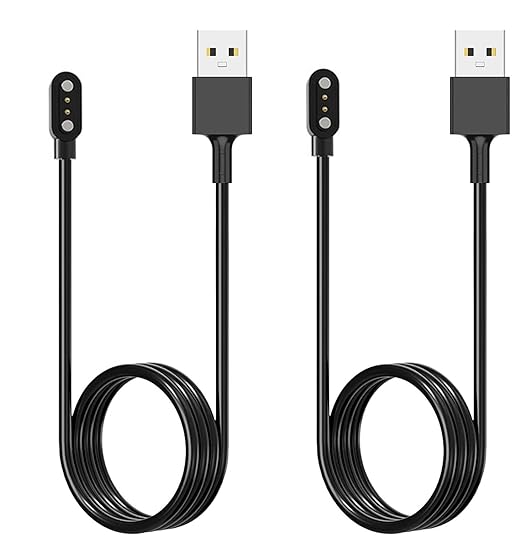
The most common reason your Eigiis Ke3 won’t charge is a problem with the charger or charging cable. Sometimes, the charger may look fine but isn’t delivering power correctly.
Signs Of Charger Or Cable Problems
- The watch does not show any charging icon or animation.
- The charger gets warm but the watch stays dead.
- The cable feels loose or only works in certain positions.
How To Troubleshoot
1. Check The Power Source
Plug another device (like a phone) into the same USB port or wall adapter. If the other device doesn’t charge, the problem is with the outlet or adapter.
2. Inspect The Cable And Charger
Look for visible signs of damage—like frayed wires, bent pins, or worn-out connectors. Try using a different USB cable or wall adapter if you have one.
3. Clean The Connectors
Sometimes, dirt or debris blocks the connection. Use a soft, dry cloth or a cotton swab to gently clean the metal contacts on both the charger and the back of your smartwatch.
4. Test With Another Charger
If you have another Eigiis Ke3 charger, try it. If the watch charges, your original charger may be faulty.
Charger And Cable Comparison
Here’s a quick comparison of charging setups to help you identify possible issues:
| Charger Type | Common Issues | Solution |
|---|---|---|
| Original Eigiis Charger | Loose cable, worn contacts | Clean contacts, replace cable |
| Third-party Charger | Incompatible voltage, slow charge | Use original charger |
| USB Port (Computer) | Low power output | Switch to wall adapter |
Non-obvious Insight
Many people don’t realize that even a small bend in the cable or a tiny bit of corrosion on the contacts can stop charging. Always store your charger carefully and avoid using wet hands when connecting the watch.

Credit: eigiis.com
2. Watch Or Charging Port Problems
If the charger and cable work well with other devices, the issue may be with the watch itself or its charging port.
Signs Of Watch Or Port Issues
- The charger heats up, but the watch stays off.
- The charging icon flashes or appears only briefly.
- You notice rust, green spots, or discoloration on the charging pins.
How To Troubleshoot
1. Check The Charging Contacts On The Watch
The Eigiis Ke3 uses magnetic charging pins. Over time, sweat, dust, or moisture can build up. Use a dry toothbrush or a cotton swab with a little rubbing alcohol to gently clean the contacts. Make sure the watch is completely dry before charging.
2. Inspect For Physical Damage
Look for bent, sunken, or missing pins on the watch. Even a small dent can break the connection.
3. Align The Watch And Charger Properly
The magnets should pull the charger into place. If you have to force the charger, check if the pins are misaligned.
Watch And Port Issue Comparison
Here’s how different charging port conditions affect charging:
| Port Condition | Charging Result | Action Needed |
|---|---|---|
| Clean & undamaged | Normal charging | None |
| Dirty or corroded | No charging or intermittent | Clean with alcohol |
| Bent pins | No charging | Contact support |
Practical Example
Let’s say you wore your Eigiis Ke3 while running in the rain. Moisture can get into the charging port and cause corrosion. After cleaning and drying, the watch may charge again. If not, the pins may need professional repair.
Non-obvious Insight
Many users overlook the importance of proper alignment when connecting the charger. Even a slight misalignment can prevent charging. Make sure the charger “snaps” into place magnetically every time.
3. Software Glitches
Sometimes, the hardware is fine—but the watch’s software is stuck or frozen, stopping it from charging or even showing the charging symbol.
Signs Of Software Problems
- The watch is unresponsive, with a black screen—even when connected to power.
- The charging icon doesn’t appear, but the charger and cable work with other devices.
- The watch does not restart or respond to buttons.
How To Troubleshoot
1. Force Restart The Watch
Hold the power button for 10–20 seconds. This often resets the watch and fixes minor software bugs.
2. Leave The Watch Charging For Longer
If the battery is fully drained, it may take 10–15 minutes before the charging icon appears. Be patient and do not disconnect too soon.
3. Check For Firmware Updates
Once the watch turns on, check the Eigiis app for any available updates. Outdated software can cause charging recognition problems.
4. Factory Reset (if Possible)
As a last resort, after the watch boots up, do a factory reset via the settings menu. This can clear deeper software bugs.
Software Vs Hardware: Key Differences
| Symptom | Likely Cause | Best Solution |
|---|---|---|
| No response, but charger works elsewhere | Software crash | Force restart |
| Charging icon shows, but battery stays low | Battery failure | Contact support |
| Intermittent charging | Hardware or firmware issue | Update firmware, check hardware |
Special Note
Sometimes, a software glitch can make the battery level appear stuck at 0%, even though the watch is charging. Wait at least 30 minutes and try restarting the device before deciding the battery is dead.

Credit: www.amazon.com
When To Seek Professional Help
If you’ve tried all the steps above and your Eigiis Ke3 still won’t charge, it’s time to contact customer support or visit a professional technician. Some problems, like a dead battery or damaged charging port, require tools and skills most people do not have at home.
What To Prepare Before Getting Help
- Your purchase receipt and warranty information
- Photos or videos showing the problem
- Details on what troubleshooting steps you’ve tried
Warranty Coverage
Many Eigiis Ke3 smartwatches include a one-year warranty. Check if your issue is covered before paying for repairs. If you bought the watch from a third-party seller, confirm their return or exchange policy.
Tips To Prevent Charging Problems
Prevention is better than repair. Here’s how to avoid charging issues in the future:
- Use only the original charger and cable included with your Eigiis Ke3.
- Keep charging contacts clean and dry—wipe them after workouts or exposure to water.
- Avoid charging in high humidity or near water.
- Store your charger carefully to prevent bending or damaging the cable.
- Charge your watch regularly—do not let the battery go to 0% for long periods.
Credit: eigiis.com
Real-life Example
Sarah, a fitness enthusiast, noticed her Eigiis Ke3 stopped charging after a long hike. She tried a different charger and cable, but nothing worked. Upon closer inspection, she saw green spots on the charging pins—a sign of corrosion from sweat.
After cleaning the contacts with a little rubbing alcohol and letting the watch dry overnight, her smartwatch started charging again.
This example shows that careful maintenance and simple fixes can solve most charging issues without needing professional help.
How To Tell If Your Charger Or Watch Needs Replacement
Sometimes, the charger or the watch itself is beyond repair. Here are some signs:
- The charger does not work with any device.
- The watch shows no signs of life after all troubleshooting.
- The charging pins or connectors are physically broken.
- The battery drains extremely fast even after a full charge.
If you experience these problems, it’s usually time for a replacement. For the safest results, buy official parts from authorized sellers. Avoid cheap third-party chargers, as they can damage your device or pose a safety risk.
For more technical details on how smartwatches charge and how batteries work, you can visit Wikipedia’s smartwatch page.
Frequently Asked Questions
Why Does My Eigiis Ke3 Show A Charging Icon But The Battery Doesn’t Increase?
If your Eigiis Ke3 displays the charging symbol but the battery percentage stays the same, it could mean the battery is too deeply discharged, the charging cable is faulty, or the battery itself is worn out. Try another charger, leave the watch charging for at least 30 minutes, and restart the device. If the problem continues, the battery may need to be replaced.
Can I Use Any Charger With My Eigiis Ke3 Smartwatch?
It’s safest to use the original charger that came with your smartwatch. Third-party chargers may use a different voltage or current, which can damage your device or cause slow charging. If you must use a replacement, make sure it is certified for the Eigiis Ke3.
How Do I Clean The Charging Contacts On My Eigiis Ke3?
Use a soft, dry cloth or a cotton swab with a little rubbing alcohol. Gently wipe the metal contacts on the back of the watch and on the charger. Make sure both are completely dry before connecting them again. Avoid using water or harsh chemicals.
My Watch Still Won’t Charge After Cleaning And Restarting. What Should I Do?
If you’ve cleaned the contacts, tried different chargers, and restarted the device but your Eigiis Ke3 still won’t charge, it may have a hardware fault, like a dead battery or damaged charging port. Contact customer support or visit an authorized repair center for help.
How Long Does It Usually Take For The Eigiis Ke3 To Start Charging If The Battery Is Completely Dead?
If the battery is fully drained, it can take 10–15 minutes before the charging icon appears on the screen. Be patient and keep the watch connected to power during this time. If nothing happens after 30 minutes, try the troubleshooting steps above.
When your Eigiis Ke3 smartwatch won’t charge, it can feel like a major problem—but with the right steps, most issues can be fixed at home. Check your charger and cable first, then inspect the watch and charging port, and finally try to reset the software.
Prevent future issues by keeping your watch clean and using the correct charger. If you’ve tried everything and it still won’t charge, don’t hesitate to get professional help. Taking quick action can extend the life of your smartwatch and keep you connected to your daily goals.