Boult Smartwatch Not Charging: Troubleshooting And Solutions
Wearing a smartwatch has become part of daily life for many people. The Boult smartwatch stands out for its features, affordable price, and stylish look. But sometimes, users face a frustrating issue: the smartwatch refuses to charge. If you’re dealing with this problem, you’re not alone. This guide will help you understand why your Boult smartwatch might not be charging and how you can fix it—without needing to rush to a service center.
Common Reasons Your Boult Smartwatch Is Not Charging
Several factors can stop your Boult smartwatch from charging. Most are simple to fix if you know what to look for. Here are the main culprits:
- Dirty charging contacts: Sweat, dust, and skin oils can build up on the pins or magnets, blocking the connection.
- Faulty charging cable or adapter: The cable may be damaged or not properly connected to power.
- Improper alignment: The watch and charger pins might not be properly matched up.
- Software glitches: Sometimes, the watch’s software can freeze, stopping it from recognizing the charger.
- Battery issues: Over time, the battery may wear out or fail.
- Defective hardware: Less common, but internal problems can prevent charging.
Many people focus only on the charger or cable. However, a surprising number of issues are due to contact points being dirty or the watch not sitting correctly on the charger. Over 30% of smartwatch charging complaints are solved by cleaning and realigning the device.
Quick Initial Checks
Before diving into complex fixes, start with these basic steps:
- Make sure the charging cable is plugged into a working power source.
- Check the USB adapter or port for damage.
- Confirm that the cable is the original one supplied with your Boult smartwatch.
- Inspect the charging contacts on both the watch and charger for dirt or corrosion.
If your watch still won’t charge after these checks, it’s time to try deeper troubleshooting.
Step-by-step Troubleshooting Guide
1. Clean The Charging Contacts
The most common reason a Boult smartwatch won’t charge is dirty or corroded contacts. To clean:
- Gently rub the metal pins on both the watch and the charger with a dry, soft cloth.
- If dirt remains, use a cotton swab slightly dampened with rubbing alcohol.
- Wait for everything to dry before reconnecting.
Non-obvious insight: Even tiny amounts of sweat or lotion can cause poor connections. Clean contacts regularly, not just when there’s a problem.
2. Check The Charger And Cable
Sometimes, the charging cable is at fault. To check:
- Try the cable with another compatible Boult smartwatch if possible.
- Use a different USB port or adapter.
- Examine the cable for any cuts, bends, or loose wires.
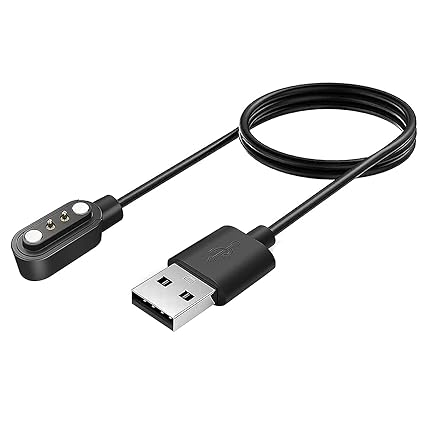
Pro tip: Many Boult smartwatches use a proprietary charger. Using third-party cables may cause charging issues or even damage the watch.
3. Ensure Proper Alignment
Boult smartwatches often use magnetic charging. If the magnets are not lined up, the watch won’t charge.
- Place the watch on the charger and feel for a click or magnetic pull.
- Make sure the watch display lights up or shows a charging symbol.
- If not, adjust the position slightly and try again.
4. Perform A Soft Reset
A software glitch can sometimes stop the charging process. To fix this:
- Press and hold the power button for 10–15 seconds until the watch restarts.
- Once it reboots, reconnect it to the charger.
This simple reset can fix many invisible software hiccups.
5. Try A Different Power Source
Not all USB ports provide the same power. Plugging your charger into a computer may not be enough. Try:
- Using a wall adapter with a higher output (at least 1A/5V).
- Avoiding power banks or car chargers for initial troubleshooting.
6. Update Firmware
Outdated firmware can sometimes cause charging or battery issues. Connect your Boult smartwatch to the official app and check for updates.
Non-obvious insight: Some firmware updates improve charging speed or stability. Always keep your watch’s software up to date.
7. Inspect For Physical Or Water Damage
Even if your Boult watch is water-resistant, water can sometimes enter and damage internal parts. Look for:
- Foggy or wet display
- Rust on charging contacts
- Buttons that don’t work
If you see these signs, do not try to charge the watch. Let it dry out completely and contact support if needed.
Comparing Charging Cables And Power Sources
To understand how different charging setups impact your Boult smartwatch, look at the following data:
| Charging Source | Typical Output (Amps) | Charging Time (0–100%) | Common Issues |
|---|---|---|---|
| Wall Adapter (Official) | 1.0A | ~90 minutes | Rare |
| Computer USB Port | 0.5A | ~150 minutes | Slow charging |
| Power Bank | Varies | ~120 minutes | Unstable power |
| Third-party Adapter | Varies | Varies | Compatibility issues |
Always use the recommended adapter to avoid charging problems.
Credit: pazerpro.com
When To Replace The Battery
Smartwatch batteries, like all lithium-ion cells, degrade over time. If your watch:
- Runs out of battery quickly even after a full charge
- Shows 100% but dies after a short while
- Does not hold any charge at all
…you may need a new battery.
Boult watches are not designed for easy battery replacement at home. Attempting to open the watch may void your warranty. If you suspect a battery problem, contact Boult’s customer support or an authorized service center.
Understanding Boult Smartwatch Warranty And Support
Boult offers a standard 1-year warranty for most smartwatches. This covers manufacturing defects but does not always include charging cable or accidental damage. Here’s how warranty support usually works:
| Issue | Covered Under Warranty? | Typical Solution |
|---|---|---|
| Battery Failure (not user damage) | Yes | Free repair/replacement |
| Charging Cable Faulty | No | Buy new cable |
| Physical/Water Damage | No | Paid repair |
| Software Issues | Yes | Firmware update |
Always keep your purchase receipt. Register your product on Boult’s official website for smoother warranty claims.
How To Extend The Life Of Your Boult Smartwatch
Proper care can prevent charging issues and extend your smartwatch’s lifespan. Here are smart habits to follow:
- Clean contacts regularly: Wipe the charging area every few days.
- Avoid overcharging: Disconnect once the battery is full.
- Keep away from moisture: Even water-resistant watches can suffer from long-term dampness.
- Use original accessories: Third-party chargers may damage the battery.
- Update software: Install firmware updates for better performance and stability.
Little-known tip: If you store your watch for a long time, charge it to about 50% and power it off. This keeps the battery healthy.
User Mistakes That Can Cause Charging Problems
Sometimes, users accidentally make things worse. Here are common mistakes:
- Forcing the watch onto the charger in the wrong position
- Using too much cleaning liquid, which can cause corrosion
- Wrapping the cable tightly, which can break internal wires
- Ignoring small warning signs, like the watch heating up while charging
- Leaving the watch on a metal surface while charging, which can cause short circuits
Take time to handle your smartwatch and its accessories with care.

Credit: www.youtube.com
Signs You Need Professional Help
If you’ve tried all troubleshooting steps and your Boult smartwatch still won’t charge, it’s time to seek expert help. Watch for these signs:
- The watch is completely dead and unresponsive, even after resets.
- You see physical damage, swelling, or leaking from the battery area.
- The watch gets abnormally hot while charging.
- No charging symbol appears no matter what charger or cable you use.
In these cases, stop using the watch and contact Boult support. Attempting repairs yourself can cause more damage and void your warranty.
How Boult Smartwatch Charging Compares To Other Brands
To see how Boult’s charging performance matches up, here’s a quick comparison with other popular brands:
| Brand | Full Charge Time | Battery Life (Typical) | Charging Method |
|---|---|---|---|
| Boult | ~90 minutes | Up to 7 days | Magnetic cable |
| Noise | ~120 minutes | Up to 7 days | Proprietary cable |
| Fire-Boltt | ~100 minutes | Up to 8 days | Magnetic cable |
| boAt | ~90 minutes | Up to 10 days | Magnetic cable |
Boult’s charging speed is among the best in its class, but only if all parts are working correctly.

Credit: tradicao.pt
Frequently Asked Questions
Why Does My Boult Smartwatch Only Charge Sometimes?
Intermittent charging is usually caused by dirty charging contacts or a loose cable. Clean the contacts carefully and make sure the cable is firmly attached. If the problem continues, try a different adapter or cable.
Can I Use Any Charger With My Boult Smartwatch?
No. Always use the official Boult charger. Third-party chargers may not match the voltage or current, which can damage your watch or make charging unreliable.
How Do I Know If My Boult Smartwatch Battery Is Dead?
If your smartwatch does not turn on at all, even after charging and resetting, the battery might be dead. Signs include the watch heating up during charging or showing no charging symbol. In this case, contact Boult support.
What Should I Do If My Watch Gets Hot While Charging?
A warm watch during charging is normal, but if it becomes very hot, unplug it immediately. This could be a sign of a battery or hardware problem. Let it cool down, then try again with a different charger. If overheating continues, seek professional help.
Where Can I Get Official Help For My Boult Smartwatch?
You can contact Boult customer support through their official website. They offer warranty repair, parts replacement, and troubleshooting.
If your Boult smartwatch is not charging, don’t panic. Most issues are minor and can be fixed at home with simple steps. Keeping your device clean, using the right accessories, and updating the software regularly will go a long way in preventing problems.
If you do need professional help, Boult’s support team is ready to assist. With the right care, your smartwatch can keep running smoothly for years.