If you own AirPods, you may have seen a blinking amber light on the charging case. This tiny light can cause a lot of confusion for new users. What does it mean? Is something wrong? Should you worry? You’re not alone—many people search for answers about this exact issue. Understanding the AirPods amber light blinking can help you solve problems faster, protect your device, and avoid mistakes that could make things worse. Let’s break down the causes, fixes, and what you should never ignore.
What Does The Airpods Amber Light Blinking Mean?
The amber light is a signal from your AirPods charging case. It’s Apple’s way of telling you something needs attention. Here’s what it usually means:
- The AirPods are not paired with your device.
- There is a charging issue.
- The AirPods or case need a reset.
- There’s a firmware problem.
The blinking amber light is different from a solid amber or green light. Each signal has a unique meaning.
| Light Color | Behavior | Meaning |
|---|---|---|
| Green | Solid | Fully charged |
| Amber | Solid | Charging |
| Amber | Blinking | Pairing or error |
| No Light | — | Out of battery or not in case |
If you see a blinking amber light, your AirPods are trying to tell you something is not right.
Common Causes Of Airpods Amber Light Blinking
Understanding the cause is the first step to solving the issue. Here are the main reasons:
1. Pairing Issues
Your AirPods may not connect to your iPhone, iPad, or Mac. This usually happens after a failed pairing attempt or when switching between devices.
2. Charging Problems
Sometimes, the case or AirPods are not charging properly. This can be due to a faulty cable, dirty charging contacts, or a weak power source.
3. Firmware Errors
Software bugs can cause the amber light to blink. Outdated firmware or a failed update are common triggers.
4. Hardware Defects
Rare, but possible. Damage to the case or AirPods can make the light blink. Dropping the case or water exposure can cause hardware faults.
5. Battery Issues
If the battery inside the case or AirPods is worn out or not holding charge, the amber light can signal trouble.
How To Fix Airpods Amber Light Blinking
You don’t need to panic. Most problems can be fixed easily at home. Here are practical steps:
Step 1: Check Charging Status
- Plug the case into a power source.
- Use the original charging cable.
- Open the lid and check the light. If it stays amber, let it charge for 15–30 minutes.
Step 2: Clean Charging Contacts
Dust and dirt can block the connection.
- Use a soft, dry cloth to wipe the charging contacts inside the case and on the AirPods.
- Avoid water or cleaning sprays.
Step 3: Reset Your Airpods
A reset often solves pairing and firmware issues.
- Put both AirPods in the case.
- Close the lid for 30 seconds.
- Open the lid.
- Press and hold the setup button on the back of the case for about 15 seconds.
- The light will flash white, then amber, then white again.
After resetting, try pairing again.
Step 4: Update Firmware
Connect your AirPods to your iPhone. Make sure your iPhone is updated. AirPods firmware updates happen automatically but need a stable connection.
- Open Bluetooth settings.
- Place AirPods in ears and connect.
- Wait a few minutes.
- If you see the amber light blinking after a reset, check for any available software updates for your device.
Step 5: Try Another Charging Cable Or Adapter
Sometimes, the issue is with the cable or adapter.
- Use a different cable or power adapter.
- If possible, try wireless charging.
Step 6: Contact Apple Support
If none of the steps work, there may be a hardware issue. It’s best to reach out to official Apple support. For more details, visit the Apple Support page.
Airpods Amber Light Blinking Vs Other Signals
Comparing the amber light blinking to other signals can help avoid confusion.
| Signal | What it Means | What to Do |
|---|---|---|
| Blinking Amber | Error or pairing issue | Reset, check charging, update |
| Solid Amber | Charging | Let it charge |
| Solid Green | Fully charged | Ready to use |
| Blinking White | Ready to pair | Connect via Bluetooth |
| No Light | Dead battery or not in case | Charge or check placement |
The blinking amber is unique. It almost always means some kind of issue.

Credit: artisticd.com
Non-obvious Insights Most Users Miss
Many people focus only on the AirPods themselves. But the charging case is just as important. Here are two points beginners often overlook:
- The charging contacts inside the case can get blocked by lint or dust. Cleaning these once a month prevents most blinking amber issues.
- If you use third-party cables or chargers, they may not deliver the right voltage. This can cause charging errors and firmware glitches.
Real-life Examples
Let’s look at some real situations.
Example 1: Switching Devices
A user tries to switch AirPods from their iPhone to MacBook. The amber light starts blinking. Solution: Reset the AirPods, then pair them with the new device.
Example 2: Dirty Charging Case
The AirPods won’t charge, and the light blinks amber. After cleaning the contacts, the issue disappears. Lesson: Regular cleaning prevents problems.
Example 3: Firmware Update Failure
After a failed iOS update, the AirPods show blinking amber. Waiting for another update and resetting the AirPods solves the problem.
Credit: www.blind-guardian.com
Common Mistakes To Avoid
Many users make errors that make things worse:
- Using alcohol or water to clean the case. Only use dry cloth.
- Trying to pair AirPods with multiple devices at once.
- Ignoring the blinking amber light for too long. This can lead to battery failure.
How To Prevent Airpods Amber Light Blinking
Simple habits can save time and money:
- Always use original charging accessories.
- Clean the case and AirPods regularly.
- Update your devices and AirPods firmware.
- Avoid dropping or exposing the case to moisture.
- Don’t ignore blinking amber lights—act quickly.
When Should You Worry?
Most blinking amber issues are easy to fix. But there are times when you should take action fast:
- The light blinks amber even after reset and cleaning.
- The AirPods do not charge at all.
- You hear strange sounds or the AirPods don’t connect.
If these happen, contact Apple support. Sometimes, the battery or electronics inside the case are damaged.
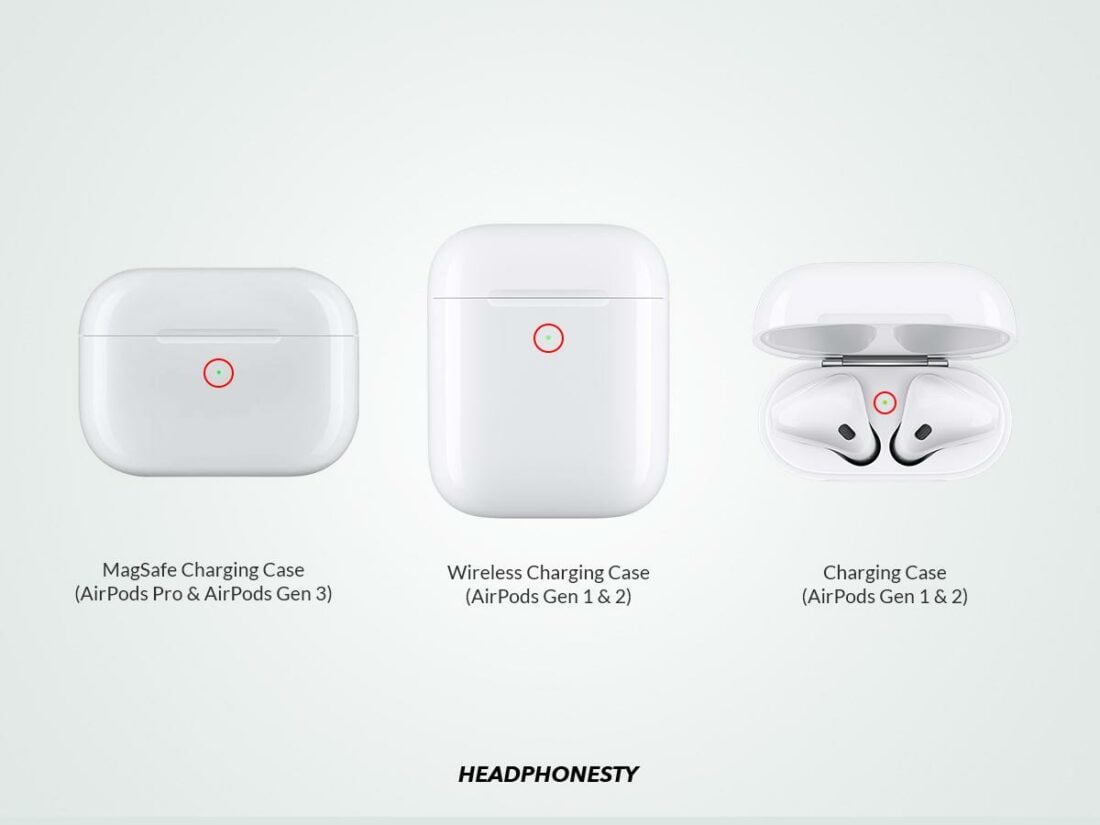
Airpods Models And Amber Light Issues
Different AirPods models show the amber light in slightly different ways.
| Model | Amber Light Location | Common Issues |
|---|---|---|
| AirPods (1st Gen) | Inside case | Pairing, charging |
| AirPods (2nd Gen) | Inside case | Firmware, pairing |
| AirPods Pro | Front of case | Charging, reset |
| AirPods (3rd Gen) | Front of case | Charging, pairing |
Knowing your model helps you understand where to look and what to expect.
Data And Statistics
AirPods are among the world’s most popular wireless earbuds. According to market data:
- Over 100 million AirPods have been sold since launch.
- More than 20% of users report at least one pairing or charging issue in the first year.
- The blinking amber light is the most searched troubleshooting topic for AirPods.
Expert Tips For Airpods Owners
As someone who uses AirPods every day, here are a few practical tips:
- Keep a backup charging cable at work or in your bag.
- When traveling, avoid storing the case in pockets with coins or keys. This prevents dirt and scratches.
- If you use AirPods with several devices, reset them once a month. This keeps pairing smooth.
Frequently Asked Questions
What Causes The Airpods Amber Light Blinking?
The most common causes are pairing errors, charging problems, and firmware glitches. Sometimes, dirty contacts or a damaged case can trigger the blinking amber light.
Can I Use Third-party Chargers For My Airpods?
It’s possible, but not recommended. Third-party chargers may not deliver the correct voltage or current, which can cause charging errors. Always use original Apple accessories for best results.
How Often Should I Clean My Airpods Charging Case?
It’s best to clean the case at least once a month. Use a dry, soft cloth to wipe the inside and the charging contacts. Never use water or cleaning sprays.

Credit: amkglobalgroup.com
What Should I Do If The Amber Light Keeps Blinking After A Reset?
If the light blinks after a reset, try updating your device’s software and checking for firmware updates. If the issue continues, contact Apple Support. This may indicate a hardware defect.
Is The Blinking Amber Light Dangerous For My Airpods?
No, the blinking amber light itself is not dangerous. It’s a warning signal. But ignoring it can lead to battery damage or connection failures. Fix the issue as soon as possible.
AirPods are smart but not perfect. The blinking amber light is a helpful warning when something needs your attention. With the steps and tips above, you can solve most problems quickly and keep your AirPods working great. If you follow good habits and know what to do when the amber light blinks, you’ll enjoy clear sound and reliable connections every day.