Zevo Bug Light Blinking: Causes, Solutions, and What You Need to Know
A blinking Zevo bug light can be both confusing and annoying, especially if you count on it to keep your space free from flying insects. Many people expect these devices to “just work,” so when the light starts blinking, it’s easy to feel lost.
But what does it actually mean when your Zevo bug light blinks? Is it signaling a problem, or just a normal part of its operation? Let’s explore the main reasons, possible fixes, and what you need to do to keep your Zevo bug light running smoothly.
Understanding Zevo Bug Lights
Zevo bug lights are a popular choice for homes, patios, and even small businesses. They use UV light to attract bugs like mosquitoes, flies, and moths, then trap them on an adhesive cartridge or zap them with an electric grid. Designed for safety and low maintenance, Zevo lights are often marketed as a set-it-and-forget-it solution.
What makes Zevo different is the focus on chemical-free pest control. By using light and physical traps, these devices avoid the use of sprays or toxins that could harm people or pets. Most Zevo bug lights plug directly into a wall outlet, require little setup, and have a simple indicator light to show their status.
Why Is My Zevo Bug Light Blinking?
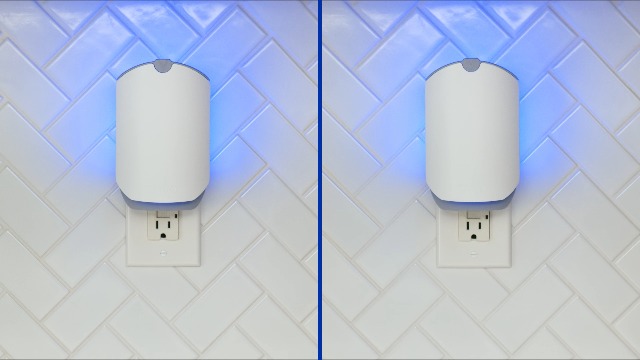
If your Zevo bug light starts blinking, it’s sending you a message. This blinking is not just a random event—there’s a reason behind it. Here are the most common explanations:
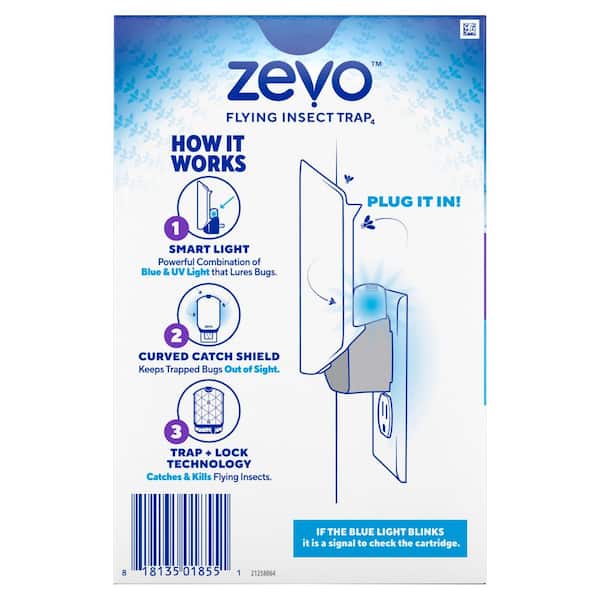
- Cartridge Needs Replacing: Many Zevo bug lights have a cartridge or sticky pad that catches insects. Once this is full, the device will often blink to alert you to replace it.
- Power Issues: Unstable power supply or loose connections can cause the light to blink.
- Device Malfunction: Internal errors or electrical faults might trigger blinking.
- Overheating: If the unit gets too hot, it may blink to warn you.
- End of Life: Some models blink when the UV bulb is at the end of its life cycle.
Understanding which of these applies to your situation is the first step to a fix.
Credit: zevoinsect.com
Common Zevo Bug Light Models And Their Indicators
Not all Zevo bug lights are the same. Some have a single LED, while others have more advanced indicators. Here’s a quick comparison of popular models and what their blinking patterns usually mean.
| Model | Indicator Light | Common Blink Meaning |
|---|---|---|
| Zevo Flying Insect Trap | Blue LED | Cartridge full or missing |
| Zevo Flying Insect Trap Plus | Multi-color LED | Cartridge full, error, or end-of-life |
| Zevo Indoor Plug-In Trap | Single color LED | Power issue or cartridge needed |
Tip: Always check your user manual for the exact meaning of a blinking light on your model.
How To Fix A Blinking Zevo Bug Light
Once you know what might be causing the blinking, you can take action. Here’s how to troubleshoot and fix the most common issues:
1. Replace The Cartridge
The most frequent cause of blinking is a full or missing cartridge. Zevo bug lights rely on a sticky pad that needs to be changed regularly.
- Turn off and unplug the device before opening it.
- Remove the old cartridge. If it’s full of bugs, dispose of it safely.
- Insert a new, compatible cartridge until it clicks into place.
- Plug the device back in and check if the blinking has stopped.
Non-obvious insight: Even if the cartridge doesn’t look full, Zevo’s sensors may require a fresh cartridge to reset the indicator.
2. Check The Power Source
A loose plug or faulty outlet can interrupt the device’s operation.
- Try plugging the device into a different outlet.
- Make sure the plug is secure and not wobbly.
- Avoid using extension cords if possible, as they can cause voltage drops.
Practical tip: If your home has older wiring, some outlets may not provide consistent power. Test with another small device to confirm.
3. Inspect For Overheating
Overheating can cause electronics to blink or shut down as a protective measure.
- Place the bug light in a well-ventilated area.
- Avoid placing it near heat sources or in direct sunlight.
- Let it cool for 10-15 minutes, then restart.
If the blinking continues after cooldown, overheating may not be the main issue.
4. Reset The Device
Sometimes, a simple reset can solve electronic glitches.
- Unplug the device for at least 30 seconds.
- Plug it back in and see if the blinking persists.
- If your model has a reset button, press it according to the manual.
Example: Many users find that after a power outage, a reset is all that’s needed.
5. Replace The Uv Bulb (if Applicable)
Some Zevo models use a UV bulb that wears out over time.
- Check the manual to see if your model allows bulb replacement.
- Order the correct bulb type if needed.
- Follow the steps in your manual to change the bulb safely.
Important: Not all models have user-replaceable bulbs. For sealed units, you may need to replace the entire device.
6. Contact Customer Support
If none of the above steps stop the blinking, there may be a deeper fault.
- Gather your purchase information and device model number.
- Contact Zevo’s official customer service.
- Many devices have a 1-year warranty for replacement or repair.
Extra tip: Describe the blinking pattern (fast, slow, constant) as this can help support diagnose the problem quickly.
Preventing Future Blinking Issues
To keep your Zevo bug light in top shape, follow these best practices:
- Replace cartridges regularly—don’t wait for the device to blink.
- Clean vents and surfaces to prevent dust buildup.
- Use a stable power source—surge protectors can help.
- Keep the device in a cool, dry place away from moisture or extreme heat.
Following these steps not only prevents blinking but also extends the life of your device.
When To Replace Your Zevo Bug Light
Even with good care, all electronics have a lifespan. If your Zevo bug light is several years old and keeps blinking after every fix, it may be time for a replacement.
Here’s a quick comparison of signs that suggest replacement is needed:
| Sign | What It Means | Action |
|---|---|---|
| Blinking after every fix | Internal fault likely | Replace device |
| Burnt or darkened bulb | Bulb at end-of-life | Replace bulb or device |
| Damaged housing | Safety risk | Replace device |
Non-obvious insight: Some users try to “hack” their Zevo bug lights by disabling blinking sensors. This is not recommended, as it can create safety risks.
Credit: www.homedepot.com
Are Blinking Patterns Different? Understanding Light Signals
Not all blinks mean the same thing. Zevo and similar devices often use different blink patterns to communicate specific problems.
- Fast blinking: Usually means cartridge missing or device error.
- Slow, steady blinking: Often signals a full cartridge.
- Solid light: Device is working normally.
Always refer to your manual, but if you’ve lost it, you can usually find a PDF version on the manufacturer’s website or contact customer support.
Example: On the Zevo Flying Insect Trap Plus, a green blinking light may mean end-of-life for the UV bulb, while blue blinking often means a cartridge issue.
Real-world User Experiences
Many Zevo users share their stories online. Here are a few common scenarios:
- “My light started blinking right after I changed the cartridge!” This often happens if the new cartridge is not seated properly. Remove and reinsert it, making sure it clicks.
- “The blinking stopped after I moved it to a different outlet.” This points to a power supply issue, not a device fault.
- “No matter what I do, it still blinks.” In rare cases, the internal sensor may be damaged—warranty support is your best option.
These stories show that most blinking issues have simple fixes, but sometimes, the device itself may need replacement.
Zevo Bug Light Vs. Other Brands: Is Blinking Unique?
You might wonder if blinking is a problem unique to Zevo or common to all bug lights. Here’s a side-by-side look:
| Brand | Blinking Indicator | Common Causes |
|---|---|---|
| Zevo | Yes | Cartridge, power, bulb |
| Flowtron | No | N/A (uses sound or no indicator) |
| Black+Decker | Yes | Bulb, power |
As you can see, blinking is a common alert method, but not all brands use it. Zevo’s approach is more user-friendly for maintenance, but it does mean you’ll need to pay attention to the signals.
When To Call An Electrician
If your Zevo bug light blinks in every outlet, but other devices work fine, the issue is likely with the device itself. However, if you notice that other appliances also behave oddly (blinking, flickering, or resetting), you may have a home wiring problem.
In this case, calling a certified electrician is the best move for your safety.
Note: Never open the device housing yourself, especially if it’s not designed for user service. This can void your warranty and pose safety risks.
Where To Get Official Help And Parts
If you need genuine cartridges, bulbs, or repairs, always use Zevo’s official website or trusted retailers. Using third-party cartridges or bulbs can cause fit issues or even damage the device.
For official resources, see the Zevo official website.
Frequently Asked Questions
Why Does My Zevo Bug Light Keep Blinking Even After I Change The Cartridge?
This usually means the cartridge is not installed correctly, or the sensor needs to be reset. Remove and reinsert the cartridge, making sure it clicks into place. If blinking continues, unplug the device for 30 seconds, then plug it back in.
Can A Blinking Zevo Bug Light Still Catch Insects?
If the light is blinking, the device may not be operating at full strength. The UV light or fan could be disabled during a fault. For best results, fix the blinking issue before relying on it for bug control.
How Often Should I Replace The Zevo Cartridge?
Most users need to replace the cartridge every 15–30 days, but this depends on how many insects are in your area. High-insect locations may require weekly replacement. Check the cartridge regularly and change it when full.
Is Blinking Dangerous For The Device?
Blinking itself is not harmful, but it signals a problem that needs attention. Ignoring a persistent blinking light can shorten the device’s lifespan or reduce its effectiveness.
Can I Use Non-zevo Cartridges In My Zevo Bug Light?
It’s not recommended. Off-brand cartridges may not fit correctly or trigger the indicator light, causing persistent blinking or even device damage. Always use official or certified replacement parts.
A blinking Zevo bug light is not something to ignore, but it’s rarely a reason for panic. With the right steps and a bit of attention, you can solve most blinking problems and keep your space bug-free. When in doubt, official resources or customer service can help you get back to a peaceful, insect-free environment.
Credit: www.amazon.com