A water meter is a simple device, but when it stops recording usage, it creates confusion and problems for both homeowners and water suppliers. Imagine getting a bill for zero usage when you know you’ve used water every day, or receiving a complaint about unusual readings. Understanding why a water meter fails to record water usage is important for anyone who pays for water or manages properties. This article explains why water meters sometimes show zero or incorrect readings, how to diagnose the issue, and what actions to take. You’ll also learn practical solutions, common mistakes, and answers to the most frequent questions.
How Water Meters Work
Water meters measure the flow of water entering a home or building. Most meters use a mechanical dial, digital display, or smart sensor. When water flows, a wheel or sensor inside the meter moves, and this movement is counted. The total is displayed as gallons or cubic feet used.
Types Of Water Meters
There are several common types:
- Mechanical meters: Use spinning wheels or pistons to measure water.
- Electromagnetic meters: Use sensors and magnets to detect flow.
- Ultrasonic meters: Use sound waves to measure movement.
- Smart meters: Send data wirelessly to the water supplier.
Each type has its own way of detecting flow and can fail for different reasons.
| Meter Type | Main Feature | Common Failure |
|---|---|---|
| Mechanical | Physical movement | Stuck gears |
| Electromagnetic | Sensor-based | Sensor failure |
| Ultrasonic | Sound waves | Electronic error |
| Smart | Remote reading | Data transmission |
Common Reasons Water Meters Stop Recording Usage
Water meters are designed to be reliable, but several problems can cause them to stop working.
1. Blocked Meter Or Pipe
If debris or sediment collects inside the meter, the moving parts can become stuck. This is especially common in older systems or after pipe repairs. Even a small blockage can prevent the meter from recording flow.
2. Mechanical Failure
Mechanical meters have gears and wheels that turn when water flows. Over time, these parts can wear out or break. If the wheel doesn’t spin, the meter shows zero usage even when water is flowing.
3. Electrical Or Battery Problems
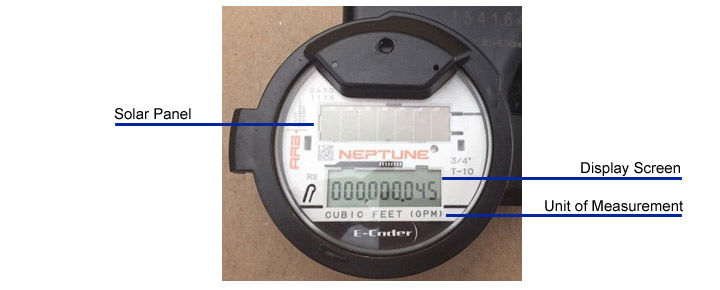
Many modern meters use batteries or electronics. If the battery runs out, or if there is a wiring issue, the meter may stop recording. Sometimes the display will go blank or show an error code.
4. Installation Errors
Incorrect installation can lead to meters not working. For example, if a meter is installed backward, it will not register flow. Poor sealing can let air in, causing false readings or no readings at all.
5. Freezing Temperatures
In cold climates, water can freeze inside the meter. Frozen water stops the internal movement, and the meter stops counting usage. After thawing, the meter may work again or may be damaged.
6. Tampering Or Unauthorized Access
Sometimes, people try to bypass meters to avoid paying for water. Tampering can damage the meter or cause it to stop recording. Signs of tampering include broken seals or unusual marks on the meter.
7. Software Or Communication Errors
Smart meters rely on software and data networks. If there is a software bug or network outage, the meter may stop sending data. This doesn’t always mean the meter itself is broken, but the supplier may not see any usage.
How To Diagnose A Water Meter Not Recording Usage
If your water meter shows zero usage but you know water is flowing, here’s how to investigate:
Step 1: Check Visible Signs
Look for obvious problems like:
- Blank or flashing display
- Physical damage (cracks, broken glass)
- Signs of freezing (ice, condensation)
- Broken seals or signs of tampering
Step 2: Run A Simple Usage Test
Turn on a faucet or tap and watch the meter. Mechanical meters often have a small spinning wheel (leak indicator). If it doesn’t move, water isn’t being recorded.
Step 3: Inspect For Blockages
If you can safely remove the meter, inspect for sediment, rust, or debris. Do not open a meter unless you know how; contact your water supplier if unsure.
Step 4: Check Battery Or Power Supply
For digital meters, check if the screen turns on. If it stays off, the battery may be dead. Some meters have a battery indicator.
Step 5: Review Usage History
Compare your current meter reading to past bills. If usage suddenly drops to zero, it’s a clear sign of a problem.
Step 6: Contact Your Water Supplier
If you cannot find the issue, call your water supplier. They can check the meter remotely (for smart meters) or send a technician.
| Diagnostic Step | What to Look For | Action |
|---|---|---|
| Visual Inspection | Damage, freezing, tampering | Report or repair |
| Usage Test | Meter movement | Verify flow |
| Blockage Check | Sediment/debris | Clean or replace |
| Power Check | Battery/display | Replace battery |
| Supplier Contact | Remote check | Schedule technician |
Repairing Or Replacing A Faulty Water Meter
If you discover your meter isn’t recording usage, you may need to repair or replace it. Here’s what to expect:
Repair Steps
- Clean or remove blockages: If sediment is the issue, cleaning may restore function.
- Replace batteries or fix wiring: For digital meters, a simple battery change may solve the problem.
- Fix installation errors: Reinstall the meter in the correct direction.
- Repair damaged parts: Replace broken wheels or gears in mechanical meters.
Replacement Process
If repairs don’t work, the meter should be replaced. Most suppliers do this free of charge, especially if the meter is faulty. Always keep your old meter until the new one is working, as you may need it for billing questions.
Cost And Responsibility
Usually, the water supplier owns the meter and handles repairs. Homeowners may be responsible for plumbing leading up to the meter. Always check your local rules.

Credit: www.discovervalve.com
Practical Tips For Homeowners
Dealing with a water meter issue can be stressful. Here are some tips:
- Record your meter readings monthly. This helps spot problems early.
- Don’t try to fix or remove the meter yourself unless you have experience.
- Check for leaks and blockages in your plumbing regularly.
- Ask your supplier for a meter test if you suspect a problem.
- If you have frequent meter issues, ask about upgrading to a smart meter.
A non-obvious tip: Sometimes, low flow rates (like a tiny leak) are too small for older meters to record. If you see zero usage but suspect a leak, ask for a leak detection test.
Water Meter Not Recording Usage: Impact And Risks
A faulty water meter affects both billing and water management.
Incorrect Billing
If usage is not recorded, bills may be too low or too high. This can cause disputes or penalties. In some places, suppliers estimate usage based on past bills, which can be unfair.
Water Waste
Meters also help detect leaks. If your meter isn’t working, unnoticed leaks can waste thousands of gallons. For example, a small leak of 1 gallon per hour wastes over 8,700 gallons per year.
Regulatory Issues
Most cities require accurate water meters by law. Failure to record usage may lead to fines or mandatory repairs.
Example: Large Apartment Building
In a 100-unit apartment, if the main meter stops recording, the supplier may bill based on the previous average. This can hide leaks or result in unfair charges to tenants.
Credit: waterga.com
Preventing Water Meter Failure
To avoid problems, regular maintenance is key.
- Ask your supplier how often meters are checked.
- In cold areas, insulate pipes and meters to prevent freezing.
- Avoid pouring chemicals or hard debris down drains.
- If you have hard water, install a filter to reduce sediment buildup.
- For smart meters, check your online usage history monthly.
A non-obvious insight: Many suppliers offer free meter tests if you ask. This can catch problems before they affect your bill.
Understanding Smart Meter Benefits
Smart meters reduce many common failures, but they have their own risks. They can send alerts if usage drops suddenly, helping catch issues early. However, they rely on data networks, so outages or software bugs may still cause missed readings.
| Meter Type | Pros | Cons |
|---|---|---|
| Mechanical | Simple, reliable | Prone to wear, misses low flows |
| Smart | Remote monitoring, alerts | Needs power, software errors |

Credit: www.mywater.us
When To Call A Professional
If you try these steps and your meter still isn’t recording, call a licensed plumber or your water supplier. Professionals can test the meter, check for hidden leaks, and replace the device safely.
A common mistake: Waiting too long to report a problem. Delays can lead to higher bills or even fines. Always act quickly if you see zero usage.
Frequently Asked Questions
Why Does My Water Meter Show Zero Usage Even When I Use Water?
This usually means the meter is blocked, broken, or incorrectly installed. Check for debris, battery problems, or installation mistakes. If you cannot find the cause, contact your supplier.
Can I Fix A Water Meter Myself?
Most repairs require special tools and knowledge. Cleaning blockages or changing batteries is possible, but replacing parts or recalibrating meters should be left to professionals.
What Happens If My Water Meter Is Faulty?
You may get incorrect bills or miss signs of leaks. Report problems to your supplier. They will usually test and replace the meter for free.
Are Smart Meters More Reliable?
Smart meters can detect issues faster and send alerts, but they rely on electronics and networks. They reduce manual errors but can fail due to power or software bugs.
How Often Should Water Meters Be Checked?
Most suppliers check meters every 1–5 years. Homeowners should record readings monthly and report any sudden changes.
Water meters are essential for fair billing and leak detection. If your meter stops recording usage, act quickly to diagnose and fix the issue. Always keep records and contact your supplier for support. For more technical details on water meter types and standards, visit Wikipedia. Taking simple steps can save money, prevent waste, and ensure you pay only for what you use.