A VTech smartwatch is often a child’s first experience with wearable tech. Kids love the games, camera, and step counter, while parents appreciate the educational features and durability. But what happens when your child’s VTech smartwatch will not turn on?
The watch is unresponsive, the screen stays black, and nothing seems to work. This situation can be frustrating for both kids and parents.
If you are facing this issue, you are not alone. Many VTech users report that their smartwatch is not turning on, especially after months of use or after charging. The good news: most causes are easy to fix at home if you follow the right steps.
This article will guide you through understanding why your VTech smartwatch is not turning on, how to fix it, and how to prevent this problem in the future. We’ll also look at warranty options, professional repairs, and answer common questions.
Why Your Vtech Smartwatch Is Not Turning On
A VTech smartwatch may fail to turn on for several reasons. Understanding the possible causes is the first step to finding a solution. Here are the most common reasons:
1. Battery Issues
The battery is the most common culprit. If the smartwatch is not charging or holding a charge, it will not turn on. Batteries in VTech smartwatches are rechargeable but have a limited lifespan. Leaving the watch unused for a long time can also cause the battery to lose its ability to hold power.
2. Charging Problems
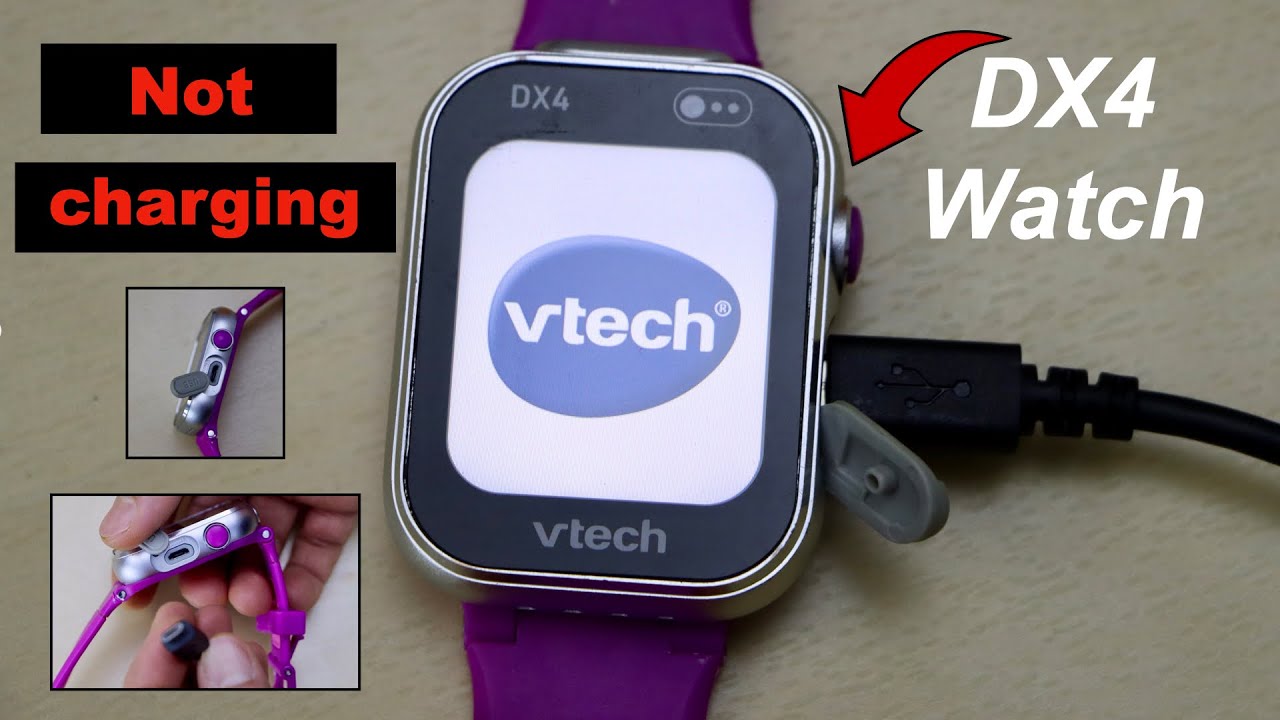
Sometimes, the problem is not the battery but the charging cable or port. Bent pins, dirt, or a faulty charger may prevent the watch from charging. If the watch was not placed correctly on its charger, it might not have charged at all.
3. Software Glitches
Like all electronics, VTech smartwatches can experience software glitches. A sudden freeze or crash may cause the watch to become unresponsive and appear “dead,” even if the battery is full.
4. Physical Damage
Dropping the watch, exposure to water, or rough handling can damage the internal components. While VTech smartwatches are built to be tough, they are not indestructible.
5. Faulty Power Button
A power button that is stuck, broken, or not making contact will stop the watch from turning on. This can happen after heavy use or if dirt gets under the button.
6. Factory Defects
In rare cases, a factory defect may be the cause. This is usually covered under warranty if the watch is still new.
First Steps: Quick Checks Before Troubleshooting
Before you start with advanced solutions, check these simple things:
- Is the watch charged? Connect it to the charger and leave it for at least 30 minutes.
- Is the charger working? Try a different USB cable or power source.
- Check for visible damage. Inspect the screen, buttons, and charging port for obvious signs of damage.
- Try turning it on. Hold the power button for at least 5 seconds.
- Restart the watch. If possible, try a forced restart (see your model’s manual).
Many times, these basic checks solve the problem. If not, keep reading for detailed steps.
Detailed Troubleshooting Guide
Fixing a VTech smartwatch that won’t turn on can be simple if you follow a systematic approach. Here’s a step-by-step guide.
1. Charge The Watch Properly
Plug the watch into its original charger and a wall outlet (not a computer USB port, which may provide less power). Leave it connected for up to 1 hour.
- If a charging icon appears, the battery was fully drained and is now charging.
- If nothing happens, try a different charger and cable.
Pro Tip: Not all USB cables are the same. Some only transfer data, not power. Use the cable that came with your watch or a known-good replacement.
2. Clean The Charging Contacts
Sometimes, dirt or sweat can block the connection between the charger and the smartwatch.
- Unplug the watch.
- Use a dry cotton swab to gently clean the charging contacts on both the watch and the cable.
- Avoid using water or cleaning sprays.
3. Inspect The Charger And Cable
Check for frayed wires, bent pins, or loose connections. Try charging another device with the same cable. If the cable does not work with another device, it may be faulty.
4. Try A Forced Restart
Many VTech watches allow a forced restart:
- Hold down the power button for 10-15 seconds.
- Release and try turning it on normally.
If your model has a reset button (usually a small hole), use a paperclip to press it gently.
5. Check For Physical Damage
Look for cracks, dents, or signs of water exposure. If you see moisture under the screen or corrosion on the contacts, the watch may need professional repair.
6. Try Connecting To A Computer
Plug the watch into a computer using the USB cable. If the computer recognizes the device, the watch is not completely dead. You may be able to reset or update the software through the VTech Learning Lodge.
7. Update Firmware
Outdated or corrupt firmware can prevent the watch from turning on. If the computer recognizes the device:
- Visit the VTech support page.
- Download the latest firmware for your model.
- Follow the instructions to update.
8. Factory Reset (if Possible)
For some issues, a factory reset can help. This will erase all data on the watch.
- Connect the watch to a computer.
- Open the VTech Learning Lodge or the dedicated app.
- Look for the option to “Reset Device to Factory Settings.”
Caution: This deletes all photos, games, and settings.
9. Let The Watch “rest”
If the watch overheated or froze, leave it unplugged for several hours, then try again. Sometimes, internal circuits need time to “reset. ”
10. Seek Professional Help
If none of these steps work, contact VTech support or an authorized repair center. If the watch is under warranty, repairs may be free.
Comparing Vtech Smartwatch Models: Features And Power Systems
Not all VTech smartwatches are the same. Here’s a comparison of popular models and their charging systems:
| Model | Battery Type | Charging Method | Battery Life (avg.) |
|---|---|---|---|
| Kidizoom DX2 | Li-Ion (rechargeable) | Micro-USB cable | 2-3 days |
| Kidizoom DX3 | Li-Ion (rechargeable) | Micro-USB cable | 2-4 days |
| Kidizoom DX | Li-Ion (rechargeable) | Micro-USB cable | 2 days |
| Kidizoom Smartwatch (Original) | Li-Ion (rechargeable) | Micro-USB cable | 1-2 days |
Insight: Newer models often come with improved battery management but may have similar charging ports. This means charging issues are similar across models.
Credit: www.youtube.com
Common Mistakes To Avoid
While troubleshooting, some mistakes can make things worse or delay a solution.
- Using the wrong cable – Always use the original or a certified replacement.
- Forcing the power button – Pressing too hard can damage the button.
- Ignoring signs of water damage – Even small amounts of moisture can cause issues.
- Trying to open the watch – Opening the case can void the warranty and damage the watch.
- Resetting without backup – Factory reset deletes all photos and data.
When To Use Warranty Or Seek Professional Repair
If your VTech smartwatch is still under warranty, do not try to open or repair it yourself. Instead, contact VTech support. Most VTech smartwatches come with a 1-year limited warranty that covers factory defects.
What Does Warranty Cover?
- Faulty batteries (not due to misuse)
- Power button failure
- Internal component failure (not caused by drops or water)
What Is Not Covered?
- Physical damage from drops or rough play
- Water damage
- Damage from using non-original chargers
How To Start A Warranty Claim
- Find your proof of purchase (receipt or email).
- Visit the VTech support website.
- Fill in the warranty claim form.
- Follow their instructions for shipping the device.
Tip: Describe the problem in detail and include photos if possible.

Credit: www.ifixit.com
Battery Maintenance Tips For Longer Life
The battery is the heart of your smartwatch. Good habits can help it last longer.
- Charge regularly – Do not let the battery go completely flat.
- Avoid extreme temperatures – Do not leave the watch in hot cars or outside in winter.
- Use the right charger – Cheap chargers can harm the battery.
- Unplug when full – Overcharging can slowly reduce battery health.
- Store with some charge – If not using for weeks, charge to 50% and turn off.
Signs Your Smartwatch Battery Needs Replacement
If your VTech smartwatch is more than 2 years old, the battery may be wearing out. Here are signs it needs replacing:
- The watch only works when plugged in.
- Charge drops very quickly.
- The watch turns off randomly.
- It will not turn on, even after charging overnight.
Replacing the battery is not easy for most users. VTech does not sell batteries separately for most smartwatches. You will need to contact their service center.
Software Issues: How Updates And Bugs Affect Power
Software can also cause power problems. Firmware bugs, incomplete updates, or a failed sync can all make your VTech smartwatch unresponsive.
Firmware Update Steps
- Connect the watch to your computer.
- Download the latest firmware from the VTech support page.
- Follow the on-screen instructions.
- Do not unplug the watch during the update.
If the update is interrupted, the watch may need to be reset. Always make sure your computer is stable before starting.
Common Software Mistakes
- Ignoring update notifications.
- Unplugging during an update.
- Using third-party software tools.
Cleaning And Caring For Your Vtech Smartwatch
Proper care and cleaning can prevent charging and power problems.
- Wipe the screen and case with a soft, dry cloth.
- Clean the charging contacts regularly.
- Do not let the watch get wet, even if it is “splash proof.”
- Store the watch in a cool, dry place.
Table: Troubleshooting Steps And Likelihood Of Success
To help you focus your efforts, here’s how effective each common fix is, based on user reports:
| Fix Attempted | Estimated Success Rate | Time Needed |
|---|---|---|
| Charging with original cable | 60% | 30-60 min |
| Cleaning contacts | 20% | 5 min |
| Forced restart | 10% | 2 min |
| Firmware update/reset | 5% | 15-30 min |
| Professional repair/warranty | 5% | Varies |
Non-obvious insight: Many users overlook cleaning the charging contacts, yet this simple step solves power issues for about 1 in 5 watches that appear “dead.”
How To Prevent Power Issues In The Future
Prevention is easier than repair. Here’s how to avoid power problems with your VTech smartwatch:
- Charge the watch every few days – Do not wait for it to fully drain.
- Store safely – Keep out of reach of water and extreme heat.
- Supervise young children – Avoid rough play while the watch is charging.
- Update software regularly – Install updates when prompted.
- Check for damage – Inspect the charger and watch monthly.
Alternatives: If Your Smartwatch Cannot Be Repaired
Sometimes, a VTech smartwatch is simply beyond repair. If so, here are your options:
- Buy a new VTech model – Newer models have better battery life and features.
- Trade in or recycle – Some stores accept old electronics for recycling.
- Repurpose as a toy – If it still turns on sometimes, use it for pretend play.
Real User Stories: What Actually Fixed The Problem
Hearing from other parents can be helpful. Here are real examples:
- Maria, Texas: “My son’s Kidizoom stopped working after a bath accident. Cleaning the charging port and leaving it to dry for 3 days brought it back to life.”
- James, Ohio: “Our DX2 wouldn’t charge. I replaced the USB cable with a good phone charger, and it started working immediately.”
- Sophie, New York: “The watch wouldn’t turn on after a software update failed. VTech replaced it under warranty after I sent a video of the problem.”
Insight for parents: Sometimes the solution is simple, but it’s important to act quickly, especially if the watch got wet.
When It’s Time To Upgrade
If your VTech smartwatch is over 2 years old, or repairs are too costly, consider upgrading. Newer models have better batteries and more features. Compare models carefully to pick one that suits your child’s needs.
Table: Common Symptoms And What They Mean
If your VTech smartwatch will not turn on, here’s what the symptoms may indicate:
| Symptom | Possible Cause | Recommended Action |
|---|---|---|
| No lights, no response | Dead battery, faulty charger, internal damage | Try charging, check cable, warranty support |
| Turns off quickly | Worn battery | Contact VTech for battery replacement |
| Screen flickers | Loose connection, software glitch | Update firmware, warranty support |
| Charging icon but no power | Software crash, battery issue | Forced restart, firmware update |

Credit: www.youtube.com
Frequently Asked Questions
Why Does My Vtech Smartwatch Not Turn On After Charging Overnight?
This usually means the battery is completely dead or the charger is faulty. Try a different USB cable and wall adapter. Clean the charging contacts. If it still does not turn on, the battery may need to be replaced.
Can I Replace The Battery Myself?
Most VTech smartwatches do not have user-replaceable batteries. Opening the case can damage the watch and void the warranty. It is best to contact VTech support for battery replacement options.
Is Water Damage Covered Under Warranty?
No, water damage is not covered under the standard VTech warranty. If the watch got wet, leave it to dry for several days and avoid charging it. If it still does not work, contact support, but repairs may not be free.
How Can I Prevent My Child From Damaging The Watch?
Supervise young children during rough play and while charging. Teach them not to press buttons too hard or expose the watch to water. Using a screen protector and a case can help prevent damage.
Where Can I Find More Help?
You can find more troubleshooting steps and support on the official VTech Support page. They offer manuals, software updates, and contact options for repairs.
A VTech smartwatch not turning on can be stressful, especially for kids who enjoy its games and activities. With the steps in this guide, most issues can be solved at home. Remember to check the basics first, care for the battery, and avoid common mistakes.
If repairs are needed, VTech support is often helpful, especially within the warranty period. By following these tips, you can keep your child’s smartwatch running and learning for years to come.