If you have a UPS (Uninterruptible Power Supply) and see a yellow light blinking, you might feel worried or confused. Is your UPS broken? Will your devices be safe? The yellow light usually means something needs attention—but not always a major problem. This article will help you understand what the blinking yellow light means, why it happens, and what you should do next. Whether you use a UPS at home or work, knowing how to deal with this issue can protect your equipment and avoid downtime.
What Does The Blinking Yellow Light Mean?
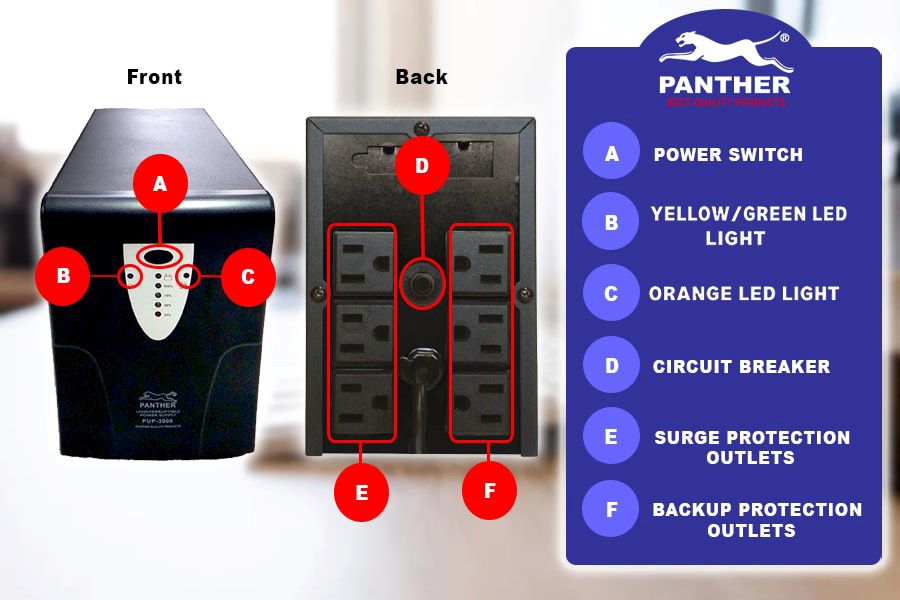
A yellow blinking light on a UPS is a warning. It does not always mean the UPS has failed. Different brands and models use lights to show the UPS status. Usually:
- Solid yellow: A steady warning or alert.
- Blinking yellow: The UPS is in a special mode or needs your attention.
The most common reasons for a blinking yellow light are:
- Battery charging: The UPS is charging its battery after a power cut.
- Battery needs replacement: The battery is old, weak, or damaged.
- Overload: Too many devices are connected.
- Internal error: The UPS found a problem inside.
Each manufacturer has its own light codes. Always check your UPS manual for exact meanings.
Common Causes And What To Do
Understanding the cause is key to fixing the issue. Let’s look at the main reasons, with practical guidance.
Battery Charging
When the power comes back after an outage, the UPS starts charging its battery. The yellow light often blinks during this process. This is normal and usually stops once charging completes.
What To Do:
- Wait for the light to turn off or change to green.
- Make sure the UPS is plugged in properly.
- If the light keeps blinking for hours, check the battery health.
Battery Needs Replacement
UPS batteries last 3–5 years on average. If the yellow light blinks and the UPS beeps, the battery may be weak or dying. Using a bad battery risks losing power during outages.
What To Do:
- Test the battery with the UPS’s self-test button (if available).
- Replace the battery if it fails the test.
- Use only recommended batteries for your UPS model.
Overload
Plugging too many devices into your UPS causes overload. The yellow light may blink, warning you to reduce the load.
What To Do:
- Unplug devices you don’t need.
- Check the UPS’s VA or watt rating to see how much power it can handle.
- If you need more backup, consider a larger UPS.
Internal Error
Sometimes, the UPS finds a problem in its electronics—like a failed circuit or sensor. The yellow light and a beep signal this.
What To Do:
- Reset the UPS by turning it off and on.
- If the light stays, contact the manufacturer or service center.
- Do not open the UPS unless you are trained.
How To Check Your Ups Status
Most modern UPS units have indicators and sometimes a small screen. Here’s how to use them:
- Look at the light codes: Find your model’s manual online if you lost it.
- Listen for beeps: The pattern can tell you more—long, short, or repeated.
- Use software: Some UPS devices let you connect to a computer and see status on software.
| UPS Brand | Yellow Light Meaning | Action Needed |
|---|---|---|
| APC | Battery charging or needs replacement | Check battery health |
| CyberPower | Overload or battery issue | Reduce load, test battery |
| Eaton | Internal error or charging | Reset UPS, contact support |
How To Replace A Ups Battery
If your battery is old or weak, replacing it is not hard but must be done carefully. Here are the steps:
- Turn off and unplug the UPS.
- Remove the battery cover (usually screws or clips).
- Take out the old battery (note the connections).
- Insert new battery, matching the wires.
- Close the cover, plug in and turn on.
- Run a self-test if your UPS has this feature.
Most UPS units use sealed lead-acid batteries. They are safe if handled properly. Always recycle old batteries at special centers.
Practical Tips
- Buy genuine batteries from trusted sellers.
- Don’t use mismatched batteries—wrong voltage or size can cause damage.
- Keep a record of battery changes for future reference.
Credit: panther.ph
Preventing Yellow Light Issues
You can avoid many UPS problems with simple habits:
- Check battery health every 6 months.
- Don’t overload your UPS. Know its power rating.
- Keep your UPS clean and dust-free.
- Use surge protectors to prevent spikes from damaging your UPS.
An often missed tip: Many users ignore firmware updates. Some UPS brands offer software that updates the device. Updating can fix bugs and improve battery management.
Comparing Ups Models: Yellow Light Features
Not all UPS devices handle alerts the same way. Here’s a comparison of popular models and how they use yellow lights.
| Model | Yellow Light Alerts | User Notification |
|---|---|---|
| APC Back-UPS Pro | Blinks during charging or overload | Beep + screen message |
| CyberPower CP1500AVRLCD | Solid yellow for battery issues | LCD warning + beep |
| Eaton 5S | Blinks for internal errors | LED + software alert |
Real Examples Of Ups Yellow Light Issues
It helps to see real situations:
- Home office: After a storm, a user noticed the yellow light blinking. It was battery charging. The light stopped after 2 hours.
- Server room: Multiple UPS units showed blinking yellow lights. The batteries were old and needed replacement. The IT team replaced them and the warning disappeared.
- Retail store: The yellow light blinked and the UPS beeped. Too many devices were connected. Removing extra printers solved the problem.
How Long Can You Ignore The Yellow Light?
You should never ignore a blinking yellow light for too long. Here’s a rough timeline:
- Charging: Okay to wait until finished (usually 1–3 hours).
- Battery needs replacement: Replace within a week.
- Overload: Fix immediately to prevent shutdown.
- Internal error: Contact support within a day.
Ignoring the warning can lead to equipment failure, data loss, or even fire risk in rare cases. Always act early.

Credit: www.youtube.com
Ups Battery Lifespan And Replacement Data
UPS batteries do not last forever. Here are some useful statistics:
| Battery Type | Average Lifespan | Replacement Cost (USD) |
|---|---|---|
| Sealed Lead-Acid | 3–5 years | $40–$80 |
| Lithium-Ion | 5–7 years | $100–$200 |
Non-obvious insight: UPS battery life depends not just on age, but also temperature. Keeping your UPS in a cool place can add years to battery life.
When To Call For Professional Help
Some yellow light issues are easy to fix. Others need expert care. Call for help if:
- The light blinks even after battery replacement.
- You smell burning or see smoke.
- The UPS will not turn on.
- You lack experience with electronics.
Most UPS manufacturers have customer service lines and websites. If you need technical details, visit the official APC support site.
Credit: cornelsplumbing.com
Frequently Asked Questions
What Does A Blinking Yellow Light On My Ups Mean?
It usually means battery charging, battery problem, overload, or internal error. Check your UPS manual for your model’s codes.
How Do I Fix A Blinking Yellow Light?
First, try to unplug some devices and check the battery. If the light keeps blinking, run a self-test or replace the battery. If you can’t solve it, call for service.
Is It Safe To Use My Ups When The Yellow Light Is Blinking?
It depends. If the light blinks for charging, it’s safe. If it signals battery or overload, fix it soon. Using a UPS with a weak battery risks losing power.
How Often Should I Replace My Ups Battery?
Most batteries last 3–5 years. Check battery health every 6 months and replace if weak.
Can I Repair A Ups Myself If The Yellow Light Won’t Stop Blinking?
Simple fixes like battery changes are safe for most users. For internal errors or complex issues, call a professional. Do not open the UPS if you are unsure.
A blinking yellow light on your UPS is a warning, not a disaster. Understanding its meaning can save your devices and keep your work safe. Always check your manual, test your battery, and act quickly if you see the yellow light.
With these tips, you can handle UPS alerts with confidence and keep your power backup working for years.