When your Tozo earbuds stop charging, it can be frustrating. You count on these small devices for music, calls, and podcasts, so any charging problem can ruin your day. The good news is that most charging issues are fixable at home without special tools. In this guide, you’ll learn why your Tozo earbuds may not charge and how to solve the problem step by step. You’ll also discover tips to prevent future charging problems and answers to common questions, so you can get back to enjoying your wireless sound.
Understanding Tozo Earbuds Charging Problems
Tozo makes several popular true wireless earbuds like the T6, T10, and NC9. All models use a charging case to power the earbuds. If your earbuds are not charging, the issue could be with the earbuds, the charging case, the cable, or even your power source.
Key reasons for charging failures include:
- Dirty charging contacts
- Battery issues
- Faulty charging case
- Software glitches
- Damaged cables or adapters
It’s important to narrow down the cause before trying fixes. Some problems are easy to spot, while others need careful checking.
Basic Steps Before Troubleshooting
Before diving into detailed fixes, do these simple checks:
- Check the power source: Plug the charging cable into a different USB port or wall adapter.
- Try a different cable: Swap out the charging cable to rule out damage.
- Inspect the case: Make sure the charging case closes fully and the earbuds fit snugly inside.
- Charge for longer: If the earbuds are deeply discharged, leave them in the case for at least 30 minutes.
These steps solve many minor issues. If your Tozo earbuds still don’t charge, read on for deeper solutions.
Credit: medium.com
Common Causes And Fixes For Tozo Earbuds Not Charging
1. Dirty Charging Contacts
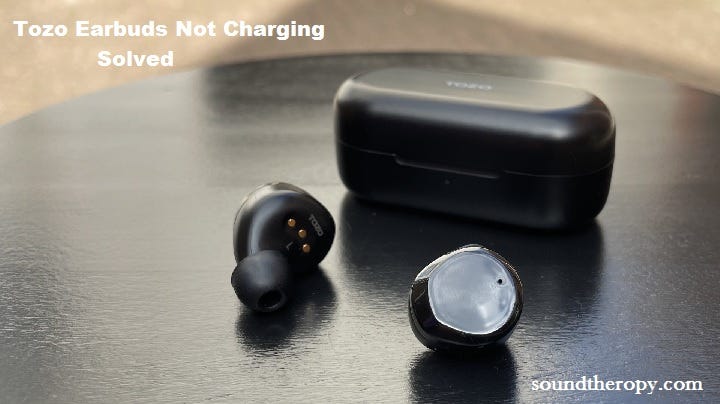
Metal contacts on both the earbuds and case can collect dust, sweat, or earwax. Even a thin layer can block charging.
How to clean:
- Use a dry, soft cloth to gently wipe the contacts on the earbuds and inside the case.
- For stubborn dirt, use a cotton swab slightly dampened with isopropyl alcohol.
- Let everything dry completely before charging again.
Non-obvious tip: Cleaning the contacts monthly can prevent most charging issues.
2. Battery Is Fully Drained
If you haven’t used your earbuds for a while, the battery may be deeply discharged. Sometimes, the charging indicator won’t light up right away.
What to do:
- Place the earbuds in the case and connect to a wall charger, not a computer.
- Leave them charging for at least 1 hour.
- Check if the charging light turns on after a few minutes.
Hidden insight: Sometimes, a full reset (see below) is needed if the battery gets stuck in a “sleep” state.
3. Faulty Charging Case
Sometimes the problem is with the charging case, not the earbuds themselves. The battery inside the case can wear out or the internal electronics can fail.
How to check:
- Try charging another set of Tozo earbuds (if you have access).
- If the charging lights on the case do not turn on, the case may need replacing.
Quick table to compare symptoms:
| Symptom | Likely Cause | Fix |
|---|---|---|
| Case doesn’t light up | Case battery or electronics failure | Replace case |
| Only one earbud charges | Dirty contact or defective earbud | Clean contacts or reset |
| Neither earbud charges | Case, cable, or both earbuds issue | Test each part separately |
4. Software Glitches
Sometimes, firmware bugs or glitches can stop charging. Most Tozo earbuds can be reset.
How to reset Tozo earbuds:
- Remove the earbuds from the case.
- Turn off Bluetooth on your phone.
- Hold the touch area on both earbuds for 10-15 seconds until the lights blink red and blue (or follow your model’s instructions).
- Put them back in the case and try charging.
Pro tip: Firmware updates (if available) can also fix charging bugs. Check the Tozo website for updates.
5. Damaged Charging Cable Or Adapter
A bad cable or USB adapter is a common cause. Even if the cable looks fine, the inner wires may be broken.
- Try using the cable with another device.
- Use a certified cable and a wall charger for best results.
6. Misaligned Earbuds In The Case
If the earbuds are not seated correctly, the contacts won’t touch and charging will not start.
- Place the earbuds in the case and press down gently.
- Listen for a click or check for the charging light.
Less obvious insight: Some Tozo models have magnetic pins that can attract metal dust, which can block proper contact.
7. Case Battery Is Dead
The charging case itself has a battery. If it runs out, the earbuds won’t charge even if plugged in.
How to tell: If the case doesn’t show charging lights when plugged in, the battery may be dead or faulty.
Fix: Charge the case for at least 2 hours. If it still doesn’t power on, you may need a new case.
Model-specific Issues
Each Tozo model has its own small differences. Here are some known quirks:
- Tozo T6: Sensitive to dust on contacts. Reset can fix stubborn charging issues.
- Tozo T10: Case battery may drain faster as it ages.
- Tozo NC9: Some users report the left earbud charges slower; clean contacts and swap sides to test.
Quick model feature comparison:
| Model | Battery Life (per charge) | Charging Case Capacity | Special Notes |
|---|---|---|---|
| Tozo T6 | 6 hours | 24 hours | Best for compact design |
| Tozo T10 | 4 hours | 14 hours | Older battery tech |
| Tozo NC9 | 8 hours | 24 hours | ANC (active noise cancelling) |
Credit: www.tozostore.com
When To Seek Professional Help
If you’ve tried all the above and your Tozo earbuds still won’t charge, it could be a hardware failure. Issues like a broken internal battery, damaged circuit board, or failed charging pins may require expert repair.
Signs you need help:
- Charging case or earbuds get very hot during charging.
- Case or earbuds are physically damaged (cracks, water entry).
- No lights, sounds, or response at all.
Contact Tozo customer support or your retailer if your device is under warranty. Repairing at home is not recommended for most users.
How To Prevent Future Charging Problems
Keeping your Tozo earbuds in good shape can help you avoid charging issues. Here’s how:
- Clean contacts monthly with a dry cloth.
- Store earbuds in the case when not in use.
- Keep away from moisture and avoid using in heavy rain.
- Use the original cable and adapter for charging.
- Avoid letting the case battery run out completely before recharging.
Extra tip: Avoid extreme heat or cold, as both can shorten battery life and cause charging problems.

Credit: www.youtube.com
Diagnosing Charging Issues: Step-by-step Guide
If you want a clear process to figure out what’s wrong, follow these steps:
- Test the charging cable and adapter with another device to confirm they work.
- Check the case: Plug it in and look for charging lights.
- Insert earbuds: Place both earbuds in the case and see if the charging indicator lights up.
- Clean contacts: If there’s no light, clean the contacts on both earbuds and in the case.
- Reset earbuds: Try a reset for your model.
- Swap components: If possible, try your earbuds in another Tozo case or vice versa.
- Contact support: If none of these work, seek professional help.
Real-world User Experiences
Many Tozo users have reported that simple cleaning or a reset fixes charging issues. For example, one user found that after a sweaty workout, their Tozo T6 would not charge. After wiping the contacts and letting them dry, the earbuds charged as normal.
Another user discovered their charging case’s port was full of lint, blocking the connection. Cleaning the port with a toothpick restored charging instantly.
Interesting insight: Some Tozo models are more sensitive to power supply quality. Charging from a laptop USB port may not provide enough power, so a wall adapter is a safer choice.
Comparing Tozo Earbud Charging With Other Brands
How do Tozo earbuds stack up against other brands when it comes to charging reliability? Here’s a quick comparison:
| Brand | Average Charging Issues (user reports) | Case Battery Life | Ease of Fixing |
|---|---|---|---|
| Tozo | Low to Moderate | 14–24 hours | Easy (clean, reset) |
| Jabra | Low | 15–28 hours | Moderate (reset needed) |
| Apple AirPods | Moderate | 24 hours | Easy (clean, reset) |
| Anker Soundcore | Low | 18–28 hours | Easy (clean) |
As you can see, Tozo earbuds are on par with other popular brands in both reliability and ease of fixing simple charging issues.
Frequently Asked Questions
Why Do My Tozo Earbuds Only Charge On One Side?
This usually means there’s dirt on the charging contacts or a minor software bug. Clean both the earbud and case contacts carefully. Try resetting the earbuds. If only one side charges after these steps, the earbud or case may be faulty.
How Long Do Tozo Earbuds Take To Fully Charge?
Most Tozo earbuds take about 1–2 hours to charge from empty to full. The charging case itself usually takes around 2 hours to charge fully via USB. Charging times can be longer if using a weak power source.
Can I Use My Tozo Earbuds While Charging?
No, true wireless earbuds like Tozo models cannot be used while charging. They must be in the case to charge, and the case must be closed. This is a safety design to protect the battery.
What Should I Do If My Tozo Charging Case Is Not Charging?
First, try a different cable and wall adapter. Clean the USB port gently if it looks dusty. If the case still does not show any charging lights after 2 hours, the internal battery may be dead and you may need a replacement case.
Are There Official Tozo Support Resources?
Yes, you can contact Tozo’s official support through their website or support email. They provide manuals, troubleshooting guides, and warranty information. For more details, visit the official Tozo support page.
Tozo earbuds are reliable for most people, but charging problems can happen with any device. With the right steps and a bit of patience, you can fix most issues yourself. Regular cleaning and careful charging habits will keep your earbuds working for years. If you ever run into trouble, don’t hesitate to seek help or visit a trusted resource like CNET’s wireless earbuds guide for more expert tips.