Strava Not Syncing With Justgiving: Causes, Fixes, And Expert Tips
For many athletes and charity supporters, Strava and JustGiving are essential digital partners. Strava tracks and celebrates every mile, while JustGiving turns your effort into fundraising for causes you care about. But what happens when Strava doesn’t sync with JustGiving? Suddenly, your hard-earned miles don’t show up on your fundraising page. This issue can be frustrating, especially when donors and friends are cheering you on.
In this article, you’ll find clear answers, step-by-step solutions, and practical advice to solve Strava-JustGiving syncing problems. Whether you’re an event organizer, a seasoned runner, or someone fundraising for the first time, you’ll learn what causes these issues, how to fix them, and how to avoid common mistakes.
You’ll also see real examples, data comparisons, and expert insights that many beginners miss.
How Strava Syncs With Justgiving
Understanding how these two platforms connect helps you fix problems faster. Here’s a simple explanation.
The Integration Process
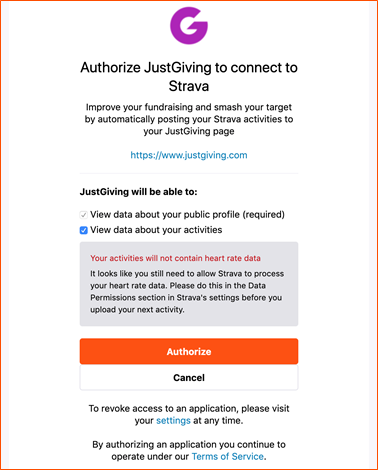
When you join a JustGiving event that supports activity tracking, you’ll see an option to connect your Strava account. This link lets JustGiving automatically import your workouts from Strava, displaying them on your fundraising page. The process usually works like this:
- Sign in to your JustGiving account.
- Join a campaign or event that supports fitness tracking.
- Click “Connect Strava” and follow the prompts.
- Authorize JustGiving to access your Strava activities.
- When you complete an activity (run, cycle, walk), Strava uploads it to its servers.
- JustGiving checks your Strava account at regular intervals and pulls new activities into your fundraising page.
What Gets Synced
Typically, distance-based activities like running, walking, and cycling are supported. Details such as:
- Date and time
- Distance covered
- Activity type (run, cycle, walk)
- Route map (sometimes)
Not all activity types (like yoga or swimming) are supported by the JustGiving sync.
Table: Supported And Unsupported Activities
Here’s a quick look at what types of activities usually sync from Strava to JustGiving:
| Activity Type | Supported? | Notes |
|---|---|---|
| Running | Yes | All distances and surfaces |
| Cycling | Yes | Road, mountain, indoor trainer |
| Walking | Yes | Includes hiking |
| Swimming | No | Not currently supported |
| Yoga | No | Not supported |
| Rowing | No | May not sync |
Insight: Many new users don’t realize JustGiving only pulls in certain activity types. If your workout isn’t showing, double-check its type in Strava.
Common Reasons Why Strava Does Not Sync With Justgiving
If your activities are not appearing, it’s usually due to one of a handful of causes. Let’s break them down.
1. Authorization Issues
If you haven’t given JustGiving the right permissions, your data won’t sync. Sometimes, permissions can be accidentally revoked if you change your Strava password or settings.
2. Connectivity Problems
A weak internet connection or temporary server outage can stop the sync process. This happens more often during weekends or big events when server loads are high.
3. Unsupported Activity Types
As seen in the table above, only certain activities are imported. If you log a “swim” or “yoga” session, JustGiving ignores it.
4. Delayed Sync
JustGiving does not always pull data instantly. There can be a lag of up to a few hours. However, if it’s been more than 24 hours, something is likely wrong.
5. Privacy Settings
If your Strava activity is set to “private,” JustGiving cannot access it. Make sure your activities are “public” or at least “followers only. ”
6. Account Link Errors
Sometimes, your JustGiving and Strava accounts become unlinked. This may happen after a password change, app update, or if you revoke app access in Strava.
7. Duplicate Or Overlapping Activities
If you upload the same activity twice (for example, from your watch and your phone), JustGiving may ignore one to avoid double-counting.
Table: Common Sync Failure Reasons And Fixes
| Problem | Quick Fix | Time to Fix |
|---|---|---|
| Authorization lost | Reconnect Strava in JustGiving | 5 min |
| Privacy setting | Make activity public in Strava | 2 min |
| Unsupported activity type | Log as run/walk/cycle | Immediate |
| Delayed sync | Wait up to 24 hours | Varies |
| Account unlinked | Relink accounts | 5 min |

Credit: www.reddit.com
How To Fix Strava Not Syncing With Justgiving
Here’s a clear, step-by-step guide to solving most syncing issues. These steps apply to both new users and experienced fundraisers.
Step 1: Check Activity Type And Privacy
- Open your Strava app or website.
- Find the missing activity.
- Make sure it is labeled as “Run,” “Walk,” or “Ride.”
- Set the activity privacy to “Everyone” or “Followers.”
Tip: Changing an activity from “Private” to “Public” can trigger the sync.
Step 2: Reconnect Strava And Justgiving
Sometimes, the link breaks. Here’s how to reconnect:
- Log into your JustGiving account.
- Go to your fundraising page or “Fitness Settings.”
- Disconnect Strava (if already connected).
- Log out of both platforms.
- Log back into JustGiving and click “Connect Strava.”
- Follow the authorization prompts.
Insight: Reconnecting after a password change is essential. Many users forget this step.
Step 3: Force A Manual Sync
JustGiving doesn’t always sync instantly. To speed things up:
- Log into JustGiving.
- Go to your fundraising page.
- Click “Refresh Activities” (if available).
- Wait a few minutes and check again.
If you don’t see a refresh button, try logging out and back in.
Step 4: Check Both Platforms For Outages
Rarely, either Strava or JustGiving experiences downtime. Visit their status pages or Twitter feeds for updates.
- Strava status: Https://status.strava.com/
- JustGiving status (usually via help pages or social media)
If there’s an outage, wait until the service is restored.
Step 5: Review Recent Changes
Have you recently:
- Changed your Strava password?
- Updated your email address?
- Switched to a new device?
- Installed a major app update?
Any of these can break the connection. Re-link your accounts as described above.
Step 6: Try A Test Activity
To troubleshoot, record a short test activity:
- Start a new “Run” (even for 1 minute).
- Save and mark it as “Public.”
- Wait up to 30 minutes.
- Check if it appears in JustGiving.
If the test activity syncs, the problem is likely with your original activity’s settings or type.
Step 7: Clear Browser/app Cache
If you’re using the JustGiving website, clear your browser’s cache. On mobile, try closing the app and restarting your device.
Extra Tip: Use Chrome’s “Incognito” mode to rule out browser add-ons interfering with the sync.
Step 8: Contact Support
If none of these steps work, reach out to support:
- Strava support: Https://support.strava.com/
- JustGiving help: Https://help.justgiving.com/
Provide clear details: activity date, type, privacy setting, and what you’ve tried so far.
Advanced Troubleshooting And Expert Insights
Some syncing issues are less obvious. Here’s what experienced users and tech experts recommend.
Check For Third-party App Interference
If you use other apps (like Garmin Connect, Fitbit, or Apple Health), they might export activities to Strava in ways JustGiving can’t read. For example, indoor rides sometimes lack GPS data, which JustGiving may require.
Insight: Activities imported from another app can sometimes lose the “Run/Walk/Ride” tag. Open the activity in Strava and re-save it with the correct type.
Data Format Issues
Occasionally, the way data is recorded (for example, missing GPS or time stamps) prevents syncing. If you paused your activity for a long time or edited it heavily, try recording a new, unedited test.
Double-check Event Settings In Justgiving
Some events have special rules. For example, a cycling event may not accept running activities. Always confirm the event’s settings before contacting support.
Table: Key Differences Between Strava And Justgiving Syncing
This table highlights differences that can confuse users:
| Feature | Strava | JustGiving |
|---|---|---|
| Supported activities | All types | Run, Walk, Ride only |
| Privacy options | Private, Followers, Everyone | Only sees “Everyone” or “Followers” |
| Manual entry allowed | Yes | No (must sync from Strava) |
| Sync delay | Instant | Up to several hours |
| Duplicate activity handling | Allows duplicates | May block duplicates |
Credit: help.justgiving.com
Preventing Future Sync Problems
Once your activities start syncing, you want to keep it that way. Here’s how to prevent common issues:
Use Consistent Devices
Stick to one device (your main phone or watch) for recording activities. This reduces the risk of duplicates or missing data.
Avoid Manual Entry
Always use the Strava app or a connected device (like Garmin, Apple Watch) to record activities. Manual entries or edits can break the sync.
Keep Apps Updated
Update Strava and JustGiving apps regularly. Updates often fix bugs that cause syncing issues.
Monitor Privacy Settings
Before every event, check that your Strava privacy settings allow JustGiving access. A privacy reset or new feature may change your settings without warning.
Test The Link Before Big Events
A day before your big fundraising challenge, do a short test activity. Confirm it appears on your JustGiving page. This simple step catches problems early.
Expert Tip: Set up sync and test at least a week before your challenge. This gives you time to solve any issues and avoid last-minute stress.
When To Consider Manual Workarounds
What if, after all steps, syncing still fails? Sometimes, technology just doesn’t cooperate. Here are some backup options:
Add Activity Details Manually
While you can’t manually import data into JustGiving, you can update your fundraising story or progress with a note. For example:
- “Completed a 10k run today—see my Strava for details!”
- Paste a screenshot or a link to your Strava activity.
Notify Donors Directly
If you’re in a time crunch, email your donors with updates or share your progress on social media. Transparency builds trust, even if the tech isn’t perfect.
Contact Event Organizers
Some charity events accept alternative proof of activity if you have syncing problems. Send them your Strava screenshots if needed.

Credit: nogood.io
The Importance Of Syncing For Fundraising Success
For charity fundraisers, seamless syncing is more than just convenience. It can make a real difference:
- Builds credibility: Donors see your progress, which encourages more giving.
- Boosts motivation: Watching your miles add up keeps you and your supporters excited.
- Saves time: No need for manual updates or explanations.
In 2022, JustGiving reported that fundraisers who updated their pages with activity data raised 40% more on average than those who did not. Syncing is not just a technical detail—it’s a proven way to boost donations.
Common Myths And Misunderstandings
Let’s clear up some frequent misconceptions about Strava-JustGiving syncing.
“my Activity Is On Strava, So It Should Show Up Instantly On Justgiving.”
In reality, JustGiving may take several hours to import new activities, especially during busy events.
“if I Edit My Activity In Strava, It Will Update In Justgiving Too.”
Not always. If you change the activity type (like from “Ride” to “Run”), it may not re-sync automatically. You may need to re-save the activity or reconnect accounts.
“any Activity Counts For My Event.”
Check your event’s rules. Some only count runs, others cycling, and so on. Unsupported activity types won’t appear in your fundraising totals.
“justgiving Will Import My Past Strava Activities.”
Usually, JustGiving only imports activities completed after you connect your accounts. Past activities may not sync unless you re-save them as new.
Real-world Examples
Emily’s Marathon Fundraiser
Emily trained for a marathon and logged all her runs in Strava. But when she checked her JustGiving page, her activities weren’t showing up. She realized she had set her Strava activities to “Private” for safety. Once she changed them to “Public,” everything synced within the hour.
Raj’s Multi-device Dilemma
Raj used both his Garmin watch and Strava app to track the same ride. The duplicate upload confused JustGiving, which only displayed one ride. After sticking to one device for recording, the problem disappeared.
Sarah’s Last-minute Panic
Sarah changed her Strava password the day before her charity walk. The link to JustGiving broke. Reconnecting her accounts fixed the issue, but she learned to test everything before event day.
How Justgiving And Strava Are Improving Sync
Both platforms know syncing is vital for fundraisers. In recent years, they have:
- Improved server speed and reliability
- Added “Refresh Activities” buttons in JustGiving
- Updated help guides with clearer troubleshooting steps
- Allowed more flexible privacy settings in Strava
Both companies regularly update their integration. For the latest information, check the official Strava and JustGiving help sites or see this JustGiving Fitness Tracking Guide.
Frequently Asked Questions
Why Are My Strava Activities Not Showing On Justgiving?
There are several common reasons: unsupported activity type, privacy settings, lost authorization, or sync delays. Make sure your activity is a “Run,” “Walk,” or “Ride,” set it to “Public,” and ensure your accounts are correctly linked.
How Long Does It Take For Strava To Sync With Justgiving?
Syncing is not always instant. It can take from a few minutes up to several hours. If your activity hasn’t appeared after 24 hours, try reconnecting your accounts or following the troubleshooting steps above.
Can I Manually Upload Activities To Justgiving?
No, JustGiving does not support manual uploads for fitness data. All activities must be synced through an approved platform like Strava. You can, however, update your fundraising story with screenshots or links.
What Should I Do If My Activity Is Marked As “private” In Strava?
Change the privacy setting to “Everyone” or “Followers” in Strava. Only public or follower-only activities are visible to JustGiving.
Will Past Strava Activities Sync To Justgiving After Connecting Accounts?
Usually, JustGiving only imports activities performed after you connect your accounts. For older activities, try re-saving them with the correct type and privacy setting, but results can vary.
A smooth connection between Strava and JustGiving makes fundraising easier, more fun, and more successful. With the steps and tips in this guide, you’ll spend less time troubleshooting and more time focusing on your challenge—and inspiring your supporters to give generously.