When you open your Samsung fridge freezer and the light doesn’t come on, it’s more than just annoying. A working light makes it easier to find food, see expiration dates, and clean the fridge. If the light is not working, you might worry that something is seriously wrong. In most cases, though, the solution is simple. This article will help you understand why your Samsung fridge freezer light might not work, how to diagnose the problem, and what you can do to fix it. You’ll also learn about common mistakes to avoid, tips from real-life situations, and when it’s best to call a professional.
Why The Light Matters In Your Samsung Fridge Freezer
A working fridge light does more than just help you see inside. It’s a sign that your fridge is getting power and working as it should. When the light stops working, it can signal a small issue like a blown bulb, or something more serious such as a wiring problem. Ignoring the problem can lead to food spoilage if you miss other warning signs. Plus, a dark fridge is less convenient and may even hide spills that attract pests.
How Your Samsung Fridge Freezer Light Works
Understanding how the light operates makes it easier to spot problems. Most Samsung fridge freezers use a door switch and an LED or incandescent bulb. When you open the door, the switch is triggered, sending power to the light. Many modern models use LED lights, which last longer than traditional bulbs but can be harder to replace.
Key Components
- Light bulb or LED module: Provides the actual light.
- Door switch: Detects when the door is open or closed.
- Wiring and connectors: Carry electricity from the fridge to the bulb.
- Control board: In smart fridges, the control board may manage the lighting.
If any of these parts fail, your fridge light may not turn on.
Common Reasons The Samsung Fridge Freezer Light Stops Working
Several issues can cause the light to fail. Some are easy to fix, while others require more skill or a technician.
- Blown Light Bulb: The most common reason. Bulbs have a limited life and need replacement after months or years.
- Faulty Door Switch: If the switch is stuck or broken, it won’t trigger the light.
- Loose or Damaged Wiring: Wires can come loose from vibrations or be damaged during cleaning or moving.
- Burned Out LED Module: For models with LED lights, the module can fail. This is less common but harder to fix.
- Control Board Malfunction: Smart fridges may have electronic issues that stop the light from working.
- Power Supply Problem: If your fridge isn’t getting power, the light (and other parts) won’t work.
How To Diagnose The Problem
Finding out why the light isn’t working saves you time and money. Here’s a step-by-step way to check:
1. Check Other Functions
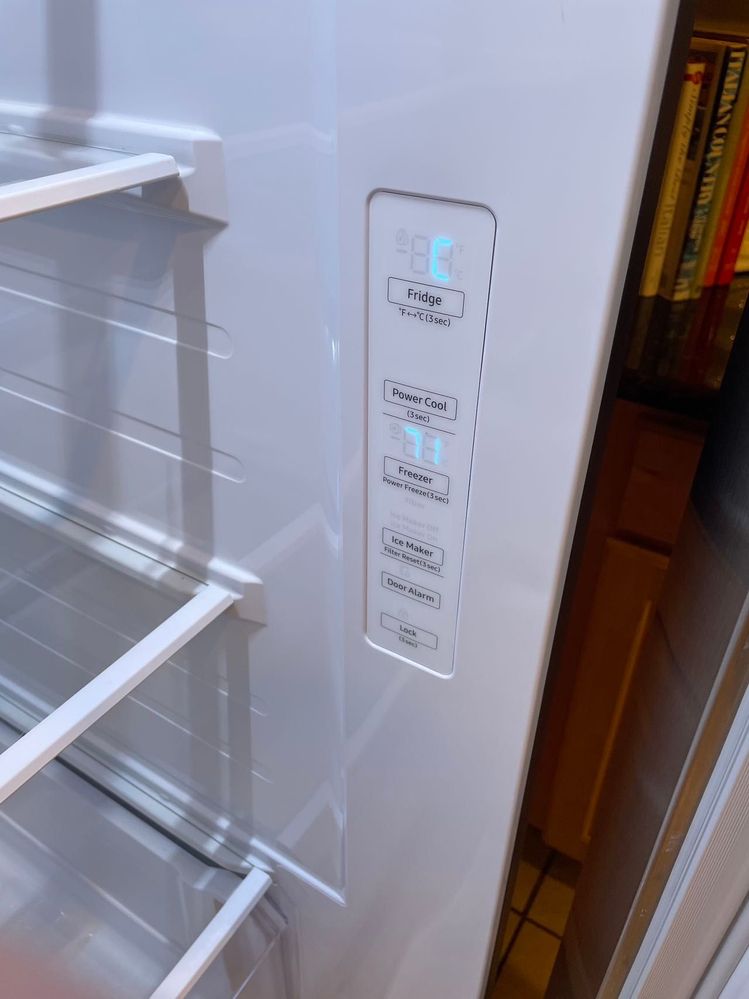
First, see if the fridge is cooling, the freezer is cold, and the display panel (if any) is working. If everything else works, the problem is likely small.
2. Test The Door Switch
Find the door switch (usually a small button near the door frame). Press it with your finger while the door is open. If the light doesn’t come on, the switch may be faulty.
3. Inspect The Bulb Or Led
For models with a replaceable bulb, open the light cover and look for signs of a blown bulb (dark spots or a broken filament). For LED modules, look for signs of burning or damage.
4. Examine The Wiring
Loose wires can stop the light from working. Inspect the area around the light for disconnected or damaged wires. Be sure to unplug the fridge before touching any wires.
5. Listen For Unusual Noises
A buzzing or clicking sound near the light can mean a wiring or control board problem.
6. Use A Multimeter
If you have some experience, use a multimeter to test for power at the bulb socket or LED module. No power usually means a switch, wiring, or control board issue.

Credit: www.youtube.com
How To Replace A Samsung Fridge Freezer Light Bulb
If the bulb is the problem, replacing it is straightforward. But there are a few things beginners miss.
Step-by-step Replacement
- Unplug the Fridge: For safety, always unplug before opening the light cover.
- Remove the Light Cover: Most covers pop off or have small screws. Gently pry or unscrew.
- Remove the Old Bulb: Twist the bulb counterclockwise (left) to remove it.
- Check the Bulb Type: Samsung uses specific bulbs (often 40W E17 base for older models, LED for newer ones). Check your manual or the old bulb for details.
- Insert the New Bulb: Screw in the replacement bulb. Make sure it matches the wattage and base type.
- Reattach the Cover: Snap or screw the cover back in place.
- Plug in the Fridge and Test: The light should work when you open the door.
Common Mistakes
- Using a bulb with the wrong wattage or size can cause overheating or no light.
- Forgetting to unplug the fridge risks electric shock.
- Forcing the cover or bulb can break the socket or plastic.
How To Replace An Led Module In A Samsung Fridge
Many newer Samsung fridges use LED lighting. These last longer but are harder to change.
What You Need
- Correct replacement LED module (get the exact part number from your manual or the old module).
- Small screwdriver (for the light cover).
- Gloves (optional, to avoid fingerprints).
Steps
- Unplug the Fridge.
- Remove the Light Cover. LED modules are usually behind a frosted plastic cover.
- Disconnect the LED Module. It may have a small plug or connector.
- Install the New Module. Connect the wires, secure the module, and replace the cover.
- Plug In and Test.
Tips
- Handle LED modules gently—they can be sensitive to static electricity.
- If the new module doesn’t light up, double-check the connectors.
Credit: us.community.samsung.com
Dealing With A Faulty Door Switch
If the switch is bad, the fridge “thinks” the door is always closed, so the light won’t turn on.
Signs Of A Faulty Door Switch
- Light never comes on, even with a new bulb or module.
- Door alarm doesn’t sound, or the fridge doesn’t beep when open.
How To Fix
- Locate the Switch (usually on the fridge wall near the door hinge).
- Remove the Switch (may pop out or need a screwdriver).
- Disconnect the Wires.
- Install the New Switch (available from Samsung or appliance parts stores).
- Test the Light.
Extra Insight
Many people miss that a sticky switch can be cleaned and reused. Try cleaning with a little rubbing alcohol and a cotton swab before replacing.
When Wiring Or The Control Board Is The Problem
If bulbs, switches, and modules are fine, the issue may be deeper.
Wiring Problems
Wires can come loose from repeated door movement or during cleaning. Look for:
- Frayed or broken wires near the door hinge.
- Burn marks or melted plastic.
Fixing wiring is best left to someone with electrical experience. Amateur repairs can cause fires or more damage.
Control Board Issues
In smart Samsung fridges, the control board manages lights and other functions. If the board fails, you may see:
- Light and display not working.
- Odd error codes on the panel.
- Multiple functions failing at once.
Control boards are expensive and tricky to replace. If you suspect this, call a Samsung technician.
Table: Common Causes And Fixes For Samsung Fridge Freezer Light Problems
Below is a simple overview of typical problems and how to address them.
| Problem | How to Check | Solution | DIY Level |
|---|---|---|---|
| Blown Bulb | Inspect for darkness or broken filament | Replace with correct bulb | Easy |
| Faulty Door Switch | Press switch, check if light works | Clean or replace switch | Moderate |
| Loose Wiring | Inspect around socket and hinge | Reconnect or repair wire | Advanced |
| Burned LED Module | No light, module discoloration | Replace LED module | Moderate |
| Control Board Problem | Other features also fail | Call a technician | Expert |
How To Avoid Future Light Problems
It’s easy to forget about your fridge light until it fails. A few habits can keep it working longer.
1. Use The Correct Bulb
Always use the wattage and type Samsung recommends. A bulb that’s too strong can damage the socket or wiring.
2. Handle The Door Gently
Slamming the fridge door can loosen wires or damage the switch.
3. Clean The Door Area
Wipe the door switch and light cover regularly. Dirt can cause the switch to stick or block the light.
4. Don’t Overload The Shelves
Heavy items can press on the light cover and bulb, causing cracks or loose connections.
5. Check After Power Surges
If your home has a power surge, test the fridge light. Surges can blow bulbs or damage electronics.
When To Call A Professional
Some problems are best left to experts. Call a technician if:
- You’ve replaced the bulb and switch, but the light still doesn’t work.
- There are signs of burning, melting, or sparks.
- The fridge has other electrical problems (e.g., not cooling, display blank).
- You don’t feel comfortable working with electrical parts.
A licensed technician can safely test and repair wiring, control boards, and other advanced parts.
Real-life Examples: What Owners Have Experienced
Hearing about other people’s experiences can help you avoid common mistakes. Here are a few situations from Samsung fridge owners:
Example 1: Wrong Bulb, No Light
Maria bought a generic bulb from a hardware store. It fit, but the light wouldn’t turn on. She later learned Samsung uses a special appliance-rated bulb that handles cold and vibration better.
Tip: Always check your manual or look up your fridge model before buying parts.
Example 2: Sticky Door Switch
Ahmad’s fridge light stopped working after a juice spill. The sticky liquid had gummed up the door switch. Cleaning it with a cotton swab and alcohol fixed the problem.
Tip: Even a small spill can keep your light off. Clean switches regularly.
Example 3: Led Module Failure
Jenna’s three-year-old Samsung fridge used an LED module. When it failed, she found it more expensive and harder to replace than a bulb. But after getting the right part number, she swapped it out in 15 minutes.
Tip: LED modules cost more, but DIY replacement is possible if you follow the steps.
Example 4: Wiring Damaged During Move
After moving apartments, Daniel’s fridge light stopped working. A wire near the door hinge had come loose during the move. A technician fixed it quickly.
Tip: If your fridge was just moved, check for loose wires.
Example 5: Power Surge Damage
After a thunderstorm, the lights and display on Marcus’s fridge went out. The control board had failed. He needed a professional to replace it.
Tip: Use a surge protector to avoid this risk.

Credit: editorsean.com
Cost Comparison: Diy Vs Professional Repair
If you’re wondering whether to fix the problem yourself or call an expert, compare the costs below.
| Repair Type | DIY Cost | Professional Cost | Difficulty |
|---|---|---|---|
| Bulb Replacement | $5–$15 | $50–$100 | Easy |
| LED Module | $30–$60 | $100–$180 | Moderate |
| Door Switch | $10–$25 | $60–$120 | Moderate |
| Wiring Repair | $0–$10 (if simple) | $80–$200 | Advanced |
| Control Board | $120–$250 (parts only) | $250–$500 | Expert |
DIY can save you money, but only if you’re comfortable with the repair. For anything beyond bulbs and switches, professional help is safer.
Samsung Warranty: What’s Covered?
Samsung fridges usually come with a one-year warranty for parts and labor, and longer coverage for the compressor and some electronic parts. Light bulbs are often not covered unless they fail very early.
- If your fridge is under warranty, contact Samsung before trying any repairs.
- Unauthorized DIY repairs may void the warranty.
Check your warranty card or visit the official Samsung Warranty page for details.
Table: Which Samsung Models Use Bulbs Vs Led Modules?
Knowing your fridge’s lighting type helps you buy the right parts.
| Model Series | Lighting Type | Replacement Ease |
|---|---|---|
| RT Series (Top Freezer) | Bulb | Easy |
| RF Series (French Door) | LED Module | Moderate |
| RS Series (Side-by-Side) | LED Module | Moderate |
| RB Series (Bottom Freezer) | Bulb/LED (varies) | Easy/Moderate |
| Bespoke Series | LED Module | Moderate |
If you’re not sure, check your user manual or the label inside your fridge.
Expert Tips: Getting The Most From Your Samsung Fridge Light
- Keep a spare bulb or LED module at home. That way, you can replace it quickly if it fails.
- Label the breaker for your kitchen circuits. This makes it easy to safely turn off power for repairs.
- Take photos before removing wires or connectors. This helps when reassembling.
- Check the light after a deep clean. Moisture can sometimes get into the switch or socket.
- If you rent, let your landlord know about any electrical problems right away.
Frequently Asked Questions
Why Did My Samsung Fridge Light Stop Working But The Fridge Is Still Cold?
Usually, the light circuit is separate from the cooling system. If your fridge is still cold, the problem is likely a blown bulb, bad switch, or LED failure. Check these before worrying about bigger issues.
Can I Use Any Bulb To Replace The Fridge Light?
No. You should use a Samsung-approved appliance bulb with the correct wattage and base. Regular bulbs may not handle cold or moisture well and could fail quickly or damage the socket.
How Do I Know If It’s The Door Switch Or The Bulb That’s Bad?
Press the door switch with the door open. If the light doesn’t come on even with a new bulb, the switch may be bad. If the light works when you jiggle the bulb, the socket or wiring may be loose.
Is It Dangerous To Fix The Fridge Light Myself?
Replacing bulbs is usually safe if you unplug the fridge first. For wiring, LED modules, or anything involving the control board, call a professional if you’re not sure. Working with live wires can cause shock or damage your fridge.
What Should I Do If My Fridge Is Still Under Warranty?
Contact Samsung support before doing any repairs. DIY fixes can void your warranty. If the light failed soon after purchase, it may be covered for free repair or replacement.
A working light in your Samsung fridge freezer makes life easier and keeps your kitchen safer. Most light problems are simple to fix, but knowing when to call a pro can save you time and money. With the tips and examples above, you can confidently handle most light issues and keep your fridge running smoothly.