When your Ring motion light stops working, it’s more than a small annoyance. You lose a key part of your home’s security and convenience. That motion-activated light is supposed to alert you and deter unwanted visitors—but what if it stays off when you need it most? Many Ring users experience this problem, and the causes are often more complex than a simple burned-out bulb. Whether you’re a new owner or have relied on Ring for years, understanding why your motion light fails is essential to restoring its function quickly.
This in-depth guide walks you through the main reasons a Ring motion light might not work, how to fix the most common problems, and how to prevent future issues. We’ll also compare different Ring models, troubleshoot with real examples, and answer frequently asked questions to ensure you leave with a practical solution.
How Ring Motion Lights Work
Before fixing a problem, it helps to know how your Ring motion light is designed to function. The motion light is part of Ring’s smart security devices, such as the Ring Floodlight Cam or Ring Spotlight Cam. These devices have:
- Motion sensors that detect movement
- LED lights that turn on when motion is detected
- Wi-Fi connectivity for app control and alerts
When motion is detected within a set range, the sensor triggers the lights. You can adjust settings through the Ring app, such as:
- Motion zones: Areas where movement will trigger the light
- Sensitivity: How much movement is needed to activate the light
- Schedules: Times when the light should be active or off
If any part of this chain fails—hardware, wiring, sensor, or software—the light may not work as expected.
Common Reasons Your Ring Motion Light Is Not Working
Several issues can cause your Ring motion light to fail. Here’s a closer look at the most frequent causes:
1. Power Supply Problems
If your Ring light isn’t getting power, it won’t turn on. This is often overlooked, especially with hardwired models.
- Loose wiring: Wires inside the fixture can become loose over time.
- Tripped breaker: Outdoor outlets or circuits may have tripped.
- Dead batteries: For battery-powered models, batteries may need to be replaced or recharged.
- Faulty outlet: The outlet or junction box itself may be damaged.
2. Motion Detection Issues
If the sensor isn’t picking up movement, the light won’t activate.
- Blocked sensor: Dirt, spider webs, or leaves can cover the sensor.
- Incorrect settings: Motion zones or sensitivity may be set too low.
- Sensor damage: Physical damage from weather or impact can harm the sensor.
3. Device Settings And Software Glitches
Incorrect app settings or software bugs can prevent the light from working.
- Disabled light in app: The light can be turned off in the Ring app by mistake.
- Firmware issues: Outdated firmware may cause the device to malfunction.
- Incorrect schedule: The light may be set to stay off during specific times.
4. Environmental Factors
Weather and location can also affect your device.
- Severe weather: Heavy rain or snow can temporarily disable the device.
- Extreme temperatures: Very hot or cold weather may affect battery and sensor performance.
- Obstructions: Plants, fences, or cars may block the motion sensor’s field of view.
5. Hardware Failure
Sometimes, the hardware itself fails.
- Burned-out LED: LEDs last a long time but can fail.
- Water damage: Even weatherproof models can suffer if seals are broken.
- Aging components: Older devices may simply reach end-of-life.
Troubleshooting Steps For A Non-working Ring Motion Light
Finding the root cause can be simple if you take a step-by-step approach. Here’s how to systematically troubleshoot your Ring motion light.
Step 1: Check Power Supply
- Test the outlet or circuit: Plug another device into the same outlet.
- Check the breaker box: Reset any tripped breakers.
- Inspect wiring (hardwired models): Turn off power and check for loose wires.
- Check batteries (battery models): Replace or recharge with official Ring batteries.
Non-obvious Tip
Some outdoor outlets have a GFCI reset button. Even if the main breaker is on, a tripped GFCI will cut power to your Ring device. Press the reset button on the outlet.
Step 2: Inspect The Motion Sensor
- Clean the sensor lens: Wipe gently with a soft cloth.
- Remove any obstructions: Clear away spider webs, leaves, or debris.
- Check sensor alignment: Make sure the sensor is pointed in the right direction.
Non-obvious Tip
Motion sensors may not detect movement directly toward the sensor. They are more sensitive to side-to-side movement. Adjust the angle if you notice it only misses straight-on approach.
Step 3: Review Device Settings In The App
- Open the Ring app: Go to your device settings.
- Check light controls: Ensure the light is enabled and not set to a schedule that keeps it off.
- Review motion zones: Expand the zone or increase sensitivity.
- Update firmware: Check for updates in the app and install them.
Step 4: Test In Different Environments
- Test at night and during the day: Some models have light sensors that only activate at night.
- Check for interference: Bright streetlights or reflective surfaces can confuse the sensor.
Step 5: Reset Or Power Cycle The Device
- Perform a soft reset: Use the app’s reset or restart function.
- Hard reset: Hold the physical reset button for 15-30 seconds (check your device manual).
Step 6: Check For Hardware Damage
- Inspect for water ingress: Look for moisture inside the lens or housing.
- Examine for cracks or physical impact: Any visible damage could mean replacement is needed.
If you complete all these steps and the light still does not work, hardware failure is likely. Contact Ring support for repair or replacement options.
Comparing Ring Motion Light Models
Not all Ring motion lights are the same. Different models have unique features, power sources, and common problems. Here’s a side-by-side comparison to help you understand your device better.
| Model | Power Source | Key Features | Common Issues |
|---|---|---|---|
| Ring Floodlight Cam | Hardwired | 1080p camera, 2 LED floodlights, siren, motion detection | Wiring problems, sensor misalignment |
| Ring Spotlight Cam Battery | Battery | LED spotlight, camera, motion sensor | Dead battery, sensor coverage gaps |
| Ring Spotlight Cam Wired | Plug-in/Hardwired | Continuous power, adjustable motion zones | Outlet issues, firmware bugs |
| Ring Smart Lighting Motion Sensor Light | Battery | Standalone motion light, app control | Battery life, environmental interference |
Tip: Always check which model you have before troubleshooting. Settings and fixes can vary by device.
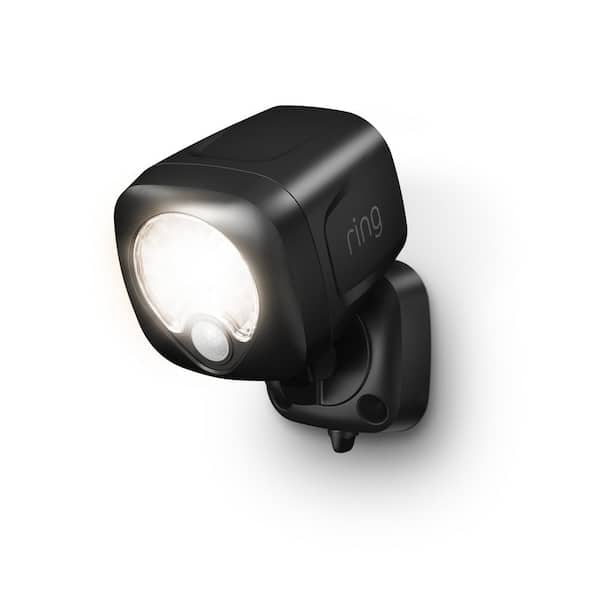
Credit: www.homedepot.com
Advanced Troubleshooting For Persistent Problems
If you’ve tried standard fixes but your Ring motion light still isn’t working, more advanced steps may help.
Checking Wi-fi Connection
A weak or unstable Wi-Fi connection can prevent your device from working properly. While the motion light should still work locally, app control and updates need Wi-Fi.
- Test Wi-Fi strength: Use the Ring app’s device health section to see signal strength.
- Move router closer: If possible, position your router closer or use a Wi-Fi extender.
- Change Wi-Fi channel: If you have many devices, interference could affect performance.
Reviewing Device Event History
The Ring app keeps a log of motion events and device status.
- Check for missed events: This shows if the device is detecting motion but not turning on the light.
- Look for error messages: These can point to hardware or software faults.
Adjusting Firmware Or Factory Reset
Firmware bugs can sometimes cause persistent light failures.
- Update firmware: Always try updating before a factory reset.
- Factory reset: This erases all settings and can fix deep software issues. Re-add the device in the app after resetting.
Contacting Support
If hardware damage is found or all else fails:
- Document your steps: Take notes or screenshots of what you’ve tried.
- Contact Ring support: They may offer replacement if your device is under warranty.
Preventing Future Motion Light Problems
Maintaining your Ring device can help avoid many common issues. Here’s how to keep your motion light working reliably.
Regular Cleaning And Inspection
- Clean lens and sensor monthly: Use a soft, dry cloth.
- Check for spider webs or nests: These can block sensors and attract small insects.
Battery Maintenance
- Charge or replace batteries regularly: Don’t wait for the device to fail.
- Use official Ring batteries: Off-brand batteries may not deliver consistent power.
Software Updates
- Enable auto-updates: Keep firmware current for best performance and security.
- Review settings after updates: Sometimes, updates reset custom preferences.
Weatherproofing
- Inspect seals and housing: Replace any worn gaskets.
- Install under shelter: If possible, place lights under an eave or porch for extra protection.
Placement And Angling
- Install at recommended height: Usually 6–9 feet above ground.
- Angle away from direct streetlights: This avoids false negatives or positives.

Credit: www.youtube.com
Real-world Examples And Case Studies
Sometimes, the best way to understand a problem is to see how others solved it. Here are a few real scenarios Ring users have faced.
Example 1: Motion Light Not Turning On At Night
A homeowner noticed their Ring Floodlight Cam would not activate after dark. The device worked during the day and responded to app commands.
Diagnosis: The light sensor was covered with a thin layer of dust, making the device “think” it was always daytime. A simple cleaning restored full function.
Example 2: Intermittent Operation After Rain
A Ring Spotlight Cam started working only sometimes after a heavy rainstorm.
Diagnosis: Water had seeped into the sensor housing through a cracked gasket. After drying out and replacing the seal, the light returned to normal operation.
Example 3: App Shows Motion, But No Light
One user found that their app reported motion events, but the light itself never turned on.
Diagnosis: The light control had been accidentally turned off in the app’s device settings. After re-enabling the light, it worked as expected.
Example 4: Light Never Comes On With Fresh Battery
A battery-powered motion light refused to activate, even with a new battery.
Diagnosis: The battery compartment contacts were corroded, preventing power flow. Cleaning with a cotton swab and a bit of rubbing alcohol fixed the problem.
Example 5: Multiple Motion Lights Not Working
Several users in the same area reported failures after a power surge.
Diagnosis: The surge tripped GFCI outlets throughout the home’s exterior. Resetting all GFCI outlets restored power to every Ring motion light.
Comparing Ring Motion Light To Other Brands
Ring is popular, but how does it compare to other smart motion lights? Here’s a quick comparison to give you perspective.
| Brand | Motion Detection Range | Power Options | Integration |
|---|---|---|---|
| Ring | Up to 30 ft | Battery, Hardwired, Plug-in | Works with Alexa, Ring App |
| Arlo | Up to 23 ft | Battery, Solar | Works with Alexa, Google Home |
| Philips Hue | Up to 39 ft | Hardwired, Battery | Works with Alexa, Hue Bridge |
| Heath Zenith | Up to 70 ft | Hardwired | Manual, Some models with app |
Insight: Some competitors offer longer detection ranges or solar power, but Ring’s strength is tight integration with its app and Alexa.
When To Repair Vs. Replace Your Ring Motion Light
It’s not always clear if you should repair your device or buy a new one. Here’s how to decide:
Repair If:
- The device is under warranty.
- The problem is software-related or caused by settings.
- The only issue is with the battery, wiring, or a loose connection.
Replace If:
- The device is out of warranty and has water or impact damage.
- The LED or motion sensor fails completely.
- Multiple resets and updates do not solve the problem.
Cost Tip: The cost of a new Ring motion light can range from $30 to $250, depending on the model. Repairs outside of warranty are often not cost-effective for older devices.
Safety Precautions When Handling Ring Motion Lights
Whenever you troubleshoot or repair a smart light, safety comes first.
- Turn off power at the breaker before opening hardwired fixtures.
- Use insulated tools for wiring checks.
- Never handle electrical devices with wet hands.
- Check ladders for stability if working at height.
If you are unsure, contact a licensed electrician or Ring support.

Credit: amkglobalgroup.com
Essential Tools And Materials For Troubleshooting
Having the right tools can make checking your Ring motion light easier and safer.
- Voltage tester: For checking power supply
- Soft cleaning cloth: For sensor and lens cleaning
- Screwdrivers (Phillips and flathead): For opening housings
- Replacement batteries: For battery-powered models
- Smartphone with Ring app installed: For checking settings and status
These tools cover most basic troubleshooting steps.
How To Set Up Ring Motion Light For Best Performance
A well-set-up device is less likely to have problems. Here’s how to optimize your Ring motion light from the start.
- Install at the correct height: 6–9 feet off the ground is ideal.
- Angle the sensor: Point slightly downward to cover the main approach path.
- Set up motion zones: Use the app to cover doors, driveways, or walkways.
- Adjust sensitivity: Start at medium and tweak as needed to avoid false triggers.
- Test at different times: Make sure it works at dusk, night, and dawn.
Pro Tip: Don’t ignore the “light schedule” feature in the app. It lets you keep lights on during key hours, such as when you expect deliveries.
Understanding The Warranty And Support Options
Ring offers a standard warranty and support options for its devices.
- Standard warranty: 1 year on most devices.
- Extended warranty: Available with Ring Protect Plus subscription.
- Support channels: Online chat, phone, and community forums.
Make sure to register your device and keep proof of purchase for fast support.
For more details, check the official Ring Warranty Page.
Frequently Asked Questions
Why Does My Ring Motion Light Only Work With The App But Not With Motion?
This usually means the motion sensor is blocked or misaligned, or the motion settings in your app are too low. Clean the sensor, check the motion zones, and increase sensitivity. If the problem continues, the sensor may be damaged.
How Long Do Ring Motion Lights Last?
LEDs in Ring motion lights can last up to 50,000 hours under normal use. Most devices are designed to last 3–5 years with proper maintenance. Battery life varies by model, typically 6–12 months per charge for standard use.
Can I Use Rechargeable Batteries In My Ring Motion Light?
Yes, but only use Ring-branded rechargeable batteries. Off-brand batteries may not provide enough power or could damage the device. Always check compatibility in your device’s manual.
What Do I Do If My Ring Motion Light Is Flickering?
Flickering is often caused by a loose connection, low battery, or power supply problems. For hardwired models, check the wiring and circuit. For battery models, replace or recharge the battery. If flickering continues, contact support.
Is There A Way To Reset My Ring Motion Light Without The App?
Yes, most Ring devices have a physical reset button on the unit. Press and hold for 15–30 seconds to perform a factory reset. Check your device’s manual for the exact location and procedure.
—
A non-working Ring motion light is frustrating but rarely unsolvable. By following a step-by-step process—starting with basic power checks and moving through advanced troubleshooting—you can fix most issues quickly. Regular maintenance and smart setup choices help prevent problems before they start. If your device is old or damaged, don’t hesitate to consider a replacement, especially with new models offering improved features and support. With the right approach, your Ring motion light can protect and light your home reliably for years to come.