Many homeowners and businesses install motion sensor lights for extra security and energy savings. These smart lights should turn on whenever they detect movement in the dark, making them perfect for driveways, garages, backyards, and hallways. But what happens when your motion sensor light does not work at night—the time you need it most? You might walk up to your porch and find yourself fumbling for keys in the dark. Or maybe your security camera doesn’t get a clear view because the light never turns on.
This problem is surprisingly common, but it can be frustrating and confusing. There are many reasons why a motion sensor light might fail to work at night. Some problems are easy to fix, while others need more attention or even professional help.
This article will help you understand the possible causes, step-by-step solutions, and ways to prevent future issues. You’ll also learn some expert tips that most beginners miss, so you can get your light working again—and make sure it stays that way.
How Motion Sensor Lights Work
Understanding how motion sensor lights function is the first step to solving problems. Most of these lights use a technology called Passive Infrared (PIR) sensors. PIR sensors detect infrared energy, which is the heat given off by humans, animals, and even cars. When something warm moves across the sensor’s field of view, the sensor sends a signal to turn on the light.
Some models use microwave sensors or dual technology for even better detection. These can sense movement through thin walls or glass, but are less common in home use.
There is an important detail: motion sensor lights have two main settings:
- Daylight sensing: The light should not turn on during the day, even if motion is detected. A light sensor disables the motion sensor when it is bright.
- Nighttime activation: The light should turn on at night when motion is detected.
If your motion sensor light is not working at night, it means the system is failing during the nighttime activation phase. The issue could be with the sensor, the settings, the power supply, or the environment.
Common Reasons Motion Sensor Lights Fail At Night
Let’s dig deeper into why motion sensor lights might not work when it’s dark. Here are the most frequent causes:
- Incorrect Settings: Many lights have dials for sensitivity, timer, and a dusk-to-dawn setting. If these are not set correctly, the light may stay off at night.
- Power Supply Issues: Loose wiring, bad connections, or a tripped circuit breaker can stop the light from getting power.
- Sensor Obstruction: Dirt, spider webs, leaves, or even paint can block the sensor’s view, so it can’t detect motion.
- Faulty Light Sensor (Photocell): The photocell may think it’s daytime and keep the light off, even when it’s dark.
- Worn-Out Bulbs or LEDs: The light may detect motion, but if the bulb or LED is dead, it won’t turn on.
- Extreme Temperatures: Very hot or cold weather can affect sensor performance.
- Nearby Light Sources: Streetlights or porch lights can confuse the photocell, making it think it’s not dark enough to activate.
- Aging Electronics: Over time, sensors and wiring can degrade, leading to inconsistent behavior.
- Firmware or Smart System Issues: For smart lights, a software bug or lost Wi-Fi connection can cause problems.
Many users overlook the effect of nearby reflective surfaces—like glass doors or shiny cars—which can bounce infrared energy away from the sensor, making it miss movement.
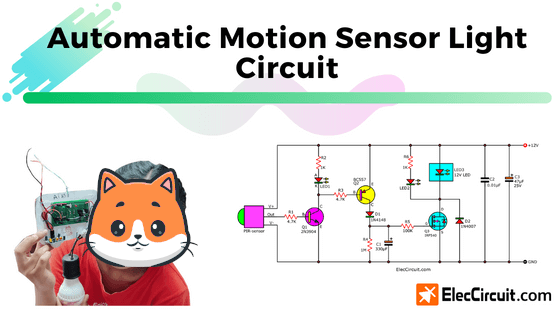
Credit: www.eleccircuit.com
Quick Checks Before Troubleshooting
Before you start unscrewing anything, do these simple checks:
- Test the power: Try turning the light on manually (if possible). Check if other lights or outlets on the same circuit work.
- Clean the sensor: Wipe the sensor window with a soft cloth.
- Check for obstructions: Remove spider webs, dirt, snow, or any covering.
- Look for nearby lights: Are there any bright lights shining near the sensor? Try turning them off.
If these don’t fix the problem, you’ll need to get more hands-on.
Step-by-step Troubleshooting Guide
1. Check Power And Wiring
Without reliable power, your motion sensor light cannot work.
- Switch off the breaker to the circuit before touching any wires.
- Inspect the connections for loose or corroded wires.
- Tighten any screws and secure wire nuts.
- Restore power and see if the light works.
If you’re not comfortable working with electricity, call a qualified electrician.
2. Test The Bulb Or Led
Sometimes the bulb or LED is the real problem, not the sensor.
- Replace the bulb with a known good one.
- For LED models, look for a “test” button or temporary override switch to force the light on.
- If the light still doesn’t work, the problem is likely in the sensor or power supply.
3. Adjust Sensitivity And Timer Dials
Most motion sensor lights have adjustment dials for:
- Sensitivity (how easily the sensor detects motion)
- Timer (how long the light stays on)
- Lux or “daylight sensing” (how dark it must be to activate)
Turn the lux dial fully toward the “night” setting (usually marked with a moon symbol). Increase sensitivity if needed, and set the timer to a reasonable length (1-5 minutes is common).
Non-obvious tip: If your light faces a busy street, reduce sensitivity to avoid false triggers from passing cars.
4. Reset The Motion Sensor
Many sensors can be reset by turning the power off for 30 seconds and then back on. Some models have a dedicated “reset” button.
- Turn off the circuit breaker or switch.
- Wait 30-60 seconds.
- Turn power back on.
- Test the light at night by moving in front of the sensor.
5. Inspect The Photocell
The photocell (light sensor) tells the light when it’s dark. If it’s dirty, blocked, or malfunctioning, the light may not turn on.
- Clean the photocell area gently.
- Cover the photocell with a piece of black tape and see if the light comes on during the day (remove tape after testing).
- If covering the photocell doesn’t turn the light on, it may need replacement.
6. Test The Sensor Range
Walk across the sensor’s field of view at different distances and angles. Sometimes, moving directly toward the sensor is less effective than moving across its path.
- Adjust the sensor head so it points toward the area you want to cover.
- Test at night, as some sensors behave differently in total darkness.
7. Look For Interference Or Confusion
Nearby infrared sources (like heat vents, outdoor heaters, or even the sun setting at a low angle) can confuse the sensor.
- Make sure the sensor is not pointed at busy streets, moving tree branches, or reflective surfaces.
- Change the sensor angle if needed.
8. Check For Firmware Or Smart Features
For smart motion sensor lights that connect to Wi-Fi or use an app, check for:
- App updates or firmware upgrades.
- Wi-Fi connection problems.
- Changes in time zones or daylight saving settings.
A software reset from the app may help.
9. Replace The Sensor Or Fixture
If everything else fails, the sensor or the entire light fixture may be faulty. Sensors can wear out after 5-10 years, especially in harsh climates.
Expert insight: Older sensors may work fine during the day but lose sensitivity at night due to aging components.
Replace with a new, high-quality motion sensor light if needed.
Comparing Types Of Motion Sensor Lights
Choosing the right light makes a big difference for reliability. Here’s a quick comparison of common types:
| Type | Sensor Technology | Best For | Common Issues |
|---|---|---|---|
| Standard PIR | Infrared (PIR) | Porches, driveways | False alarms from animals, blocked sensors |
| Microwave | Microwave radar | Garages, large areas | Can detect through walls (false triggers) |
| Dual Technology | PIR + Microwave | High-security areas | More expensive, harder to install |
| Smart Wi-Fi | PIR + App control | Home automation | Firmware issues, Wi-Fi drops |
When To Call A Professional
You can fix many motion sensor light problems yourself, but some situations need expert help:
- You see burnt or melted wiring
- The light trips the circuit breaker repeatedly
- The fixture is very high up or hard to reach
- You are uncomfortable working with electricity
Professional electricians have the right tools to test voltage and safely replace wiring or fixtures.
Preventing Motion Sensor Light Problems
Most people only think about their motion sensor lights when something goes wrong. A little maintenance can prevent problems and keep your light working reliably at night.
Regular Cleaning
Dirt, dust, and spider webs are common sensor blockers. Clean the sensor window and light housing every few months with a soft, damp cloth.
Check Settings Seasonally
As daylight hours change with the seasons, you may need to adjust the lux or daylight sensing setting so your light activates at the right time.
Test Function Monthly
Walk in front of your light at night to make sure it turns on. This quick test can catch problems early.
Replace Bulbs As Needed
LED bulbs last a long time, but standard bulbs need regular replacement. Always use the correct wattage and type recommended by the manufacturer.
Protect From Weather
If your sensor light is outdoors, make sure it is rated for outdoor use and sealed against rain and snow. Install under an eave or porch for extra protection.
Watch For Pests
Wasps, spiders, and other insects sometimes build nests inside or near sensor lights. These can block the sensor or cause false triggers.
Non-obvious tip: Use a little bit of peppermint oil around the fixture to deter spiders and insects (but avoid getting oil on the sensor lens).
Comparing Led Vs. Halogen Motion Sensor Lights
Here’s how LED and halogen motion sensor lights compare for nighttime use:
| Feature | LED Motion Light | Halogen Motion Light |
|---|---|---|
| Energy Efficiency | Very high | Low |
| Lifespan | 20,000-50,000 hours | 2,000 hours |
| Brightness | High, instant-on | Very bright, but heats up |
| Cost | Higher upfront, lower over time | Cheaper upfront, higher energy use |
| Weather Resistance | Excellent (sealed units) | Often less weatherproof |
LED motion lights are a better long-term choice for most homes, especially in cold climates where halogen bulbs fail sooner.

Credit: www.amazon.com
How Environment Affects Motion Sensor Lights At Night
Many people overlook the effect of the environment on how well their motion sensor light works at night.
Temperature
- PIR sensors detect heat differences between moving objects and the background. If it’s very hot or cold, the difference is smaller, and the sensor can miss motion.
- Extreme cold can also make some bulbs slow to start.
Humidity And Rain
- Moisture can cause corrosion in wires and connectors.
- Heavy rain can sometimes trigger lights if it moves branches or objects in the sensor’s view.
Bugs And Small Animals
- Moths, bats, or even blowing leaves can trigger the light.
- If your light comes on for no reason at night, check for these triggers.
Placement
Where you install the sensor matters. Mounting too high can reduce sensitivity. Facing the sensor directly at a street or busy sidewalk will cause many false alarms.
Upgrading To Smart Motion Sensor Lights
If your current light is old or unreliable, consider upgrading to a smart motion sensor light. These connect to your home Wi-Fi and can be controlled by your phone. Benefits include:
- Customizable schedules (turn on only during certain hours)
- Notifications to your smartphone
- Integration with other smart home devices
- Adjustable sensitivity and detection zones
However, smart lights can be affected by Wi-Fi outages or app bugs, so always keep a manual override option.
Real-world Example: Diagnosing A Porch Light Problem
Let’s look at a common scenario:
Maria installed a motion sensor light on her front porch. It worked fine for a year, then suddenly stopped turning on at night. During the day, everything seemed normal.
She checked the following:
- Cleaned the sensor window—no change
- Replaced the bulb—no change
- Adjusted the lux setting more toward “night”—the light stayed off
Next, Maria tested the light by covering the photocell with electrical tape. Still no light. She noticed a new streetlamp had been installed nearby, shining directly at her porch.
The real problem: The photocell was being fooled by the bright streetlight, so it never thought it was dark enough to turn on.
Solution: Maria rotated the sensor head away from the streetlight and added a small plastic shield to block direct light from the streetlamp. Her motion sensor light started working at night again.
Lesson: Always consider changes in your environment, not just the light fixture itself.
How To Choose A Reliable Motion Sensor Light
When replacing or upgrading, here’s what to look for:
- Outdoor Rating: Ensure the fixture is rated for outdoor use.
- Adjustable Settings: Look for models with adjustable sensitivity, timer, and dusk-to-dawn controls.
- Quality Sensor: PIR sensors are standard, but dual technology adds reliability.
- LED Lighting: LEDs last longer and use less power.
- Warranty: Choose brands offering at least a 2-year warranty.
- Installation Flexibility: Some models allow wall, ceiling, or corner mounting.
- Manual Override: Lets you turn the light on/off without the sensor.
- Smart Features: Wi-Fi control and app integration add convenience, but check reviews for reliability.
Here’s a quick comparison of features to consider:
| Feature | Why It Matters |
|---|---|
| Adjustable Sensitivity | Prevents false triggers from cars or animals |
| Weatherproof Rating (IP65+) | Ensures long life outdoors |
| LED Technology | Saves energy, lasts longer |
| Manual Override | Lets you turn light on/off as needed |
| Warranty | Protects against defects, shows manufacturer confidence |
Reducing False Alarms And Missed Detections
A common frustration is lights that turn on for no reason—or not at all when you actually need them.
To Reduce False Alarms:
- Adjust sensitivity downward if you live near a street or have lots of small animals.
- Aim the sensor away from moving trees or plants.
- Use masking tape to cover part of the sensor’s lens, narrowing its field of view.
To Avoid Missed Detections:
- Mount the sensor at the height recommended by the manufacturer (usually 6-12 feet).
- Test the light at night from several angles.
- Avoid pointing the sensor directly at a heat source or shiny surface.
When Replacement Is Better Than Repair
Sometimes, fixing an old motion sensor light is not worth the effort. Replace your light if:
- The fixture is more than 8-10 years old.
- The sensor is no longer sensitive, even after cleaning and adjusting.
- Water has gotten inside the unit.
- The wiring is badly corroded or damaged.
Newer models are more energy-efficient and reliable, so upgrading can save frustration in the long run.
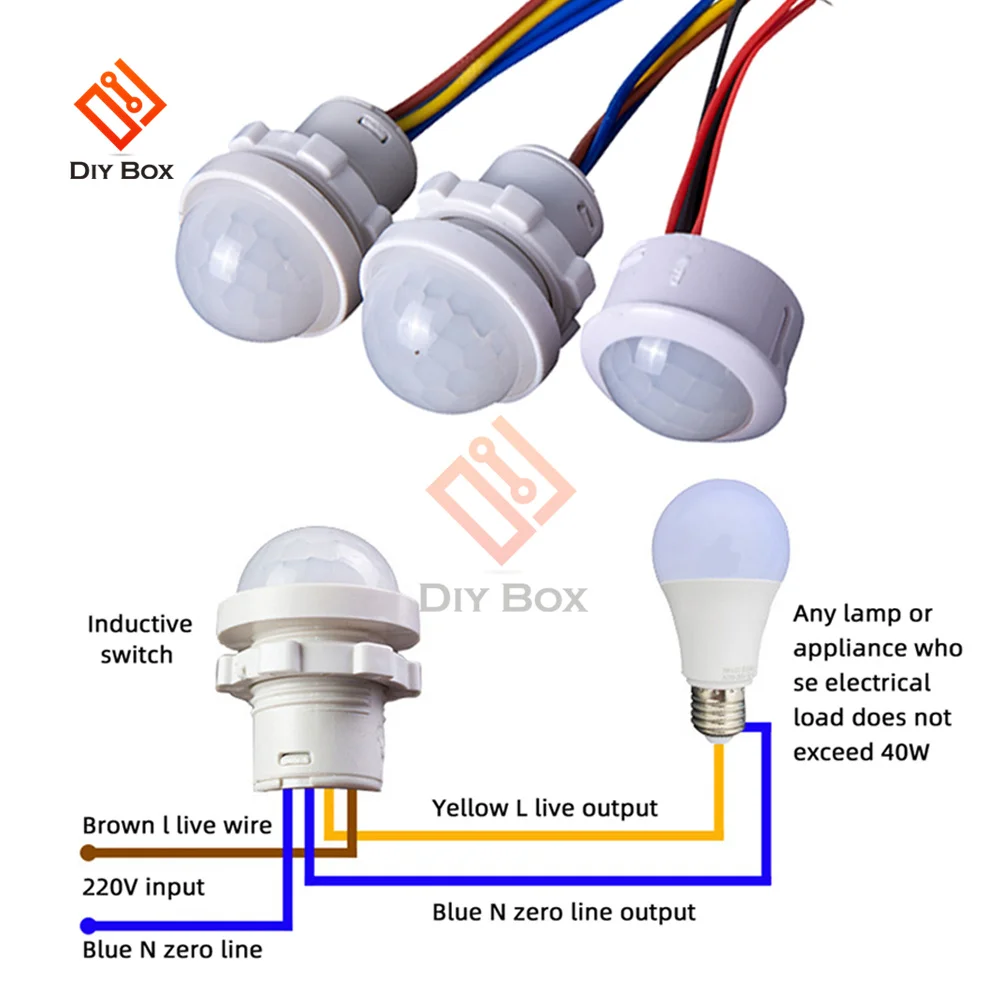
Credit: www.aliexpress.com
Energy Efficiency And Cost Savings
Modern LED motion sensor lights can reduce your outdoor lighting energy use by over 80% compared to halogen or incandescent models. According to the US Department of Energy, replacing just one 100-watt outdoor light with an 18-watt LED motion sensor can save up to $75 per year in electricity.
Pairing motion sensor lights with smart home systems can further cut costs, since you can schedule lights to stay off during low-activity times.
For more on lighting efficiency, see the US Department of Energy.
Frequently Asked Questions
Why Does My Motion Sensor Light Work During The Day But Not At Night?
This usually means the photocell is not sensing darkness correctly. Possible reasons include nearby bright lights, a dirty or damaged photocell, or incorrect lux settings. Try adjusting the lux dial, cleaning the sensor, or blocking nearby light sources.
How Do I Override A Motion Sensor Light To Stay On?
Many models have a manual override. Usually, flipping the wall switch off and on quickly will turn the light on permanently. To reset, turn the switch off for 30 seconds, then on again. Check your model’s instructions for details.
Can Weather Affect My Motion Sensor Light’s Performance?
Yes. Extreme temperatures can reduce sensor sensitivity or delay bulb startup. Moisture can cause corrosion, while heavy wind and rain may trigger false alarms. Use lights rated for outdoor conditions, and install them under cover if possible.
How Long Do Motion Sensor Lights Usually Last?
A quality LED motion sensor light should last 10-15 years. Halogen or incandescent models usually last 2-5 years. Sensors themselves can wear out from exposure or repeated use, especially in harsh weather.
What’s The Best Height To Install A Motion Sensor Light?
Most manufacturers recommend 6 to 12 feet above the ground. This gives the sensor a wide view and the best chance to detect people or cars. Too high or too low can reduce sensitivity or cause false triggers.
—
A motion sensor light that doesn’t work at night can feel like a big problem, but most issues are easy to fix with the right approach. Start with simple checks: clean the sensor, test the bulb, and adjust the settings. Don’t ignore changes in your environment—new streetlights, trees, or even fresh paint can affect performance. If your light is old or unreliable, upgrading to a modern, LED-based or smart motion sensor light is often the best long-term solution. With regular testing and a little preventive care, you’ll keep your home safe and bright, exactly when you need it.