If you own a Litter Robot, you probably love the convenience it brings for cleaning your cat’s litter box. But when you see a blue light blinking on your unit, it can cause worry or confusion. Many users wonder what this signal means, how to fix it, and whether their unit needs repair. In this article, you’ll get a clear explanation of the blinking blue light, what causes it, and step-by-step solutions. You’ll also find practical tips, common mistakes, and helpful tables comparing different Litter Robot models. By the end, you’ll feel confident handling this issue without stress.
What Does The Litter Robot Blue Light Blinking Mean?
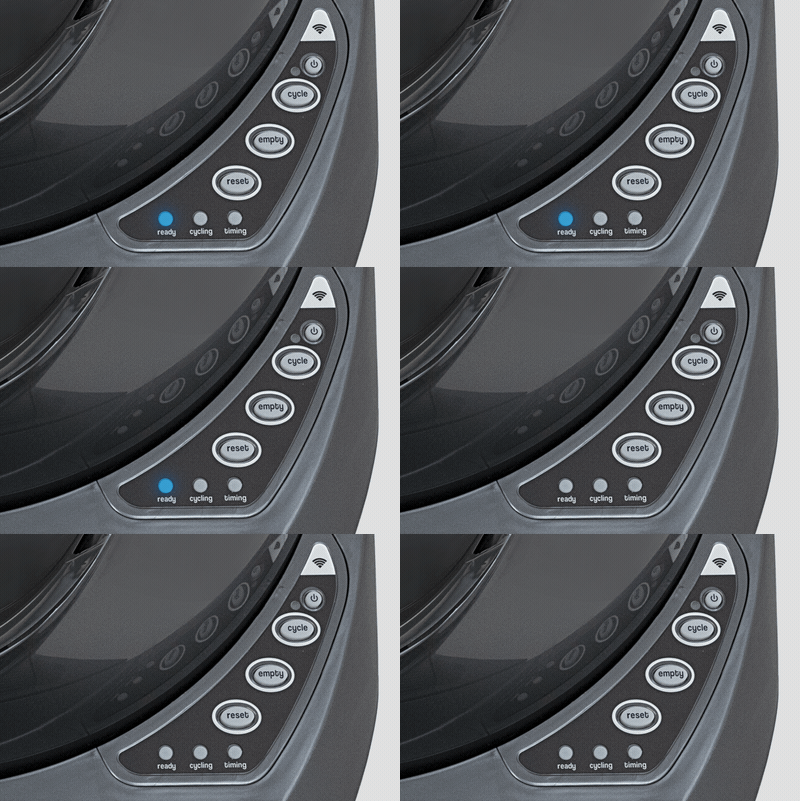
The blue light blinking on a Litter Robot is mostly a status or warning indicator. In most cases, it signals that the waste drawer is full or not properly installed. The blinking light is the unit’s way of telling you it needs attention. However, there are a few other reasons why this light might blink, such as sensor issues or software glitches.
Understanding the exact cause is important because ignoring the blinking light may result in your Litter Robot not cycling, which could lead to odors and mess. If you see this signal, check the waste drawer first. If it’s not full, there may be another issue.
Main Reasons For Blue Light Blinking
Several things can trigger the blue light. Here are the most common causes:
1. Full Waste Drawer
The Litter Robot uses sensors to detect when the waste drawer is full. Emptying the drawer usually stops the blinking.
2. Drawer Not Properly Seated
If the drawer is not pushed in all the way or is misaligned, the sensor may think it’s missing.
3. Sensor Blocked Or Dirty
Dust, litter, or debris on the sensors can cause false readings. Cleaning the sensors often solves this.
4. Bag Placement Issue
If the waste bag is sticking out or interfering with sensors, the unit might show a blinking blue light.
5. Software Glitch
Rarely, the control panel may freeze or malfunction. A quick reset can help.
6. Obstructed Globe
The globe might not be rotating properly if something is stuck inside.
Let’s compare how different Litter Robot models indicate drawer status:
| Model | Blue Light Meaning | Other Indicators |
|---|---|---|
| Litter Robot 3 | Drawer full or not seated | Solid yellow for cycle; flashing red for error |
| Litter Robot 4 | Drawer full; sensor error | Multicolor LED for specific faults |
| Litter Robot 2 | No blue light; uses other indicators | Solid green/yellow for ready/cycle |

Credit: www.reddit.com
Step-by-step Solution For Blue Light Blinking
Fixing the blinking blue light is usually simple. Here’s a practical guide to solve the problem:
1. Empty The Waste Drawer
Open the waste drawer and remove the bag. Replace it with a new liner, making sure it sits flat and does not block the sensors. Push the drawer back in firmly.
2. Check Drawer Alignment
Make sure the drawer slides in all the way. If it’s crooked or not fully seated, the sensor won’t recognize it. Try removing and reinserting the drawer.
3. Clean The Sensors
Find the sensors above the waste drawer. Use a dry cloth or compressed air to remove dust and litter. Don’t use water, as it can damage electronics.
4. Inspect The Bag Placement
The bag should not hang over the edges or cover the sensors. Tuck extra bag material neatly under the drawer lip.
5. Reset The Unit
Press the reset button on your Litter Robot. This clears any errors and forces the unit to check sensor status again.
6. Inspect The Globe
Open the globe and look for stuck litter, toys, or clumps. Remove any obstructions and check if the globe rotates freely.
7. Check For Firmware Updates
If you have a Wi-Fi enabled Litter Robot, use the app to check for updates. Sometimes, software fixes can solve sensor issues.
| Step | Action | Success Rate |
|---|---|---|
| 1 | Empty waste drawer | 85% |
| 2 | Align drawer | 60% |
| 3 | Clean sensors | 75% |
| 4 | Reset unit | 50% |
| 5 | Update firmware | 30% |
Common Mistakes When Troubleshooting
Even experienced users make errors when fixing the blinking blue light. Here are some mistakes to avoid:
- Forgetting to tuck the waste bag: If the bag sticks out, it can block sensors and trigger the light.
- Using wet wipes on sensors: Moisture damages electronics. Always use a dry cloth.
- Ignoring firmware updates: Software bugs can cause blinking. Updates often fix these.
- Not pushing the drawer fully in: Even a slight gap can cause sensor errors.
- Skipping regular cleaning: Dust and litter buildup can lead to frequent false alerts.
Many beginners overlook the importance of bag placement. It’s not obvious, but a poorly placed bag is one of the top causes for sensor errors. Another insight is that sometimes the sensors get covered by litter dust that’s invisible to the eye, so regular cleaning helps.
Credit: www.litter-robot.com
Preventing Blue Light Blinking In The Future
You can avoid most blinking blue light problems by following a few simple habits:
- Empty the waste drawer every 3–5 days, depending on how many cats you have.
- Clean the sensors weekly to prevent dust buildup.
- Check the bag placement each time you change it.
- Inspect the globe monthly for stuck litter or debris.
- Update the firmware when prompted by the app.
Setting a reminder on your phone to clean and check the unit can save you time and trouble. Also, using high-quality liners that fit well helps reduce bag placement errors.
| Action | Frequency | Effectiveness |
|---|---|---|
| Empty waste drawer | Every 3-5 days | High |
| Clean sensors | Weekly | Medium |
| Check bag placement | Each change | High |
| Inspect globe | Monthly | Medium |
| Update firmware | As needed | Low |
When To Contact Support
Most blinking blue light issues can be fixed at home, but sometimes you need expert help. Contact Litter Robot support if:
- The blue light keeps blinking after you’ve tried all steps.
- You notice other error lights or strange noises.
- The unit stops cycling or won’t reset.
- Sensors are damaged or loose.
Keep your unit’s serial number and purchase information handy. Support may ask for photos or videos to diagnose the problem. You can reach official support through their website or app.
If your unit is still under warranty, repairs or replacements may be covered. For more details, visit the official Litter Robot Support Site.

Credit: www.reddit.com
Comparing Litter Robot Models: Blue Light Behavior
Different Litter Robot models use lights in slightly different ways. Here’s a comparison to help you identify the signals:
| Model | Blue Light Behavior | Other Status Lights |
|---|---|---|
| Litter Robot 3 Connect | Blinks for full drawer or sensor error | Yellow for cycling; red for faults |
| Litter Robot 4 | Blinks for full drawer, sensor error, or app alerts | Multicolor LED for detailed faults |
| Litter Robot 2 Classic | No blue light; uses green/yellow | Green for ready; yellow for cycle |
If you have the Litter Robot 4, you may get more detailed fault codes through the app. The Litter Robot 3 Connect also lets you check the drawer status from your phone, but the basic blue light rules are the same.
Real User Experiences And Insights
Many users share their stories about the blinking blue light online. Most report that emptying the drawer and checking the bag solves the problem. However, some found that cleaning the sensors was the real solution, especially after weeks of use.
One user with two cats noticed the light blinking more often after switching to a thicker liner. The bag was too bulky for the sensors. Switching to a thinner liner fixed the issue. Another owner found that a small piece of litter stuck in the globe triggered the blue light repeatedly.
Removing it solved the problem instantly.
A non-obvious tip is to check the unit’s placement. If the Litter Robot is on an uneven floor, the drawer might not seat properly. Leveling the unit helped several users stop the blinking light.
Frequently Asked Questions
What Does It Mean When The Litter Robot Blue Light Blinks?
The blue light blinking usually means the waste drawer is full or not seated correctly. It can also signal sensor problems or bag placement errors.
How Do I Fix The Blinking Blue Light?
Start by emptying the waste drawer, checking bag placement, and cleaning the sensors. If the light keeps blinking, try resetting the unit and inspecting the globe.
Can The Blue Light Indicate A Serious Problem?
Usually, the blinking blue light is not serious. However, if it continues after troubleshooting, or if other error lights appear, there may be a hardware issue that needs professional support.
Does The Blue Light Blinking Affect Cleaning Cycles?
Yes, the unit will pause cleaning cycles until the issue is resolved. Ignoring the blue light can lead to litter buildup and odor.
Is The Blinking Blue Light Different On Litter Robot 3 And 4?
Both models use the blue light to signal a full drawer or sensor error. The Litter Robot 4 offers more detailed alerts through its app and multicolor LED.
Taking care of your Litter Robot ensures it keeps your cat’s litter box fresh and odor-free. The blinking blue light is simply the unit’s way of asking for attention. By following these practical steps and tips, you can quickly fix the issue and avoid problems in the future. If you ever feel stuck, remember that official support is just a click away.