If you own a Jisulife Ultra 1 portable fan, you know how useful it can be for travel, outdoor activities, or simply staying cool on a hot day. But what if the light on your Jisulife Ultra 1 suddenly stops working? This problem can be confusing, especially if you rely on the built-in light for camping or emergencies. Don’t worry—most issues with the Jisulife Ultra 1’s light can be fixed with a few simple checks. This article explains why the light might not work, how to troubleshoot the problem, and what steps to take if you need a repair or replacement. Even if you’re not a technical person, you’ll find clear instructions and useful tips that help you solve the issue.
Understanding The Jisulife Ultra 1 Light Feature
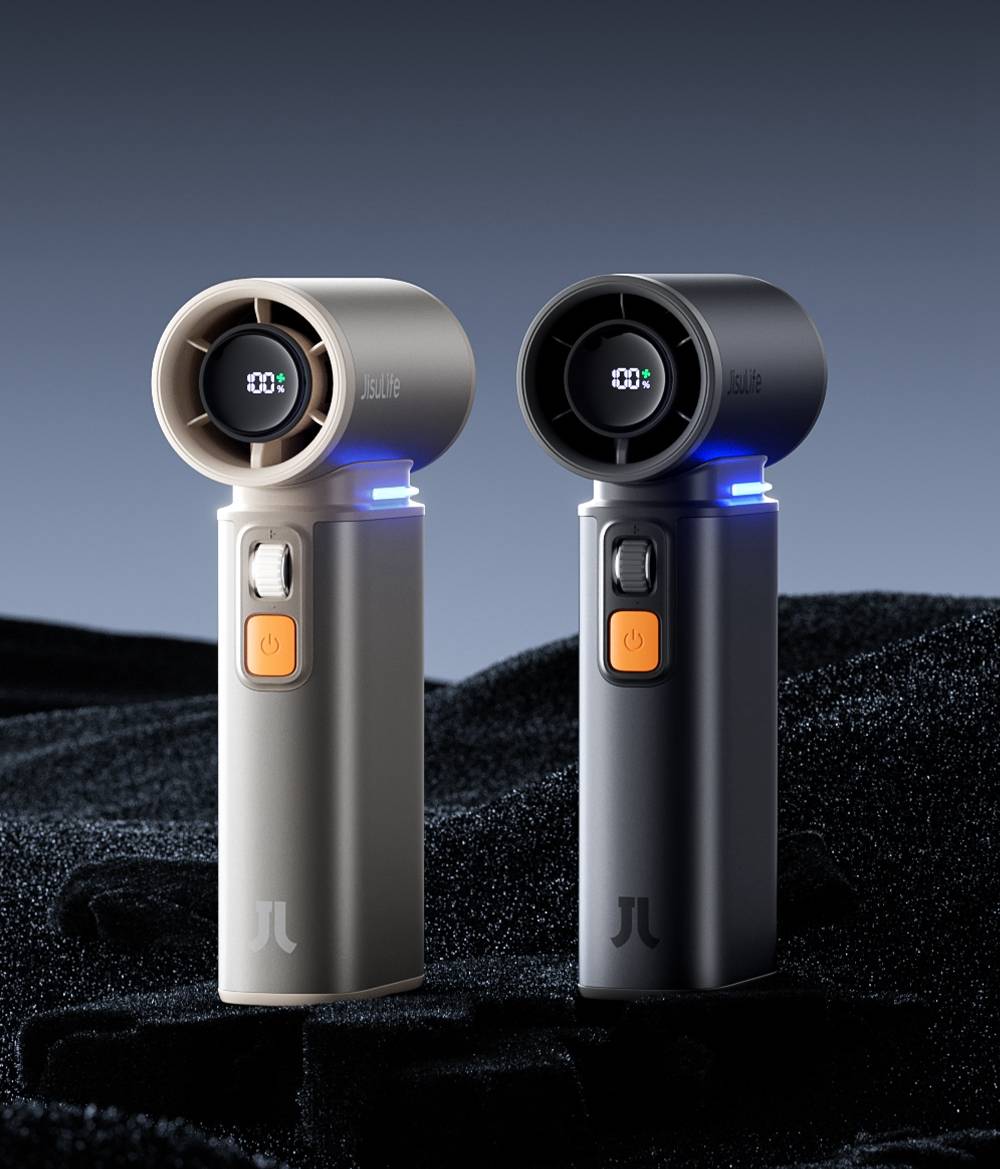
The Jisulife Ultra 1 is known for its compact design, quiet operation, and extra features. One popular feature is the built-in LED light. This light is especially helpful at night or in places with poor lighting. Some users use it as a mini flashlight or desk lamp. The light is powered by the same rechargeable battery as the fan, so it’s important for both functions to work smoothly.
Key features of the Jisulife Ultra 1 light:
- LED type: Energy-efficient, long-lasting bulbs
- Multiple brightness levels: Usually has at least two brightness settings
- Power source: Shares battery with the fan
- Control method: Activated by pressing or holding a button
Problems with the light can be caused by battery, electrical, or physical issues. Understanding how the light works helps you find the right solution.
Common Reasons The Jisulife Ultra 1 Light Stops Working
If the Jisulife Ultra 1 light is not working, it’s usually for one of these reasons:
- Battery issues: The battery is empty, weak, or not making good contact.
- Button problems: The switch or button is stuck, broken, or not connected.
- Firmware glitches: Sometimes the device needs to be reset.
- LED failure: The LED bulb is damaged or burned out.
- Wiring or solder problems: Internal wires may have come loose.
- Moisture or dirt: Water or dust inside can block the circuit.
- User error: The light was turned off by mistake or the wrong button was pressed.
Many of these causes are easy to check and fix at home. Let’s look at each reason in detail and see how you can troubleshoot.
Initial Checks Before Troubleshooting
Before opening your fan or looking for a warranty, try these basic checks. They often solve the problem with very little effort.
1. Make sure the battery is charged.
Connect your Jisulife Ultra 1 to a USB charger and let it charge for at least 30 minutes. A weak battery can stop the light from turning on even if the fan works.
2. Try all light control methods.
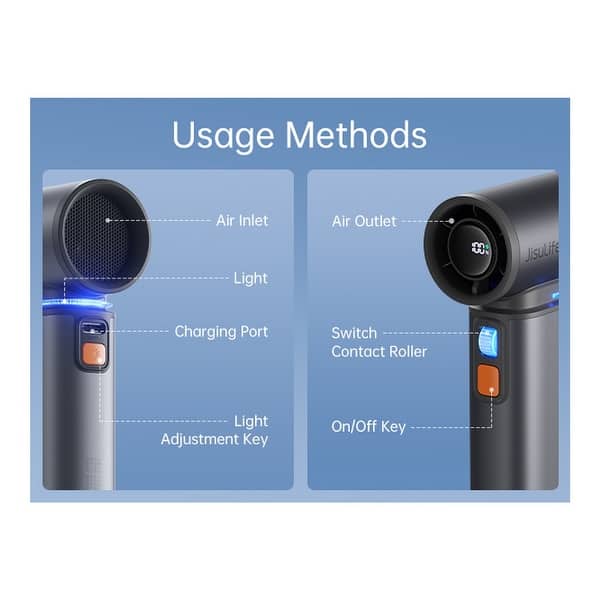
Some versions require you to press and hold the power button or double-press a side button to activate the light. Check your user manual or try different button combinations.
3. Inspect for visible damage.
Look for cracks, water signs, or dirt inside the light area. Damage may block the light or break the circuit.
4. Test the fan and other features.
If only the light is not working but the fan runs normally, the problem is likely with the light or its wiring—not the battery.
Step-by-step Troubleshooting Guide
If basic checks don’t fix the issue, follow these steps to find out what’s wrong. Move through each step in order, and stop if you find the problem.
1. Charge And Test The Device
Plug the Jisulife Ultra 1 into a wall charger or power bank. Wait 30–60 minutes. Try to turn on the light. If the battery indicator doesn’t show charging or the fan won’t start, the battery may be the issue.
2. Reset The Device
Some electronics freeze or lock up. To reset:
- Hold the power button for 10–15 seconds, then release.
- Wait a few seconds and try again.
- If your model has a reset hole, use a paperclip to press the reset button.
This simple step can clear software glitches that stop the light from working.
3. Check The Buttons
Sometimes the light button or switch is stuck or not responding.
- Press the button firmly and listen for a click.
- If it feels loose or does not click, the button may be broken.
- Try pressing in different ways (short, long, double-press).
If the button is stuck, gently clean around it with a toothpick or soft brush.
4. Inspect For Moisture Or Dirt
Moisture can stop the LED light from working. Check for:
- Water droplets inside the light area
- Dirt or dust in the button or charging port
If you find moisture, turn off the device and let it dry in a warm, dry place for 24 hours. Do not use a hair dryer or heat gun, as this can damage the electronics.
5. Examine The Led Light
If the fan works but the light does not, the LED itself may be faulty.
- Shine another flashlight directly at the LED. If you see cracks or black spots, the LED is likely burned out.
- Some LEDs may look fine but have internal damage.
LEDs in these fans usually last thousands of hours, but a drop or impact can break them.
6. Listen For Unusual Sounds
When you try to turn on the light, listen carefully. A faint click, buzz, or no sound at all can help you guess what’s wrong.
- Click, but no light: Button works, LED or wiring may be bad.
- Buzz or static: Possible wiring short or moisture.
- No sound: Button or circuit may be broken.
7. Test With And Without The Fan Running
Turn on the fan and then try the light. Sometimes, the light won’t work if the fan is on the highest speed due to battery limits. Try different combinations.
8. Try A Different Charger Or Cable
A weak or faulty charging cable can cause low power. Use a different USB cable and charger. Wait until the battery is fully charged, then try the light again.
Credit: jisulife.com
When To Open The Device
If you’re comfortable with small electronics, you may want to open the fan and check for loose wires. Only do this if your warranty has expired or you’re sure you won’t damage the device.
Opening steps:
- Unscrew the casing around the light and fan.
- Look for disconnected wires, especially near the light or button.
- Check for corrosion or dirt.
- Gently reconnect any loose wires and reassemble.
If you see burned parts or a broken switch, replacement is likely needed.
Warranty, Repair, And Replacement Options
If your Jisulife Ultra 1 light is still not working after troubleshooting, check if your device is under warranty.
Warranty Coverage
Most Jisulife fans come with a 1-year limited warranty covering defects in materials and workmanship. This usually includes the light not working if it’s not due to misuse or water damage.
Steps to use warranty:
- Find your purchase receipt or order email.
- Visit the official Jisulife website or the seller’s site.
- Look for a “Warranty Claim” or “Support” section.
- Fill out the form and upload proof of purchase.
- Describe the problem clearly (e.g., “Light not working, fan works.”).
The company may offer a repair, replacement, or refund, depending on the situation.
Repair Centers And Local Help
If the warranty is expired, you can:
- Visit a local electronics repair shop. Many technicians can fix minor wiring or switch problems for a low cost.
- Contact Jisulife’s support for advice, even out of warranty. They may offer parts or instructions.
Tip: Always ask for the repair price before agreeing to service.
Buying A Replacement
If repair is too costly, consider buying a new Jisulife Ultra 1 or a different model. Compare prices, features, and reviews to get the best value.
Comparing Jisulife Ultra 1 Light With Other Portable Fans
If your Ultra 1’s light is important to you, it’s useful to compare it with similar portable fans. The table below shows how the Jisulife Ultra 1’s light feature stacks up against other popular models.
| Model | Light Feature | Battery Life (Light Only) | Brightness Levels | Charging Port |
|---|---|---|---|---|
| Jisulife Ultra 1 | Yes (LED) | Up to 20 hours | 2–3 | USB-C |
| VersionTECH Mini Fan | No | N/A | N/A | Micro-USB |
| HandFan Portable | Yes (LED) | Up to 15 hours | 2 | USB-C |
| EasyAcc Pocket Fan | No | N/A | N/A | Micro-USB |
This comparison shows that the Jisulife Ultra 1 is one of the few compact fans with a strong built-in light. If this feature matters, it’s a good idea to repair or replace your device rather than switch to a model without a light.
Preventing Light Problems In The Future
Once your light is working again, a few simple habits can help prevent new problems:
- Keep the fan dry. Avoid using it in the rain or near water.
- Charge regularly. Don’t let the battery stay empty for long periods.
- Clean dust and lint. Wipe the buttons and light area with a soft cloth.
- Store safely. Use a case or bag to protect from drops or bumps.
- Don’t force the buttons. If a button is stuck, clean it gently—don’t press harder.
These steps help your Jisulife Ultra 1 last longer and work better.
Real-world Examples: User Experiences
Many users have reported problems with the Jisulife Ultra 1 light, especially after heavy use or travel. Here are some real stories:
Case 1: Battery Was the Problem
Sarah, a college student, found that her light would not turn on after a day at the beach. The fan still worked. After charging with a different USB cable, the light worked again. The original cable had a broken wire.
Case 2: Button Stuck by Dirt
Tom used his fan while gardening. Dirt got into the button area, and the light wouldn’t respond. He cleaned around the button with a brush, and the light worked again.
Case 3: LED Burned Out
Linda dropped her fan. The light never worked after that, though the fan did. At a repair shop, she learned the LED was broken and needed to be replaced.
Case 4: Firmware Glitch
Jin’s light stopped working after charging overnight. A long press on the power button reset the device, and the light came back on.
Case 5: Out of Warranty, Replaced Device
Marco’s fan was over a year old. The light stopped working, and repair was too expensive. He bought a new Jisulife Ultra 1 and now stores it in a case.
These examples show that most issues are easy to fix, but sometimes replacement is the best option.
Jisulife Ultra 1: Technical Specs Relevant To Light Problems
Understanding the technical side can help if you want to repair the fan or explain the issue to a technician.
| Feature | Specification |
|---|---|
| Light Type | LED (white, 0.5–1W) |
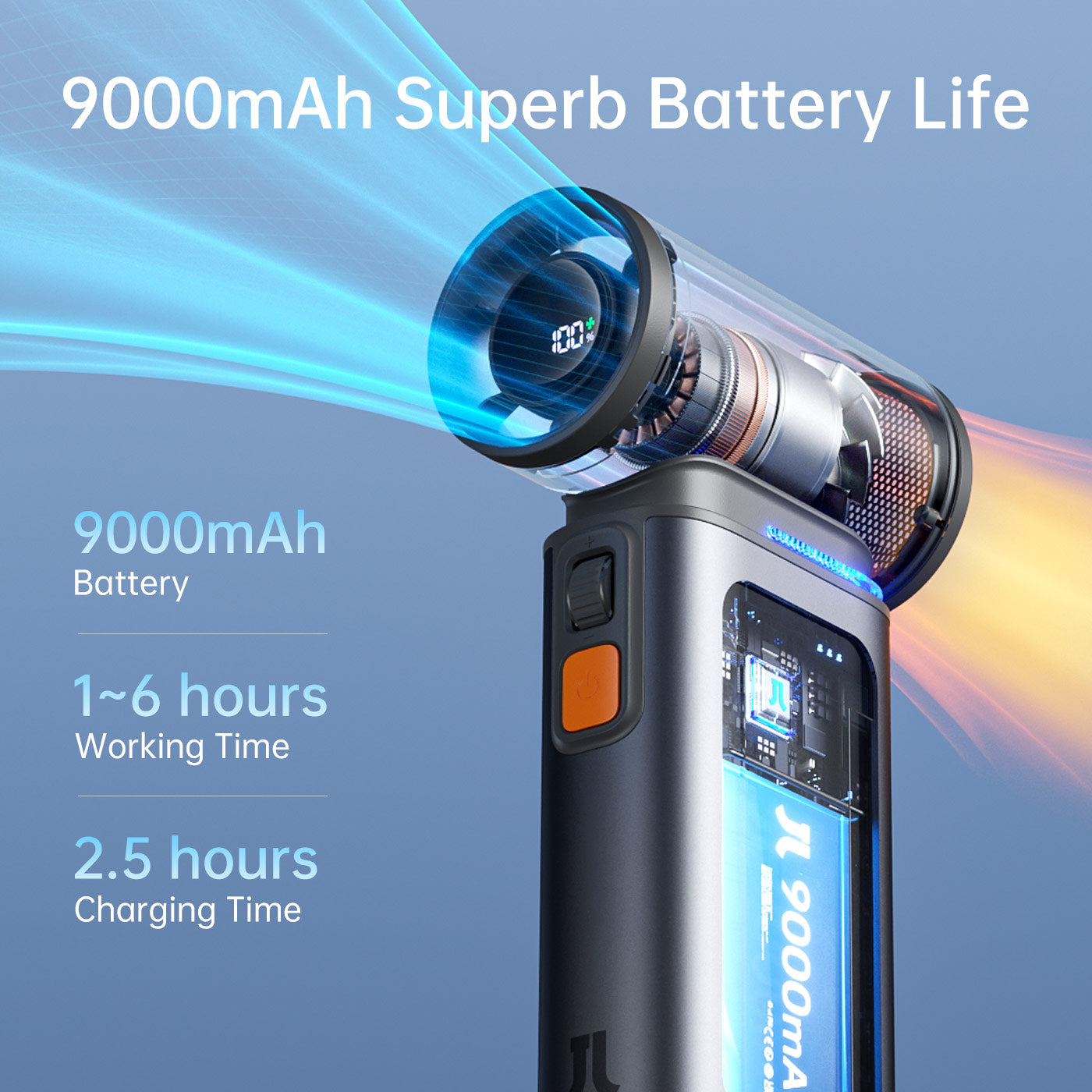
| Battery Capacity | 4000–5000 mAh (varies by version) |
| Battery Life (Light Only) | 15–20 hours |
| Charging Port | USB-C |
| Button Type | Physical switch or multi-function button |
| Housing Material | ABS Plastic |
| Water Resistance | None (keep dry) |
If you need to buy replacement parts, these details will help you find the right LED or battery.
Credit: buybuybaby.bedbathandbeyond.com
Advanced Diy Repair: For The Confident User
If you’re handy with tools, you can try to fix the light yourself. This is only for people comfortable with small electronics. Here’s what you need to know:
Tools Needed
- Small Phillips screwdriver
- Plastic pry tool or guitar pick
- Multimeter (for testing circuits)
- Soldering iron (for fixing wires)
- Replacement LED (if needed)
Steps To Check The Light Circuit
- Remove the back cover. Unscrew and gently open the case.
- Locate the LED and wires. Find the small circuit board near the light.
- Check for loose wires. Use a plastic tool to move the wires gently.
- Test with a multimeter. Set to “continuity” and check if the circuit is complete.
- Replace the LED if needed. Unsolder the old one and solder in a new LED of the same size and voltage.
Warning: Opening the device usually voids the warranty. Only try this if you’re sure, and always work with the device turned off and unplugged.
Common Diy Mistakes
- Using too much force and breaking the plastic clips
- Mixing up screws or losing small parts
- Soldering with the wrong temperature and damaging the board
- Installing the wrong type of LED
If you’re not sure, it’s usually safer to seek professional help.
What To Do If The Light Still Won’t Work
If you’ve tried all the steps above and the light is still not working, consider your options:
- Contact Jisulife support. They may offer advice or a special solution.
- Use a separate flashlight. As a temporary fix, carry a small LED light for emergencies.
- Buy a new fan. Sometimes, new devices are less expensive than repairs.
Remember, the fan will still work even if the light is broken. If the light is essential for you, replacement is the best long-term option.
Comparing Warranty And Support: Jisulife Vs. Competitors
If you’re thinking about buying a new device, support and warranty matter. Here’s a quick look at how Jisulife compares to others.
| Brand | Warranty Length | Customer Support | Repair/Replacement Policy |
|---|---|---|---|
| Jisulife | 1 year | Email/Online Chat | Repair or replace (if under warranty) |
| HandFan | 6 months–1 year | Email/Phone | Replace only |
| VersionTECH | 6 months | Replace only | |
| EasyAcc | 1 year | Email/Website | Repair or replace |
Jisulife offers a good balance of warranty and support compared to other brands.
When To Replace Vs. Repair
Deciding between repair and replacement depends on cost, age of the device, and how much you use the light feature.
Repair is best when:
- The device is less than a year old (still under warranty)
- The problem is minor (loose wire, button stuck)
- You need the light for daily use
Replace is better when:
- The device is more than a year old and repair is expensive
- The LED or main circuit is damaged
- You want the latest features or longer battery life
Tip: Always compare the cost of repair with the price of a new fan before making a decision.
Credit: jisulife.com
Making The Most Of Your Jisulife Ultra 1
Even if you never use the light often, it’s nice to have a portable fan that’s fully working. Here’s how to get the best from your Jisulife Ultra 1:
- Charge it before travel. Don’t get caught with a dead battery.
- Check the light before going camping or outdoors. Test all features before you need them.
- Read the manual. Some features are hidden or need special button presses.
- Register your product. This makes warranty claims easier.
The Jisulife Ultra 1 is a handy device, and taking a few moments to check the light can save you trouble later.
Frequently Asked Questions
Why Is My Jisulife Ultra 1 Light Not Turning On, But The Fan Works?
Usually, this means the LED light, button, or wiring is faulty, but the battery and main circuit are fine. Try charging fully, resetting the device, and cleaning the button. If these don’t work, the LED may need to be replaced.
Can I Fix The Jisulife Ultra 1 Light Myself?
If you’re comfortable with small electronics, you can check for loose wires or a broken LED. Use the right tools and follow safety steps. If you’re unsure, a repair shop can help. Opening the device will void the warranty.
Is The Light Covered Under Jisulife’s Warranty?
Yes, the built-in light is covered if the problem is due to manufacturing defects and the device is under warranty. Damage from water, drops, or user repairs may not be covered. Check with Jisulife support for details.
What Type Of Led Is Used In The Jisulife Ultra 1?
The fan uses a small, energy-efficient white LED (usually 0.5–1 watt). If you need to replace it, look for the same size and voltage to avoid damage.
Where Can I Get Official Help For My Jisulife Ultra 1?
You can contact Jisulife through their official website for support, warranty claims, and technical help. They respond by email or chat and can guide you through repair or replacement options.
If your Jisulife Ultra 1 light is not working, don’t panic. With careful checks and simple steps, you can often solve the problem yourself. And if not, you now know your options for getting help, repair, or replacement. Keeping your device in good shape means you’ll stay cool—and never be left in the dark.