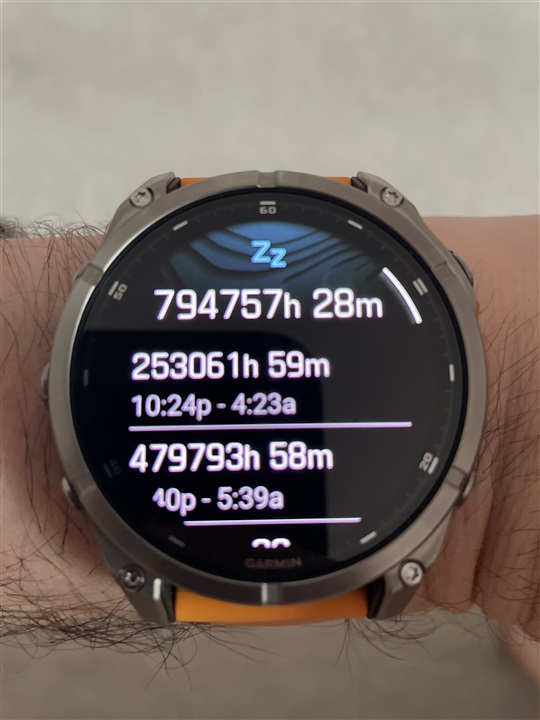
Most people buy the Garmin Fenix 8 because it tracks nearly everything about their health. Steps, heart rate, sleep, workouts—it’s all in the numbers. But if you’ve tried taking a midday nap, you might have noticed something strange: your watch doesn’t record naps. For users who want to see their nap data, this is confusing and disappointing.
Many fitness trackers now support nap detection, but Garmin Fenix 8 doesn’t do it automatically. There are reasons for this, and there are ways you can work around the problem. Let’s explore why the Fenix 8 isn’t recording naps, the impact this has, and what you can do about it.
We’ll also look at eight key factors that affect nap tracking, compare with other devices, and answer common questions.
Why The Garmin Fenix 8 Doesn’t Record Naps
The Fenix 8 uses advanced sensors and algorithms to detect sleep. However, its sleep tracking is designed mainly for overnight periods. The watch tries to guess when you’re sleeping based on your movement and heart rate, but it expects sleep to happen during the night.
Garmin’s sleep algorithm looks for long periods of inactivity, lower heart rate, and typical sleep times. Daytime naps—usually shorter and less predictable—often don’t fit these patterns. This means the Fenix 8 ignores naps unless you manually start a sleep activity or use a workaround.
The 8 Key Factors Affecting Nap Tracking
Understanding why naps aren’t recorded begins with eight important factors. Each plays a role in Garmin’s sleep detection—and how naps are handled.
1. Sleep Algorithm Design
The Fenix 8’s sleep algorithm is built for nighttime sleep. It looks for sleep between certain hours, usually when you’re not moving and your heart rate drops. The algorithm expects sleep to last at least three hours, so short naps are overlooked.
For example, if you nap for 30 minutes at 2 p. m. , the algorithm treats this as inactivity—not sleep. Even if your heart rate changes, the system doesn’t log it as a nap.
2. Sensor Sensitivity
The Fenix 8 uses accelerometers and heart rate sensors to detect sleep. But these sensors aren’t tuned for short, light naps. If you move even a little during your nap, the watch may think you’re awake.
Some people nap in a noisy place or wake up briefly during a nap. Small movements can confuse the sensors. Unlike overnight sleep, naps often involve more interruptions.
3. Nap Duration
Garmin’s system requires a minimum sleep duration. Usually, it must be at least an hour or more. Most naps are much shorter—20 to 40 minutes. If your nap doesn’t meet this duration, the Fenix 8 won’t record it as sleep.
This duration limit is stricter than other brands. For example, Fitbit can sometimes record naps as short as 20 minutes.
4. Manual Sleep Logging
The Fenix 8 does not let you manually log naps as sleep. You can log workouts or activities, but there’s no option for nap tracking. Some users try to use the “Rest” activity, but this doesn’t add nap data to the sleep report.
Manual logging is a feature many users want. Without it, naps are ignored unless you use third-party apps or tricks.
5. Time Of Day Detection
The watch expects sleep to happen at night. If you nap during the day, especially outside typical sleep hours, the Fenix 8 often ignores it. The algorithm is less sensitive to naps taken between 9 a. m. and 6 p.
m.
This time-based detection is one reason why naps aren’t recorded. Other brands, like Whoop, detect naps regardless of the time of day.
6. Firmware Limitations
Garmin updates its watches with firmware. Sometimes, these updates change how sleep is tracked. But nap tracking is not part of the latest Fenix 8 firmware.
Some users report improvements in sleep detection, but nap tracking remains missing. You can check for firmware updates, but don’t expect nap support unless Garmin changes its algorithm.
7. Third-party App Support
Some apps can sync with Garmin devices. However, most third-party apps rely on the Fenix 8’s built-in data. If the watch doesn’t record naps, these apps won’t show them either.
There are a few apps that let you manually log naps, but their data won’t appear in Garmin Connect’s sleep analysis. This makes nap tracking less useful for most users.
8. Comparison With Other Devices
Other brands offer better nap tracking. Fitbit, Whoop, and Oura Ring can detect naps automatically and add them to sleep reports. Garmin’s lack of nap tracking stands out when compared to these devices.
Let’s look at a quick comparison of nap tracking across popular devices:
| Device | Nap Tracking | Manual Logging | Minimum Nap Duration |
|---|---|---|---|
| Garmin Fenix 8 | No automatic | No | 1 hour |
| Fitbit Charge 5 | Yes | Yes | 20 minutes |
| Whoop 4.0 | Yes | No | 15 minutes |
| Oura Ring Gen 3 | Yes | Yes | 15 minutes |
Credit: forums.garmin.com
How Not Recording Naps Affects Your Health Data
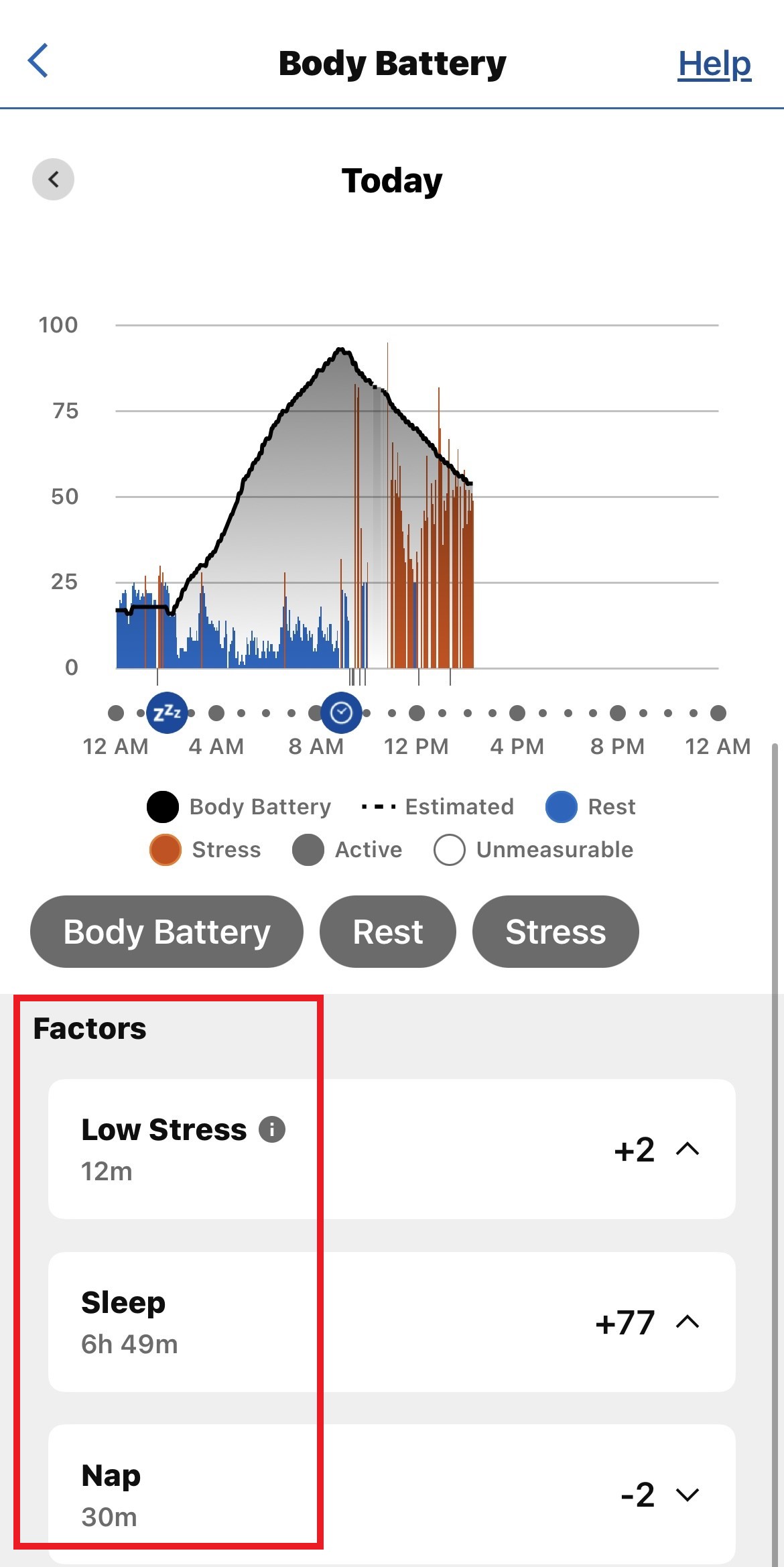
Missing nap data can impact your recovery insights and sleep scores. If you nap regularly, your total sleep time is lower than reality, and your recovery score may not reflect your true rest.
Some users rely on total sleep tracking for training or managing fatigue. Without nap data, your watch could suggest more rest than needed or misjudge your readiness for exercise.
Athletes and shift workers are especially affected. Naps are a key part of their routine, and missing nap data makes their sleep analysis incomplete.
What You Can Do: Workarounds For Nap Tracking
Although the Fenix 8 doesn’t record naps, there are ways to get around this limitation. Here are a few practical steps:
- Try the “Rest” activity: Start a Rest activity before your nap. It won’t show up in sleep analysis, but you can review your nap duration later.
- Use third-party logging apps: Apps like Sleep Cycle or Apple Health let you manually add naps. You can sync these with Garmin Connect, but nap data won’t appear in Garmin’s sleep report.
- Keep a nap diary: Record naps manually in a notebook or app. Track nap times, duration, and how you feel afterward. This can help you adjust your sleep habits.
- Request features from Garmin: Use Garmin forums or feedback forms to ask for nap tracking. The company sometimes adds features based on user demand.
Real-world Examples: User Experiences
Users in the Garmin community often share their nap-tracking struggles. For example, Sarah, a marathon runner, takes a 30-minute nap before evening training. Her Fenix 8 ignores the nap, and her daily sleep report shows only overnight rest.
John, a shift worker, naps for an hour after night duty. His watch doesn’t log the nap, so his sleep analysis is incomplete. He keeps a manual nap diary to track his rest.
These examples show that nap tracking matters for people with active lifestyles, unusual work hours, or health needs.
Data Insights: How Often Do People Nap?
Research shows that 30% of adults in the US take regular naps. For athletes and shift workers, the rate is even higher—nearly 50%. The average nap lasts 20–40 minutes.
Missing nap data affects a large group of users. As wearable technology improves, nap tracking is becoming a must-have feature.
| Group | Nap Frequency | Average Nap Duration |
|---|---|---|
| General Adults | 30% | 20–40 min |
| Athletes | 50% | 30–60 min |
| Shift Workers | 45% | 30–50 min |
Credit: support.garmin.com
What Garmin Says About Nap Tracking
Garmin’s official documentation explains that sleep detection is optimized for overnight sleep. The company says the Fenix 8 can detect long periods of inactivity, but naps are not included unless they meet the minimum duration and happen during expected sleep hours.
Garmin has not announced plans to add nap tracking to the Fenix 8. However, user feedback may influence future updates. You can learn more from Garmin’s support pages and official forums.
For more detailed information on sleep tracking technology, see Garmin’s official blog.
Comparing Sleep Tracking Features: Garmin Vs. Competitors
To understand the gap, here’s a comparison of sleep tracking features between Garmin and other brands:
| Feature | Garmin Fenix 8 | Fitbit Charge 5 | Oura Ring Gen 3 |
|---|---|---|---|
| Automatic Sleep Detection | Yes | Yes | Yes |
| Nap Detection | No | Yes | Yes |
| Sleep Stages | Yes | Yes | Yes |
| Manual Sleep Logging | No | Yes | Yes |
| Sleep Score | Yes | Yes | Yes |

Credit: www.reddit.com
Practical Tips For Garmin Fenix 8 Users
If nap tracking is important to you, consider these tips:
- Adjust your routine: If possible, take longer naps and keep still. The Fenix 8 may record naps lasting over an hour.
- Use manual logs: Keep a nap diary to understand your total rest.
- Explore other devices: If nap tracking is essential, consider a wearable that offers it, like Fitbit or Oura Ring.
- Contact Garmin: Request nap tracking as a feature. Your feedback can drive product improvements.
An insight many beginners miss: Even if you can’t record naps, you can still use the watch’s heart rate variability and rest activities to understand your recovery. These tools can help you adjust your training and rest, even without nap data.
Frequently Asked Questions
Why Doesn’t Garmin Fenix 8 Track Naps Automatically?
The Fenix 8’s sleep algorithm is designed for nighttime sleep. It looks for long, uninterrupted periods of rest, mainly during typical sleep hours. Naps are usually shorter and happen during the day, so the algorithm doesn’t detect them.
Can I Manually Log Naps In Garmin Connect?
No, Garmin Connect does not offer a way to manually log naps as sleep. You can log other activities, but nap data will not be included in your sleep report.
Are There Any Third-party Apps That Help With Nap Tracking?
Some third-party apps, like Sleep Cycle or Apple Health, let you log naps manually. But their data is separate from Garmin’s sleep report. Naps tracked with these apps won’t appear in Garmin Connect’s sleep analysis.
Will Garmin Add Nap Tracking In The Future?
Garmin has not announced plans to add nap tracking to the Fenix 8. However, user feedback and demand may influence future updates. You can submit feature requests to Garmin through their forums or support channels.
Does Missing Nap Data Affect My Recovery Scores?
Yes, missing nap data can make your recovery scores less accurate. If you nap often, your total rest is higher than what the watch reports. This can affect training suggestions and fatigue tracking.
The Garmin Fenix 8 is a powerful health tracker, but its lack of nap recording leaves a gap for many users. Understanding why naps aren’t tracked, and using the right workarounds, can help you get the most from your device.
Whether you’re an athlete, shift worker, or just someone who enjoys a quick nap, knowing these details makes your health data more meaningful.