Many people rely on Dahua NVRs (Network Video Recorders) for security at home and business. But sometimes, these devices stop recording, leaving critical gaps in surveillance. If your Dahua NVR is not recording, it can be stressful and confusing, especially if you’re not a tech expert. Understanding why this happens and how to fix it is important for protecting your property and peace of mind.
This guide walks you through common reasons, troubleshooting steps, and practical tips. We’ll cover everything from hardware issues to software settings, plus some advanced advice most beginners miss. By the end, you’ll know how to solve recording failures, prevent future problems, and keep your security system working reliably.
How Dahua Nvrs Record Video
To fix a recording issue, it helps to know how Dahua NVRs work. These devices receive video streams from IP cameras and store them on a hard drive. You can view footage live, or replay it later. Recording can be continuous, scheduled, or triggered by motion detection.
Here’s a simple flow:
- Cameras send video to the NVR.
- NVR processes and saves video to a hard disk.
- User accesses playback through the NVR interface.
Any break in this chain can cause recording to fail.
Types Of Recording Modes
Dahua NVRs offer three main recording modes:
- Continuous: Records all the time.
- Scheduled: Records at specific times.
- Motion Detection: Records only when movement is detected.
Choosing the right mode is important. For example, if you set motion detection but cameras don’t detect movement, no video will be saved. Sometimes, beginners forget to check these settings, which can be a simple fix.
Common Reasons Dahua Nvr Is Not Recording
Let’s look at the top causes:
- Hard Drive Issues: Faulty, full, or disconnected hard drives are a major reason.
- Camera Connection Problems: Offline cameras mean no video sent to NVR.
- Recording Settings Error: Wrong mode, time, or schedule can block recording.
- Firmware Bugs: Old or buggy firmware can cause unexpected failures.
- Power Supply Interruptions: If NVR or cameras lose power, recording stops.
- Network Issues: Unstable connections between cameras and NVR cause missed footage.
- User Account Permissions: Some users may lack rights to change or view recordings.
Many people check only the basics. But sometimes, the problem is hidden in less obvious settings or hardware.
Example: Hard Drive Failure
A study showed that 45% of NVR recording failures were due to hard drive problems. Drives often wear out after 2-3 years. If your NVR’s hard drive is old, it may need replacement.
Hidden Settings Mistake
A common beginner mistake is enabling overwrite protection but not setting it correctly. This can stop recording when the drive is full. Checking these advanced settings often solves the issue.
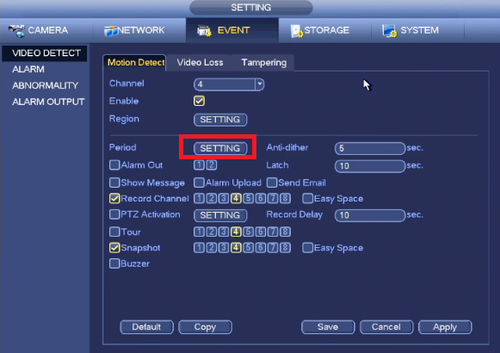
Credit: dahuawiki.com
Troubleshooting Steps For Dahua Nvr Not Recording
To fix the problem, follow these practical steps:
1. Check Hard Drive Status
- Go to the NVR menu and find Storage Management.
- Look for errors, capacity, and health status.
- If the drive is missing or marked as “unformatted,” reformat or replace it.
Useful Data
Here’s a quick comparison of hard drive errors and their solutions:
| Error Type | Possible Cause | Solution |
|---|---|---|
| Unformatted | New or corrupted drive | Format drive in NVR menu |
| Full | No overwrite enabled | Enable overwrite or delete files |
| Not Detected | Loose cable or faulty drive | Reconnect or replace drive |
2. Inspect Camera Connections
- Check if cameras show live video on the NVR.
- If not, reboot cameras and check network cables.
- Go to Camera Management in NVR settings to confirm status.
3. Review Recording Settings
- Open Record Schedule in the menu.
- Confirm mode: Continuous, scheduled, or motion.
- Check time periods—make sure they cover the desired hours.
- Test motion detection with a hand wave in front of the camera.
4. Update Firmware
- Visit the Dahua official site for the latest firmware.
- Follow instructions to update safely.
- Firmware updates often fix hidden bugs and improve stability.
5. Test Power And Network
- Make sure NVR and cameras have stable power.
- Use a backup UPS if outages are common.
- Check network switches and routers for drops.
6. Check User Permissions
- In User Management, confirm your account has recording rights.
- Sometimes, a restricted account can block access to settings.
Advanced Solutions And Tips
If the basics don’t fix it, try these advanced steps:
Reconfigure Storage Settings
Dahua NVRs allow for multiple hard drives or network storage. If you use external storage, check the connection and setup.
Analyze Logs
Many NVRs keep logs of errors and events. Look for messages about recording failures.
Reset To Factory Defaults
If settings are deeply corrupted, a factory reset can help. Back up your configuration first.
Test With A New Hard Drive
If possible, install a new, compatible drive and see if recording resumes.
Compare Storage Types
Some NVRs support both HDD (hard disk drive) and SSD (solid-state drive). SSDs are faster and more reliable but cost more.
| Storage Type | Speed | Reliability | Cost |
|---|---|---|---|
| HDD | Medium | Moderate | Lower |
| SSD | High | High | Higher |
Understand Bitrate And Storage Limits
Dahua NVRs record at a set bitrate, which affects video quality and storage usage. If too many cameras use high bitrate, the drive fills up quickly and may stop recording.
Example Bitrate Calculation
If you have four cameras, each recording at 4 Mbps:
- Total bitrate: 16 Mbps
- For a 1TB drive, this supports about 6 days of continuous recording
This calculation helps plan upgrades and prevent storage shortages.
Preventing Dahua Nvr Recording Problems
Taking proactive steps saves time and keeps your system reliable.
Regular Maintenance
- Check hard drives every 3-6 months.
- Update firmware once or twice a year.
- Review recording schedules monthly.
Use Quality Cables And Power
Cheap cables or unstable power are a common cause of camera dropouts. Use shielded Ethernet cables and surge-protected power strips.
Monitor Storage Usage
Many NVRs show storage graphs. Keep space above 10% free to avoid sudden stops.
Set Up Alerts
Some Dahua NVRs can email or notify when recording fails or disk space is low.
Backup Important Footage
Don’t rely on a single NVR. Save critical videos to another device or cloud storage.
Comparison: Dahua Nvr Vs Other Brands
Dahua is a leading brand, but how does it compare for recording reliability?
| Brand | Typical Recording Issues | Ease of Troubleshooting | Support Quality |
|---|---|---|---|
| Dahua | Hard drive, settings, firmware | Good menu, clear logs | Strong online resources |
| Hikvision | Hard drive, network | Good menu, complex logs | Mixed support |
| Uniview | Settings, camera sync | Simple menu | Limited support |
Dahua stands out for clear error messages and easy menu navigation. However, firmware updates are sometimes less frequent than competitors.

Credit: www.youtube.com
When To Call For Professional Help
Some problems are too complex for home users:
- Hardware failures beyond simple replacement
- Deep network configuration errors
- Persistent firmware bugs
If you’ve tried the steps above and your Dahua NVR is not recording, contact a certified technician or Dahua support. They can test hardware, check logs, and update firmware safely. For advanced cases, visit the official Dahua support page or a reputable installer.
Frequently Asked Questions
Why Does My Dahua Nvr Say “no Disk”?
This usually means the hard drive is missing, disconnected, or unformatted. Check cables, mount the drive securely, and format it in the NVR menu. If the drive is old or faulty, replace it.
Can I Use Any Hard Drive With My Dahua Nvr?
No, Dahua NVRs require compatible hard drives, usually surveillance-grade. Regular desktop drives may fail faster. Always check the Dahua specs for supported models and capacities.
How Do I Know If My Cameras Are Recording?
Go to the NVR’s live view and playback menu. Look for red recording icons or check the record schedule. You can also test by triggering motion and checking playback.
What Happens If The Hard Drive Is Full?
If overwrite is enabled, the NVR will delete old files and keep recording. If not, recording stops. Set overwrite in the storage settings to avoid gaps.
Is It Safe To Update Nvr Firmware Myself?
Yes, but follow the Dahua instructions carefully. Always use official firmware from the Dahua website. Avoid updating during power outages. If unsure, ask a technician for help or visit Dahua Security for guidance.
Keeping your Dahua NVR recording reliably is essential for security. By understanding how these devices work and following the troubleshooting steps above, you’ll solve most problems yourself. Regular maintenance, checking storage, and updating software prevent many issues. Remember, if complex errors persist, professional help is always available.
With a little care, your Dahua NVR will protect your property and give you peace of mind for years to come.

Credit: www.youtube.com