If you use an iPhone, iPad, or Mac, you probably rely on iCloud to keep your contacts safe and updated across your devices. When you add a new phone number or email, you expect to see it everywhere, instantly. But sometimes, it just doesn’t happen. Contacts vanish. New entries don’t show up. It feels like your digital address book is stuck in the past. This can be frustrating, especially if you depend on up-to-date contacts for work, family, or emergencies.
Why do contacts stop syncing with iCloud? Is it a technical bug or a simple setting? And most importantly, how do you fix it—fast? This article will guide you through the reasons, solutions, and best practices, so your contacts stay in sync and you never lose important information again.
Why Contacts Might Not Sync To Icloud
It helps to understand what could go wrong. ICloud contact syncing depends on several factors working perfectly together. When one fails, syncing breaks.
1. Internet Connection Issues
iCloud needs a stable internet connection. If your device is offline, or if the connection is weak, syncing will not happen. Even a temporary loss of Wi-Fi or cellular data can interrupt the process.
2. Icloud Account Problems
If you’re not signed into the correct Apple ID, or if there are issues with your account (like needing to verify your email), contacts may not sync.
3. Incorrect Settings
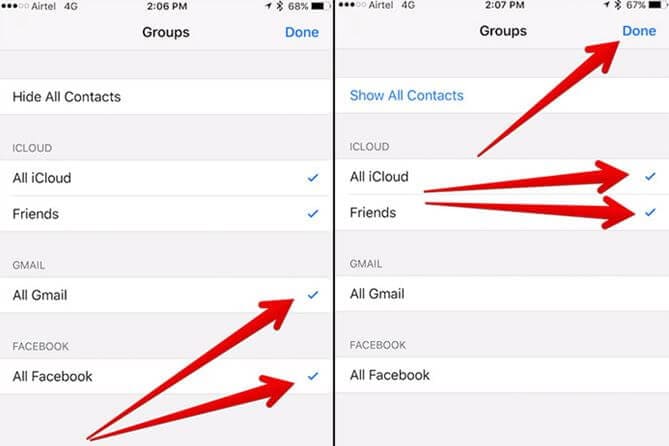
Sometimes, the contacts on your device are not linked to iCloud at all. For example, your iPhone might be saving new contacts to your SIM card, Gmail, or another account, instead of to iCloud.
4. Outdated Software
Apple updates iOS, iPadOS, and macOS regularly. If you’re running an old version, bugs or compatibility issues can stop syncing.
5. Storage Limitations
Every iCloud account has a storage limit. If your iCloud is full, new data—including contacts—won’t sync.
6. Sync Delays Or Server Issues
Sometimes, Apple’s iCloud servers are temporarily down or busy. This can delay syncing for everyone.
7. Corrupted Data
Rarely, a corrupted contact entry or duplicated contacts can block the process. This is harder to spot, but it does happen.
How To Check If Contacts Are Syncing
Before you try to fix anything, you need to know if the problem is really with iCloud syncing. Here’s how you can check:
- Add a test contact on your iPhone or iPad. Give it a simple name like “Test Sync.”
- On another Apple device (like your Mac or iPad), open the Contacts app.
- Wait a few minutes and see if the test contact appears.
- If it doesn’t show up, your contacts are not syncing.
You can also use the iCloud website:
- Go to iCloud.com and sign in with your Apple ID.
- Open the Contacts section.
- See if the new contact is there.
If it’s missing, the issue is real.
Step-by-step Fixes For Contacts Not Syncing To Icloud
Let’s walk through clear steps to solve most syncing issues. Start with the simplest solutions and move to more advanced options as needed.
1. Check Internet Connection
Make sure your device has active Wi-Fi or cellular data. Open Safari and try loading a website. If it’s slow or fails, fix your connection first.
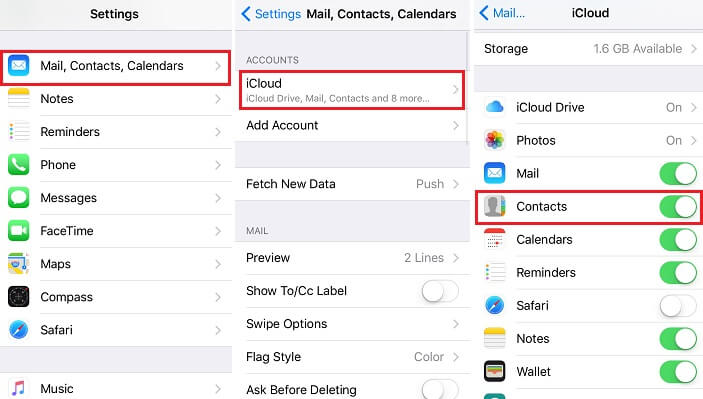
2. Confirm Icloud Settings
- Open Settings on your iPhone or iPad.
- Tap your name at the top.
- Tap iCloud.
- Make sure the toggle next to Contacts is ON (green).
If it’s off, turn it on. You may be asked if you want to merge existing contacts—choose “Merge” to upload your local contacts to iCloud.
3. Verify Default Account For Contacts
Your device may save new contacts to a different account (like Gmail or Outlook).
- Go to Settings > Contacts > Default Account.
- Choose iCloud.
This ensures all new contacts go to iCloud, not another account.
4. Sign Out And Back In To Icloud
Sometimes, simply signing out and back in can refresh the sync.
- Go to Settings > [your name] > scroll down and tap Sign Out.
- Enter your Apple ID password.
- Choose to keep a copy of your data on your iPhone.
- Sign out, then sign back in.
Be aware: signing out removes iCloud data from your device, but it stays in iCloud. Always back up important information first.
5. Update Your Device
Check for the latest software updates.
- Go to Settings > General > Software Update.
- Download and install any updates available.
Outdated software can cause unexpected bugs.
6. Check Icloud Storage
- Open Settings > [your name] > iCloud > Manage Storage.
- See how much space you have left.
If you’re out of storage, you can:
- Delete old backups, photos, or files you no longer need.
- Upgrade your iCloud storage plan.
7. Refresh Contacts Sync
You can force your device to sync contacts again.
- Open Settings > [your name] > iCloud.
- Toggle Contacts OFF. Wait a few seconds.
- Toggle Contacts ON again.
This forces a re-sync.
8. Restart Your Device
Sometimes, a simple restart fixes minor software glitches.
- Hold the power button until you see the “slide to power off” option.
- Power off, wait a few seconds, then turn your device back on.
9. Check Apple System Status
If iCloud is down for everyone, you can check Apple’s official status page.
- Visit Apple System Status.
- If there’s a problem with iCloud Contacts, you’ll see a yellow or red dot.
If this is the case, you must wait for Apple to fix the issue.
10. Remove Duplicate Or Corrupt Contacts
Corrupted or duplicated contacts can break syncing.
- Open the Contacts app and look for strange or incomplete entries.
- Delete or edit these, then try syncing again.
On Mac, you can use the Card > Look for Duplicates tool in the Contacts app.
11. Turn Off Low Power Mode
Low Power Mode can pause background tasks, including syncing.
- Go to Settings > Battery.
- Make sure Low Power Mode is OFF.
12. Reset Network Settings
If the issue is network-related, resetting network settings can help.
- Go to Settings > General > Transfer or Reset iPhone > Reset > Reset Network Settings.
Note: This will erase saved Wi-Fi passwords, so have them handy.
13. Remove And Re-add Icloud Account (advanced)
If nothing works, removing and re-adding your iCloud account can solve deep issues. Only use this if you have a backup.
- Sign out of iCloud (as above).
- Restart your device.
- Sign back in to iCloud.
14. Contact Apple Support
If you still have trouble, reach out to Apple Support. Sometimes, there’s a deeper issue only Apple can fix.
Common Scenarios And How To Handle Them
Some situations are more complex. Here are common cases and what you can do.
Switching From Another Service (gmail, Outlook) To Icloud
If you used another email provider for contacts, your old contacts might not be in iCloud.
- Export contacts from Gmail or Outlook as a .vcf (vCard) file.
- Go to iCloud.com on a computer.
- Log in, open Contacts, and import the .vcf file.
Now all your contacts are in iCloud and can sync to your devices.
Contacts Not Syncing Between Iphone And Mac
This is common if you use both devices but don’t see the same contacts.
- Make sure both devices are signed into the same Apple ID.
- Check that iCloud Contacts is enabled on both.
- Sometimes, the Mac Contacts app is set to show only “On My Mac” contacts. Change this to show iCloud contacts.
Contacts Not Syncing After Upgrading Iphone
When moving to a new iPhone, contacts sometimes don’t appear.
- Check that you signed in with the right Apple ID.
- Make sure the previous iPhone had uploaded all contacts to iCloud before switching.
Family Sharing And Shared Contacts
Apple’s Family Sharing does not share contacts automatically. Each family member has their own contacts list. If you want to share contacts, you need to manually export and import contact files.
Credit: www.sync-mac.com
Data Table: Icloud Storage Plans And Limits
Different iCloud storage plans can impact syncing if you run out of space. Here is a quick comparison:
| Plan | Storage Amount | Monthly Price (US) | Suitable For |
|---|---|---|---|
| Free | 5 GB | $0 | Basic use, few contacts, minimal photos |
| Individual | 50 GB | $0.99 | Photos, documents, contacts, small backups |
| Family | 200 GB | $2.99 | Multiple users, more backups, larger media |
| Pro | 2 TB | $9.99 | Large families, heavy media and backups |
If your contacts won’t sync and you have a full iCloud, upgrading your plan is a quick fix.
Data Table: Common Contact Storage Locations
Sometimes, contacts are saved in places other than iCloud. Here’s how the main options compare:
| Storage Location | Syncs with iCloud | Accessible on All Devices | Common Issues |
|---|---|---|---|
| iCloud | Yes | Yes | Sync delays if offline |
| Gmail | No (unless imported) | Yes (with Google account) | Contacts split across accounts |
| On My iPhone | No | No | Not backed up or synced |
| SIM Card | No | No | Limited fields, no sync |
If your contacts are saved “On My iPhone,” they won’t sync to iCloud until you move them.
Practical Tips To Keep Contacts Synced
Solving the issue is just the start. Here’s how to avoid contact syncing problems in the future.
- Always add new contacts to iCloud: Double-check the default account in your settings.
- Back up regularly: Use iCloud Backup or export your contacts as a .vcf file.
- Keep software updated: New updates fix bugs and add security.
- Avoid duplicate accounts: Using multiple contact accounts (Gmail, Exchange, iCloud) can cause confusion.
- Check storage every few months: Clear out old files to avoid hitting your iCloud limit.
- Label contacts clearly: Strange characters or emojis in names can sometimes cause sync issues.
Advanced Troubleshooting: Mac And Windows
For users who manage contacts on computers, syncing issues can look different.
On Mac
- Open the Contacts app.
- From the top menu, choose Contacts > Accounts.
- Make sure iCloud is listed and enabled.
- If not, add it using your Apple ID.
If you see “On My Mac” as the default, change it to iCloud.
On Windows
You can use iCloud for Windows to sync contacts with Microsoft Outlook.
- Download and install iCloud for Windows from Apple’s website.
- Sign in with your Apple ID.
- Choose to sync Mail, Contacts, Calendars, and Tasks.
- Open Outlook and check if iCloud contacts appear.
Data Table: Icloud Sync Troubleshooting Steps And Impact
Understanding which solutions work for which problems can save time. Here’s a breakdown:
| Step | Solves Account Problems | Solves Connection Issues | Solves Storage Issues | Solves Corrupt Data |
|---|---|---|---|---|
| Sign Out/In iCloud | Yes | No | No | Sometimes |
| Update Software | No | Sometimes | No | Rarely |
| Check Default Account | No | No | No | No |
| Reset Network Settings | No | Yes | No | No |
| Free Up iCloud Storage | No | No | Yes | No |
| Remove Duplicate Contacts | No | No | No | Yes |
Non-obvious Insights Most Beginners Miss
- Contacts can be split across accounts without you noticing. If you add some contacts to iCloud and others to Gmail, only the iCloud contacts will sync. It’s easy to think syncing is broken when actually, you’re just looking at two different lists.
- Restoring contacts from a backup doesn’t always sync them to iCloud. If you restore from an old backup, the contacts may only exist locally or under “On My iPhone.” You must manually move them to iCloud to enable syncing.
When To Consider Third-party Apps
If you have a very large contacts database or need more control, several apps can help manage or clean up contacts. However, always use reputable apps and back up your contacts before making changes.

Credit: support.apple.com
Protecting Your Privacy
Your contacts contain sensitive information. When troubleshooting or using third-party apps, be careful with permissions. Only sync contacts with trusted services. Avoid sharing your Apple ID with others.
Frequently Asked Questions
Why Do My Iphone Contacts Show Up On Icloud.com But Not On My Device?
This usually means your device is not syncing with iCloud. Check if Contacts is enabled under Settings > [your name] > iCloud. Make sure your device is online. Try toggling Contacts off and on to force a sync.
How Can I Move Contacts Saved “on My Iphone” To Icloud?
Open the Contacts app, select the contact, tap “Share Contact,” and email it to yourself as a. vcf file. Then, open the file on your computer and import it into iCloud using the iCloud. com Contacts section.
What Happens If I Delete A Contact From Icloud?
Deleting a contact from iCloud removes it from all devices using that iCloud account. It does not delete contacts stored in other accounts (like Gmail).
Can I Sync Contacts Between Icloud And Google Or Outlook?
Not automatically. You need to export contacts from one service and import into another. There are third-party tools, but always check privacy and reviews before using them. For official help, visit Apple Support.
Will Upgrading My Icloud Storage Fix Syncing Problems?
Upgrading iCloud storage helps only if your previous issue was running out of space. If there are other problems (like network or account issues), storage upgrades won’t help.
Staying organized and keeping your contacts in sync is possible with just a little effort and some smart habits. Most syncing problems are quick to fix once you know where to look. By following the steps and tips here, you’ll keep your contacts safe, up-to-date, and always accessible—no matter which Apple device you use.
Credit: drfone.wondershare.com