If you own an Instax Mini 11, you probably love the instant photos it gives you. But sometimes, the camera’s light starts blinking, and you may not know why. This can be confusing, especially if you’re new to instant cameras. A blinking light could mean different things—some are simple to fix, and some need more attention. Understanding these signals helps you avoid missed moments and keeps your camera working well.
This guide explains why the Instax Mini 11 light blinks and covers 11 common reasons, each with solutions. You’ll also find helpful tables, non-obvious tips, and answers to questions many users ask. Let’s make sure your Instax is always ready to capture memories.
What Does A Blinking Light Mean On Instax Mini 11?
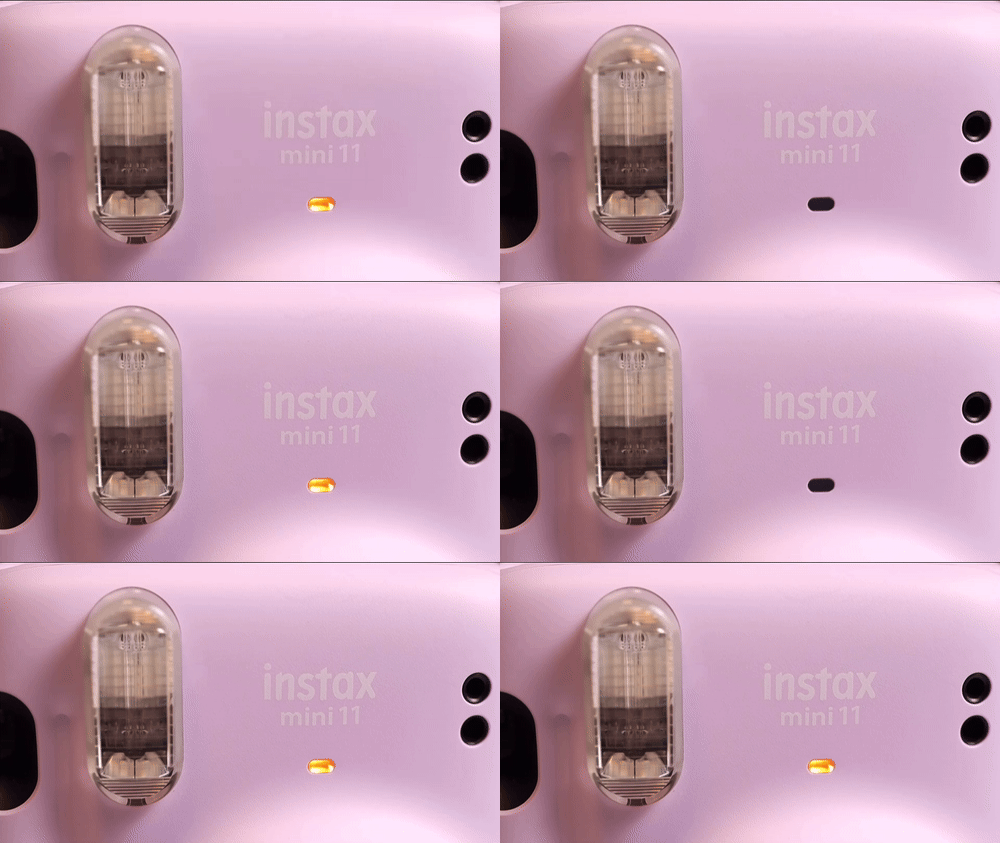
The Instax Mini 11 uses indicator lights to communicate with you. When everything works, the light next to the lens glows steadily. But if there’s a problem, you may see the light blink in different patterns. The meaning changes depending on the color and speed of the blink.
Understanding these signals can save you time and stress. For example, a slow blinking orange light may hint at a battery issue, while a fast-blinking red light might warn about a film jam. These signals are the camera’s way of asking for help.
11 Reasons Why Instax Mini 11 Light Is Blinking
Let’s look at the 11 most common reasons for a blinking light, with practical solutions for each.
1. Low Or Dead Batteries
The most frequent reason the light blinks is weak or empty batteries. The Instax Mini 11 needs two AA batteries, and when they run low, the camera cannot power the flash or film ejection.
What to do:
Replace both batteries with new, high-quality AA alkaline batteries. Avoid mixing old and new batteries, as this can cause uneven power and more blinking.
Extra tip:
Rechargeable AA batteries may not give the required voltage. Stick with standard alkalines for best results.
2. Batteries Inserted Incorrectly
Even fresh batteries won’t help if they’re put in the wrong way. The Mini 11’s battery compartment shows which direction each battery should face.
How to check:
Open the battery cover and look for the plus (+) and minus (–) symbols. Make sure each battery matches the markings.
Common mistake:
Forcing the cover shut can damage the battery contacts. Always check alignment first.
3. Film Pack Not Loaded
If there’s no film inside, the camera blinks to remind you. The Instax Mini 11 uses special Instax Mini film packs, which must be loaded correctly.
What to do:
Open the back cover, insert a new film pack (yellow mark to yellow mark), and close it tightly. The camera will eject the black protective sheet automatically.
Non-obvious insight:
Do not open the back cover after loading film. Light exposure can ruin unused shots.
4. Empty Film Pack
If you have taken all 10 shots, the camera will blink, telling you there’s no film left.
How to fix:
Remove the empty film cartridge and insert a fresh pack. Make sure the camera is off when changing film.
Extra:
Count your shots—when you see a white sheet after pressing the shutter, your pack is empty.
5. Film Jam Or Ejection Problem
Sometimes, film does not eject fully after a shot, or the black protective sheet gets stuck. This causes the light to blink rapidly.
What to do:
Open the back only in a well-lit room, gently pull out the stuck film, then reload if needed. Never use sharp objects.
Pro tip:
If jams keep happening, check for dirt or debris near the rollers.
6. Lens Not Extended
The Instax Mini 11 will not function if the lens isn’t pulled out fully. The light blinks to warn you.
How to check:
Press the button next to the lens. Make sure the lens extends until it clicks.
Mistake to avoid:
Don’t force the lens in or out—this can break the mechanism.
7. Lens Blocked Or Stuck
If something blocks the lens or it’s stuck halfway, the camera can’t operate and the light will blink.
What to do:
Check for dust, sand, or accidental finger blockage. Gently clean with a soft cloth.
Non-obvious insight:
Never try to twist or yank the lens. If stuck, remove the batteries, wait a minute, then try again.
8. Flash Charging
When you turn on the camera, the orange light blinks while the flash is charging. This is normal and takes a few seconds.
What to do:
Wait until the light turns solid before taking a photo. If the light keeps blinking for more than 30 seconds, check the batteries.
Extra:
Frequent flash use drains batteries faster—always carry spares.
9. Temperature Too Low Or High
Instax film and electronics work best between 41°F and 104°F (5°C to 40°C). If it’s colder or hotter, the light may blink to show it’s too risky to operate.
Solution:
Warm up the camera and film (but not over direct heat). Don’t shoot in freezing weather or hot cars.
Fact:
Cold film creates faded or blue images. Warm it gently in a pocket before use.
10. Dirty Battery Contacts
Sometimes, the battery contacts inside the camera get dirty or corroded. This reduces power even if batteries are fresh, causing the light to blink.
How to fix:
Turn off the camera, remove the batteries, and clean the contacts with a dry cotton swab.
Warning:
Never use water or metal objects, as this can damage the camera.
11. Internal Camera Error
If none of the above apply and the light keeps blinking, the camera may have a system error.
What to try:
Remove batteries, wait 2 minutes, then reinsert. If the issue continues, contact Fujifilm support.
Example:
A sudden drop or liquid spill can trigger these errors. Handle your camera with care to avoid surprises.

Credit: www.reddit.com
Comparing Common Instax Mini 11 Light Blinking Issues
This table shows how to identify and solve the most frequent blinking light problems:
| Problem | Light Pattern | Quick Solution |
|---|---|---|
| Low Batteries | Slow orange blink | Replace with new AA batteries |
| Film Jam | Fast red blink | Remove jammed film gently |
| Flash Charging | Steady orange blink | Wait for solid light |
| Lens Not Extended | Light blinks, no action | Pull out lens until it clicks |
Instax Mini 11 Vs. Older Instax Models: Light Blinking Differences
If you’ve used older Instax models, you might notice the Mini 11’s blinking patterns are easier to read.
| Feature | Instax Mini 11 | Instax Mini 9 |
|---|---|---|
| Blinking Patterns | Clear, fast or slow | Less obvious |
| Flash Charging | Separate light indicator | Shared with power light |
| Error Codes | More intuitive | Can be confusing |
Credit: www.aistudio.co.jp
Practical Tips To Prevent Blinking Light Problems
- Use only new, high-quality AA batteries—cheap batteries often cause issues.
- Keep the camera and film at room temperature, especially in winter or summer.
- Store film packs in their original wrapper until use.
- Don’t open the back cover once film is loaded.
- Clean battery contacts every few months.
When To Seek Professional Help
If you’ve tried all the solutions above and the light keeps blinking, it may be a deeper hardware problem. Contact Fujifilm customer support or visit an authorized repair center. Don’t attempt to open or repair the camera yourself—this voids the warranty.
For more official information, visit the Fujifilm Instax Mini 11 support page.

Credit: www.youtube.com
Frequently Asked Questions
Why Does My Instax Mini 11’s Light Keep Blinking After I Load New Film?
This usually means the film pack wasn’t loaded properly, or the camera can’t recognize the film. Check if the yellow marks on the film and camera align. Also, make sure the black protective sheet ejected.
Can I Use Rechargeable Batteries In My Instax Mini 11?
Rechargeable batteries often have lower voltage than fresh alkaline batteries. This can cause blinking lights or weak performance. Alkaline AA batteries are recommended for reliable use.
What Should I Do If My Instax Mini 11 Blinks In Cold Weather?
Bring both the camera and film to a warmer place. Cold temperatures slow battery and film chemistry, leading to blinking lights. Gently warm the film in your pocket before using.
Is It Bad If I Open The Film Compartment When There’s Still Film Inside?
Yes, opening the film compartment mid-pack exposes unused film to light, ruining your shots. Only open the back when you’re sure the film pack is empty.
My Instax Mini 11 Blinks But Works Sometimes—what’s Wrong?
Intermittent blinking often means dirty battery contacts or nearly empty batteries. Clean contacts with a cotton swab and insert new alkaline batteries to solve the problem.
The Instax Mini 11 is a fun and reliable instant camera once you know how to read its signals. By understanding why the light blinks and following these solutions, you’ll spend less time troubleshooting and more time enjoying photos. Small habits—like using the right batteries and handling film with care—will keep your camera running smoothly for years to come.