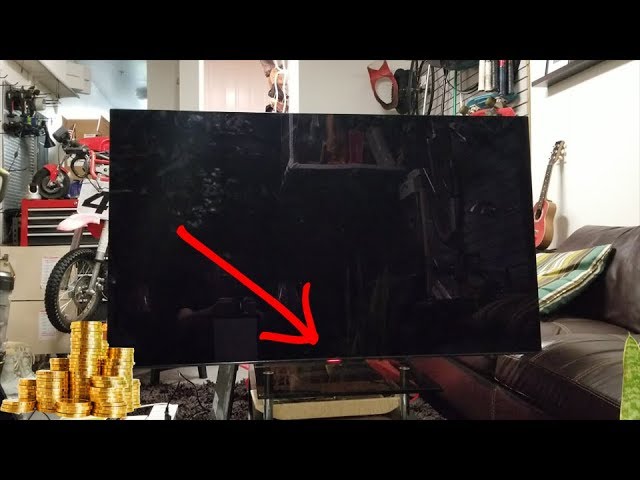
If you own a Sony TV and see a red light blinking on the front panel, you might feel worried or confused. This blinking light often signals a problem. Many people think their TV is broken, but in most cases, the issue can be fixed without expensive repairs. Understanding what the blinking red light means and how to respond can save time, stress, and money.
Sony TVs are popular for their picture quality and smart features. But like all electronics, they can face issues, especially after years of use. The red light blinking is a built-in signal from the TV. It tells you that something is wrong, and helps you figure out what to do next.
This article will guide you step-by-step, so you can handle the situation confidently—even if you are not a technical expert.
What Does The Sony Tv Red Light Blinking Mean?
The red light blinking on Sony TVs is not random. Sony designed this feature to help users and technicians diagnose problems. Usually, the TV’s standby light blinks a certain number of times, pauses, and then repeats. Each pattern has a meaning.
Common Blink Codes
The number of blinks matters. For example:
- 2 blinks: Often means a problem with the power supply.
- 4 blinks: Usually points to a faulty backlight or LED panel.
- 6 blinks: Suggests an issue with the mainboard or internal components.
- 8 blinks: Can indicate overheating or a fan malfunction.
Sony has published official guides explaining these blink codes. For newer models, you can check the user manual or the Sony support website for details.
Why Does Sony Use Blink Codes?
Blink codes make it easier to find the cause without opening the TV or running special tests. This system helps both users and repair professionals. It also reduces unnecessary repairs, since some problems are simple to fix.
Most Common Causes Of Red Light Blinking
Understanding the root causes can help you decide what to do next. Here are the main reasons your Sony TV might show a blinking red light:
- Power Supply Issues: A surge, faulty outlet, or damaged cable can cause the TV to fail to power up properly.
- Overheating: Dust inside the TV, blocked vents, or high room temperature can trigger the safety system.
- Defective Backlight/LED Panel: The TV cannot display images, so it signals a hardware fault.
- Firmware Problems: Software glitches or failed updates can stop the TV from starting correctly.
- Mainboard Failure: The mainboard controls most TV functions. If it fails, the TV cannot work.
- Loose Connections: Sometimes, a loose HDMI, power, or internal cable can cause errors.
Below is a comparison of the most frequent causes:
| Cause | Red Light Pattern | Chance to Fix Yourself |
|---|---|---|
| Power Supply Issue | 2 blinks | High |
| Overheating | 8 blinks | Medium |
| Backlight Failure | 4 blinks | Low |
| Firmware Problem | Any pattern | Medium |
| Mainboard Failure | 6 blinks | Low |
| Loose Connections | Random | High |

Credit: www.wikihow.com
How To Fix Sony Tv Red Light Blinking
Many people assume a blinking red light means the TV is broken forever. But in reality, you can fix most problems yourself. Let’s go through the best steps.
Step 1: Count The Blinks
Watch the blinking pattern carefully. Count the number of times the light blinks before it pauses. Write down this number. This is your “blink code” and tells you the error type.
Step 2: Power Cycle The Tv
One of the simplest solutions is to power cycle the TV. Here’s how:
- Unplug the TV from the wall outlet.
- Wait at least 60 seconds.
- Plug the TV back in.
- Turn it on.
This resets the TV and often clears minor errors. Many users find this step solves the problem—especially for power supply or firmware glitches.
Step 3: Check The Power Source
Use a working outlet and check the power cord for damage. If possible, try plugging the TV into a different outlet. Avoid using extension cords or surge protectors for this test.
Step 4: Clean Vents And Remove Dust
Overheating is a common cause. Make sure the vents are not blocked. Use a soft brush or vacuum cleaner to remove dust. If your TV is wall-mounted, ensure there is enough space behind it for air circulation.
Step 5: Update Firmware
If the TV powers on but the red light blinks during use, check for firmware updates. Go to the TV’s settings menu and look for software updates. Follow Sony’s instructions carefully.
Step 6: Check All Connections
Loose cables can cause errors. Check all HDMI, USB, and audio cables. Push them in firmly. If you recently moved the TV or added new devices, double-check every connection.
Step 7: Factory Reset
If the TV still does not work, try a factory reset. This erases all settings and returns the TV to its original state. The method depends on the model:
- For most Sony TVs: Press and hold the power button for 10 seconds.
- For Android TVs: Go to Settings > Device Preferences > Reset.
Be aware that this will erase your custom settings and apps.
Step 8: Contact Sony Support
If none of the above steps work, it’s time to contact Sony. Give them your blink code, model number, and a description of the problem. Sony’s support team can offer specific advice or arrange a repair.
When To Call A Technician
Some issues require professional help. For example:
- If you see 4 blinks (backlight failure), replacing the panel is complex and costly.
- 6 blinks (mainboard failure) usually needs expert repair.
- If you smell burning or see smoke, unplug the TV immediately.
Repairs can cost anywhere from $100 to $500, depending on the part. Always ask for a repair estimate before agreeing to service.
Below you can compare typical repair costs:
| Problem | Repair Cost (USD) | DIY Possible? |
|---|---|---|
| Power Supply | $100 – $150 | Yes |
| Backlight Panel | $200 – $400 | No |
| Mainboard | $300 – $500 | No |
| Firmware Update | Free | Yes |
Credit: www.youtube.com
Preventing Red Light Blinking In The Future
It is easier to prevent problems than to fix them. Here are practical tips:
- Keep your TV clean and dust-free.
- Use a surge protector to guard against power spikes.
- Update firmware regularly via Sony’s website or TV settings.
- Avoid blocking vents and keep the TV in a cool, dry place.
- Check cables every few months for wear or looseness.
Many people overlook regular maintenance. Just cleaning vents and checking cables can extend your TV’s life by years.
Real-life Example
A Sony Bravia owner noticed a red light blinking 4 times after a power outage. The TV would not turn on. He unplugged the TV, waited 2 minutes, and plugged it back in. The blinking continued. After checking the manual, he learned that 4 blinks meant a backlight problem. He cleaned the vents and checked the cables, but nothing worked. He contacted Sony support, who confirmed the diagnosis. Repairing the backlight would cost $350, so he decided to buy a new TV.
This example shows the value of knowing the blink codes and acting quickly. Sometimes, small steps fix the problem. In other cases, knowing the repair cost helps you make a smart decision.
Credit: www.reddit.com
Non-obvious Insights
Many beginners miss these points:
- Blink codes can change after a power cycle. Always check again after resetting the TV.
- External devices (like HDMI sticks) can cause errors. Disconnect all accessories and see if the problem goes away.
- Firmware updates sometimes fail quietly. If you see blinking after an update, retry the update or use a USB stick to reinstall.
Frequently Asked Questions
What Does It Mean When My Sony Tv Blinks Red 4 Times?
The 4 blinks usually mean a backlight or LED panel failure. It’s a hardware issue, and the TV cannot show a picture. You should contact Sony support or a technician for repair.
Can I Fix The Red Light Blinking Myself?
Yes, in many cases. Try unplugging the TV, cleaning vents, checking cables, and updating firmware. If the blinking continues, count the blinks and look up the error code. Some problems, like power supply issues, can be fixed at home, but others need professional help.
Is My Tv Still Under Warranty If The Red Light Blinks?
Check your purchase date and warranty card. Sony TVs typically have a 1-year warranty. If your TV is under warranty, contact Sony for free repair or replacement. Always keep your receipt and warranty documents.
How Much Does It Cost To Fix A Sony Tv Red Light Blinking Issue?
Repair costs depend on the problem. Power supply fixes are cheaper ($100–$150), while mainboard or panel repairs are more expensive ($300–$500). Sometimes, it is better to buy a new TV, especially if the repair cost is high.
Where Can I Find The Blink Code List For My Sony Tv Model?
You can find blink codes and their meanings in your TV’s user manual or on Sony’s official support website. For detailed information, visit Sony Support.
If you see a blinking red light, don’t panic. Count the blinks, follow the steps above, and use Sony’s resources. With the right knowledge, you can solve most problems yourself or make smart choices about repair.