If your Harbor Breeze ceiling fan light suddenly stops working, it can be more than a minor annoyance. Many people rely on their ceiling fan lights for daily activities, and a malfunction can disrupt your routine. This issue is common, but often the fix is easier than you might expect. Whether you’re a new homeowner or have had your fan for years, understanding why the light isn’t working and how to solve it will save you both time and money. Let’s explore the key causes, solutions, and tips for handling a non-working Harbor Breeze ceiling fan light.
Why Harbor Breeze Ceiling Fan Lights Stop Working
A ceiling fan light may stop working for several reasons. Some causes are simple, like a burned-out bulb or a tripped breaker. Others involve more complex issues with wiring, switches, or the fan’s remote receiver. Here are the main factors that can lead to your ceiling fan light not working:
- Burned-out light bulbs
- Loose or faulty wiring
- Dead batteries in the remote
- Defective wall switch
- Blown fuse or tripped circuit breaker
- Faulty pull chain
- Broken light kit or socket
- Malfunctioning remote receiver
- Problems with the fan’s capacitor
Each of these issues has its own symptoms and solutions. Knowing how to check each one can help you fix your fan light quickly.
Basic Troubleshooting Steps
Before calling an electrician, try these basic troubleshooting steps. Many issues can be solved at home with simple tools and a careful approach.
1. Check The Light Bulbs
Start with the most obvious step. Remove the bulb and check for signs of damage such as a blackened or broken filament. Test the bulb in another lamp to confirm if it works.
- Replace any burned-out bulbs with the correct wattage and type.
- Make sure the bulb is screwed in tightly but not too tight.
2. Inspect Power Supply
If changing the bulb doesn’t help, the next step is to check if the fan is getting power.
- Flip the wall switch off and on.
- Check if other lights or outlets in the room have power.
- Reset any tripped breakers in your home’s electrical panel.
3. Test The Remote Control
Many Harbor Breeze fans use a remote to control the light. If the remote batteries are dead, the light won’t work.
- Replace the remote batteries with fresh ones.
- Make sure the remote is paired correctly with the fan.
4. Try The Pull Chain
If your fan uses a pull chain for the light, give it a gentle pull.
- If the chain feels stuck or broken, it may need replacement.
- Sometimes the chain switch inside the fan light kit can wear out.
5. Examine The Wall Switch
Wall switches can fail over time. Test the switch by toggling it several times.
- If possible, test the fan on a different circuit.
- Use a non-contact voltage tester to check for power at the switch.
6. Check The Light Kit And Wiring
Loose wires or a faulty light kit can cause the light to stop working. Turn off the power at the breaker before opening the fan’s light kit.
- Inspect for loose connections or burned wires.
- Tighten any loose wire nuts.
- If you see burned insulation or a melted socket, replace the damaged part.
7. Reset The Fan
Some Harbor Breeze models need to be reset after a power outage or electrical surge.
- Turn off the wall switch and breaker for 1-2 minutes.
- Turn the power back on and test the light again.
If none of these steps solve the problem, it’s time to dig deeper into the possible causes.
Common Causes And How To Fix Them
Let’s take a closer look at the most frequent reasons your Harbor Breeze fan light is not working, along with practical solutions for each situation.
Burned-out Bulbs
This is the easiest issue to fix. Over time, bulbs burn out and need replacement. Always use the bulb type and wattage recommended in your fan’s manual. Using the wrong bulb can damage the light kit or reduce its lifespan.
Dead Remote Batteries
Remote controls are convenient, but dead batteries are a common reason the light won’t turn on. Replace all batteries at once, and check the remote’s battery compartment for corrosion. Clean any corrosion with a cotton swab and a little vinegar.
Faulty Wall Switch
Wall switches wear out after years of use. If flipping the switch doesn’t turn on the light, replace the switch with a new one. Make sure the replacement is rated for use with ceiling fans.
Blown Fuse Or Tripped Breaker
A surge or overload can trip a breaker or blow a fuse, cutting power to the fan. Locate your home’s electrical panel and check the breakers. Reset any that are tripped. If the breaker trips again, there may be a wiring problem that needs a professional.
Loose Or Faulty Wiring
Loose wires are a leading cause of light failures. Vibration from the fan can loosen wire nuts inside the light kit or ceiling box. Always turn off power at the breaker before checking wiring. If you’re unsure about wiring, call an electrician.
Broken Pull Chain Switch
Pull chains can snap inside the housing. If the chain feels loose or doesn’t “click,” the internal switch may be broken. Replacement pull chain switches are inexpensive and easy to install with basic tools.
Defective Light Kit
If all else fails, the light kit itself may be defective. This can happen due to age, heat, or manufacturing defects. You can order a replacement kit for your specific Harbor Breeze model.
Malfunctioning Remote Receiver
Sometimes, the problem is not the remote itself, but the receiver inside the fan. The receiver can fail due to power surges or age, stopping the light from working even if the fan still spins. Replacing the receiver often solves the issue.
Capacitor Problems
Rarely, the fan’s capacitor may fail. While this usually affects the fan motor, it can sometimes cause the light to stop working. Capacitor replacement is more complex and should be done by an electrician.
Comparing Common Causes: Fan Won’t Spin Vs. Light Won’t Work
Here’s a simple comparison to help you tell the difference between a fan that won’t spin and a light that won’t work.
| Symptom | Likely Cause | Solution |
|---|---|---|
| Fan spins, light does not work | Bulb, light kit, remote, wiring | Check bulb, test remote, inspect wiring |
| Light works, fan won’t spin | Capacitor, motor, wiring | Check capacitor, motor, wiring |
| Both fan and light do not work | Power supply, breaker, wiring | Check breaker, test for power, inspect wiring |
Understanding these differences can help you focus your troubleshooting and avoid unnecessary repairs.
Step-by-step Guide: Fixing A Harbor Breeze Ceiling Fan Light
If you’re comfortable with basic DIY tasks, you can fix most ceiling fan light problems yourself. Here’s a step-by-step guide to finding and fixing the most common issues.
Step 1: Safety First
- Turn off the power to the fan at the breaker box.
- Use a non-contact voltage tester to confirm the power is off.
Step 2: Remove The Light Kit Cover
- Unscrew the light kit cover or globe carefully.
- Lay out the screws and parts in a safe place.
Step 3: Inspect The Bulb And Socket
- Remove the light bulb and inspect the socket for corrosion or debris.
- Use a dry cloth to clean the socket.
- Install a new bulb of the correct type and wattage.
Step 4: Check Wiring Connections
- Look for loose or disconnected wires inside the light kit.
- Tighten any loose wire nuts and check for burned or melted insulation.
Step 5: Test The Pull Chain Or Switch
- If the pull chain feels broken, replace the switch.
- Disconnect the wires from the old switch and connect them to the new one.
Step 6: Test The Remote Receiver
- Remove the fan canopy and locate the remote receiver.
- Make sure all connections are tight and the dip switches match those in the remote.
- Replace the receiver if it looks damaged or fails to respond.
Step 7: Reassemble And Test
- Put the light kit and globe back in place.
- Restore power at the breaker and test the fan and light.
These steps will solve most Harbor Breeze ceiling fan light issues. If you’re unsure or uncomfortable working with wiring, it’s best to contact a licensed electrician.
Harbor Breeze Ceiling Fan Light Types And Compatibility
Harbor Breeze fans come with different types of lights, including incandescent, CFL, and LED. Compatibility matters when replacing bulbs or light kits. Using the wrong bulb type or wattage can damage the fixture or void your warranty.
| Light Type | Common Wattage | Benefits | Drawbacks |
|---|---|---|---|
| Incandescent | 40W – 60W | Warm light, dimmable | Short life, high energy use |
| CFL | 13W – 18W | Energy efficient, longer life | Contains mercury, not always dimmable |
| LED | 8W – 15W | Very efficient, long life, cool running | May not work with old dimmers, higher upfront cost |
Check your owner’s manual before buying replacement bulbs. Some fans require special base sizes or shapes.
When To Replace Vs. Repair Your Light Kit
Sometimes, repairing the light kit isn’t practical. Replacement may be the better option if:
- The light kit is melted or badly burned.
- Wiring inside the kit is damaged beyond simple repair.
- The kit is very old and spare parts are hard to find.
- The cost of parts and labor approaches the cost of a new kit.
Most light kits are universal, but always check compatibility with your Harbor Breeze model. Taking a photo of the old kit before removing it helps when buying a replacement.
Harbor Breeze Ceiling Fan Warranty And Support
Many Harbor Breeze fans include a limited lifetime warranty on the motor and a 1-year warranty on parts, including the light kit. Save your purchase receipt and register your fan if possible. If your fan is still under warranty, contact Harbor Breeze support before making repairs. Attempting your own repairs may void the warranty in some cases.
Support is available through the retailer where you purchased the fan (often Lowe’s) or Harbor Breeze’s customer service number. For more details, visit the manufacturer’s official website or your retailer’s support page.
Preventing Future Ceiling Fan Light Problems
Some simple habits can help you avoid future issues with your ceiling fan light:
- Use the correct bulbs: Always install the bulb type and wattage recommended for your fan.
- Change bulbs carefully: Don’t overtighten bulbs, as this can damage the socket.
- Check remote batteries regularly: Replace batteries every 6-12 months.
- Tighten screws and wire nuts: Vibration can loosen connections over time.
- Clean the fan and light kit: Dust and debris can cause overheating or poor connections.
- Avoid overloading circuits: Don’t connect too many devices to one breaker.
- Schedule annual inspections: Check wiring and hardware for signs of wear.
By following these steps, you’ll reduce the chances of facing another unexpected light failure.
Advanced Troubleshooting: What If Nothing Works?
If the above steps don’t solve your issue, it may be time for advanced troubleshooting:
- Test for voltage: Use a multimeter to check for power at the light socket and wiring connections.
- Inspect the circuit breaker: If the breaker trips repeatedly, there may be a short circuit or overload.
- Check for signs of a bad capacitor: If the fan motor hums but doesn’t spin, the capacitor might be at fault.
- Look for melted or damaged components: Any signs of burning, melting, or black marks suggest serious wiring problems.
- Call a professional electrician: If you’re unable to find the problem, or if you see damaged wiring, get professional help.
Ignoring ongoing electrical issues can be dangerous. Always put safety first.

Credit: diy.stackexchange.com
Real User Stories: Ceiling Fan Light Fixes
Hearing from other Harbor Breeze owners can be reassuring. Here are two real examples:
- Linda from Texas noticed her fan light wouldn’t turn on, but the fan worked fine. After replacing the bulb and remote batteries, the problem continued. She opened the light kit and found a loose wire nut. Tightening the connection solved the issue immediately.
- Mark in Ohio had a light that flickered, then stopped working completely. He discovered the wall switch had worn out after 15 years. A new switch from the hardware store fixed his problem.
These examples show that many issues have simple fixes. Checking the basics before assuming the worst can save you time and money.
Harbor Breeze Ceiling Fan Light Kit Comparison
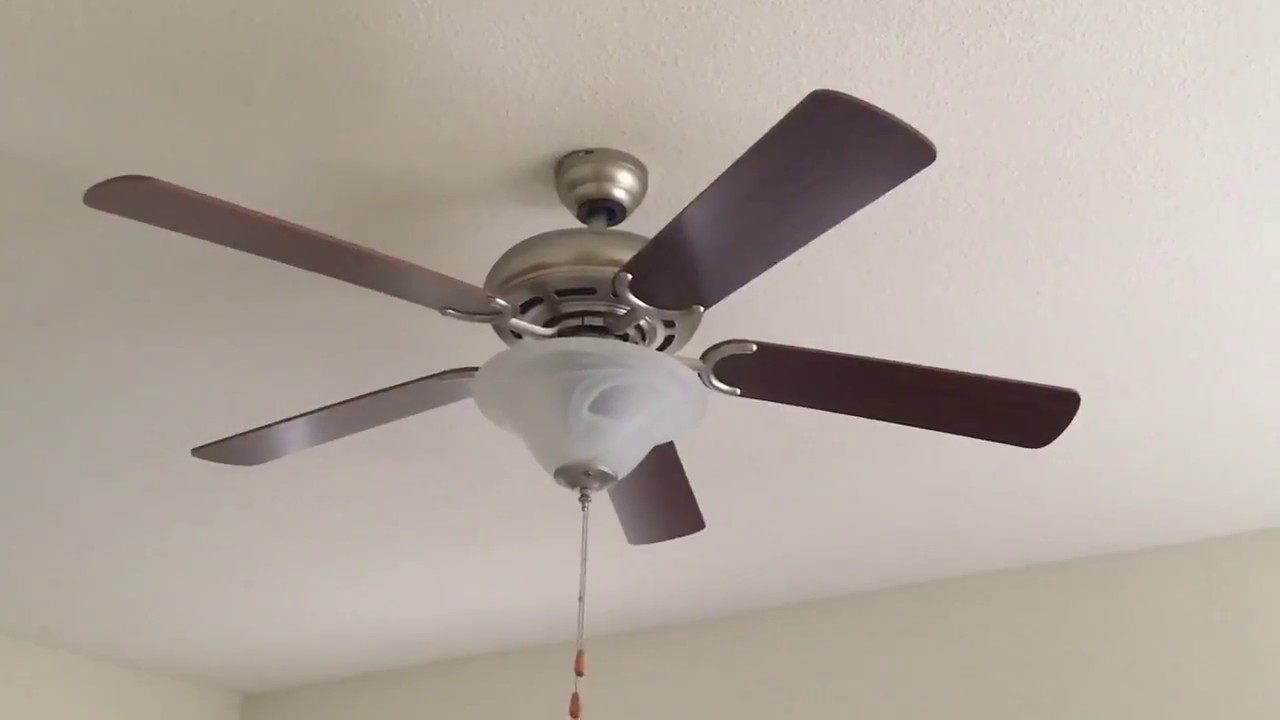
If you decide to replace your light kit, comparing a few popular Harbor Breeze models can help you choose the right one.
| Model Name | Light Type | Bulb Base | Features | Average Price |
|---|---|---|---|---|
| Harbor Breeze Armory | LED | Medium (E26) | Dimmable, frosted glass | $30 |
| Harbor Breeze Brushed Nickel | CFL | Candelabra (E12) | Modern look, energy efficient | $25 |
| Harbor Breeze Classic | Incandescent | Medium (E26) | Traditional style, clear glass | $22 |
Always confirm the compatibility of the kit with your fan model before purchasing.
Credit: www.youtube.com
Two Insights Beginners Often Miss
- Remote receivers can fail silently. Many people assume their remote is broken or batteries are dead, but often the receiver inside the fan fails. This can stop both the fan and light from working with the remote, even if the wall switch still works.
- Wire nuts can loosen over time. The vibration from your ceiling fan can slowly loosen wire nuts inside the light kit or ceiling box. This is a hidden issue that causes intermittent or total light failure, and is easy to fix once found.
Safe Disposal Of Light Bulbs
If your Harbor Breeze fan uses CFL bulbs, remember that they contain small amounts of mercury. Do not throw them in the trash. Instead, take them to a recycling center or a retailer that accepts used bulbs. LEDs and incandescent bulbs can be disposed of with regular household waste, but recycling is always better for the environment.
For more about safe bulb disposal and recycling, visit the US Environmental Protection Agency (EPA).
Credit: www.reddit.com
Frequently Asked Questions
What Should I Do If My Harbor Breeze Ceiling Fan Light Stopped Working But The Fan Still Works?
If the fan works but the light doesn’t, start by checking the light bulb, then the remote batteries or wall switch. If those are fine, check for loose wiring inside the light kit. If the problem remains, the light kit or remote receiver might need replacement.
Can I Use Led Bulbs In My Harbor Breeze Ceiling Fan Light?
Most Harbor Breeze fans support LED bulbs, but check the owner’s manual first. Make sure to use the correct base type and wattage. Some older models may not work with certain LED bulbs, especially if they use dimmers.
Why Does My Harbor Breeze Fan Light Flicker Or Dim Randomly?
Flickering can be caused by loose bulbs, weak wiring connections, or incompatible bulbs. Try tightening the bulb and checking for loose wires. If you use a dimmer switch, make sure your bulbs are dimmable and compatible with the switch.
How Do I Reset My Harbor Breeze Ceiling Fan Remote?
To reset the remote, turn off the power to the fan at the breaker for about 1-2 minutes. Turn the power back on, then press and hold the “fan off” button on the remote for 10 seconds. If this doesn’t work, check the dip switches inside the remote and receiver to ensure they match.
Who Should I Contact For Harbor Breeze Ceiling Fan Light Repairs Under Warranty?
For warranty repairs, contact the retailer where you purchased the fan (often Lowe’s) or Harbor Breeze’s customer service. Have your receipt and model number ready for faster service.
A ceiling fan light that isn’t working can be frustrating, but in most cases, the solution is within your reach. By following the troubleshooting steps in this guide, you can quickly identify and fix the problem—often without calling for professional help.
Regular maintenance, careful bulb selection, and attention to wiring will keep your Harbor Breeze fan light shining brightly for years to come. If you do need help, don’t hesitate to reach out to a qualified electrician or Harbor Breeze support for expert assistance.