If you have a Brita pitcher at home, you know how simple it makes clean drinking water. Many Brita models, especially the newer ones, come with a small light on the lid. This Brita filter indicator light tells you when to change your water filter. For most users, this light is a small thing that makes life easier—until it suddenly stops working or behaves strangely.
When the Brita pitcher light is not working, it can be confusing and even a little frustrating. You might start to wonder: Is my water still filtered? Did I install the filter wrong? Is something broken? The good news is, this problem is common, and in most cases, it is easy to fix at home.
In this article, you’ll find a clear explanation of why the Brita pitcher light stops working, how the indicator works, and what you can do to solve the problem. You’ll also learn how to prevent future issues, how the indicator compares to other brands, and what to look out for if you’re considering a replacement.
If you want safe, filtered water with less hassle, this guide will help you get your Brita pitcher back in working order.
Understanding The Brita Pitcher Light
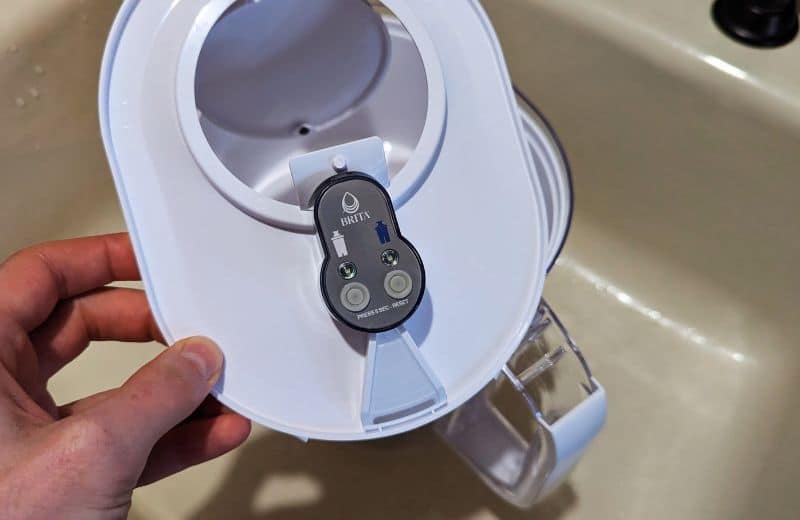
The Brita filter indicator light is a simple but important feature. Its main job is to remind you to replace the water filter on time. Most Brita pitchers with a light use a small electronic chip and a battery to track either time or usage.
There are two main types of Brita pitcher lights:
- Timer-based indicators: These lights count down the days (usually around 40) from when you install a new filter.
- Flow-based indicators: These sense when you pour water and count the number of pours.
When the filter is new, the light will show green. As you approach the end of the filter’s life, the light turns yellow, then red. A non-working or blinking light can mean different things, but usually, it signals a problem with the indicator itself, not the filter.
How Does The Indicator Work?
Brita’s indicator uses a small, built-in battery and a button or sensor to reset. When you press and hold the reset button after changing the filter, the system starts its count. Every time you pour water, a sensor detects the tilt or movement and updates the count.
Some models use a “SmartLight” system with three colors:
- Green: Filter is good.
- Yellow: Filter needs replacing soon.
- Red: Replace the filter now.
The indicator light is not directly connected to the filter’s actual condition; it only tracks time or usage. This means your water may still be filtered even if the light is off, but you should not ignore the light for too long.
Common Reasons The Brita Pitcher Light Is Not Working
When the light on your Brita pitcher does not work, it usually falls into one of these categories:
1. Dead Or Weak Battery
The indicator light runs on a small non-replaceable battery. After about 2-5 years, this battery may run out. Most Brita pitchers do not let you replace the battery, so if this is the issue, the whole lid may need replacing.
2. Incorrect Reset
If the filter indicator is not reset properly after installing a new filter, the light can show the wrong color or turn off completely. Make sure you press and hold the reset button for the time shown in the manual (usually 5-10 seconds).
3. Faulty Sensor
On flow-based models, a sensor inside the lid tracks each time you pour. If this sensor is dirty, misaligned, or broken, the light may not work or may blink strangely.
4. Water Damage Or Moisture
While Brita lids are designed to handle some water, too much moisture inside the lid can cause electrical problems. Water can get in through cracks or if the lid is washed in a dishwasher (not recommended for most models).
5. Manufacturing Defect
Though rare, some Brita lids have been known to have defects from the factory. If your light never worked or failed soon after purchase, this could be the reason.
6. Outdated Model
Older Brita models use mechanical timers or older circuit designs that are more likely to fail over time. These may have indicator problems simply due to age.
Non-obvious insight: Many users do not realize that the indicator battery is non-replaceable, so even careful handling cannot prevent eventual failure.
Troubleshooting: Step-by-step Solutions
If your Brita pitcher light is not working, you can often fix it yourself. Here’s a clear troubleshooting process to follow:
1. Check The Reset Process
After changing your filter, always reset the indicator:
- Remove the lid from the pitcher.
- Press and hold the reset button (usually labeled) for 5-10 seconds.
- Wait for the light to flash green, then release.
- If the light flashes or changes color, the reset worked.
If nothing happens, try again. If it still does not work, move to the next step.
2. Inspect For Water Or Moisture
Open the lid and check for any signs of water inside the electronics area. If you see moisture:
- Dry the area gently with a paper towel.
- Leave the lid open in a dry spot for 24 hours.
- Do not use a hair dryer or direct heat (this can damage plastic).
3. Clean The Sensor Area
On flow-based models, a small magnet or sensor detects pours. If this area is dirty:
- Use a cotton swab to gently clean the sensor area.
- Do not use harsh chemicals or soap.
4. Check For Visible Damage
Look for cracks or broken parts around the light or battery area. If you see damage, the lid may need replacing.
5. Test The Indicator
After drying and cleaning, try resetting the indicator again. If the light remains off, the battery is likely dead.
Pro tip: Sometimes, a stuck button can cause the indicator to fail. Gently press the button several times to release it, then try resetting.
When To Replace The Lid
If the above steps do not fix the problem, and the battery is dead or the electronics are damaged, you may need to buy a new lid. Brita sells replacement lids for many models, but some older models may require a full pitcher replacement.
How Long Should The Brita Pitcher Light Last?
The life of the Brita indicator depends on use and storage. On average:
- Battery life: 2-5 years (non-replaceable)
- Sensor life: As long as the battery lasts, unless exposed to water or physical damage
- Lid replacement cost: $10-$20 for most models
If you use your pitcher often, the indicator may run out of battery faster due to frequent sensor use.
Brita Indicator Lifespan Vs. Other Brands
Below is a comparison of typical filter indicator lifespans from top brands:
| Brand | Indicator Type | Average Lifespan | Battery Replaceable? |
|---|---|---|---|
| Brita | Timer/Flow | 2-5 years | No |
| ZeroWater | TDS Meter | 1-3 years | Yes |
| PUR | Mechanical Timer | 1-2 years | No |
| Soma | Manual Reminder | Unlimited | N/A |
Insight: Some brands let you replace the indicator battery or use a separate meter, which can save money over time.
Credit: waterfilterguru.com
Is Your Water Still Safe If The Light Is Off?
A non-working indicator does not mean your water is unsafe. The Brita filter itself continues to work as long as it is not clogged or expired. The indicator is only a reminder.
However, using a filter for too long can lead to:
- Reduced filtration (chlorine, metals, and taste may come back)
- Slow water flow
- Risk of bacteria if the filter is very old
If you do not have the light working, use the following rules:
- Change the filter every 40 gallons or 2 months, whichever comes first (for standard filters)
- For Longlast+ filters, change every 120 gallons or 6 months
Practical tip: Write the filter change date on a piece of tape and stick it to the pitcher. This old-school reminder works even if the light fails.
How To Replace A Brita Pitcher Lid
If you decide to replace the lid, follow these steps:
- Identify your model: Look at the bottom of your pitcher or inside the lid for the model number.
- Order the correct lid: Buy only from Brita’s official website or trusted retailers to avoid compatibility issues.
- Install the new lid: Remove the old lid, fit the new one onto the pitcher, and reset the indicator as per instructions.
- Test the light: Make sure the indicator flashes green after reset.
Below is a quick comparison of Brita lid types and compatibility:
| Pitcher Model | Lid Type | Indicator Type | Lid Replaceable? |
|---|---|---|---|
| Brita Everyday | Flip-top | Manual Timer | Yes |
| Brita Metro | Sliding | SmartLight | Yes |
| Brita Lake | Flip-top | Manual Timer | Yes |
| Brita Stream | Snap-on | No Light | N/A |
Note: Not all Brita pitchers have lights or compatible replacement lids. Always double-check before buying.

Credit: www.youtube.com
Preventing Future Brita Light Problems
You can make your Brita indicator last longer by following these simple tips:
- Do not wash the lid in the dishwasher. Most lids are not waterproof and can be damaged by heat or water inside the electronics.
- Avoid soaking the lid. Clean it with a damp cloth instead.
- Store in a dry place. Do not leave the pitcher near a sink or where water can splash into the lid.
- Reset correctly. Always follow the reset instructions when changing filters.
- Use only genuine Brita filters. Off-brand filters may not fit perfectly and can cause leaks or sensor issues.
Beginner mistake: Many people accidentally submerge the lid in water, thinking it is fully waterproof. This is a common cause of light failure.
Brita Pitcher Light Vs. Manual Tracking
Some users prefer to ignore the indicator light and track filter changes manually. Here’s how both methods compare:
| Method | Pros | Cons |
|---|---|---|
| Indicator Light | Automatic reminder, easy to use | Battery can die, possible false alerts |
| Manual Tracking | Never fails, no electronics | Easy to forget, needs personal discipline |
If you have a busy life or share your pitcher with others, the indicator light can be helpful—when it works.
When To Contact Brita Support
If your pitcher is still under warranty (usually 1 year), and the indicator light fails early, contact Brita support. They may send a replacement lid or pitcher.
To prepare for a support request:
- Keep your purchase receipt
- Take a photo of the pitcher and the problem
- Write down the model and serial number
Brita’s customer service can be reached through their official site or by phone. For more details, visit the Brita official support page.
Should You Upgrade Your Brita Pitcher?
If your pitcher is more than a few years old, you might consider upgrading to a newer model. Newer Brita pitchers have better indicators, easier filter changes, and sometimes improved filtering technology.
Things to look for in an upgrade:
- Longer-lasting filters (such as Longlast+)
- Improved indicator lights (brighter, easier to read)
- Dishwasher-safe lids (on some models)
- Better pouring design
Upgrading is optional, but if your current pitcher is leaking or cracked, it could be the right time.

Credit: www.reddit.com
Tips For Accurate Filter Tracking Without The Light
If you lose your indicator, you can still track filter changes with these simple methods:
- Calendar reminders: Set a phone reminder every 2 months.
- Write the date: Mark the date on the filter or pitcher with a waterproof marker.
- Use a filter log: Keep a simple notebook or digital note for each change.
These methods are more reliable over time and prevent running your filter too long.
Advanced tip: Some smart home apps let you schedule reminders for Brita filter changes.
Alternatives To Brita Pitcher Lights
If you want a more reliable filter tracking system, consider these alternatives:
- ZeroWater TDS meter: Measures actual water quality, not just time/usage.
- PUR mechanical timer: No battery, uses a rotating dial.
- Manual logs or apps: Not dependent on electronics.
Each has pros and cons, but all avoid the problem of a dead indicator light.
Frequently Asked Questions
What Should I Do If My Brita Light Flashes Red After Resetting?
A red light after reset usually means the filter is not installed correctly or the reset process was interrupted. Remove the filter, reinstall it, and try resetting again. Make sure you press and hold the button for the full recommended time.
Can I Replace The Battery In My Brita Pitcher Lid?
No, the battery in most Brita lids is non-replaceable. If the battery dies, you need to replace the whole lid or the pitcher.
Is It Safe To Use The Pitcher If The Indicator Light Is Off?
Yes, as long as you change the filter every 2 months (or 40 gallons), your water will still be filtered. The light is just a reminder, not a safety device.
Why Does My Brita Light Blink Every Time I Pour Water?
This is normal for flow-based indicators. The light blinks to show it has counted a pour. If the light blinks randomly or won’t stop, it could be a sensor problem or moisture inside the lid.
How Do I Know Which Brita Lid I Need For A Replacement?
Check the model number on your pitcher or inside the lid. Use this information to find the right replacement lid online or at a store. When in doubt, contact Brita support with your model details.
When your Brita pitcher light stops working, it can feel like a small but annoying problem. The good news is, you have many options to fix or work around it. Understanding why the light fails and how to track filter changes without it will keep your water safe and your pitcher running well.
With a little care, your Brita can continue to provide fresh water for years—even if the indicator light is gone.