If you rely on a Fitbit to track your health, it’s frustrating when the device stops recording your heart rate. This feature is key for measuring workout intensity, daily activity, sleep quality, and even your overall wellness. When your Fitbit isn’t tracking heart rate, it can feel like you’re missing the most important part of your health picture. But why does this happen—and more importantly, how can you fix it?
Fitbit heart rate tracking uses a technology called photoplethysmography (PPG). In simple words, the device shines a green LED light onto your skin, which is then absorbed or reflected by your blood. The sensor reads this reflection to estimate your heart beats per minute. But several things—both technical and practical—can interfere with this process.
Many users try basic fixes, but often miss small details that actually matter. For example, did you know the way you wear your Fitbit can make a bigger difference than the model you use? Or that certain activities can “confuse” the sensor? In this guide, you’ll learn not only the main causes of heart rate tracking problems, but also advanced troubleshooting steps and tips that most beginners overlook.
Let’s explore why your Fitbit might not be tracking your heart rate, and how you can get this vital feature working again.
Common Reasons Fitbit Is Not Tracking Heart Rate
When your Fitbit fails to pick up your heart rate, it’s rarely because the device is broken. Most problems have simple causes, and you can fix many at home with no special tools.
1. Poor Device Placement
Fitbits need to touch your skin closely to work well. If the device is too loose, too tight, or sits on your wrist bone, it may not get a good reading. The right fit is snug but comfortable—tight enough that the back of the device stays in contact with your skin, but not so tight that it leaves marks or feels uncomfortable.
A common mistake is wearing the Fitbit above the wrist bone, which can block the sensor. For most people, placing the device about one finger above the wrist bone gives the best results.
2. Dirty Sensor Or Skin
The optical sensor works best with a clean surface. Sweat, oils, lotion, sunscreen, or dirt can block the sensor’s light. Even small amounts of dust can affect readings. Clean the back of your Fitbit and your wrist with a damp cloth, then dry both. Avoid using soaps or harsh chemicals that can damage the device.
3. Low Battery
If your Fitbit’s battery is low, it may turn off the heart rate sensor to save power. Many models automatically disable non-essential features below a certain battery level (usually under 10%). Try charging your Fitbit to at least 50% and check if heart rate tracking returns.
4. Incorrect Settings
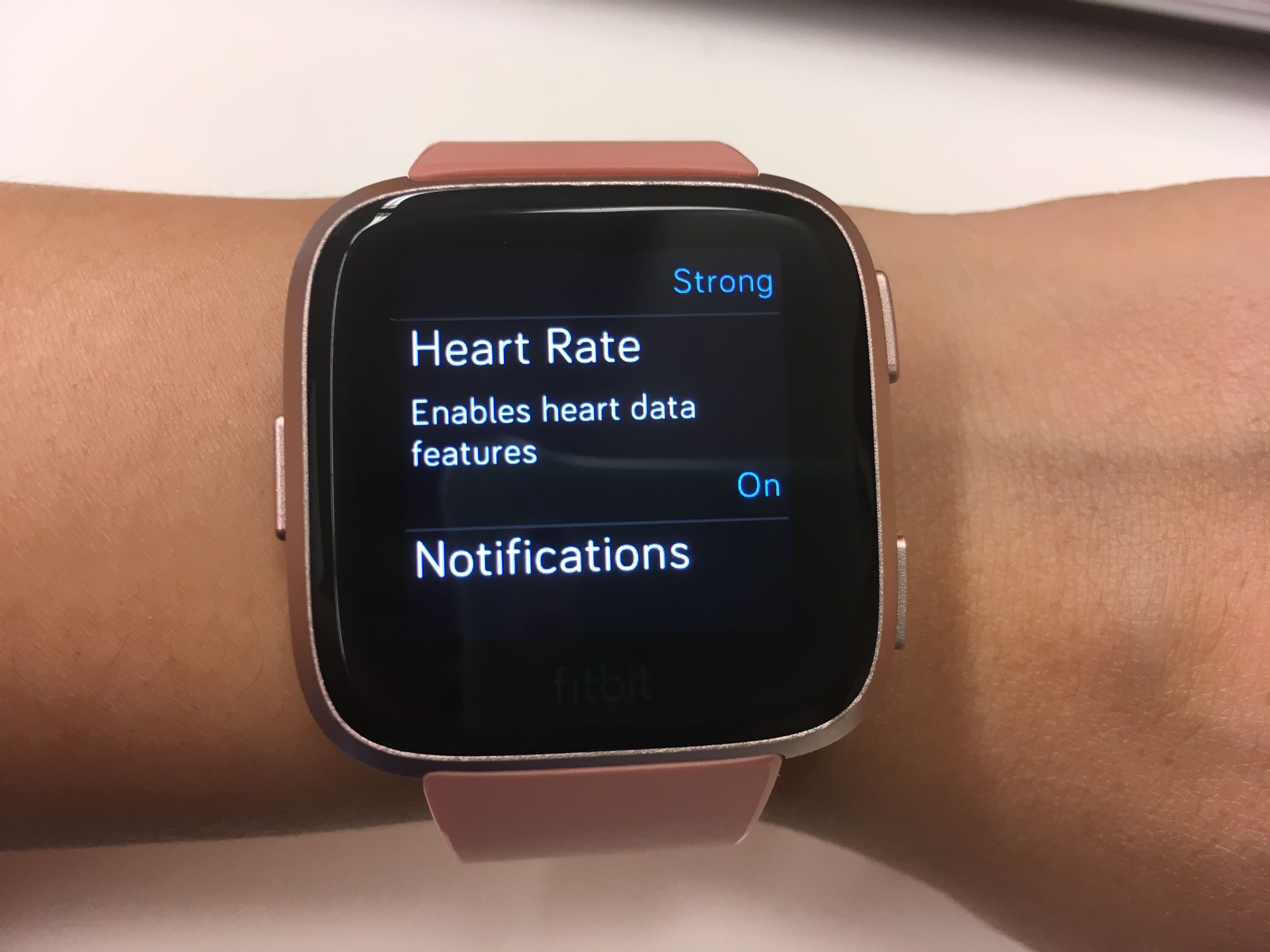
Some users accidentally turn off heart rate tracking in the Fitbit app or on the device itself. Each model has a setting to enable or disable this feature. Double-check your settings—look for options like “Heart Rate: Auto/On” and make sure it’s not set to “Off.”
5. Firmware Or App Issues
Outdated firmware or Fitbit app versions can cause bugs that interfere with tracking. Sometimes, a simple update fixes everything. Check for updates in both the Fitbit app and on your device.
6. Tattoos Or Dark Skin Tones
While Fitbit sensors work on most skin types, darker tattoos or dense body hair can confuse the optical sensor. The green LED light may not penetrate these surfaces well, resulting in poor or no readings.
7. Intense Or Repetitive Movements
During high-intensity exercise (like boxing or CrossFit), the constant, jerky movements can break contact between the device and your skin. This may cause the heart rate sensor to lose track, especially if the band isn’t secure.
8. Environmental Factors
Very cold temperatures can reduce blood flow to your wrists, making it harder for the sensor to detect a pulse. Similarly, extremely hot or humid weather can cause sweating, which sometimes interferes with readings.
9. Device Malfunction
In rare cases, the heart rate sensor may fail due to hardware issues. If you’ve tried all troubleshooting steps and still have problems, the device may need repair or replacement.
How Fitbit Heart Rate Tracking Works
Understanding how your Fitbit measures heart rate can help you solve problems more effectively. Most Fitbit models use PurePulse technology. Here’s what happens inside:
- The device shines green LED lights into your wrist.
- Blood absorbs green light; less light returns to the sensor when your heart beats.
- The sensor measures changes in light absorption with each beat.
- An algorithm calculates your heart rate in beats per minute (BPM).
This method works for most people, but it’s not perfect. Factors like movement, skin tone, and even wrist structure can affect accuracy.
Comparing Fitbit Heart Rate Accuracy To Other Devices
Below is a comparison of common heart rate tracking devices and their accuracy for daily use:
| Device Type | Accuracy (Resting HR) | Accuracy (Exercise) | Best Use Case |
|---|---|---|---|
| Fitbit (wrist optical) | ±5 BPM | ±10 BPM | Everyday tracking |
| Chest strap (ECG) | ±1 BPM | ±2 BPM | Sports, high-intensity |
| Smartwatch (Apple/Samsung) | ±5 BPM | ±8 BPM | General fitness |
Fitbits are generally reliable for everyday heart rate tracking, but for clinical accuracy—especially during intense exercise—a chest strap is better.
Credit: antillespr.edu
Step-by-step Troubleshooting Guide
If your Fitbit is not tracking heart rate, follow these steps in order. Each step builds on the previous one. Many users skip steps or try them out of order, which can lead to confusion.
Step 1: Check The Band Fit And Placement
- Remove your Fitbit and put it back on, making sure it’s snug but not too tight.
- Wear the device about one finger-width above your wrist bone (not directly on the bone).
- For high-intensity workouts, tighten the band slightly.
- Avoid wearing your Fitbit on the inside of your wrist.
Step 2: Clean The Sensor And Your Skin
- Use a damp, lint-free cloth to gently wipe the back of your Fitbit and your wrist.
- Dry both before wearing the device again.
- Do not use strong cleaners or solvents.
Step 3: Verify Heart Rate Settings
- On your Fitbit, swipe to Settings.
- Look for “Heart Rate” or a similar option.
- Make sure it’s set to Auto or On. If it’s off, turn it on.
- In the Fitbit app, tap your device image, go to device settings, and check heart rate preferences.
Step 4: Charge Your Device
- Connect your Fitbit to the charger.
- Wait until the battery is at least 50% full.
- Try using heart rate tracking again.
Step 5: Restart Or Reboot The Device
- Hold the main button(s) on your Fitbit until you see the logo (usually about 10 seconds).
- This refreshes the software and often fixes temporary glitches.
Step 6: Update Firmware And App
- Open the Fitbit app on your phone.
- Tap your profile picture, then your device image.
- If an update is available, you’ll see a prompt. Follow instructions to update.
- Update the Fitbit app itself from the App Store or Google Play.
Step 7: Test In A Controlled Environment
- Sit quietly for 5 minutes in a comfortable position.
- Place your Fitbit correctly and check if heart rate readings appear.
- If you only have trouble during exercise, try a lower-intensity activity to see if the problem persists.
Step 8: Try A Different Wrist
- Switch the device to your other wrist.
- Set your “Dominant hand” preference in the Fitbit app to match.
Step 9: Reset To Factory Settings (advanced)
- This step erases all stored data and resets your Fitbit to its original state.
- Only try this if other steps fail.
- Instructions vary by model—check the official Fitbit support site for your device.
Step 10: Contact Fitbit Support
- If none of the above works, your sensor may be faulty.
- Reach out to Fitbit customer support for further help or to request a repair.
Model-specific Tips And Issues
Not all Fitbit devices are the same. Some models have unique features or known problems that affect heart rate tracking.
Fitbit Charge Series
The Fitbit Charge line (Charge 2, 3, 4, 5) is popular for everyday use. These models sometimes have issues after software updates. If your Charge device stops tracking heart rate after an update, try restarting and updating again. On Charge 4 and 5, a factory reset can often solve stubborn issues.
Fitbit Versa And Sense Series
The Versa and Sense models use more advanced sensors and can track additional metrics like SpO2. These devices are sensitive to skin contact. If you see “–” instead of a number, clean both device and skin, and make sure the band is secure. Versa 2 and 3 users sometimes report issues with third-party watch faces—switch to an official Fitbit face to rule this out.
Fitbit Inspire Series
The Inspire models have smaller sensors and are more sensitive to placement. Make sure the device is not sitting on your wrist bone. Inspire 2 and 3 can be less accurate during activities that involve heavy wrist movement.
Fitbit Luxe
The Luxe is stylish but has a narrow band and sensor. For the best results, wear it snugly and avoid lotions or sunscreen under the device.
Older Models
If you use a Fitbit Alta HR, Blaze, or Charge HR, note that older hardware can degrade over time. If you’ve had your device for many years, sensor wear or battery aging may be the cause.
Comparing Model Features That Affect Heart Rate Tracking
Here’s a quick comparison of popular Fitbit models and their heart rate tracking features:
| Model | Heart Rate Sensor | Water Resistance | Best For |
|---|---|---|---|
| Charge 5 | PurePulse 2.0 | 50m | General health, sleep |
| Versa 3 | PurePulse 2.0 | 50m | Sports, smart features |
| Inspire 3 | PurePulse | 50m | Lightweight, style |
| Luxe | PurePulse | 50m | Fashion, daily wear |
Less Obvious Causes Of Heart Rate Tracking Problems
Some issues are easy to miss, even for experienced users.
Skin Temperature And Blood Flow
During cold weather, your blood vessels constrict, and less blood flows near the skin. This can make it much harder for your Fitbit to detect a pulse. Try warming your wrist or moving indoors before checking your heart rate.
Medications And Health Conditions
Certain medications (like beta blockers) or health conditions (such as arrhythmias) can change your heart rate patterns. This may confuse the device’s algorithm, causing gaps or errors in tracking.
Device Memory Full
If your Fitbit has not synced with the app for a long time, its memory can fill up. When this happens, the device may turn off some features (including heart rate tracking) to save space. Sync your Fitbit regularly to avoid this problem.
Bluetooth Interference
Fitbit devices sync via Bluetooth. If you have too many Bluetooth devices nearby, there may be interference that affects syncing and, rarely, real-time heart rate display. Move away from other Bluetooth devices during troubleshooting.
How To Improve Heart Rate Accuracy
If your Fitbit tracks heart rate but the numbers seem wrong, or the readings jump around, these steps can help improve accuracy.
1. Wear Position
- Place the device one finger above the wrist bone for everyday wear.
- For exercise, move the band slightly higher up the arm and tighten it a bit.
2. Avoid Lotions And Sunscreens
Even small amounts of lotion or sunscreen can block the sensor. If you use these products, apply them after putting on your Fitbit or avoid the area under the device.
3. Give It Time
Some Fitbits take up to 30 seconds to “lock on” to your heart rate, especially after putting the device back on or starting a workout. Wait for a stable reading before beginning activity tracking.
4. Try Different Bands
If you use a third-party or stretch band, it may not hold the device firmly in place. Consider switching to the original Fitbit band or a secure alternative.
5. Sync Frequently
Regular syncing keeps your device running smoothly and clears memory. This can improve overall performance, including heart rate tracking.

Credit: antillespr.edu
When To Replace Your Fitbit
Sometimes, the best fix is a new device. Here are signs your Fitbit may need to be replaced:
- The heart rate sensor never works, even after a reset and cleaning.
- The battery drains quickly or doesn’t hold a charge.
- The display or buttons stop working.
- The device is more than 3-4 years old and out of warranty.
Fitbit devices are not designed to last forever. Sensors and batteries can wear out with daily use. If your device is old, consider upgrading to a newer model with improved heart rate tracking.
The Role Of Heart Rate In Your Health Data
Heart rate tracking is not just for workouts. Fitbit uses your heart rate to calculate active minutes, calories burned, sleep stages, and even stress levels. If your heart rate data is missing, you lose accuracy in all these areas.
For example, Fitbit’s Active Zone Minutes feature uses your heart rate to decide how much exercise counts as “intense.” Sleep tracking uses heart rate patterns to estimate deep, light, and REM sleep stages. If heart rate tracking fails, you may see gaps in your sleep reports or calorie burn estimates.
Credit: amkglobalgroup.com
How To Check If Your Heart Rate Is Being Tracked
Fitbit shows heart rate data in several places:
- On the device screen (look for a heart icon and a number).
- In the Fitbit app dashboard (the heart rate tile).
- In exercise summaries or sleep logs.
If you see dashes (“–”) instead of a number, or the heart icon is gray, your Fitbit is not picking up a signal.
Comparing Fitbit Heart Rate Data With Medical Devices
Many users wonder if Fitbit heart rate data is as accurate as medical devices. The answer is: Fitbit is accurate enough for general wellness, but not for medical diagnosis. In studies, Fitbit and other wrist-based trackers are usually within 5-10 beats per minute of chest straps or ECG devices during rest. During intense exercise or with certain health conditions, errors can be larger.
Here’s a comparison:
| Device | Resting HR Accuracy | High-Intensity Accuracy | Clinical Use? |
|---|---|---|---|
| Fitbit Charge 5 | Good (±5 BPM) | Moderate (±10 BPM) | No |
| ECG Chest Strap | Excellent (±1 BPM) | Excellent (±2 BPM) | Yes |
| Manual Pulse Check | Good | Fair | Yes |
For daily fitness, Fitbit is a strong option. For heart conditions, chest pain, or arrhythmia monitoring, use a medical-grade device and consult your doctor.
What To Do If Fitbit Heart Rate Data Is Missing In Reports
If your Fitbit seems to track heart rate during the day but data is missing from your app or reports, try these steps:
- Sync your Fitbit manually by opening the app and tapping “Sync Now.”
- Check if the Fitbit app has permission to access your phone’s Bluetooth and location.
- Make sure you’re using the latest app version.
- Log out of the app and log back in.
- Restart both your phone and your Fitbit.
If data is still missing, check the Fitbit website dashboard (Fitbit Dashboard) to see if it appears there. Sometimes, data syncs to the web before appearing in the app.
When To Seek Professional Help
If you have tried all troubleshooting steps and your Fitbit still does not track heart rate, it may be time to get expert help. Here’s when you should contact Fitbit support:
- After a factory reset, the heart rate sensor still does not work.
- The device is under warranty (usually 1 year from purchase).
- You see error messages, flashing lights, or the device overheats.
- You notice skin irritation, burns, or other physical problems.
Fitbit support can offer repairs, replacements, or advanced troubleshooting. Keep your proof of purchase and serial number ready when you contact them.
Frequently Asked Questions
Why Does My Fitbit Show Dashes (–) Instead Of A Heart Rate?
Dashes mean your Fitbit is not detecting a pulse. This can happen if the device is loose, dirty, not in contact with skin, or the heart rate feature is off. Clean the sensor, adjust the fit, and check settings.
Can Tattoos Or Dark Skin Affect Fitbit Heart Rate Tracking?
Yes. Dark tattoos can block the green light from the sensor, reducing accuracy or stopping tracking. Most dark skin tones work fine, but dense tattoos or very dark pigmentation may cause problems.
What Is The Best Way To Wear My Fitbit For Heart Rate Tracking?
Wear your Fitbit snugly, about one finger above your wrist bone. Make sure the sensor touches your skin at all times. For workouts, move the band slightly up your arm and tighten if needed.
Is Fitbit Heart Rate Tracking Accurate For Medical Use?
No. Fitbit is not a medical device. It’s accurate enough for fitness tracking, but not for diagnosing health conditions or replacing medical tests.
My Fitbit Tracks Steps And Sleep But Not Heart Rate. Why?
Heart rate tracking uses a separate sensor from steps and sleep. If it stops working, it’s often due to settings, poor fit, a dirty sensor, or low battery. Follow the troubleshooting steps above to restore it.
If you want to learn more about wearable heart rate technology, check out this detailed explanation on Wikipedia.
Fitbit is a powerful tool for understanding your health, but like any technology, it needs proper care and setup. With a little patience and the right steps, you can usually solve heart rate tracking issues and get back to monitoring your wellness with confidence.