If your Vtech smartwatch is not charging, it can feel frustrating, especially when your child is eager to use it again. This problem is quite common and affects many Vtech watch models, including the Kidizoom Smartwatch DX2 and DX3. Luckily, most charging issues can be fixed at home with simple checks and steps. In this article, you’ll learn why your Vtech smartwatch may not charge, how to troubleshoot, and when to seek help. We’ll also cover some mistakes people often make and give practical tips so you can avoid future problems. Whether you’re a parent or a young user, you’ll find clear guidance to get your smartwatch working again.
Understanding How Vtech Smartwatches Charge
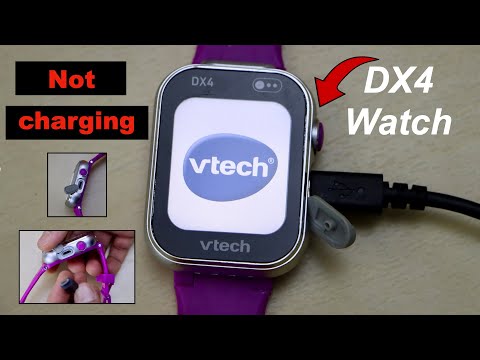
Vtech smartwatches usually use a micro-USB cable for charging. The watch’s battery is built-in and cannot be removed. Charging takes about 2 to 3 hours for a full charge, and a full battery lasts for 1-2 days with normal use. The charging port is usually on the side of the watch. When you plug it in, the watch screen should show a battery icon or charging message.
Typical Charging Setup
A Vtech smartwatch needs:
- Micro-USB cable (usually included)
- USB power adapter or a computer USB port
- Clean, working charging port
If any of these parts fail, the watch may not charge.
Common Reasons Why Your Vtech Smartwatch Is Not Charging
Many factors can cause charging problems. Here are the most frequent ones:
- Damaged cable: The cable may have cuts, bends, or broken connectors.
- Faulty power adapter: The adapter may not supply power.
- Dirty charging port: Dust or lint can block contact.
- Battery degradation: Older watches may have worn-out batteries.
- Software glitches: Sometimes the watch firmware needs a reset.
- Incorrect charging method: Using the wrong cable or adapter.
These issues can happen in any combination, and sometimes the fix is simpler than expected.
Credit: www.youtube.com
Step-by-step Troubleshooting Guide
Follow these steps to solve your charging problem. Many users skip basic checks and waste time, so start here.
Check The Charging Cable And Adapter
- Inspect the micro-USB cable for damage. Try charging another device with the same cable.
- Use a different USB power adapter. Many adapters fail, especially cheap ones.
- Test charging from a computer’s USB port.
Clean The Charging Port
- Look inside the watch’s port for dust, lint, or debris.
- Use a soft brush or compressed air to clean. Avoid sharp objects.
- Make sure the port is dry before charging.
Inspect For Physical Damage
- Check the watch’s charging port for bent pins or cracks.
- If you see damage, do not force the cable in. It may need repair.
Try A Different Cable
- Use a new or known working micro-USB cable.
- Avoid cables that are too loose or too tight in the port.
Restart The Watch
- Hold down the power button for 10 seconds to force a restart.
- Sometimes a simple reboot clears software errors.
Update Firmware (if Possible)
- Connect the watch to a computer.
- Visit the official Vtech website for firmware updates.
- Follow instructions to update, which may fix charging bugs.
Let The Battery Rest
- If the battery is completely drained, leave the watch plugged in for 30 minutes before turning it on.
- Some batteries need time to “wake up” after deep discharge.
Try A Wall Outlet
- Charging from a wall outlet is often faster and more reliable than a computer.
- Avoid USB hubs or extension cords.
Monitor Charging Indicators
- Watch for the battery icon or charging screen.
- If nothing appears, try a different cable, adapter, or port.
Data Table: Common Charging Problems And Solutions
Here’s a quick reference for some typical issues and how to fix them.
| Problem | Possible Cause | Recommended Solution |
|---|---|---|
| No charging icon | Damaged cable or adapter | Replace cable/adapter |
| Charging icon appears, but battery does not fill | Battery degradation | Contact Vtech support |
| Charging port loose | Physical damage | Professional repair |
| Charging only on computer | Adapter issue | Change adapter |
| Charging slow | Dirty port or weak adapter | Clean port/change adapter |
Credit: www.walmart.com
Key Mistakes To Avoid
Even experienced users sometimes make mistakes that worsen charging issues. Here are two common ones:
- Using a third-party cable: Not all micro-USB cables fit well or supply enough power. Always use the original Vtech cable or a high-quality replacement.
- Forcing the cable into the port: If the port is dirty or damaged, forcing the cable can break it completely. Clean gently and check before plugging in.
How To Prevent Charging Problems
You can avoid most charging issues with simple habits:
- Store the cable safely: Don’t bend or twist it.
- Clean the port regularly: Once a month, use a brush or compressed air.
- Charge before the battery is empty: Deep discharges are bad for batteries.
- Use the original adapter: Avoid cheap replacements.
- Update software: Check for Vtech updates every few months.

Credit: www.ifixit.com
When To Seek Professional Help
If your watch still won’t charge after all these steps, it may need expert repair. Here’s when to contact Vtech or a repair shop:
- The charging port is physically damaged or loose.
- The battery drains very quickly, even after charging.
- The watch overheats during charging.
- The charging icon never appears, even with new cables/adapters.
Vtech offers warranty support for most watches within 1 year of purchase. You can contact them through their official support page.
Comparison Table: Vtech Watch Models And Charging Issues
Different Vtech smartwatch models have slightly different charging problems. Here is a comparison:
| Model | Charging Port Type | Common Charging Issue | Solution |
|---|---|---|---|
| Kidizoom DX2 | Micro-USB | Port gets dirty | Clean port |
| Kidizoom DX3 | Micro-USB | Cable wears out | Replace cable |
| Kidizoom Connect | Micro-USB | Battery ages fast | Contact support |
| Kidizoom Smartwatch Plus | Micro-USB | Adapter fails | Change adapter |
How Long Should Vtech Smartwatch Batteries Last?
A new Vtech smartwatch battery usually lasts 1-2 years before losing capacity. After this, you may notice:
- The watch takes longer to charge.
- The battery drains faster.
- Charging stops working sometimes.
Most Vtech batteries are not user-replaceable. Professional replacement is possible, but often costs as much as a new watch.
Battery Performance Data
| Battery Age | Typical Battery Life | Charging Time |
|---|---|---|
| New (0-6 months) | 1-2 days | 2-3 hours |
| 1 year | 12-18 hours | 3-4 hours |
| 2 years | 6-8 hours | 4-5 hours |
| 3+ years | Less than 4 hours | May not charge |
Non-obvious Insights Most Beginners Miss
- Some power adapters supply too little current: Many USB adapters are designed for phones and tablets. If your adapter supplies less than 1A (1000mA), your watch may charge slowly or not at all. Check your adapter label for output specs.
- Charging in extreme temperatures reduces battery life: Don’t charge the watch if it feels very hot or cold. Room temperature is best. Charging outside 32–95°F (0–35°C) can cause permanent battery damage.
Real-life Example
A parent noticed their child’s Kidizoom DX2 was not charging, even after trying different cables. The charging port felt loose. On inspection, they found lint stuck inside. After cleaning with a small brush, the watch started charging again. This simple step solved the problem, saving the cost of professional repair.
Frequently Asked Questions
Why Does My Vtech Smartwatch Show A Charging Icon But Not Charge?
This usually means the battery is degraded or the cable is faulty. Try a new cable and adapter first. If the problem continues, the battery may need professional replacement.
Can I Use Any Usb Cable To Charge My Vtech Smartwatch?
Not all USB cables are the same. Some cables are too thin or poorly made. Always use the original cable or a high-quality micro-USB cable to avoid damage.
How Do I Know If The Charging Port Is Broken?
If the cable fits loosely, the port is cracked, or the charging icon never shows, the port may be broken. Physical damage is often visible. Avoid forcing the cable and seek professional repair.
Is It Safe To Charge My Watch Overnight?
Yes, it is generally safe. Vtech smartwatches have built-in protection. But avoid charging for days at a time or in hot environments, as this can shorten battery life.
Where Can I Get Help If My Watch Still Won’t Charge?
You can contact Vtech through their official support page. They offer warranty repair and advice. If your warranty has expired, a local electronics repair shop may help.
Getting your Vtech smartwatch charging again is usually a matter of careful checking and simple fixes. Most problems are caused by damaged cables, dirty ports, or weak adapters. Avoid common mistakes, clean regularly, and use the right charging gear. If your watch still won’t charge after trying all steps, don’t hesitate to seek professional help. With these tips, you can keep your Vtech smartwatch running smoothly and avoid future charging issues.