If you use the IQOS Iluma device, you might see a red light blinking at some point. This can feel confusing, especially if you are new to IQOS or switching from older models. Many users wonder, “Why is my IQOS Iluma red light blinking? What should I do?” This guide will explain everything you need to know in clear, simple English. You’ll learn what causes the red light, how to fix it, and how to keep your device working well.
What Is The Iqos Iluma?
The IQOS Iluma is a modern heated tobacco device from Philip Morris International. Unlike older models, it uses Smartcore Induction System technology. This means it heats tobacco sticks (called TEREA) without a blade, which reduces cleaning and makes the device more durable. Many users like the Iluma because it’s easy to use and gives a consistent taste. But, like any electronic device, sometimes it shows warning signals—like the red light blinking.
Understanding Iqos Iluma Red Light Blinking
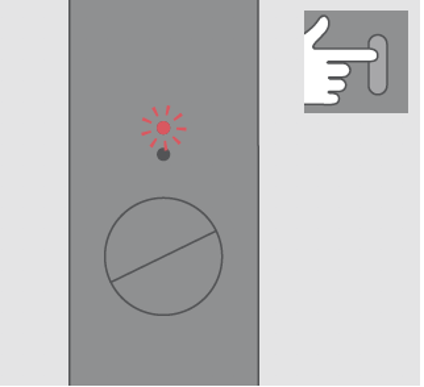
Seeing a red light blinking on your IQOS Iluma usually means there is a problem. It is the device’s way of telling you something needs attention. The red light can blink on the holder, the charger, or both. The meaning depends on where and how the light blinks.
Where Does The Red Light Appear?
- On the holder (the part you smoke with)
- On the pocket charger (the bigger device that charges the holder)
Sometimes, both may show a red light at the same time.
Common Patterns
- Single red light blinking: Most common warning
- Red light stays on: Less common, but also a problem
- Red and white lights blink together: Sometimes seen during charging errors
Understanding the pattern helps you know what to check next.
Credit: matsu.ae
Main Reasons For Iqos Iluma Red Light Blinking
Different things can cause the red light to blink. Here are the main reasons, with examples:
- Low battery – The device needs charging. If the battery is very low, it may not start heating.
- Device is too hot or too cold – The Iluma works best between 50°F and 104°F (10°C to 40°C). Extreme temperatures can cause errors.
- Dirty or blocked contacts – Dirt or debris on charging contacts can stop the device from charging properly.
- Malfunction or hardware issue – If something inside the device is broken or not working right.
- Software error – Sometimes, the device’s software needs to be reset or updated.
- Incorrect insertion of TEREA stick – If the stick is not put in correctly, the device will show a red light.
- Water or liquid damage – Exposure to liquids can cause the red light to blink.
What To Do When Iqos Iluma Red Light Blinks
Let’s look at practical steps to solve the problem, based on the most common reasons:
1. Check Battery Level
Plug your device into the charger and wait at least 20 minutes. If the red light goes away and the device works, the battery was just too low. If not, try a different charging cable and wall adapter.
2. Let Device Cool Down Or Warm Up
If you used the Iluma many times in a row, it may be too hot. Wait 10–15 minutes before using it again. If you are in a cold place, warm the device in your hand or pocket for a few minutes.
3. Clean Charging Contacts
Use a dry cotton swab to gently clean the metal contacts on both the holder and the charger. Do not use water or liquids. Even small dirt can stop charging.
4. Reset The Device
Most IQOS Iluma errors can be fixed by a reset:
- Hold the power button on the charger for 10 seconds until all lights blink, then release.
- Wait for the lights to go off and then on again.
- Try using the device.
A reset often clears software glitches.
5. Check Terea Stick
Remove the tobacco stick and check if it is inserted fully and correctly. Never use non-original or damaged sticks. Using the wrong stick can damage the device.
6. Inspect For Physical Or Water Damage
If the device got wet or dropped, the red light may signal damage. Let the device dry (if only a little water), but if the problem stays, contact IQOS support.
7. Try A Different Power Source
Sometimes, the USB cable or plug does not provide enough power. Switch to the official cable and charger from IQOS.
Practical Insight: Many users forget that even a small amount of dust or lint in the charging port can block power. Always check for this before thinking the device is broken.
Iqos Iluma Red Light Vs. Other Lights
The Iluma uses different color lights to show its status. Here’s a comparison:
| Light Color | Meaning | Action Needed |
|---|---|---|
| White | Ready, working, or charging | None, device is fine |
| Red (blinking) | Error or warning | Troubleshoot as above |
| Red (solid) | Serious problem or battery dead | Reset or service needed |
| Amber | Charging in progress | Wait until finished |
Non-obvious tip: Sometimes, users confuse the amber and red lights when charging. The red light always means a warning—amber is normal during charging.
How To Prevent Iqos Iluma Red Light Problems
Prevention is always better than repair. Here are practical ways to avoid common issues:
- Charge regularly – Don’t let the battery get too low.
- Keep device clean – Clean the contacts every week.
- Use only original TEREA sticks – Other sticks can block or damage the device.
- Avoid moisture – Keep your Iluma away from water, rain, and high humidity.
- Handle gently – Do not drop or shake the device.
- Store properly – Keep the device in a case when not using.
Storage Temperature Table
Proper storage helps your device last longer. Here’s a quick guide:
| Condition | Recommended Range | Risk if Ignored |
|---|---|---|
| Storage Temperature | 32°F to 95°F (0°C to 35°C) | Battery or hardware damage |
| Humidity | 20% to 80% | Corrosion or malfunction |
| Direct Sunlight | Avoid | Overheating, battery swelling |
Expert insight: Many users keep their IQOS in a hot car or bag. This can cause repeated red light errors due to heat stress.
Credit: www.vapourcore.com
When To Seek Professional Help
If you have tried all the troubleshooting steps and the red light keeps blinking, it’s time to get support. Signs you need expert help:
- Red light stays on after reset and cleaning
- Device does not charge at all
- Strange smells or sounds from the device
- Water damage or physical cracks
Contact your local IQOS store or visit the official support site. Sometimes, devices under warranty can be replaced for free.
Iqos Iluma Red Light: User Examples
Let’s look at three real-world examples:
Case 1: Maria noticed her Iluma holder’s red light blinked every time she tried to use it in the morning. She realized she left the device in her cold car overnight. Warming it up in her hand for five minutes solved the problem.
Case 2: John’s Iluma charger showed a red light when plugged in. After cleaning the contacts with a dry swab, the device worked again. Dust from his pocket was blocking the connection.
Case 3: Ahmed’s device kept blinking red even after charging and resetting. He found out his child had used a non-original stick. After switching back to TEREA and resetting, it worked fine.
These examples show that simple fixes often solve the problem.
Credit: www.iqos.com
Iqos Iluma Red Light: Common Myths
Myth: The red light means the device is broken forever.
Truth: Most red light issues are minor and can be fixed at home.
Myth: Any tobacco stick will work in the Iluma.
Truth: Only TEREA sticks are safe. Others can damage the device.
Myth: Cleaning with alcohol is best.
Truth: Alcohol can damage contacts. Use a dry swab only.
How Does Iqos Iluma Compare To Older Models?
The Iluma is different from earlier IQOS devices. Here’s a quick comparison:
| Feature | IQOS Iluma | IQOS 3 Duo |
|---|---|---|
| Heating technology | Induction (no blade) | Blade heating |
| Cleaning needed | Rare | Often |
| Red light issues | Less common, but possible | More common, often due to blade |
| Sticks compatibility | Only TEREA | HEETS and compatible |
Key point: The Iluma is more reliable, but red light errors can still happen if not used correctly.
When Is Replacement Needed?
Sometimes, the device cannot be fixed at home. You may need a replacement if:
- The red light stays on after all troubleshooting
- The device won’t turn on or charge
- There is visible damage or swelling
Check if your device is under warranty. Most IQOS Iluma devices have a one-year warranty. Keep your receipt and contact support for a replacement. For more information, check the official Philip Morris International website.
Frequently Asked Questions
Why Is My Iqos Iluma Red Light Blinking After Charging?
The red light can blink after charging if the device was not charged fully, if the contacts are dirty, or if there is a software glitch. Clean the contacts, try a reset, and use only the original charging cable and adapter.
Can I Use My Iqos Iluma If The Red Light Is Blinking?
No, you should not use the device when the red light is blinking. This signals a problem that needs fixing. Using it might cause more damage.
How Do I Reset My Iqos Iluma?
Press and hold the power button on the charger for 10 seconds until all lights blink. Release, wait for the lights to reset, then try again. This often solves software errors.
Does The Red Light Mean My Device Is Broken?
Not always. Most red light problems are easy to fix with charging, cleaning, or resetting. If the light stays on after all steps, the device may need repair or replacement.
Can I Fix The Iqos Iluma Red Light Myself?
Yes, most users can fix common red light issues at home by charging, cleaning contacts, checking the stick, and resetting the device. For more serious problems, contact IQOS support.
Keeping your IQOS Iluma working well is not difficult if you know what the red light means and how to handle it. With these tips, you can avoid stress and enjoy your device with fewer problems.