Quantum Fiber Blue Light Blinking
If you use Quantum Fiber for your internet, seeing a blue light blinking on your modem or gateway can be confusing. Many users wonder, “Why is the blue light blinking? Is my internet broken?” This blinking blue signal usually means something is happening with your connection, but the reason is not always obvious. Let’s explore what this blue light really means, what you should do, and how to get your internet running smoothly again.
What Does The Quantum Fiber Blue Light Mean?
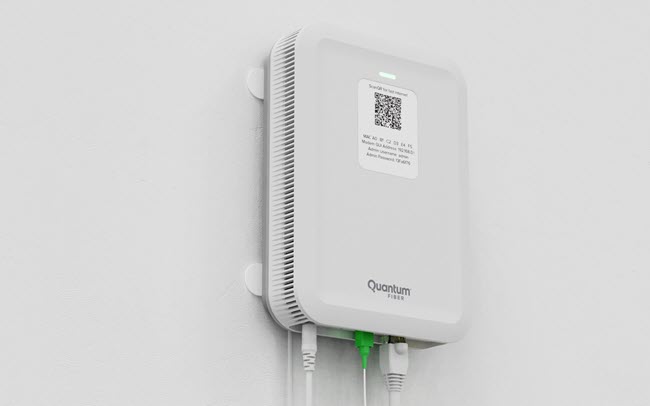
The blue light on your Quantum Fiber gateway is a status indicator. It tells you about the current state of your internet device. Quantum Fiber uses different colors and blinking patterns to communicate with you. Understanding these signals can save you time and frustration.
- Solid Blue Light: Your gateway is working and connected to the internet.
- Blinking Blue Light: The device is trying to connect or update.
- Red or Amber Light: There is a problem, like no connection or a hardware issue.
When the blue light is blinking, the gateway is in the process of setting up a connection. This usually happens after you restart the device, after a power outage, or when the system is updating firmware. Most of the time, this will resolve by itself in a few minutes.
Main Reasons For Quantum Fiber Blue Light Blinking
Many things can cause the blue light to blink. Here are the most common reasons:
- Device is starting up: After a reset or power cycle, the gateway checks for a connection.
- Firmware update: Your device may be downloading and installing new software.
- Trying to connect to the network: If the fiber line is disturbed, the gateway will keep searching for a signal.
- Service outage: There may be a problem in your area.
- Loose or damaged cables: Cables that are not connected properly can prevent the device from linking up.
Understanding these causes helps you decide what to do next. For example, if you just restarted the gateway, a blinking blue light is normal for a few minutes.
What To Do When You See A Blinking Blue Light
If you notice the blue light blinking for more than 5-10 minutes, it’s time to troubleshoot. Here are steps you can take:
1. Check The Fiber And Power Cables
Make sure all cables are tight and undamaged. The fiber optic cable is delicate. If it is bent or broken, your gateway cannot connect. The power cable must also be plugged in firmly.
2. Restart Your Gateway
Unplug the power from the gateway. Wait 30 seconds, then plug it back in. This simple step often solves many connection problems.
3. Wait For Firmware Updates
Sometimes, the device is updating its firmware. This can take up to 15 minutes. Do not unplug or restart the device during this time.
4. Check For Service Outages
Visit the Quantum Fiber website or call support to see if there’s a known service outage in your area. If there is, you must wait until the company fixes the problem.
5. Inspect The Ont (optical Network Terminal)
If you have a separate ONT, check its lights too. A red or off light here means a bigger network problem.
6. Contact Quantum Fiber Support
If you have tried everything and the blue light still blinks, call Quantum Fiber support. Give them details, such as how long the light has been blinking and any other changes.
Quantum Fiber Light Patterns: A Quick Reference
Understanding what each light means can help you diagnose problems quickly. Here’s a useful table for Quantum Fiber gateway light patterns:
| Light Color | Pattern | What It Means |
|---|---|---|
| Blue | Blinking | Connecting or updating firmware |
| Blue | Solid | Connected and working |
| Red | Solid/Blinking | No internet or hardware problem |
| Amber | Solid | Limited connectivity or error |
| No Light | Off | No power |
Keep this guide near your gateway for quick help.
Credit: www.quantumfiber.com
How Quantum Fiber Blue Light Differs From Other Providers
Not all internet providers use the same light signals. Here’s how Quantum Fiber compares to some other popular brands:
| Provider | Blinking Blue Light | Solid Blue Light | Red/Amber Light |
|---|---|---|---|
| Quantum Fiber | Connecting/Updating | Connected | Error/No Connection |
| AT&T Fiber | WiFi Protected Setup | Online | Error/Outage |
| Google Fiber | Booting/Setup | Online | Error/No Signal |
| Xfinity | WPS Mode | Online | Connection Issue |
As you can see, Quantum Fiber uses the blue blinking light for both setup and updates. Other providers may use different colors or meanings.
When Should You Worry About The Blinking Blue Light?
A blinking blue light is not always bad. Here are times when you should take action:
- The blue light blinks for more than 15 minutes.
- The internet does not come back after a power outage.
- The device restarts itself over and over.
- Other lights show red or amber.
If you see these signs, it’s more than just a normal update or reboot. You may have a fiber cut, device failure, or a service problem.

Credit: www.reddit.com
Advanced Troubleshooting Steps
Sometimes, the usual fixes are not enough. Here are deeper steps if you feel comfortable:
1. Check For Loose Fiber Connections
Open the fiber wall jack (if safe) and see if the cable is fully inserted. The connector should click in place. Do not force the cable—it can break.
2. Factory Reset Your Gateway
Find the reset button (usually at the back). Press and hold for 10 seconds. This will erase custom settings but can fix stubborn problems.
3. Test Another Outlet
Plug your gateway into a different power outlet. Sometimes, a bad outlet can cause issues.
4. Use The Quantum Fiber App
The Quantum Fiber app can tell you if there are known issues or updates. It can also guide you through simple fixes.
5. Review Recent Changes
Think about anything that changed recently: new devices, renovations, or moving the gateway. These can affect your connection.
Common Mistakes When Dealing With A Blinking Blue Light
Many users make errors when they see a blinking blue light. Avoid these common mistakes:
- Unplugging the gateway during an update: This can corrupt the firmware.
- Ignoring loose cables: Even a small movement can disconnect fiber.
- Skipping support resources: Quantum Fiber’s website and app often list real-time outages.
- Not checking for physical damage: Pets, cleaning, or furniture movement can break cables.
One non-obvious insight: Even dust inside the fiber port can block the signal. Use compressed air gently if needed.
Another point: If you rent your gateway from Quantum Fiber, do not open the device case. This may void your warranty.

Credit: www.reddit.com
How Long Should The Blue Light Blink?
Usually, the blue light blinks for 2-10 minutes during normal startup or after a reset. Firmware updates can take up to 15 minutes. If it continues after this time, there is likely a problem.
Here is a quick timing reference:
| Situation | Expected Blink Time | What To Do |
|---|---|---|
| Normal restart | 2-5 minutes | Wait, then check connection |
| Firmware update | 5-15 minutes | Wait, do not unplug |
| After outage | Up to 10 minutes | Wait, then restart if needed |
| More than 15 minutes | Over 15 minutes | Troubleshoot or contact support |
If you reach the last row, it’s time to get help.
When To Request A Technician
You should ask for a technician if:
- The blue light blinks for hours with no change.
- You find a broken or cut fiber cable.
- The ONT (if separate) has red or no lights.
- All other devices also lose internet.
- You have tried all steps and nothing helps.
Sometimes, outside work or physical damage to the fiber line is the cause. Only a technician can repair this.
Preventing Future Blue Light Issues
Some problems are preventable. Here are some tips:
- Keep cables tidy and away from pets or vacuums.
- Do not move the gateway often.
- Avoid plugging many devices into one power strip.
- Update gateway firmware regularly (if manual update is allowed).
- Use the Quantum Fiber app to monitor your network health.
It’s also helpful to note down when you see issues. This can help support staff diagnose repeat problems faster.
Real User Experiences
Some users share that their blue light blinked for hours, only to find the fiber cable was slightly loose after cleaning. Others experienced blinking after storms, which caused damage outside their home. In many cases, a careful cable check solved the problem.
A small number of users found that their gateway was faulty. In this situation, Quantum Fiber replaced the unit for free if it was under warranty.
Where To Find More Help
Quantum Fiber’s support site has guides and a live chat feature. The app can also walk you through basic tests. For detailed technical information, you can also check resources like Wikipedia’s fiber-optic communication article.
Frequently Asked Questions
Why Is My Quantum Fiber Blue Light Blinking For A Long Time?
If the blue light blinks for more than 15 minutes, your gateway may have trouble connecting, or there may be an outage or cable problem. Follow the troubleshooting steps above, and call support if needed.
Does A Blinking Blue Light Mean My Internet Is Down?
Usually, yes. While the blue light blinks, the gateway is not fully connected, so you will not have internet access. Wait a few minutes, then check again.
Can I Fix A Blinking Blue Light Myself?
Yes, many causes are easy to fix. Check cables, restart the device, and make sure there is no outage. More serious problems may need a technician.
Is It Safe To Unplug The Gateway While The Blue Light Blinks?
If the device is updating firmware, do not unplug it. If it is just reconnecting, a restart is safe. If you are not sure, wait 10-15 minutes first.
Will I Lose My Settings If I Reset The Gateway?
A simple power cycle does not erase settings. A full factory reset will erase custom settings like Wi-Fi name and password. Try other fixes first.
Quantum Fiber’s blue light blinking is usually a normal part of the device’s operation. Understanding what it means and knowing the right steps can save you hours of downtime and stress. With the information above, you’re ready to handle most situations confidently and keep your internet running smoothly.