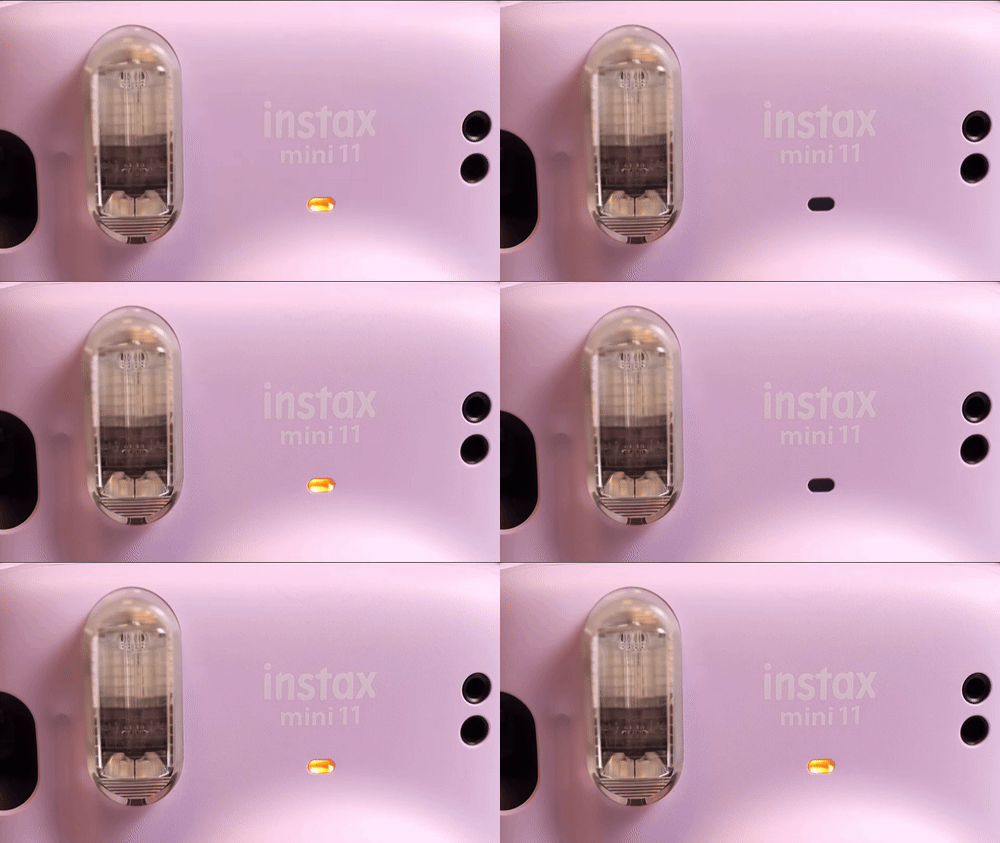
If you own an Instax camera and suddenly see an orange light blinking, it’s easy to feel worried. You just want your instant photos, but now your camera seems confused. Don’t panic—this blinking orange light is a common issue, and with a little help, you can fix it. Many Instax users face this, often after inserting new film or changing batteries. Understanding why this light blinks and what you should do can save you time, money, and frustration.
This article explains the causes of the Instax orange light blinking, how to diagnose the problem, and step-by-step solutions for different Instax models. We’ll also cover tips to prevent future problems and answer the most common questions. Whether you’re new to Instax or a long-time fan, this guide gives you clear answers, so you can get back to capturing memories.
What The Instax Orange Light Blinking Means
When you see the orange light blinking on your Instax camera, it’s the camera’s way of telling you something isn’t right. This light, usually near the viewfinder or around the lens, is there to warn you. But the meaning depends on the camera model and situation.
For most Instax Mini cameras, a blinking orange light can mean:
- The batteries are low or inserted incorrectly
- The film pack is empty or not installed properly
- The camera’s lens is not extended
- There’s a jam or mechanical problem
Some newer models may show extra signs, like error codes on a screen. But with classic Instax Minis, the blinking orange light is your main clue.
Instax Camera Models And Light Location
Different Instax models use blinking lights in slightly different ways. Here’s a quick overview:
| Model | Orange Light Location | Typical Meaning |
|---|---|---|
| Instax Mini 9/11 | Next to viewfinder | Battery or film issue |
| Instax Mini 8 | Above lens barrel | Lens or battery issue |
| Instax Mini 70/90 | LCD display + lens ring | Error or jam |
| Instax Square SQ6 | Next to lens | Battery or film |
It’s easy to mix up the lights on your camera. Always check your manual to know which light is which. But for most Instax Minis, the orange blinking light means “something’s wrong—check battery and film first. ”
Main Causes Of The Orange Light Blinking
Now, let’s look at the most common reasons for this blinking light. Understanding these causes helps you fix the problem faster.
1. Low Or Wrong Batteries
Old batteries are the number one reason for a blinking orange light. Instax cameras need fresh, strong AA or AAA batteries (depending on the model). Even if the batteries work in other devices, they might not have enough power for the Instax’s high-energy flash.
Some users make a common mistake: using rechargeable or mixed batteries. Instax cameras are very sensitive to battery type.
2. Film Pack Issues
If the film is not loaded right, or the pack is empty, the camera won’t work. The Instax needs to sense a full, correctly-inserted film pack to operate.
A classic beginner mistake is touching the film’s black backing or inserting the pack upside-down.
3. Lens Not Extended
On models like the Mini 8/9/11, the camera won’t work until you pull the lens out. If you turn on the camera but forget to extend the lens, the orange light blinks as a warning.
4. Camera Jam Or Mechanical Error
Sometimes, the camera’s internal gears get stuck. This can happen if you try to force the film pack in, drop the camera, or if dust gets inside.
5. Extreme Temperatures
Instax cameras and film packs are sensitive to cold or heat. Very cold batteries lose power quickly, and film can jam if frozen or overheated.
Step-by-step Fixes For The Blinking Orange Light
Let’s solve the problem. Work through these steps, one by one, to find and fix what’s wrong.
Step 1: Check And Replace The Batteries
- Open the battery cover.
- Remove both batteries—even if you just put them in.
- Wait 10 seconds to reset the camera.
- Insert two brand new, same-brand alkaline batteries (not rechargeable).
- Make sure the plus (+) and minus (–) ends match the markings.
Pro tip: Instax cameras drain batteries quickly, especially when using the flash. Always carry a spare set.
Step 2: Check The Film Pack
- Open the film compartment.
- Look for the yellow alignment marks—make sure they match.
- Never touch the black film backing.
- If the pack is empty (see white plastic at the back), install a new pack.
- Close the film door and listen for a whirring sound—this means the camera is ready.
Beginner insight: The first shot after inserting new film is the black “dark slide.” This is normal and protects the film.
Step 3: Extend The Lens
For Mini 8/9/11 and similar models:
- Turn on the camera by pressing the power button or pulling out the lens barrel until it clicks.
If the lens is not fully extended, the camera won’t shoot, and the orange light may blink.
Step 4: Remove Jams
If you hear grinding noises or the film won’t eject:
- Turn off the camera.
- Remove the batteries.
- Gently wiggle the lens back and forth (do not force).
- Reinsert batteries and try again.
If this does not help, you may need a camera repair specialist.
Step 5: Let The Camera Rest
If you’ve used the camera a lot in a short time, it may need a break. Let it rest for 15 minutes, then try again with fresh batteries.
Troubleshooting For Specific Instax Models
Here’s a quick reference for the most popular Instax cameras:
| Model | Battery Type | Common Fix |
|---|---|---|
| Instax Mini 8/9/11 | AA Alkaline | Replace batteries, check film, extend lens |
| Instax Mini 70 | CR2 Lithium | Replace battery, check film |
| Instax Mini 90 | NP-45S Rechargeable | Charge battery, check film, reset camera |
| Instax Square SQ6 | CR2 Lithium | Replace battery, check film alignment |
Knowing your exact model helps you find the right fix. The wrong battery type or inserting batteries backwards is a top cause for problems in the Mini 70 and SQ6.
Preventing Future Orange Light Problems
Most orange light issues are easy to prevent with good habits:
- Always use fresh, same-brand batteries.
- Store film in a cool, dry place (not in the fridge).
- Insert film packs gently, never force them.
- Avoid dropping or shaking the camera.
- Turn off the camera when not in use.
Non-obvious tip: If you see condensation or water inside the camera (after rain or cold), remove batteries and film. Let the camera dry for 24 hours before using it.

Credit: www.reddit.com
When To Seek Professional Help
If you’ve tried all the steps above and the orange light still blinks, your camera may have a deeper issue. Common signs you need expert repair:
- The camera makes grinding or clicking noises
- The lens won’t extend or retract
- The light blinks even with new batteries and film
- The display shows error codes
Contact Fujifilm support or a certified camera repair shop. Sometimes, a firmware update or small repair can bring your Instax back to life.
Instax Myths And Mistakes
Many users believe the orange light means their camera is “broken” or the film is “bad.” In reality, most problems are simple:
- Using old or cheap batteries
- Not extending the lens fully
- Inserting film upside-down
A less-known mistake: Some users try to “fix” the orange light by pressing the shutter button repeatedly. This can jam the camera gears and make things worse.
How To Tell If It’s The Battery Or Film
If you’re not sure whether the problem is the battery or film, try this:
- Remove film. Insert new batteries. Turn on the camera. If the orange light stays solid (not blinking), it’s likely a film problem.
- Insert new film. If the orange light blinks only with film, the pack may be faulty or not seated correctly.
You can also check the battery voltage with a tester. Good AA batteries should show at least 1. 5V each.
Instax Camera Orange Light: Quick Reference Guide
Here’s a practical summary for quick troubleshooting:
| Orange Light Behavior | Likely Cause | Suggested Fix |
|---|---|---|
| Blinks rapidly, no sound | Batteries low/dead | Replace with new alkaline batteries |
| Blinks after inserting film | Film pack not seated | Reinsert film, align yellow marks |
| Blinks after pressing shutter | Lens not extended | Pull out lens barrel |
| Blinks, camera whirs | Internal jam | Turn off, remove batteries, gently move lens |
Keep this guide handy when you travel or shoot events.

Credit: www.youtube.com
External Resources
If you need more details or want to read official advice, visit the Fujifilm Support page. They offer manuals, model-specific guides, and contact options for repairs.
Frequently Asked Questions
Why Does My Instax Camera Blink Orange After I Insert New Film?
The orange light blinks if the film pack is not installed correctly, or if the camera can’t detect it. Check that you lined up the yellow mark on the film pack with the one inside the camera. Also, make sure you did not touch the film’s black surface, which can damage it.
Can I Use Rechargeable Batteries In My Instax Camera?
Most Instax cameras work best with standard alkaline batteries. Rechargeable batteries (like NiMH) have a lower voltage and may not provide enough power for the flash, causing the orange light to blink. Always use the battery type recommended in your camera’s manual.
What Should I Do If The Light Blinks But The Camera Won’t Eject Film?
First, check the batteries. If they’re fresh, remove and reinstall the film pack, making sure it’s seated properly. If the problem continues, there may be a jam inside the camera. In that case, try gently moving the lens or contact a repair center.
Is The Blinking Orange Light Dangerous For The Camera?
No, the blinking light itself is just a warning. It won’t hurt the camera. However, if you keep trying to use the camera without fixing the cause, you might damage the gears or electronics. Always solve the issue before shooting again.
How Can I Avoid Orange Light Problems In The Future?
Use new, same-brand batteries; store film correctly; and be gentle when loading film. Don’t try to force the lens or film pack. Regularly clean the camera and avoid extreme temperatures for best results.
If you follow these tips, you’ll enjoy many happy Instax moments—without the worry of that blinking orange light.
Credit: www.aistudio.co.jp