When your Canon G2000 printer suddenly starts blinking its light 8 times, it can feel frustrating and confusing—especially if you rely on your printer for work or school. This error is common among Canon G-series owners, and understanding what it means can help you fix the problem quickly. In this article, you’ll learn why the Canon G2000 blinks 8 times, what causes it, and the best step-by-step solutions to get your printer running again.
What Does The Canon G2000 Light Blinking 8 Times Mean?
Canon printers use blinking lights to signal different types of errors. If your Canon G2000’s alarm or power light blinks 8 times in a row, then pauses, this is a specific error code. For the G2000, 8 blinks typically means the ink absorber is almost full or already full. The ink absorber is a pad inside your printer that collects excess ink during printing and cleaning cycles. When this pad reaches its limit, the printer warns you to prevent ink spills or internal damage.
Many users misunderstand this signal and try random fixes, but knowing the real cause saves time. Here’s what makes the 8-time blinking unique:
- It’s different from paper jams or cartridge errors.
- The printer will not print until you address the problem.
- Continuing to use the printer without fixing this can lead to ink leaking inside.
Why Does The Ink Absorber Get Full?
The ink absorber is a sponge-like pad that sits at the bottom of your printer. Every time you clean the print head or the printer runs maintenance, small drops of ink are flushed into this pad. Over months or years of use, the pad slowly fills up. The printer tracks how much ink is sent to the absorber and uses this to estimate when it’s full.
Some key reasons the ink absorber error happens:
- Frequent cleaning cycles: Running head cleaning often fills the pad faster.
- Heavy printing: Large print jobs, especially with lots of color, add more waste ink.
- Old printer age: Older machines are more likely to reach absorber capacity.
Can You Keep Printing With The Error?
Ignoring the 8-blink warning is not a good idea. If you keep using the printer:
- Ink may overflow inside, staining parts and causing permanent damage.
- Print quality can drop due to internal mess.
- The printer may shut down completely to prevent damage.
If you rely on your Canon G2000, it’s better to fix the problem as soon as you see the blinking lights.
How To Fix Canon G2000 Light Blinking 8 Times
Solving the 8-blink error involves two main steps: resetting the ink absorber counter and, if possible, cleaning or replacing the absorber pads. Here’s a practical guide.
1. Reset The Ink Absorber Counter
First, try resetting the printer’s internal counter. This tells the printer you’ve replaced or cleaned the pads, even if you haven’t yet.
How to reset:
- Turn off the printer but leave it plugged in.
- Press and hold the Stop/Reset button.
- While holding Stop/Reset, press and hold the Power button.
- Release the Stop/Reset button, but keep holding Power.
- Press the Stop/Reset button 5 times (each press should be quick).
- Release the Power button.
- Wait for the printer to enter service mode (the light will stay green).
- Turn off the printer, then turn it on again.
This process resets the error. If the blinking stops, you can print again—but this doesn’t solve a physically full absorber.
2. Clean Or Replace The Ink Absorber Pads
If the error comes back or you want a permanent fix, you need to clean or replace the absorber pads.
Steps for cleaning:
- Unplug the printer for safety.
- Open the printer cover and locate the ink absorber pads (usually on the right side, under the print head’s resting position).
- Remove the pads gently using tweezers.
- Wash the pads in warm water until clean. Squeeze out excess water and let them dry completely.
- If pads are too worn, replace with new ones (buy from a Canon dealer or online).
- Reinstall the pads, close the printer, and reset the counter as above.
Caution: Ink is messy and can stain hands and surfaces. Wear gloves and protect your work area.
3. When To Seek Professional Help
If you’re not comfortable opening your printer, or if the error comes back quickly, visit a Canon service center. They can replace the pads and reset the counter with specialized tools.
Common Mistakes To Avoid
Many users make errors that can make things worse:
- Ignoring the error and forcing the printer to keep working.
- Using the reset trick without cleaning the absorber—this can lead to ink leaks.
- Using wrong pads or DIY materials instead of Canon absorbers.
- Not drying pads completely before reinstalling.
Being careful with these steps keeps your printer working longer.
Diy Vs. Service Center: Which Is Better?
You might wonder if it’s worth fixing this yourself or going to a professional. Here’s a quick comparison:
| Option | Pros | Cons |
|---|---|---|
| DIY Cleaning | Cheap, fast, immediate | Messy, risk of mistakes, voids warranty |
| Service Center | Professional, safe, warranty protected | Costs more, takes time |
For most people, if your printer is out of warranty and you are careful, DIY is fine. If the printer is new or expensive, a professional service is safer.

Credit: printertales.com
How Long Does An Ink Absorber Last?
The lifespan of the absorber depends on your usage:
- Light use: 2-4 years before the error appears.
- Heavy use: 1-2 years.
- Frequent cleaning: Shortens the life further.
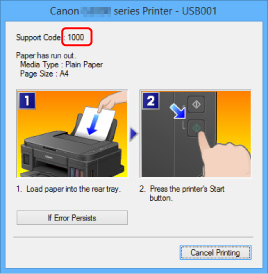
You can check the ink absorber’s status in the Canon software or by the error pattern. Some printers show a “Support Code 1700” on the computer screen, which matches the 8-blink error.
Preventing The Ink Absorber Error
While you can’t avoid absorber filling forever, you can make it last longer:
- Avoid unnecessary cleaning cycles. Only clean the print head if print quality drops.
- Print regularly. This avoids clogs and reduces the need for cleaning.
- Use high-quality ink to reduce waste.
- Monitor absorber status in the Canon software.
Similar Errors And How To Tell The Difference
Canon printers use different blinking codes for different problems. Here’s how the 8-blink error compares:
| Blink Count | Error Type | What It Means |
|---|---|---|
| 2 times | Paper out | No paper in tray |
| 3 times | Paper jam | Paper stuck inside |
| 4 times | Ink cartridge error | Problem with ink tank |
| 8 times | Ink absorber full | Needs cleaning/reset |
Knowing the exact blink code helps you avoid the wrong fixes.
Cost Of Fixing The Ink Absorber
Fixing the 8-blink error is usually not expensive:
- DIY cleaning: Free (if you reuse pads), or $5–$15 for new pads.
- Service center: $20–$50 depending on your location.
Compare this with the cost of a new printer, and you’ll see fixing is usually worth it.
Real-world Example
A small office in Jakarta used a Canon G2000 for three years and printed about 1,500 pages per month. One day, the light started blinking 8 times. They tried resetting, but the error returned. After opening the printer, they found the absorber pad was soaked.
Cleaning and drying the pads, then resetting the counter, restored the printer to normal. This simple fix saved them the cost of a new machine.
When Is It Time To Replace The Printer?
If your Canon G2000 is very old or if the absorber fills up again quickly after cleaning, it may be time for a new printer. Signs to look for:
- Pads get full every few months.
- The printer has other issues (like slow printing or low quality).
- Repair costs are more than half the price of a new model.
In these cases, replacement is a smarter investment.
Credit: ij.manual.canon
Where To Find Official Help
If you need extra guidance, Canon’s official website provides manuals and support pages. You can also visit a local Canon-authorized service center. For more details on Canon’s error codes and troubleshooting, see the Canon Support Center.
Frequently Asked Questions
Why Does My Canon G2000 Keep Blinking 8 Times After Resetting?
Even if you reset the counter, if the ink absorber pad is actually full, the error can return quickly. Resetting only clears the warning, but does not physically empty the pad. Clean or replace the pads for a lasting solution.
Can I Use Paper Towels Or Sponges As Absorber Pad Replacements?
It’s not recommended. Canon’s pads are made to absorb a lot of ink and resist mold. Using DIY materials can cause leaks or printer damage. Always use proper Canon absorber pads when possible.
Is It Safe To Keep Printing After The 8-blink Error?
No. Continuing to print may cause ink to spill inside the printer, damaging electronics and making repairs more expensive. Always address the error before printing again.
How Do I Know If I Need A Professional Repair?
If you’re not comfortable opening your printer, or if the error keeps returning after cleaning and resetting, a Canon technician can help. Also, visit a service center if your printer is under warranty.
Will Cleaning The Absorber Pads Void My Warranty?
Yes, opening the printer and handling internal parts can void any remaining warranty. If your Canon G2000 is still covered, it’s best to use official service channels.
Fixing the Canon G2000 light blinking 8 times may sound complicated, but most users can solve it with a little patience. By understanding the cause, avoiding common mistakes, and knowing when to seek help, you’ll keep your printer running smoothly for years.

Credit: www.youtube.com