If you own a Dyson Airwrap, you probably love how this styling tool transforms your hair quickly and safely. But seeing a red light blinking on your Airwrap can be confusing and worrying. Is it a warning? Is your device damaged? Should you stop using it right away? Many people face this issue, but clear answers are often hard to find. This guide gives you everything you need to know—why the red light blinks, what it means, and how to fix it. You’ll also learn about maintenance, common mistakes, and how to keep your Airwrap working perfectly. If you’re tired of vague advice and want real solutions, you’re in the right place.
What Does The Red Light Blinking Mean?
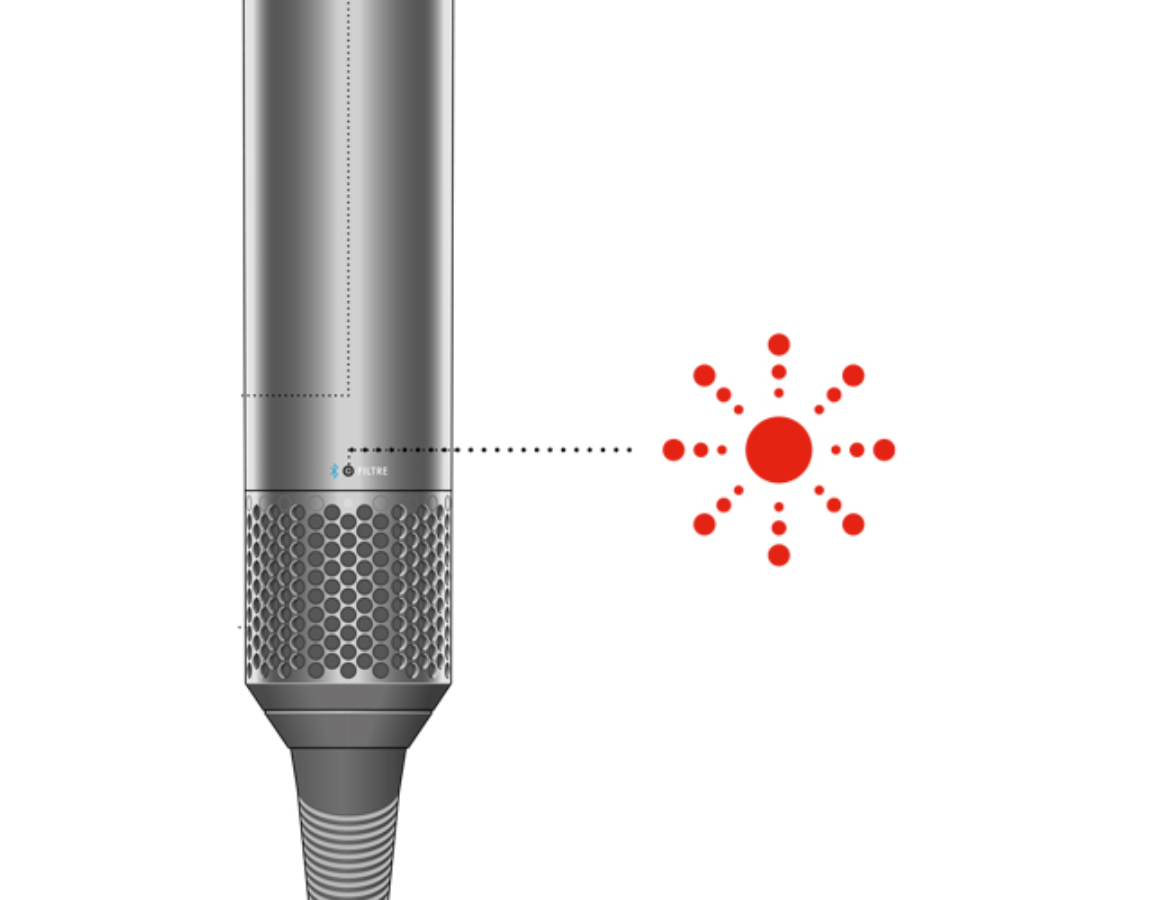
When the Dyson Airwrap red light blinks, it’s not just an annoyance. This signal means the device needs your attention. The red light usually appears near the filter at the base of the handle. Dyson designed this alert to help you prevent bigger problems.
Common Reasons For The Red Light
- Filter Needs Cleaning: The most frequent cause. Dust and hair can block the filter, making the Airwrap work harder.
- Filter Not Attached Properly: Sometimes, after cleaning, the filter isn’t snapped back securely.
- Airflow Obstruction: Something is blocking the air intake or exhaust.
- Overheating: If the Airwrap is used for a long time, internal sensors may trigger the light to protect the device.
- Technical Fault: Rare, but possible. Electronic issues inside the Airwrap can trigger the light.
The Red Light Vs Other Lights
Your Dyson Airwrap uses different colored lights for different signals. Here’s a quick comparison:
| Light Color | Meaning | Action Needed |
|---|---|---|
| Red (Blinking) | Filter issue or device error | Clean filter, check for obstructions |
| White | Normal operation | None |
| Blue | Cool shot active | None |
| Red (Solid) | Overheating or technical fault | Turn off and allow to cool |
Step-by-step: What To Do When You See The Red Light
Many people panic and stop using their Airwrap, but the solution is often simple. Follow these steps:
1. Turn Off And Unplug
Safety comes first. Turn off your Airwrap and unplug it before doing anything else.
2. Remove The Filter Cage
At the base of the handle, you’ll see a small cage. Gently twist it and slide it off. The cage protects the filter and is easy to remove.
3. Clean The Filter
Use the cleaning brush that comes with your Airwrap. If you lost it, a soft toothbrush works too.
- Brush away dust and hair from the filter mesh.
- Run the brush along the inside and outside until clean.
Some people forget to clean the filter regularly, which is a common mistake. Dyson recommends cleaning every month for best performance.
4. Reattach The Filter Cage Properly
Make sure the cage clicks back into place. If it’s loose, the Airwrap may not work correctly.
5. Plug In And Test
Turn your Airwrap back on. If the red light is gone, you fixed the problem. If it’s still blinking, try cleaning again or check for blockages.
6. Look For Obstructions
Check for hair or dust in the air intake and exhaust vents. Remove anything you find.
7. Allow To Cool
If you’ve used your Airwrap for a long time, let it cool for 15–30 minutes before retrying.
8. Contact Dyson Support
If the red light stays on after trying all steps, there may be a technical fault. Contact Dyson customer service or visit an official repair center.
Credit: support.dyson.com.au
Why Cleaning The Filter Matters
The Airwrap uses a powerful motor and airflow to style hair. Blockages put extra stress on the system, which:
- Reduces performance (less heat or weaker airflow)
- Causes overheating
- Shortens device lifespan
Regular filter cleaning keeps your Airwrap safe, efficient, and under warranty. Dyson data shows that over 60% of repairs are due to poor maintenance, especially filter neglect.
Preventing The Red Light Blinking
You can avoid most issues by taking care of your Airwrap.
Routine Maintenance Tips
- Clean the filter monthly
- Store the Airwrap in a cool, dry place
- Keep attachments free from hair and debris
- Check vents for blockages
- Avoid using with wet hands or near water
Some users think only cleaning the filter is necessary, but cleaning the whole device prevents dust buildup in other parts.
How Often Should You Clean?
The right cleaning frequency depends on your usage:
| Usage Frequency | Recommended Cleaning |
|---|---|
| Daily | Every 2 weeks |
| Weekly | Once a month |
| Occasional | Every 2–3 months |
Mistakes That Make The Red Light Appear
Even careful users make mistakes. Here are common errors:
- Ignoring the filter cage: Cleaning the filter but not the cage.
- Reattaching filter cage incorrectly: Not clicking it back fully.
- Using attachments with debris: Hair and dust on barrels can block airflow.
- Storing in humid places: Moisture can cause sensor errors.
- Overusing the device without breaks: Extended use overheats the motor.
A non-obvious insight: If you style hair with heavy products (like mousse or spray), these particles can clog the filter faster, so clean more often.
How The Red Light Affects Performance
If you ignore the red light, your Airwrap will:
- Lose power: Weaker airflow and less heat
- Stop working: Safety features may shut it down
- Get damaged: Internal parts overheat and wear out
Some users report that ignoring the blinking red light caused their device to fail within months, costing up to $100 in repairs.

Credit: www.youtube.com
Technical Faults: When To Worry
Sometimes, the red light is not about the filter. Technical problems are rare, but important:
- Sensor malfunction: Internal sensors may break, sending false signals.
- Motor issues: If the motor overheats or fails, the red light may blink or stay solid.
- Circuit board errors: Electrical faults can trigger the light.
If you try all cleaning steps and the light stays on, don’t open the Airwrap yourself. This voids the warranty and can be dangerous. Instead, call Dyson or visit their service center.
Comparing Dyson Airwrap Models: Red Light Alerts
Not all Airwrap models use the same signals. Here’s a comparison:
| Model | Red Light Location | Alert Type | Self-Cleaning Feature |
|---|---|---|---|
| Airwrap Original | Base of handle | Blinking & solid | No |
| Airwrap Complete | Base of handle | Blinking & solid | No |
| Airwrap Multi-Styler | Near power button | Blinking only | Yes |
If you have the Multi-Styler, it may alert you to clean the filter but also has a self-cleaning mode. Check your manual for details.
Dyson Airwrap Warranty And Repairs
Every Dyson Airwrap comes with a 2-year warranty. If your device needs repair, Dyson usually covers:
- Filter and sensor issues
- Motor faults
- Circuit board errors
If damage is due to misuse (like dropping the device or opening it yourself), the warranty may not apply. Always follow Dyson’s maintenance instructions.
Repair Costs
Out-of-warranty repairs can cost:
- Filter or sensor replacement: $40–$70
- Motor repair: $100–$150
- Circuit board: $120–$200
These prices are averages based on US repair shops.
Real-life Examples: Red Light Blinking
Many users share their experiences online. Here are some real stories:
- Samantha (New York): Her Airwrap red light blinked after six months. Cleaning the filter fixed it in two minutes.
- Carlos (Texas): The light stayed on after cleaning. Dyson support replaced a faulty sensor under warranty.
- Lina (California): She ignored the blinking red light for weeks. The Airwrap overheated and stopped working, costing her $120 to fix.
These stories show that simple maintenance can save time and money.
Non-obvious Tips For Airwrap Owners
- Use compressed air: Blow out dust from vents for deeper cleaning.
- Rotate attachments regularly: Some barrels collect more hair and dust than others.
- Check your power outlet: Voltage fluctuations can trigger false alerts.
- Don’t store with power cord wrapped tightly: This stresses internal wiring.
Beginners often miss the power outlet tip—sometimes, a blinking red light is caused by unstable power.
When To Replace Your Dyson Airwrap
If your Airwrap keeps showing the red light and repairs don’t help, it may be time to replace it. Signs include:
- Red light appears even after cleaning
- Strange noises from the motor
- Device shuts down unexpectedly
- Warranty expired and repair costs are high
Dyson recommends replacing devices after 5 years of heavy use.

Credit: support.dyson.co.nz
How To Get Help From Dyson
Dyson offers support online and in stores. To get help:
- Visit the official site for troubleshooting guides
- Chat with customer service
- Find local repair centers
For more details about Dyson Airwrap maintenance and troubleshooting, check the official Dyson Support page.
Frequently Asked Questions
What Does It Mean If The Dyson Airwrap Red Light Is Blinking?
A blinking red light means there is a filter issue, airflow problem, or the device is overheating. Clean the filter and check for blockages. If the light stays on, contact Dyson support.
How Often Should I Clean My Dyson Airwrap Filter?
For daily users, clean every 2 weeks. For weekly users, clean once a month. If you use styling products, clean more often.
Can I Use My Dyson Airwrap If The Red Light Is Blinking?
It’s best not to use the device when the red light is blinking. Doing so can cause damage or reduce performance. Clean the filter and check for obstructions first.
Is The Red Light Blinking A Sign Of A Serious Fault?
Usually, it’s a maintenance alert. But if cleaning does not help, it may signal a technical fault. If so, contact Dyson or visit a repair center.
Will Ignoring The Red Light Void My Warranty?
Ignoring maintenance can lead to damage that is not covered by warranty. Always follow Dyson’s cleaning and care instructions to stay protected.
Taking care of your Dyson Airwrap keeps your hair styling routine smooth and your device safe. The red light blinking is a helpful warning—not a reason to panic. With regular cleaning and smart maintenance, you’ll enjoy the Airwrap for years.
If you ever face stubborn issues, Dyson support is ready to help. Remember these tips and you’ll never let a blinking light slow you down.