Yahoo Mail and Microsoft Outlook are two popular email services used by millions around the world. Many users combine the strengths of both: managing all emails in Outlook while using their Yahoo Mail account. This setup should make life easier, not harder. But sometimes, Yahoo Mail not syncing with Outlook becomes a real headache. Emails don’t arrive, folders don’t update, or sent messages go missing. If you rely on both services—at home or work—these problems can quickly disrupt your routine.
This guide aims to help you understand why Yahoo Mail and Outlook stop syncing, how to fix the most common problems, and what steps you can take to prevent future issues. We’ll also explore advanced solutions, real-world examples, and practical tips that often get overlooked.
If you want your Yahoo Mail and Outlook to work smoothly together, you’re in the right place.
Why Yahoo Mail Fails To Sync With Outlook
When you connect Yahoo Mail to Outlook, both services must communicate using certain protocols and settings. If something goes wrong—on either side—syncing stops. Let’s break down the most common reasons behind the problem.
- Incorrect Email Settings: Outlook needs the right Yahoo server addresses and security options. Even a small typo can block syncing.
- Outdated App Passwords: Yahoo sometimes requires a special password for Outlook, called an “app password.” Forgetting to update or use this can prevent syncing.
- Two-Step Verification Issues: If you use two-factor authentication on Yahoo, you must set up Outlook correctly. Missing this step will cause errors.
- Corrupted Outlook Profile: Sometimes, your Outlook profile gets damaged and stops working with Yahoo Mail.
- Internet Connection Problems: Weak or unstable connections can interrupt syncing.
- Server Outages: If Yahoo or Microsoft servers are down, syncing will fail for everyone, not just you.
- Firewall or Antivirus Blocks: Security software can sometimes block Outlook from reaching Yahoo servers.
- Large Attachments or Mailbox Size: Very large emails, or a mailbox full of old messages, can stop new messages from arriving.
Non-obvious insight: Many users forget that even after fixing the settings, Outlook may take several minutes to re-sync with Yahoo. Patience is sometimes the missing piece.
How Yahoo Mail And Outlook Connect: The Technology Explained
To solve syncing issues, it helps to understand how both platforms communicate.
IMAP vs. POP3: These are the two main methods for connecting Yahoo Mail to Outlook.
- IMAP keeps your emails and folders the same on all devices. Deleting a message on your phone deletes it everywhere.
- POP3 downloads emails to one device and usually deletes them from the server. This can cause confusion if you check mail in multiple places.
Yahoo Mail recommends using IMAP for most users because it keeps everything in sync.
App Passwords: If you use two-step verification, Yahoo requires a unique app password for Outlook. This is different from your regular Yahoo login.
Here’s a simple comparison of IMAP and POP3 for Yahoo Mail and Outlook:
| Feature | IMAP | POP3 |
|---|---|---|
| Syncs across devices | Yes | No |
| Folders supported | Yes | No |
| Emails deleted from server | No (unless deleted in client) | Often Yes |
| Best for multiple devices | Yes | No |
Non-obvious insight: If you ever switch from POP3 to IMAP, you may need to manually move old emails to the new account in Outlook, or they could disappear.
Step-by-step: How To Set Up Yahoo Mail In Outlook
Before troubleshooting, make sure Yahoo Mail is set up correctly in Outlook. Here’s how:
- Enable IMAP in Yahoo Mail:
- Log in at mail.yahoo.com.
- Go to Settings > More Settings > Mailboxes.
- Under “Mailbox sync settings,” make sure IMAP is enabled.
- Get an App Password (if using two-step verification):
- Go to your Yahoo Account Security page.
- Click “Generate app password.”
- Choose “Outlook” and copy the code.
- Add Yahoo Mail to Outlook:
- Open Outlook and go to File > Add Account.
- Enter your Yahoo email and use the app password (not your main Yahoo password).
- Choose “IMAP” as the account type.
- Enter these server settings:
| Setting | IMAP | SMTP |
|---|---|---|
| Server | imap.mail.yahoo.com | smtp.mail.yahoo.com |
| Port | 993 | 465 or 587 |
| Encryption | SSL/TLS | SSL/TLS |
| Username | Your full email address | Your full email address |
| Password | App password (if needed) | App password (if needed) |
- Test the Connection:
- Send a test email to yourself. Check if it arrives in both Yahoo Mail (web) and Outlook.
Troubleshooting: Fixing Yahoo Mail Not Syncing With Outlook
If your Yahoo Mail still isn’t syncing with Outlook, follow these steps. Work through each one until you find the solution.
1. Double-check Server Settings
A tiny mistake can break everything. Open Outlook, go to your Yahoo account settings, and review:
- IMAP server: Imap.mail.yahoo.com, port 993, SSL/TLS enabled
- SMTP server: Smtp.mail.yahoo.com, port 465 or 587, SSL/TLS enabled
- Username: Full Yahoo email address
- Password: App password (if using two-step verification)
2. Update Or Generate A New App Password
If you recently changed your Yahoo password or enabled two-step verification, generate a new app password and update it in Outlook.
- Go to Yahoo Account Security > Generate app password.
- In Outlook, update your password under Account Settings.
Tip: App passwords can expire or get revoked. If syncing suddenly stops, try creating a new one.
3. Check Internet And Firewall Settings
A weak connection or security software can block Outlook. Try these tips:
- Test your internet speed and stability.
- Temporarily turn off your firewall/antivirus to see if syncing resumes.
- Add Outlook and Yahoo to your firewall’s trusted list.
4. Repair Or Re-add Your Outlook Profile
Corrupted profiles are a common—but often missed—problem.
- In Outlook, go to File > Account Settings > Manage Profiles.
- Click “Repair” or remove and re-add the Yahoo account.
Note: Back up important emails before removing accounts.
5. Clear Outlook Cache
A full or corrupted cache can stop new emails from appearing.
- Close Outlook.
- Navigate to %localappdata%MicrosoftOutlook in File Explorer.
- Delete .ost and .dat files (these will be rebuilt).
6. Remove Large Attachments And Clean Up Mailbox
A full mailbox or one with many large attachments can block syncing.
- Delete old or unneeded emails, especially those with large files.
- Empty your Trash and Spam folders.
7. Update Outlook And Yahoo Mail App
An outdated Outlook or Yahoo Mail app can have bugs that prevent syncing.
- In Outlook, go to File > Office Account > Update Options > Update Now.
- On mobile, update the Yahoo Mail app through the App Store or Google Play.
8. Check For Server Outages
Sometimes the problem is not on your end. Check:
- Yahoo’s Twitter or status page for outage reports.
- Microsoft’s service health dashboard.
Non-obvious insight: If only some folders won’t sync, try creating a new folder in Yahoo Mail web, then check if it appears in Outlook. Sometimes this “wakes up” the sync process.
Credit: support.microsoft.com
Advanced Solutions When Syncing Still Fails
If you’ve tried everything above and Yahoo Mail still won’t sync with Outlook, it’s time for deeper fixes.
Using Outlook’s Built-in Troubleshooter
Microsoft Outlook has built-in tools for diagnosing account problems.
- Go to File > Account Settings > Account Settings.
- Select your Yahoo account and click “Repair.”
- Follow the prompts to let Outlook fix common issues automatically.
Creating A New Windows Profile
Sometimes, a corrupted Windows user profile blocks Outlook from working properly.
- Create a new Windows user account.
- Set up Outlook and add Yahoo Mail again.
- If syncing works, move your files to the new profile.
Use Yahoo’s Official Help Resources
Yahoo provides step-by-step guides and support articles. These can be helpful for rare or complex issues. You can find them at Yahoo Help.
Real-world Examples And Common Mistakes
Let’s look at a few real situations that cause syncing trouble.
Example 1: Maria uses two devices—her laptop and her phone. She set up Yahoo Mail in Outlook using POP3 on her laptop and IMAP on her phone. Now, some emails appear only on her laptop, and others only on her phone. The problem? POP3 downloads and removes emails from the server, while IMAP keeps them everywhere. Solution: Use IMAP everywhere.
Example 2: Ahmed set up his Yahoo Mail in Outlook but forgot to generate an app password after enabling two-step verification. His emails stopped syncing, and Outlook kept asking for his password. After creating a new app password and updating it in Outlook, syncing started again.
Mistake 1: Entering only the part before “@yahoo.com” as the username. Always use your full email address for both incoming and outgoing servers.
Mistake 2: Not updating Outlook or Windows. Old software can have bugs or lack support for the newest security standards.
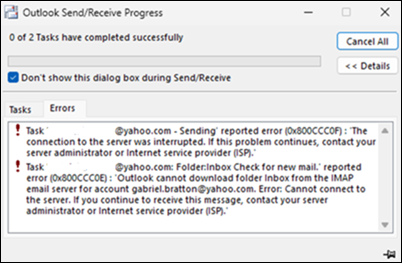
Mistake 3: Ignoring error messages. If Outlook shows a specific error code, searching for that code can lead directly to the solution.
Credit: www.windowscentral.com
Preventing Future Syncing Problems
Once you solve syncing issues, you want to avoid them in the future. Here are some practical steps:
- Keep Outlook and Yahoo Mail Updated: Regular updates include bug fixes and new security features.
- Use IMAP, Not POP3: IMAP is more reliable for syncing across devices.
- Clean Up Your Mailbox Regularly: Delete large attachments, empty trash, and organize folders.
- Review Security Settings: Make sure your firewall and antivirus aren’t blocking Outlook or Yahoo.
- Document Your App Passwords: Save them securely, so you can update Outlook quickly if needed.
- Backup Important Emails: Outlook can export your emails to a file. Do this regularly in case you need to rebuild your profile.
Comparing Yahoo Mail Syncing In Outlook Vs. Other Email Clients
Some users wonder if switching email apps might solve their problems. Here’s a comparison of how Yahoo Mail typically syncs in Outlook, Thunderbird, and Apple Mail:
| Email Client | IMAP Support | App Password Required | Sync Reliability | Ease of Setup |
|---|---|---|---|---|
| Outlook | Yes | Yes (if 2FA enabled) | High (with correct settings) | Moderate |
| Thunderbird | Yes | Yes (if 2FA enabled) | High | Easy |
| Apple Mail | Yes | Yes (if 2FA enabled) | High | Easy |
Insight: Outlook offers powerful features but requires more careful setup, especially with app passwords and security options. Thunderbird and Apple Mail are sometimes more forgiving for beginners.

Credit: www.youtube.com
What To Do If You’re Still Stuck
If you’ve tried all the steps and syncing still fails, consider these options:
- Contact Yahoo Support: They can help you check for account-specific issues.
- Contact Microsoft Support: Outlook experts can diagnose app or profile problems.
- Try an Alternative Email App: Sometimes, switching to Thunderbird or another client helps.
- Use Yahoo Mail Web Temporarily: You won’t miss important messages while you troubleshoot.
Pro tip: Take screenshots of your settings and error messages. This makes it easier for support teams to help you.
Frequently Asked Questions
Why Does Outlook Keep Asking For My Yahoo Password?
This usually happens if you’re using two-step verification on Yahoo but haven’t set up an app password for Outlook. Generate a new app password in Yahoo’s Account Security page and use it instead of your regular password in Outlook.
Is It Safe To Use Yahoo Mail In Outlook?
Yes, as long as you use IMAP with SSL/TLS encryption and create an app password if two-step verification is enabled. Both Yahoo and Outlook use strong security protocols, but always keep your apps updated and use strong passwords.
What If My Yahoo Folders Don’t Appear In Outlook?
Make sure you used IMAP when setting up your account. POP3 does not support folders. Also, try creating a new folder in Yahoo Mail web—if it appears in Outlook, syncing should work. If not, remove and re-add the Yahoo account in Outlook.
Does Deleting Emails In Outlook Delete Them From Yahoo Mail?
If your account uses IMAP, deleting emails in Outlook will delete them from Yahoo Mail and other devices. If you use POP3, changes in Outlook do not affect Yahoo Mail’s web inbox.
How Can I Tell If Yahoo Mail Servers Are Down?
Check Yahoo’s official social media pages or their status page for outage updates. You can also visit sites like Downdetector to see if other users are reporting problems.
Bringing together Yahoo Mail and Outlook can feel challenging, but with the right steps, it usually works smoothly. Paying attention to small details—like server settings and app passwords—solves most problems. When in doubt, take your time and check official resources like Microsoft’s Outlook guide. With patience and these tips, your Yahoo Mail should sync with Outlook reliably.