If you’re a regular user of the Commbank app, you know how much it simplifies banking tasks—checking your balance, paying bills, and even managing card controls. But what happens when the app suddenly stops working? For many, this can create stress and confusion, especially if you need to transfer money or pay for something urgently. You’re not alone; millions rely on the app daily, and technical issues can happen to anyone. Understanding why the Commbank app isn’t working and how to fix it quickly can save you frustration, wasted time, and even financial trouble.
In this guide, you’ll find practical solutions and clear steps to solve most problems with the Commbank app. You’ll learn why these issues happen, what you can do right now, and when it’s time to contact support. Whether you’re new to mobile banking or a long-time user, you’ll get the insights you need—without complicated tech jargon.
Why The Commbank App Might Not Work
When the Commbank app fails, the cause is rarely just one thing. Let’s look at the most common reasons:
- Network Issues: Slow or unstable internet is a major culprit. Mobile banking apps require a secure, strong connection—if your data or Wi-Fi is weak, the app can freeze or show errors.
- App Updates: If you haven’t updated the app, older versions may stop working due to security changes or bug fixes.
- Device Compatibility: Outdated operating systems or unsupported devices can cause crashes.
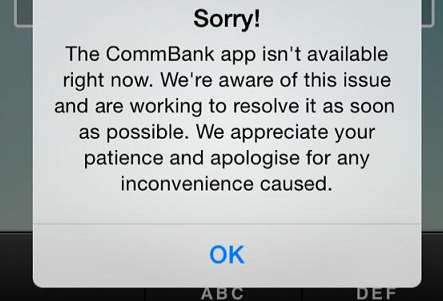
- Bank Server Problems: Sometimes the problem is with Commonwealth Bank’s servers—especially during maintenance or outages.
- Login Issues: Forgotten passwords, locked accounts, or two-factor authentication errors can block access.
- App Cache/Data Problems: Temporary files or corrupted cache can prevent the app from loading properly.
- Security Settings: Firewall or antivirus apps, VPNs, or device security settings can interfere.
- Account Problems: If your account is restricted, closed, or under review, you might be locked out.
Many users assume the problem is their phone or internet, but issues can be app-side or even bank-side. Knowing this helps you troubleshoot smarter.
Quick Checks Before Troubleshooting
Before you dive into complex solutions, try these simple checks:
- Check your internet connection. Switch between Wi-Fi and mobile data to see if the issue resolves.
- Restart your device. A quick reboot can solve many app glitches.
- See if the Commbank app is down. Visit the Commonwealth Bank’s official social media or outage monitoring sites.
- Check for app updates. Visit the App Store (iOS) or Google Play Store (Android) and update if needed.
- Try logging in on another device. This can reveal if the issue is device-specific.
Sometimes, these steps fix the problem in less than a minute. If not, continue with the solutions below.
Step-by-step Solutions For Commbank App Not Working
Let’s break down troubleshooting into easy steps. Follow them in order for the best chance of getting the app working again.
1. Update The App
App developers release updates to fix bugs and improve security. An outdated app version is a common cause for errors and crashes.
How to update:
- IOS: Open the App Store, tap your profile, find the Commbank app, and tap “Update.”
- Android: Open Google Play Store, search for Commbank, and tap “Update.”
Tip: Enable automatic updates for fewer problems in the future.
2. Clear Cache And App Data
Over time, cached data can become corrupted. Clearing it often fixes loading or login issues.
Android:
- Go to Settings > Apps > Commbank > Storage > Clear Cache.
- If still not working, tap “Clear Data” (you’ll need to log in again).
iOS: Uninstalling and reinstalling the app clears cache.
Non-obvious insight: Many users only clear cache, but sometimes clearing all app data is necessary. Just remember your login details before doing this.
3. Check Device Compatibility
The Commbank app requires a minimum version of iOS or Android. If your device is too old, you may not be able to use the latest app version.
Minimum requirements (as of early 2024):
| Platform | Minimum OS Version | Supported Devices |
|---|---|---|
| iOS | iOS 13.0+ | iPhone 6s or newer |
| Android | Android 8.0+ | Most devices since 2017 |
If your device doesn’t meet the requirements, consider updating your OS or using another device.
4. Test Your Internet Connection
A slow or unstable connection can block login or transactions. Here’s how to test:
- Open a web browser and visit any site (e.g., news site).
- Run a speed test (search “internet speed test” on Google).
- Try switching from Wi-Fi to mobile data or vice versa.
Key point: Public Wi-Fi can block banking apps for security reasons. Always use a trusted connection.
5. Disable Vpn Or Security Apps
Many users don’t realize that VPNs, ad blockers, or antivirus apps can stop the Commbank app from connecting.
Try this:
- Temporarily turn off your VPN or security app.
- Open Commbank and try again.
If this solves the problem, adjust your VPN settings or whitelist the app.
6. Check For Server Outages
Banks sometimes have scheduled maintenance or unexpected outages.
How to check:
- Visit the Commonwealth Bank’s official Twitter or Facebook.
- Use third-party outage sites like DownDetector.
- Ask friends if they’re having issues too.
If the problem is bank-side, you’ll need to wait. Outages are usually resolved within hours.
7. Reset Your Password
If login is the issue, try resetting your password. Use the “Forgot password? ” link on the app or via the bank’s website.
Non-obvious insight: Sometimes, even if you remember your password, resetting it can clear account flags or security holds.
8. Reinstall The App
Uninstalling and reinstalling can fix corrupted installations.
- Delete the Commbank app.
- Restart your device.
- Reinstall from the App Store or Google Play.
This step often works when nothing else does.
9. Check Account Status
If your account is restricted or under review, the app may refuse to let you log in. Check your email for messages from the bank or call customer service to confirm.
10. Try The Web Portal
If the app is down but you need urgent access, log in at https://www.commbank.com.au. The web portal often works even when the app has issues.
Common Error Messages And What They Mean
Understanding error messages can help you solve problems faster. Here are some you might see:
- “Unable to connect to server” – Usually network or server outage.
- “Incorrect password or username” – Double-check credentials; reset if needed.
- “App not supported on this device” – Your device or OS is outdated.
- “Your session has expired” – Log in again; could be a sign of weak internet.
- “Account restricted” – Bank has placed a hold; call support.
If you see a technical error code (like 500 or 403), note it down—support staff can help more quickly if you provide this.
When To Contact Commonwealth Bank Support
If you’ve tried the steps above and still can’t use the app, it’s time to get help.
Contact options:
- In-app chat: If accessible, use chat for fast help.
- Phone: Call 13 2221 (within Australia).
- Website: Use the “Contact us” section at https://www.commbank.com.au.
- Visit a branch: For urgent issues or if your account is locked.
What to have ready:
- Your customer ID or account details.
- The device you’re using.
- Screenshots or exact error messages.
Tip: Support lines can be busy, especially during outages. Try less busy hours (early morning or late evening).
Commbank App Vs. Web Portal: Which Is More Reliable?
Many users wonder if the app or the web portal is more stable. Here’s a quick comparison:
| Feature | Commbank App | Web Portal |
|---|---|---|
| Accessibility | Mobile only | Any device with browser |
| Frequent Issues | App crashes, login errors | Browser compatibility |
| Updates Required | App Store/Google Play | Browser auto-updates |
| Features | Card controls, mobile payments | Full account management |
Insight: If the app fails and you have urgent banking needs, try the web portal. It’s less affected by device-specific issues.

Credit: www.youtube.com
How To Prevent Commbank App Problems In The Future
Prevention is better than cure. Here are simple habits to avoid most app problems:
- Enable automatic app updates. This keeps your app secure and bug-free.
- Update your device’s operating system. Old OS versions can cause compatibility issues.
- Avoid using the app on rooted or jailbroken devices. These are less secure and often blocked.
- Don’t install third-party app stores. Stick to official app stores to avoid malware.
- Regularly clear cache/data. Once every few months is enough.
- Use strong, unique passwords and change them regularly.
- Set up account recovery options. Add your email and phone for easy resets.
- Monitor for phishing scams. Never enter your details into unofficial apps or links.
| Problem | Prevention Tip |
|---|---|
| App won’t update | Keep enough free storage |
| Login issues | Check password manager for typos |
| Security warnings | Don’t use VPNs with banking apps |
| Account locked | Enable two-factor authentication |
Real-world Examples: How Users Fixed Their Commbank App
Case 1: Jane couldn’t log in on her Android phone. She tried restarting and updating, but nothing worked. After clearing app data, the app started working again. She realized she hadn’t updated her phone’s OS in over a year.
Case 2: Sam saw an “unable to connect to server” message. Switching from home Wi-Fi to mobile data fixed the issue. Later, he learned his router’s firewall was blocking the app.
Case 3: Priya’s app crashed after an update. Support told her to uninstall and reinstall. She also made sure her device had enough storage—after deleting a few unused apps, the Commbank app ran smoothly.
Uncommon fix: A few users found that turning off battery saver modes helped. Some battery optimizers can block background data, preventing banking apps from updating info in real time.
Credit: www.itnews.com.au
What If The Problem Is With Commonwealth Bank?
Sometimes, the issue isn’t you—it’s the bank. Here’s what to do if you suspect a bank-side problem:
- Check official announcements: Banks usually post about outages on social media or their website.
- Ask friends or family: If others have the same problem, it’s likely a widespread issue.
- Wait for updates: Most outages last a few minutes to a few hours.
Pro tip: Don’t keep reinstalling the app if you see lots of users reporting the same issue. This won’t help and can even lock your account if you try logging in too many times.
Security Warnings And Scam Alerts
Banking apps are targets for scams and phishing attacks. If you get a strange error or request for personal info, stop and check:
- Official app only: Download from the App Store or Google Play.
- Never share PINs or passwords via email, SMS, or calls.
- Check sender details: Real bank messages come from official numbers or emails.
If you suspect a scam, report it to Commonwealth Bank immediately.
Accessibility And Special Needs
Commbank has made efforts to make its app accessible:
- VoiceOver (iOS) and TalkBack (Android): The app supports screen readers.
- Font size: You can adjust text size in your device settings.
- Color contrast: Designed for readability.
If you use accessibility features and face issues, mention this when contacting support—they may have tailored solutions.
Troubleshooting For International Users
Travelers and expats sometimes face unique problems with the Commbank app:
- Geo-blocks: Some features may not work outside Australia.
- SMS codes: Overseas phone numbers may not receive security codes.
- VPN restrictions: Using a VPN to access Australian services can trigger security alerts.
Tip: Let the bank know if you’re traveling. Add an international contact number for backups.
When The App Is Working But Transactions Fail
Sometimes, you can log in but can’t transfer money or pay bills. Reasons include:
- Daily limits reached: Check your transaction limits.
- Payee details incorrect: Double-check BSB and account numbers.
- Scheduled maintenance: Some features are offline during updates.
- Card or account blocked: Call support if you see repeated failures.
Alternatives To The Commbank App
If you’re having ongoing trouble, consider:
- Web portal: Works on any browser.
- Phone banking: Call for balance and transfers.
- ATMs: For cash withdrawals or checking balances.
- In-branch services: For more complex needs.
Non-obvious insight: Some users install the app on a tablet as a backup. This way, if your phone has issues, you still have access.

Credit: www.savings.com.au
How Commonwealth Bank Handles App Outages
The bank’s IT team monitors the app 24/7. For major outages:
- They post updates on their status page and social media.
- They work to restore service, usually within hours.
- You may get SMS or email alerts if your account is affected.
If you miss a payment due to an outage, contact the bank—they often waive late fees if the problem was on their end.
How To Give Feedback Or Report Bugs
Your feedback helps improve the app. Here’s how to report problems:
- Use the “Feedback” or “Help” option in the app.
- Email through the official website.
- Mention your device, app version, and a brief description.
Pro tip: Attach screenshots if possible. This helps support teams diagnose the problem.
Frequently Asked Questions
Why Does The Commbank App Need Frequent Updates?
Regular updates fix security issues, add new features, and improve performance. Banks must stay ahead of cyber threats, so updates are critical for your safety.
Is It Safe To Reinstall The Commbank App?
Yes, as long as you install from the official app store. Your banking data is stored securely on the bank’s servers, not your phone.
What Should I Do If I Can’t Receive Sms Security Codes?
Check if your number is correct in your account settings. If overseas, SMS delivery may fail. Contact the bank to set up alternative verification.
Can I Use The Commbank App On Multiple Devices?
Yes, but for security, the bank may ask for verification on each device. If you change phones, always remove your account from the old device.
Where Can I Find Real-time Outage Updates?
Check the Commonwealth Bank’s official social media or visit Commonwealth Bank’s website for status updates.
If you rely on the Commbank app, a sudden problem can be stressful. But with the steps and advice above, you’re in a strong position to solve almost any issue—fast. Remember, most problems are fixable in minutes, and help is always available.
Stay updated, protect your device, and you’ll keep your banking smooth and secure.