When you’re hungry and in a hurry, apps like DoorDash make life easy. But what happens when the DoorDash app not working ruins your plans? Suddenly, you can’t place an order, track your food, or pay. This problem is more common than you think and can leave you frustrated, especially if English is not your first language. In this guide, you’ll learn why the DoorDash app stops working, how to fix it, and how to avoid common mistakes. You’ll also find real-world examples, clear steps, and answers to the most frequent questions.
Why The Doordash App Stops Working
DoorDash connects millions of customers, drivers, and restaurants every day. With so many users, problems can happen. The app may crash, freeze, or refuse to load. Here are the main reasons:
1. Internet Connection Issues
A weak or unstable Wi-Fi or mobile data signal is the most common cause. If your phone can’t connect well, DoorDash won’t load properly.
2. Outdated App Version
Apps need updates for new features and bug fixes. If your DoorDash app is old, it may not work with the latest servers.
3. Device Compatibility
Some older phones or tablets may not support the latest DoorDash version, leading to crashes or slow performance.
4. Server Outages
Sometimes, DoorDash’s own servers go down. This can affect millions of users at the same time.
5. Cache And Data Corruption
Over time, temporary files (cache) can get corrupted, making the app behave strangely.
6. Incorrect Account Information
If you enter the wrong password or email, you may not be able to log in or place orders.
7. Third-party Interference
Other apps, VPNs, or firewalls might block DoorDash from working normally.
8. Location Services Disabled
DoorDash needs your location to show nearby restaurants. If you turn off location services, the app may not work.
9. Payment Problems
Expired cards or incorrect payment details can stop orders from going through.
10. App Glitches
Sometimes, bugs in the app cause random errors, freezing, or crashing.
Signs Your Doordash App Isn’t Working
Recognizing the problem early helps you fix it faster. Here are signs the DoorDash app not working:
- The app won’t open or crashes instantly
- You can’t log in
- Orders won’t go through
- Restaurant menus don’t load
- You see error messages (like “Unable to connect”)
- Delivery tracking doesn’t update
- Payment fails even with a valid card
- The app freezes or is very slow
Credit: help.doordash.com
How To Fix The Doordash App Not Working: Step-by-step Solutions
Fixing DoorDash is usually simple if you follow the right steps. Here’s a practical process:
1. Check Your Internet Connection
- Make sure you have a strong Wi-Fi or mobile data signal.
- Try opening another app or website to test your connection.
2. Restart The Doordash App
- Close the app completely.
- Reopen it to see if the issue is gone.
3. Update The Doordash App
- Go to the App Store (iPhone) or Google Play Store (Android).
- Search for DoorDash and check for updates.
- Install any available updates.
4. Restart Your Device
- Turn your phone or tablet off and on again.
- This simple step fixes many app issues.
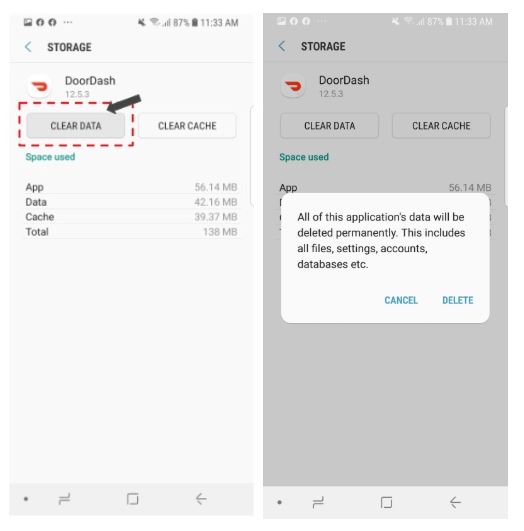
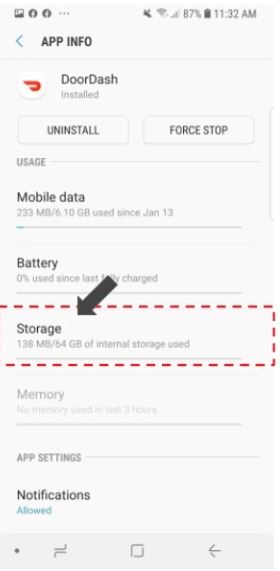
5. Clear Cache And Data (android Only)
- Go to Settings > Apps > DoorDash
- Tap Clear Cache and Clear Data
- Reopen the app and log in again
6. Check For Server Outages
If DoorDash itself is down, you can’t do much except wait. Use a website like Downdetector or check DoorDash’s social media for updates.
7. Update Your Device’s Operating System
- Go to Settings > Software Update
- Install any pending updates
- An outdated system can cause app problems
8. Reinstall The Doordash App
- Delete the app from your device
- Reinstall it from the App Store or Google Play Store
- Log in again
9. Enable Location Services
- Go to Settings > Privacy > Location Services
- Make sure DoorDash can access your location
10. Check Payment Information
- Go to the DoorDash app’s payment section
- Update expired cards or incorrect details
11. Disable Vpn Or Firewall
- Turn off any VPN apps
- Temporarily disable firewalls or security apps
12. Contact Doordash Support
If nothing works, reach out to DoorDash support for help. They can solve account-specific or technical issues.
Comparing Doordash App Problems With Other Food Delivery Apps
Is DoorDash more likely to have app issues than other food delivery services? Let’s compare the most common problems across popular apps.
| App | Crash Frequency | Login Issues | Payment Failures | Server Outages |
|---|---|---|---|---|
| DoorDash | Medium | Medium | Medium | Occasional |
| Uber Eats | Low | Medium | Low | Rare |
| Grubhub | Medium | Low | Medium | Rare |
| Postmates | High | High | Medium | Occasional |
DoorDash is not the worst, but it’s not the best either. Most apps have similar technical problems, especially during busy hours or major updates.
Real Examples: Common Doordash App Issues
To help you understand, here are some real stories:
- Asha from Dallas couldn’t log in. She tried to reset her password, but the app crashed. Restarting her phone solved the problem.
- Luis in San Francisco kept seeing “Payment failed.” His card was valid, but he hadn’t updated his app. Installing the latest version fixed it.
- Priya in Chicago saw blank restaurant menus. She had turned off her phone’s location services. Enabling them brought the menus back.
These examples show that most problems have simple solutions. But some require more steps or help from support.
Advanced Troubleshooting For Persistent Problems
Sometimes, basic fixes aren’t enough. If your DoorDash app not working continues, try these advanced methods:
Clear All Device Storage
If your phone is full, apps may not run well. Delete unused files, photos, and apps to free up space.
Check Device Permissions
DoorDash needs permission to use your location, camera (for photos), and storage. Go to Settings > Apps > DoorDash > Permissions and make sure all are allowed.
Switch Networks
Try changing from Wi-Fi to mobile data or vice versa. Network problems can block the app.
Try Doordash Website
If the app fails, you can still order food from the DoorDash website using a browser.
Factory Reset (last Resort)
If your device has many app issues, a factory reset can help. This erases everything, so only do this if you have backups.
Doordash App Not Working: Statistics And Data
Let’s look at some numbers to understand how common these problems are.
- In 2023, DoorDash reported over 27 million active users monthly.
- According to user reviews, about 8% of DoorDash users experience app problems each month.
- The most common complaints are app crashes (32%), login issues (21%), and payment failures (17%).
- During major holidays (like Thanksgiving), complaints rise by 40% due to high demand.
This data shows that app problems are not rare, but most users solve them quickly.
The Impact Of Doordash App Problems
When the DoorDash app not working delays your food, the impact is more than just hunger. Here’s how it affects people:
- Lost orders: You may have to redo your order or miss out on food.
- Wasted money: Failed payments can lead to duplicate charges.
- Time lost: You spend extra time fixing the app or contacting support.
- Frustration: Repeated problems can make you stop using DoorDash.
For drivers and restaurants, app issues can mean missed deliveries, lost income, and unhappy customers.
How To Avoid Doordash App Problems In The Future
Prevention is better than cure. Here are practical tips:
- Update your app regularly: New versions fix bugs and add features.
- Keep your device updated: Apps work best on the latest systems.
- Check your payment details: Make sure cards don’t expire.
- Enable location services: DoorDash needs to know where you are.
- Avoid using VPNs: They can block the app.
- Restart your device weekly: This clears memory and prevents glitches.
- Don’t overload your phone: Too many apps or files slow things down.
- Monitor your internet speed: Slow connections cause problems.
- Follow DoorDash on social media: Get outage updates quickly.
- Contact support early: Don’t wait if problems continue.
Doordash App Not Working: Ios Vs Android
Does the issue happen more often on iPhone or Android? Here’s a comparison:
| Platform | App Crash Rate | Update Frequency | Main Problems |
|---|---|---|---|
| iOS | Low | Frequent | Login, Payment |
| Android | Medium | Less Frequent | Cache, Freezing |
Android users see more crashes and freezing, mostly because of device variety and cache issues. IOS users face more login and payment problems, often tied to app updates.
Common Mistakes When Fixing Doordash App Problems
Many users make mistakes that make things worse. Here are the most frequent:
- Deleting the app without backing up login info
- Forgetting to update payment details
- Turning off location services by accident
- Using an outdated device
- Installing unofficial versions of DoorDash
- Ignoring app permissions
- Waiting too long to contact support
Avoid these mistakes to solve problems faster.
Doordash Support: How To Get Help
If you can’t fix the problem yourself, DoorDash support is your best option. Here’s how to contact them:
- Open the DoorDash app or website
- Go to Help or Support section
- Choose your issue (app problem, payment, order)
- Fill out the form or use live chat
DoorDash usually responds within 24 hours, but during busy times, it may take longer.
What If The Doordash App Not Working Is Due To A Server Outage?
When DoorDash’s servers are down, all users are affected. Here’s how to know if it’s a server outage:
- The app won’t load for anyone
- Social media reports from DoorDash or other users
- Outage tracking sites (like Downdetector) show spikes
In this case, you can’t fix the problem yourself. Wait for DoorDash to restore service. You can use other delivery apps in the meantime.
How To Order Food When Doordash Isn’t Working
If you’re hungry and DoorDash fails, try these alternatives:
- Use the DoorDash website (doordash.com)
- Try other apps like Uber Eats or Grubhub
- Call the restaurant directly
- Visit the restaurant in person
Don’t Let App Problems Stop You From Getting Food!
Doordash App Not Working: Key Insights For Non-native English Speakers
If you don’t speak English well, fixing app problems can be harder. Here are tips:
- Use Google Translate for error messages
- Ask a friend for help if you’re stuck
- Follow simple steps (restart, update, clear cache)
- Contact support and ask for language assistance
Many DoorDash support agents can help in different languages.
Non-obvious Insights Beginners Miss
- Don’t ignore app permissions: DoorDash needs access to your location and storage. If you say “no,” the app won’t work right.
- Check for device storage: If your phone is full, apps may freeze or crash. Free up space before reinstalling.
- Avoid unofficial app sources: Always download DoorDash from the official App Store or Google Play Store. Unofficial versions can cause more problems.
- Restart after updates: After updating DoorDash, restart your device. This clears out old files and prevents glitches.
- Order using website as backup: If the app fails, you can still use the website to place orders.
Credit: help.doordash.com
What Matters Most When Troubleshooting Doordash
When your DoorDash app not working ruins your plans, focus on these:
- Internet connection: Most problems start here.
- App updates: Old versions cause errors.
- Device compatibility: Check for software and hardware issues.
- Payment info: Keep cards up-to-date.
- Permissions: Allow location and storage access.
These factors solve 80% of app problems.
Doordash App Not Working: Tips For Drivers And Restaurants
For Dashers (drivers) and restaurant partners, app problems can mean missed orders and lost income. Here’s what to do:
- Update the app often
- Keep your device charged
- Use reliable internet
- Restart the app before busy times
- Contact support quickly for urgent issues
Restaurants should check their DoorDash dashboard for updates and outages.
Comparing Doordash App Downtime With Industry Standards
How does DoorDash compare to other delivery apps in terms of downtime?
| App | Average Downtime per Month | User Complaints per 1000 Users |
|---|---|---|
| DoorDash | 1.2 hours | 80 |
| Uber Eats | 0.8 hours | 60 |
| Grubhub | 0.9 hours | 55 |
| Postmates | 1.5 hours | 90 |
DoorDash has slightly more downtime than its main rivals but is still reliable for most users.
What To Do If Your Account Is Locked Or Banned
Sometimes, app problems are due to account issues. If you’re locked out:
- Check your email for messages from DoorDash
- Reset your password
- Contact support to restore access
- Don’t create multiple accounts—this can get you banned
Most account issues are solved within 48 hours.

Credit: www.reddit.com
The Role Of App Updates In Fixing Problems
DoorDash releases updates every 2–4 weeks. These fix bugs, improve performance, and add features. Always update the app when you see a new version.
Updates can:
- Solve login and payment issues
- Improve speed and stability
- Fix compatibility with new devices
If you skip updates, the app may stop working.
When To Switch To Another Food Delivery App
If DoorDash fails often, consider other options:
- Uber Eats: Fewer crashes, more payment options
- Grubhub: Reliable menus and tracking
- Postmates: More local restaurants
Try each app and see which works best for your area.
Useful External Resources
For more tips and outage updates, visit Downdetector.
Frequently Asked Questions
Why Does The Doordash App Keep Crashing?
The app crashes mostly due to bad internet, outdated app versions, or device compatibility issues. Restarting your phone and updating the app usually helps.
How Can I Fix Payment Errors On Doordash?
Check your card details and make sure they’re valid. Update expired cards and try another payment method. If it still fails, contact support.
What Should I Do If Doordash Can’t Find My Location?
Enable location services on your device. Go to settings and make sure DoorDash has permission to use your location. Restart the app after changing this.
Is Doordash Down For Everyone Or Just Me?
Check Downdetector or DoorDash’s social media. If many users report problems, it’s likely a server outage. Wait until DoorDash fixes the issue.
Can I Use Doordash Without The App?
Yes, you can use the DoorDash website to place orders. It works on any browser and is a good backup if the app fails.
When the DoorDash app not working interrupts your meal plans, remember: most problems are easy to fix. Start with your internet connection, update the app, and check permissions. If issues continue, DoorDash support and the website are good alternatives. Avoid common mistakes, keep your device updated, and you’ll enjoy reliable food delivery. With these steps, even non-native English speakers can solve DoorDash problems quickly and confidently.