If you rely on a Brita water filter pitcher, you know how helpful it is for getting clean, good-tasting water at home. But what happens when the Brita filter light stops working? Many people feel confused or frustrated when the light doesn’t turn on, stays stuck on one color, or flashes in a way that doesn’t make sense. The filter light is supposed to make life easier by reminding you when to change the filter. When it fails, you might worry about drinking unfiltered water or wasting money by replacing the filter too soon.
The good news is, most Brita filter light problems are easy to solve, and you don’t need to be a tech expert. This guide will walk you through everything you need to know about a Brita filter light not working. You’ll learn how the filter light works, why it can fail, how to fix it yourself, and what to do if nothing helps. With simple explanations, clear steps, and practical tips, you’ll feel confident about getting your Brita pitcher back to normal. Let’s dive in and make your water filtering simple again.
How The Brita Filter Light Works
Understanding the Brita filter light helps you troubleshoot problems. The light is a small electronic indicator built into the lid of your Brita pitcher or dispenser. Its main job is to track usage and tell you when it’s time to replace the filter. But the way the light works can vary by model.
Most Brita pitchers use one of these two systems:
- Timer-based system: The light tracks time. After a set number of weeks (often 4 weeks for Standard filters), the light changes color to signal a filter change.
- Usage-based system: The light tracks how many times you open the lid or pour water. After a set number of pours (sometimes 40 gallons or 151 liters), it signals a filter change.
What The Colors Mean
Brita filter lights usually use three colors:
- Green: Filter is working well
- Yellow: Filter will need changing soon
- Red: Change the filter now
Some advanced Brita models (like Brita Longlast or SmartLight) may use extra signals, like blinking or flashing, to show errors.
Why This Matters
If the light fails, you lose an important reminder. You might keep using an old filter, which can mean drinking less-clean water. Or you might change filters too soon, wasting money. Fixing the light helps you stay on track and get the best from your Brita pitcher.
Common Reasons The Brita Filter Light Doesn’t Work
When your Brita filter light isn’t working, the cause is usually simple. Here are the most common reasons:
- Dead or weak battery: Most Brita filter lights use a non-replaceable, coin-style battery. When this battery runs out, the light stops working.
- Loose or stuck button: The reset button may get stuck, dirty, or damaged. If it doesn’t work, the light may not reset after changing the filter.
- Moisture inside the lid: If water gets into the electronics, it can cause the light to malfunction.
- Damaged electronics: Dropping or hitting the lid can damage the circuit inside.
- Faulty LED: The tiny light bulb (LED) may burn out, though this is rare.
- Incorrect filter installation: If the filter isn’t seated properly, the light may not recognize it.
Other Less-obvious Causes
- Manufacturing defects: Sometimes, the light is faulty from the start.
- High humidity or improper washing: Washing the lid in the dishwasher or soaking it can damage the electronics.
- Old age: Brita lids last years, but eventually, electronics can fail.
Quick Troubleshooting Steps
Before you worry or buy a new pitcher, try these simple steps. Most Brita filter light problems are easy to fix at home.
1. Check If The Light Is Actually Broken
Sometimes, the filter light is just in “off” mode, or the color is hard to see in bright light. Move to a dimmer room and press the reset button. If the light flashes, it works.
2. Reset The Filter Light
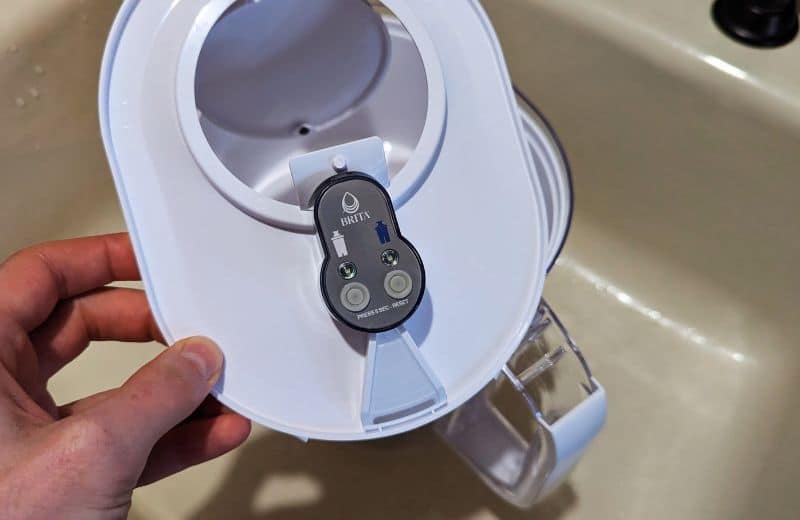
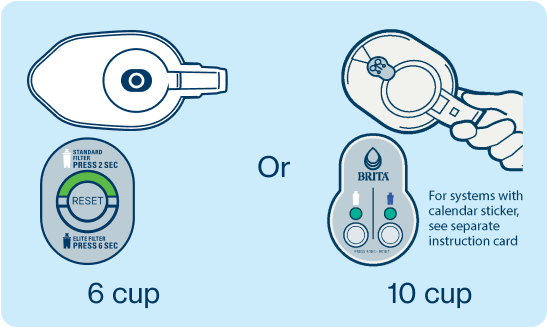
Most Brita pitchers have a small, round reset button near the filter light. After installing a new filter:
- Hold the reset button down for 5-10 seconds.
- Watch for a flash or color change.
- Release the button.
If the light resets to green, you’re all set.
3. Dry The Lid
If you’ve washed the lid or spilled water, dry it fully:
- Open the lid and remove any visible water.
- Let it air dry for a few hours.
- Do not use a hair dryer or oven, as this can melt the plastic.
4. Clean Around The Button
Dirt, dust, or minerals can block the reset button.
- Use a dry cotton swab to gently clean around the button.
- Do not use water or spray cleaners.
5. Reinstall The Filter
Take out the filter and put it back in, making sure it’s seated firmly.
6. Try A Hard Reset
On some models, you can reset the electronics by removing the filter and battery (if possible), waiting 1-2 minutes, and reinstalling everything.
When To Replace The Lid
If your Brita filter light still doesn’t work after the above steps, the problem may be inside the electronics. Unfortunately, Brita does not sell replacement batteries for most models because the battery is sealed in the lid to prevent water damage.
When this happens, you have two options:
- Keep using the pitcher and change the filter every 2 months (or 40 gallons / 151 liters) by tracking manually.
- Buy a new lid or pitcher. If your pitcher is under warranty, contact Brita support for a free replacement.
Brita’s warranty usually covers defects for 1 year from purchase. You’ll need your receipt and the pitcher’s model number.
Credit: waterfilterguru.com
Brita Pitcher Models And Their Filter Light Systems
Different Brita pitchers use different types of filter light systems. The table below compares some popular Brita models, their filter light type, and how the indicator works.
| Model Name | Filter Light System | Battery Type | Reset Method |
|---|---|---|---|
| Brita Everyday | Timer-based (4 weeks) | Non-replaceable | Press & hold button |
| Brita Grand | Pour-count based (40 gallons) | Non-replaceable | Press & hold button |
| Brita Longlast | SmartLight (advanced) | Non-replaceable | Tap & hold button |
| Brita Ultramax Dispenser | Timer-based (4 weeks) | Non-replaceable | Press & hold button |
| Brita Stream | Pour-count based | Non-replaceable | Press & hold button |
Some older Brita models do not have any filter light at all. Always check your model to know what kind of indicator system you have.
How To Manually Track Filter Changes
If your Brita filter light is broken and you can’t repair it, don’t worry. You can easily keep your water safe by tracking filter changes manually. Here’s how:
- Know your filter type: Standard, Longlast+, Stream, etc.
- Check the recommended change time: Most Standard filters last for 2 months (40 gallons/151 liters), Longlast+ for 6 months (120 gallons/454 liters).
- Use a calendar or phone reminder: Mark the date you install a new filter. Set a reminder to change it after the recommended time.
- Watch for taste or smell changes: If water tastes or smells different, change the filter sooner.
Example Filter Life Comparison
Here’s a quick comparison of how often to change different Brita filters:
| Filter Type | Change Every | Gallons/Liters |
|---|---|---|
| Standard | 2 months | 40 gal / 151 L |
| Longlast+ | 6 months | 120 gal / 454 L |
| Stream | 2 months | 40 gal / 151 L |
If you use a lot of water, you may need to change the filter more often. For example, a large family may go through 40 gallons in less than 2 months.
Diy Fixes For Common Brita Filter Light Problems
Some filter light problems can be fixed at home. Here are practical solutions for the most common issues.
Filter Light Is Completely Dead
This usually means the battery is dead. There is no easy way to replace the battery in most Brita lids, as they are sealed. However, some experienced DIYers have opened the lid with a small screwdriver to replace the battery, but this can damage the lid and void your warranty.
For most people, the best option is to replace the lid or pitcher.
Filter Light Stays On Red
If the light stays on red, even after you change the filter and reset the light:
- Make sure you are pressing the reset button correctly (hold for 5-10 seconds).
- Remove the filter and reinstall it firmly.
- Check for dirt or mineral buildup around the button and clean it gently.
Filter Light Stays On Green
If your light is stuck on green, it may not be tracking time or usage. Try resetting the light. If this fails, the electronics may be damaged. Track changes manually.
Filter Light Flashes Or Blinks
A flashing or blinking light can mean a few things:
- Rapid flashing: May signal a stuck button or water inside the electronics.
- Slow blinking: Some models blink to show the filter is nearly done.
Let the lid dry completely, then try resetting again.
Reset Button Not Working
If the reset button is loose, stuck, or missing, the light may not reset. Try cleaning gently. If the button is broken, you may need a new lid.
What To Avoid When Fixing A Brita Filter Light
Many people accidentally damage their Brita pitcher when trying to fix the filter light. Here’s what NOT to do:
- Don’t put the lid in the dishwasher: The heat and water can ruin the electronics.
- Don’t soak the lid: Even a little water inside can damage the battery or circuit.
- Don’t use sharp objects to press the button: This can break the button or puncture the lid.
- Don’t try to open the lid unless you are ready to replace it: Opening the lid can break the seal and expose electronics to water and germs.
Signs You Need To Change Your Brita Filter (even Without The Light)
Even if your filter light isn’t working, you can still tell when it’s time to change the filter by watching for these signs:
- Water tastes or smells different
- Water flows more slowly
- Particles or cloudiness in filtered water
- You’ve used the filter for 2 months (Standard) or 6 months (Longlast+)
If you notice these changes, replace the filter right away.
Is Drinking From An Old Brita Filter Unsafe?
Many people worry about drinking from an old or expired Brita filter. Here’s what you need to know:
- Old filters may not remove as many contaminants.
- Bacteria can build up in used filters.
- Water may taste bad or smell odd.
While drinking from an old filter is not usually dangerous in the short term, it’s best to change the filter on time for the cleanest water.
How To Extend The Life Of Your Brita Filter Light
If you want your Brita filter light to last as long as possible, follow these tips:
- Hand wash the lid only. Wipe with a damp cloth, and never soak it.
- Keep the lid dry. If you spill water, dry it quickly.
- Store the pitcher in a cool, dry place. High heat and humidity can damage electronics.
- Press the reset button gently. Don’t use sharp objects or press too hard.
What If Your Brita Filter Light Is Always Wrong?
Sometimes, the filter light is always green or red, no matter what you do. This can happen if the electronics fail, the battery is weak, or the sensor doesn’t detect usage. In this case, manual tracking is the safest option.

Credit: www.youtube.com
Comparing Brita Filter Light To Other Brands
Some water filter pitchers from other brands use different systems to track filter life. Here’s a comparison:
| Brand | Indicator Type | Battery Replaceable? | Manual Tracking Option? |
|---|---|---|---|
| Brita | Light (timer/pour count) | No | Yes |
| PUR | Light (timer/pour count) | No | Yes |
| Soma | Manual dial | N/A | Yes |
| ZeroWater | TDS meter | N/A | Yes |
Brita’s filter light is useful, but not essential. Other brands use dials, meters, or simple reminders to help you track filter changes.
When To Contact Brita Support
If your Brita filter light is not working and you’ve tried all the basic fixes, it’s time to reach out to Brita customer service. Here’s when you should contact them:
- Your pitcher is under 1 year old (still under warranty)
- The filter light was broken from the start
- The reset button is missing or won’t press
- You need a replacement lid
Have your receipt, model number, and a photo of the problem ready. Brita support can usually send a replacement lid if you qualify.
You can reach Brita’s support through their official site: Brita Support.
Credit: www.brita.ca
Environmental Impact: What Happens To Old Brita Lids?
When your filter light dies and you replace the lid or pitcher, what happens to the old one? Most Brita lids contain small electronics and batteries that shouldn’t go in the regular trash. Check if your local recycling center accepts small electronics.
Brita also runs a recycling program in partnership with TerraCycle, where you can send in used filters and parts. This keeps batteries and plastic out of landfills.
Non-obvious Insights Most People Miss
- Filter light accuracy depends on your usage. If you fill your Brita pitcher only once a day, the timer or pour count may not match the true filter life. Heavy users may need to change the filter sooner than the light suggests.
- Water quality affects filter life. If your tap water is very hard (full of minerals), the filter may clog faster, and the filter light won’t know. Always check water taste and flow, not just the light.
- Resetting the filter light before changing the filter can cause confusion. Make sure to install the new filter first, then reset the light. If you reset early, you might use the filter too long.
Real-world Example: Sarah’s Brita Filter Light Story
Sarah, a college student, noticed her Brita filter light stopped working after a few months. At first, she worried she’d have to buy a new pitcher. She tried the basic steps—pressing the reset button, drying the lid, and checking the filter.
Nothing worked. So, she started tracking filter changes on her phone calendar. She realized she actually used more water than average, so the two-month reminder helped her change the filter on time. When she finally replaced her pitcher, she got one with a working light, but she still uses her phone for reminders.
This shows that while the filter light is helpful, it’s not the only way to keep your Brita pitcher working well.
Frequently Asked Questions
Why Did My Brita Filter Light Stop Working?
The most common reason is a dead battery in the lid. Other causes include moisture damage, a stuck reset button, or faulty electronics. Try resetting the light, drying the lid, and reinstalling the filter. If these don’t work, the battery may be dead.
Can I Replace The Battery In My Brita Filter Light?
No, for most Brita pitcher models, the battery is sealed inside the lid and cannot be replaced. This design helps keep water out but means you need a new lid or pitcher if the battery dies.
Is It Safe To Keep Using My Brita Pitcher If The Filter Light Doesn’t Work?
Yes, you can keep using your pitcher. Just track filter changes manually using a calendar or phone reminder, and watch for changes in taste or flow to know when to replace the filter.
How Long Should A Brita Filter Light Last?
A Brita filter light usually lasts 2-5 years, depending on use and storage. Frequent washing, soaking the lid, or high humidity can shorten its life.
Where Can I Learn More About Brita Filter Care And Troubleshooting?
For more tips, filter care guides, and official support, visit the Brita Support page.
A Brita filter light not working is a common problem, but it doesn’t have to stop you from enjoying clean water. With simple troubleshooting steps, manual tracking, and a few practical tips, you can keep your water fresh and safe—light or no light.
And if you ever need a new lid or support, Brita’s help is just a click away.