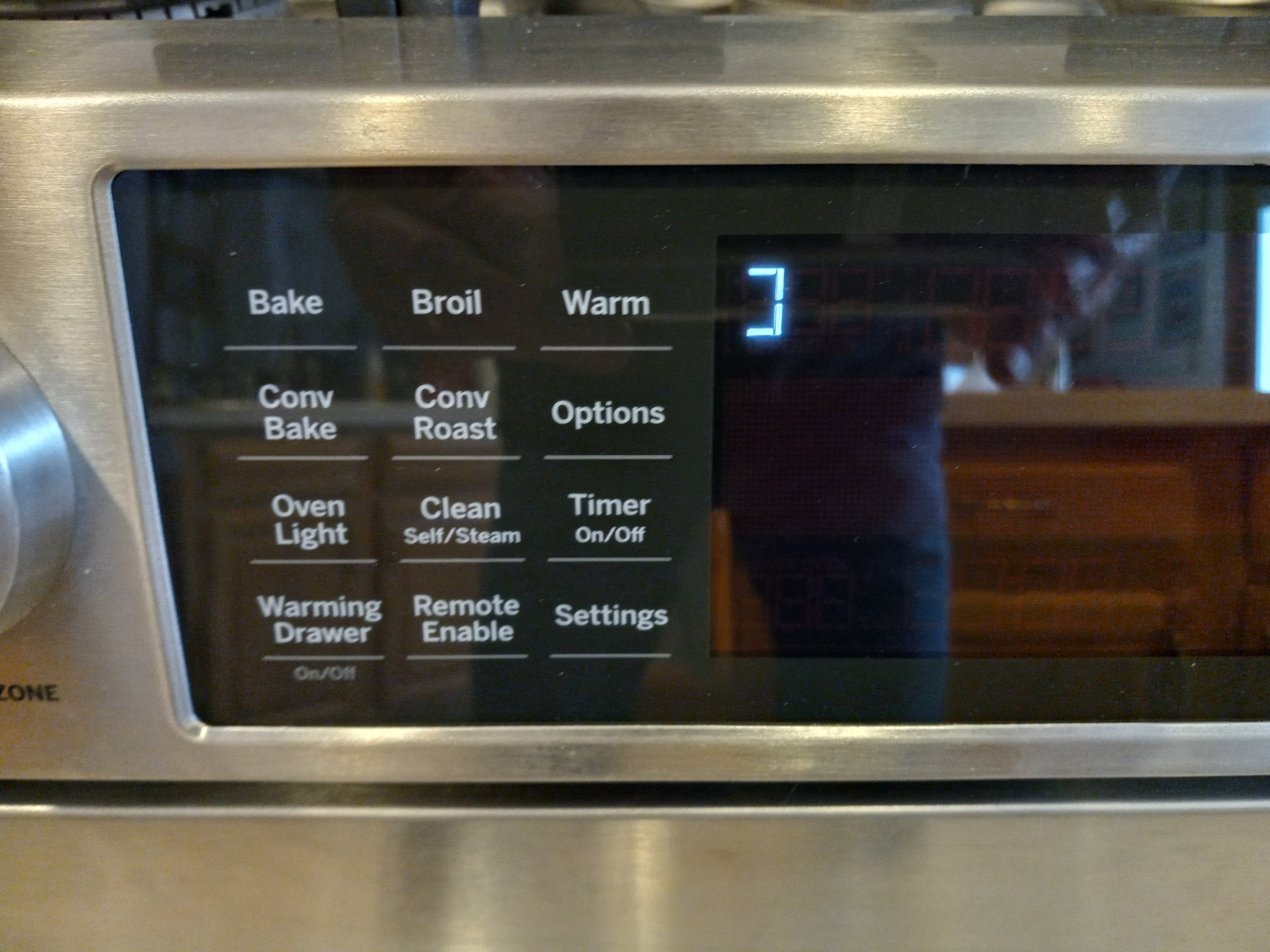
A silent oven display is more than just annoying—it makes cooking and baking with your GE oven much harder. You can’t see the temperature, timer, or even if the oven is on. Many people panic when their GE oven display is not working, but this problem often has a simple cause and solution. Before you call a technician, there’s a lot you can check and fix yourself.
Let’s explore why your GE oven’s display might be blank or not showing correctly. We’ll cover common causes, how to diagnose the problem, and practical steps to get your oven working again. Along the way, you’ll learn tips that most beginners miss, and you’ll know when it’s time to call an expert.
Why Is The Ge Oven Display Important?
The oven display is your main way to control and understand what your oven is doing. Here are a few things the display helps you with:
- Setting the cooking temperature
- Using the timer or clock
- Selecting special functions like self-cleaning
- Checking error codes when something goes wrong
A working display makes it easy to use your oven safely and effectively. Without it, you’re guessing every step.
Understanding Ge Oven Display Problems
When your oven display stops working, it usually means one of three things:
- The display is completely blank (no lights, no numbers)
- The display is dim or flickering
- The display shows incorrect numbers or error codes
Let’s look at each of these to understand what they mean.
1. Completely Blank Display
If your GE oven display is totally black, it usually points to a power or connection problem. It could be a tripped breaker, a loose wire, or a faulty control board.
2. Dim Or Flickering Display
A dim display often means a failing display board or weak power supply. Flickering can also happen if the oven is not getting steady electricity.
3. Incorrect Numbers Or Error Codes
Sometimes, the display shows weird numbers, letters, or error codes. This might mean a faulty sensor, stuck button, or a need for a reset.
Common Causes Of Ge Oven Display Not Working
To fix your oven, you first need to know why the display failed. Here are the most common reasons:
Power Issues
Many display problems are simply due to power supply interruptions.
- The oven is not plugged in properly
- The circuit breaker has tripped
- A fuse has blown
- Loose or damaged power cord
Control Board Failure
The control board is the “brain” of your oven. If it fails, the display often goes blank or acts strange. Control boards can fail from age, power surges, or overheating.
Display Board Or Touchpad Failure
Some GE ovens have a separate display board or touchpad. If this part fails, the rest of the oven might work, but you can’t see or control anything.
Faulty Wiring Or Loose Connections
Ovens shake slightly during use, and wires can come loose over time. Heat and moisture can also cause wire connectors to corrode.
Bad Transformer
The transformer reduces the voltage for the display. If it fails, the display won’t get enough power and will go dark.
Failed Oven Sensor
A bad temperature sensor can sometimes send error codes or cause the display to act up.
User Error Or Settings
Sometimes, the display is off because of a setting—like demo mode or energy-saving mode—especially on newer ovens.
How To Diagnose A Non-working Ge Oven Display
Before replacing anything, do a quick diagnosis. This can save you time and money.
Step 1: Basic Checks
- Is the oven plugged in?
- Is the circuit breaker ON?
- Are other kitchen appliances working?
If everything else works but your oven display is still blank, move to the next step.
Step 2: Try A Reset
Many minor glitches can be fixed with a reset.
- Turn off the oven at the circuit breaker
- Wait 60 seconds
- Turn the breaker back on
Check if the display comes back. This simple reset often solves temporary electronic issues.
Step 3: Check For Error Codes
If the display lights up but shows a code (like F1, F2, etc. ), look up the code in your user manual or online. These codes can tell you exactly what’s wrong.
Step 4: Test The Outlet
Plug another appliance (like a toaster) into the same outlet. If it doesn’t work, the outlet or circuit is the problem.
Step 5: Inspect The Oven
If you’re comfortable, carefully pull the oven out and check for loose wires or obvious damage. Always unplug the oven or turn off the breaker before opening the back panel.
Step 6: Review User Settings
Check your manual for settings like energy saver or display off modes. Sometimes, the display is off but the oven still works.
Step-by-step Solutions For A Ge Oven Display Not Working
Let’s go through the most effective solutions, from easiest to hardest.
1. Reset The Oven
As explained earlier, a simple reset often fixes the display. Turn the oven off at the breaker, wait a minute, and turn it back on.
2. Check Power And Connections
- Verify the power cord is fully plugged in
- Check the circuit breaker and fuses
- Inspect the outlet by plugging in another device
If you find a tripped breaker or blown fuse, reset or replace it.
3. Adjust Display Settings
Some ovens let you turn off the display to save energy. Check your manual for how to turn the display back on. Usually, you press and hold a button or use a menu.
4. Examine The Display Board
If the display is dim, flickering, or blank but the oven still heats, the display board might be failing.
- Unplug the oven or turn off the breaker
- Remove the display panel (usually held with screws)
- Check for burnt areas or loose wires
If you see damage, you may need to replace the display board.
5. Inspect The Control Board
The control board is usually behind the control panel. Signs of a bad control board include:
- No display lights at all
- Oven doesn’t respond to button presses
- Error codes that won’t clear
Replacing a control board is more complex, but still possible for a handy person.
6. Replace A Faulty Transformer
If the display is very dim, the transformer may not be providing enough power. Testing and replacing a transformer should be done by someone comfortable with electronics, as it involves high voltage.
7. Check The Touchpad
If some buttons work but others don’t, the touchpad may be failing. Try pressing all buttons to test. If only a few are dead, the touchpad needs replacement.
8. Call A Professional
If you’ve tried the above and the display is still not working, or if you see burnt wires or smell smoke, call a licensed appliance technician. Some repairs require special tools and knowledge.
Quick Troubleshooting Guide
Here’s a summary table to quickly match your problem with the likely cause and solution:
| Problem | Likely Cause | Recommended Action |
|---|---|---|
| Completely blank display | No power / Control board failure | Check power, reset breaker, inspect control board |
| Dim or flickering display | Bad transformer / Display board | Test transformer, consider replacing display board |
| Display shows error code | Sensor or control issue | Check error code, consult manual |
| Some buttons work, some don’t | Touchpad failure | Replace touchpad |
| Oven works, but no display | Display board failure | Replace display board |
Diy Display Board Replacement: What You Need To Know
Replacing the display board is one of the most common fixes for a dead GE oven display. Here’s what to expect:
Tools And Materials
- Screwdriver (usually Phillips)
- Replacement display board (get the exact model for your oven)
- Gloves for safety
Steps
- Unplug the oven or turn off its breaker
- Remove the control panel (usually a few screws)
- Disconnect the wires from the old display board (take a picture for reference)
- Remove the old board and install the new one
- Reconnect all wires and screws
- Restore power and test the oven
Tips
- Always double-check model numbers before buying parts
- Take pictures of wire connections before removing anything
- Handle boards by the edges to avoid static damage
When To Repair Vs Replace Your Ge Oven
Sometimes, repairing your oven is not the best idea. Here’s how to decide:
| Situation | Repair | Replace |
|---|---|---|
| Oven under 8 years old, simple display issue | Yes | No |
| Oven over 12 years old, multiple issues | No | Yes |
| Parts are available and affordable | Yes | No |
| Major internal damage (burnt wires, control board, and more) | No | Yes |
| Oven still under warranty | Yes (covered) | No |
As a general rule, if repair costs are over half the price of a new oven, replacement is usually smarter.
Costs Of Fixing A Ge Oven Display
Many people worry about repair costs. Here’s what you can expect:
- DIY reset or power check: $0
- Replacement display board: $80–$200 (part only)
- Professional labor: $100–$250
- Complete control board: $150–$400
These prices are averages for the US. If you do the work yourself, you can save money, but always consider safety.
Ge Oven Models: Which Ones Are Affected?
Most modern GE ovens use similar electronic displays, including:
- GE Profile Series
- GE Café Series
- GE JGB (gas) and JB (electric) models
- Older and newer free-standing and wall ovens
The problem is not limited to one series or age. Both old and new ovens can suffer display failures, but older models are more likely.
Non-obvious Insights Most Owners Miss
Even experienced users miss these important points:
- Power surges: Many display failures come after a power outage or lightning strike. Using a surge protector for your oven can reduce future problems.
- Hidden fuses: Some ovens have a small fuse inside the control panel. If you see no power at all, check for this fuse before replacing big parts.
- Warranty checks: GE ovens sometimes have an extended warranty on electronic parts. Contact GE support with your serial number before paying for repairs.
- Moisture damage: Spills and steam can get inside the control panel. If you clean your oven with too much water, let it dry for 24 hours before assuming the board is dead.
Preventing Future Display Problems
Here’s how you can protect your oven display from future failures:
- Avoid slamming the oven door, which can shake wires loose
- Don’t spray cleaner directly on the control panel—spray on cloth first
- Use a surge protector to guard against voltage spikes
- Check your breaker box after power outages
- Keep the area above the oven dry and clean
When To Call A Professional
It’s smart to call a technician if:
- You smell burning or see melted wires
- You hear popping or see sparks
- You’re unsure about working with electricity
- The oven is still under warranty
A professional can quickly diagnose and fix issues, and it’s often safer if you’re not comfortable with electronics.
Real-world Example: A Common Scenario
Maria owns a GE Profile oven. One morning, she found the display completely blank. She checked the breaker, which was fine, and tried a reset. Still nothing. Maria removed the control panel and found a small glass fuse inside. After replacing the $5 fuse, her display worked again.
This simple fix saved her $200 in repair costs. Many people miss these small parts and pay for full control board replacements.

Credit: circuitboardmedics.com
How To Read Ge Oven Error Codes
If your display lights up but shows a code, it’s sending you a message. Here are some common codes:
- F1: Control board fault
- F2: Oven temperature too high
- F3/F4: Temperature sensor problem
- F7: Stuck key on touchpad
When you see a code, unplug the oven for a minute. If it returns, look up the code in your manual or on the GE Appliances official support page.
Common Mistakes To Avoid
Many owners make these errors when trying to fix the display:
- Replacing the whole oven when a small part failed
- Not unplugging the oven before opening the panel
- Using the wrong replacement part (model numbers matter!)
- Ignoring the warranty
Take your time and check the simple things first.

Credit: www.youtube.com
Safety Warnings
Working on ovens involves electricity and sometimes gas. Always:
- Unplug the oven or shut off the breaker before any repair
- Avoid touching wires with wet hands
- Don’t force connectors—they may break easily
- Call a pro if you’re unsure
Your safety is more important than a quick fix.
Summary Of What To Do When Your Ge Oven Display Is Not Working
- Check power supply and breakers
- Try a simple reset
- Review display and user settings
- Test the outlet
- Inspect inside for loose wires or fuses
- Replace the display or control board if needed
- Call a professional if you’re unsure or the oven is under warranty
Remember, most display issues are fixable—even by beginners—if you follow the steps above.
Credit: www.doityourself.com
Frequently Asked Questions
Why Does My Ge Oven Display Go Blank After Self-cleaning?
Self-cleaning cycles create extreme heat, which can sometimes damage control boards or display wiring, especially in older ovens. If your display fails after self-cleaning, check for blown fuses or heat-damaged wires behind the control panel.
Can I Use My Ge Oven If The Display Is Not Working?
Sometimes, yes. If the oven still heats and responds to button presses, you can use it. However, it’s risky because you can’t see the temperature or timer. For safety and best results, fix the display before using the oven.
How Do I Find The Right Replacement Display Board For My Ge Oven?
Look for a sticker or label inside the oven door or behind the control panel. It will have the model number. Use this number when searching for parts, and double-check with the seller that the part matches your oven.
What Does It Mean If The Display Is Working But Showing The Wrong Time Or Temperature?
This could be a control board glitch or a need for a reset. Try unplugging the oven for 1–2 minutes, then set the clock again. If the problem comes back, the control board may need repair or replacement.
Is It Worth Repairing An Old Ge Oven With A Dead Display?
If your oven is over 12–15 years old and has other issues, replacement may be better. But if the oven works well otherwise and parts are available, repairing the display is often much cheaper than buying new.
—
A broken GE oven display is frustrating but usually fixable. By following the troubleshooting steps above, you can often restore your oven for little cost and keep cooking with confidence. If you ever feel unsure or unsafe, don’t hesitate to call a professional.
With the right approach, your kitchen will be back to normal in no time.