Many people trust Bosch dishwashers because they are reliable, energy-efficient, and quiet. But even the best dishwashers sometimes run into problems. One common issue is when the reset function does not seem to work. This can be frustrating, especially if dishes are piling up and you are unsure how to fix the machine. If you have tried to reset your Bosch dishwasher and nothing happens, you are not alone. Let’s look at why the reset might not work, what you can do, and some deeper troubleshooting steps to help you get your dishwasher running again.
Understanding The Bosch Dishwasher Reset Function
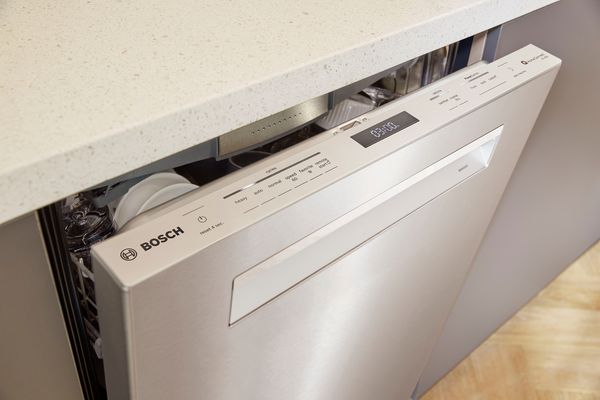
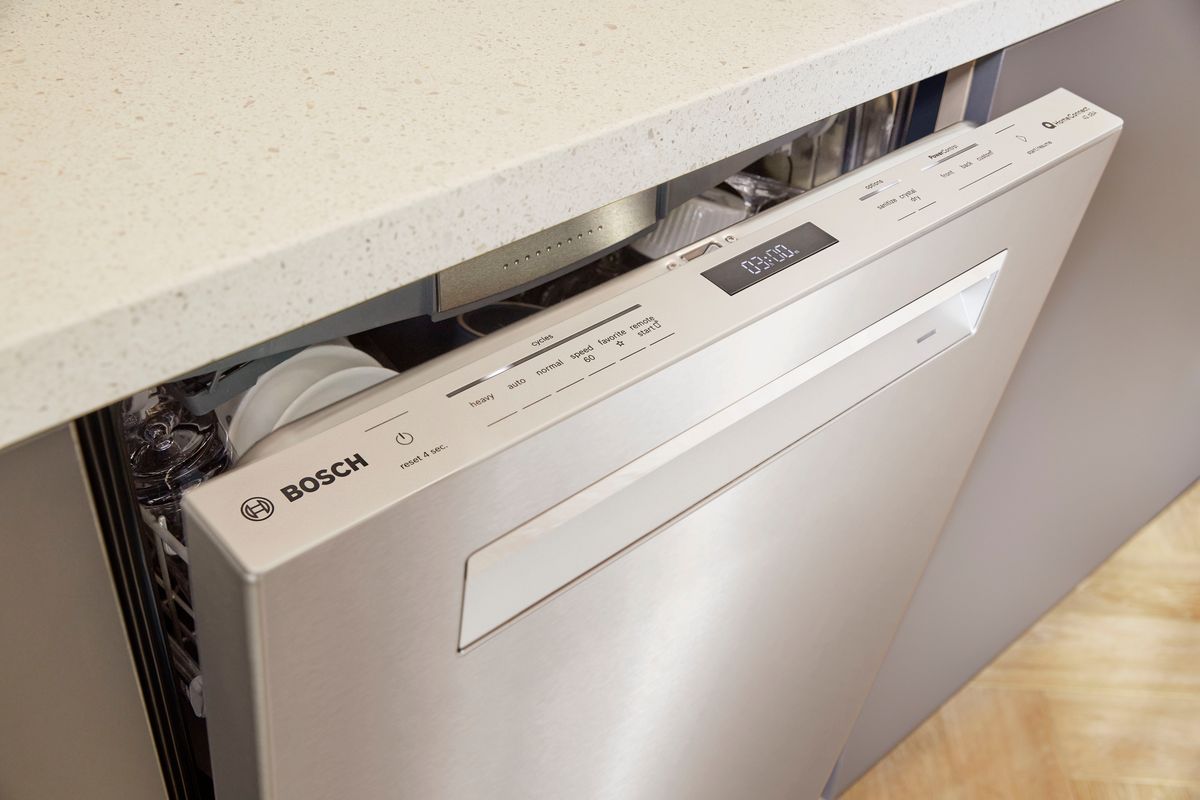
Bosch dishwashers use advanced electronics to control cycles, monitor water flow, and check for problems. The reset function is built in to stop a cycle, clear error codes, or recover from a fault. Usually, you press and hold the Start button for 3–5 seconds (sometimes labeled Start/Reset), and the dishwasher should drain and return to standby mode. But sometimes, this simple reset does not solve the problem.
If your reset does not work, it’s important to understand what the reset function actually does:
- Clears minor errors: It can clear temporary errors or glitches.
- Drains the dishwasher: In most models, a reset will drain any remaining water.
- Stops and resets the cycle: Useful if you started the wrong program or need to change settings.
- Does NOT fix hardware faults: If there is a deeper problem, a reset might not help.
Knowing what the reset is meant for helps you decide the next step if it fails.
How To Properly Reset A Bosch Dishwasher
Before you assume something is broken, make sure you are using the correct reset method. Bosch dishwashers come in different models, and the process can vary. Here are the most common methods:
- Standard Button Reset
- Open the door slightly (but keep it latched).
- Press and hold the Start/Reset button for about 3–5 seconds.
- Wait for the display to show “0: 01” or hear a beep.
- Close the door and let the dishwasher drain (can take up to 2 minutes).
- The dishwasher should go back to standby.
- Power Cycle Reset
- Turn off the dishwasher using the power button or unplug it.
- Wait for at least 5 minutes.
- Plug it back in or turn on the breaker.
- This can clear deeper software glitches.
- Model-Specific Procedures
- Some Bosch models require pressing two buttons together (usually Cancel + Drain).
- Check your user manual for the exact method.
If you have followed these steps and the dishwasher still does not reset, you may be facing a more complex problem.
Common Reasons Why Bosch Dishwasher Reset Is Not Working
There are several reasons why the reset function might not respond. Let’s look at the most likely causes and how to identify them.
1. Control Panel Malfunction
If the buttons on the control panel do not respond, the panel may be faulty. This can happen due to moisture, worn contacts, or electrical issues.
Signs:
- No lights or sounds when pressing buttons
- Certain buttons don’t work, while others do
- Display is blank or flickering
2. Software Or Firmware Glitch
Modern dishwashers use software to run programs. Sometimes, glitches or corrupted firmware can cause the system to freeze or ignore commands.
How it shows:
- The dishwasher is stuck on one cycle
- Error codes keep repeating after reset
- Unit won’t start a new cycle
3. Door Latch Or Sensor Problems
For safety, Bosch dishwashers will not reset if the door latch is not properly closed or the sensor is broken.
What to check:
- Door does not click shut
- Error code related to the door (“E15” or similar)
- Display says “door open” even when closed
4. Stuck Or Unresponsive Buttons
Sometimes, a button might be stuck or broken, making it impossible to send the reset command.
Noticeable if:
- Button feels loose, sticky, or does not “click”
- Pressing the button does nothing, but others work
5. Power Supply Issues
A weak or unstable power supply can prevent the dishwasher from resetting. This is often overlooked.
Watch for:
- Power flickers or the unit randomly turns off
- Circuit breaker trips when dishwasher is running
6. Electronic Control Board Failure
The main control board is the brain of your dishwasher. If it fails, resets and other functions may not work.
Possible clues:
- Multiple unrelated errors
- Dishwasher won’t start, reset, or respond at all
7. Child Lock Or Delay Start Activated
Bosch dishwashers have safety features like child lock or delay start. If these are active, the reset might not work.
Symptoms:
- Buttons beep but nothing happens
- Display shows a lock icon or delay timer
Troubleshooting Steps When Reset Does Not Work
If your Bosch dishwasher is ignoring the reset, don’t panic. Try these step-by-step troubleshooting methods to narrow down the problem.
1. Confirm The Reset Procedure
Double-check your user manual or the Bosch website to make sure you are using the correct reset steps for your model. Bosch has several series (100, 300, 500, 800, Benchmark) and some require a unique button combination.
2. Power Cycle The Dishwasher
Unplug the dishwasher or turn off the circuit breaker for 5–10 minutes. This can sometimes reset the electronics and clear temporary faults.
3. Inspect The Door Latch
Open and close the door firmly. Listen for a solid “click. ” If not, inspect the latch for debris or visible damage. Try cleaning the latch area with a soft, damp cloth. If the latch is broken, it will need to be replaced.
4. Check For Child Lock Or Delay Start
Look for a lock icon on the display. To turn off the child lock, press and hold the <** and **> buttons (or check your manual). Cancel any delay start by holding the Start button until the timer clears.
5. Examine The Control Panel
Press each button and observe if they feel normal. If some buttons are unresponsive or stuck, gently clean around the buttons with a soft cloth. Avoid using too much water. If the panel is clearly faulty, replacement may be needed.
6. Look For Error Codes
If your dishwasher displays an error code, look it up in your manual or online. Common Bosch codes:
- E15: Water leak detected
- E24: Drainage issue
- E09: Heating error
If you see an error, a reset alone may not clear it—you will need to address the root cause.
7. Test The Power Supply
Plug another small appliance into the same outlet to make sure it works. If the outlet has no power, check your home’s circuit breaker or fuse box.
8. Inspect For Water In The Base
Some Bosch dishwashers have a safety float switch that detects leaks. If water collects in the base, the machine locks out and ignores resets. Remove the toe kick and check for water. If found, dry the base with towels and allow it to air dry before plugging the unit back in.
9. Try A Diagnostic Mode
Many Bosch dishwashers have a diagnostic mode for advanced troubleshooting. Usually, you press and hold specific buttons (like Power Scrub Plus + Regular Wash) and then turn on power. The dishwasher will run a self-test and may reveal hidden faults.
10. Contact Bosch Support Or A Technician
If none of the above steps work, the issue may be with the main control board or another internal part. In this case, contact Bosch customer support or a certified technician.
Credit: www.bosch-home.com
Comparing Bosch Reset Issues With Other Dishwasher Brands
It helps to know how Bosch reset issues compare with other top brands. Here’s a quick comparison:
| Brand | Common Reset Method | Reset Success Rate | Known Reset Issues |
|---|---|---|---|
| Bosch | Hold Start/Reset 3–5 sec | High (when hardware is OK) | Control board, door sensor |
| Whirlpool | Unplug 1 min, press Cancel/Drain | High | Control lock, stuck buttons |
| GE | Press Start/Reset, power cycle | Moderate | Electronic glitches |
| Samsung | Reset breaker, touchpad sequence | Moderate | Touchpad, power issues |
| LG | Power off, press and hold Start | High | Drain errors, sensor faults |
Insight: Bosch reset issues are usually linked to safety sensors or control boards. Other brands may have more trouble with touchpads or software bugs.
Key Components Related To Reset Problems
If a reset does not fix your Bosch dishwasher, it often points to problems with specific components. Here’s a closer look at the most important parts:
1. Control Panel
This is where you set programs and start/reset the dishwasher. If it fails, none of the commands will work. Control panels can wear out after years of use or get damaged by moisture.
2. Door Latch/sensor
If the door is not fully closed or the sensor is broken, the dishwasher will not start or reset. Even a small misalignment can cause the sensor to read “open. ”
3. Main Control Board
This electronic board controls all dishwasher functions. It is expensive to replace, but often the root cause if all else fails.
4. Float Switch
This safety device detects water leaks. If activated, it locks the machine and blocks resets until the water is removed.
5. Power Supply
A steady electrical supply is needed for all electronics. Surges or weak power can cause the dishwasher to freeze or ignore commands.
When To Repair Vs. Replace Parts
Sometimes, fixing a reset issue is as simple as cleaning or adjusting a component. Other times, you may need to replace a part. Here is a guide to help you decide:
| Part | Repair Option | Replacement Cost (Approx.) | DIY Difficulty |
|---|---|---|---|
| Control Panel | Clean, reseat ribbon cable | $80–$200 | Moderate |
| Door Latch/Sensor | Clean, realign | $20–$50 | Easy |
| Main Control Board | Reset, inspect for burn marks | $150–$350 | Challenging |
| Float Switch | Dry, reset position | $15–$40 | Easy |
| Power Supply | Check breaker, outlet | Varies | Easy |
Tip: If the control board fails and your dishwasher is over 10 years old, replacing the entire unit may make more sense financially.
Non-obvious Insights Most People Miss
1. Hidden Moisture Can Block Resets
Even a few drops of water inside the control panel or in the base can prevent resets. This often happens after a spill, leak, or steam exposure. Removing the panel and letting it air dry for 24 hours can sometimes bring the controls back to life.
2. Power Surges And Outages
A sudden power surge can confuse the dishwasher’s control board and lock up the system. If you recently had a power outage or lightning, a longer power cycle (unplugging for 30+ minutes) may be needed to “hard reset” the electronics.
Preventing Bosch Dishwasher Reset Problems
It’s easier to prevent reset issues than fix them. Here’s how to keep your Bosch dishwasher running smoothly:
- Keep the control panel dry: Wipe up spills immediately and avoid spraying water near the controls.
- Check the door latch regularly: Make sure the door closes easily and the latch is free of food debris.
- Run regular cleaning cycles: Use dishwasher cleaner once a month to prevent buildup and sensor errors.
- Use surge protectors: If your home has unstable electricity, use a surge protector to protect the control board.
- Don’t force buttons: If a button sticks, clean it gently. Forcing it can break the contacts inside.
Example: Real-world Bosch Reset Issue
Consider a case where a family noticed their Bosch dishwasher would not reset after a power outage. They tried holding the Start button, but nothing happened. The display showed an error code “E15.” After checking online, they found this code means a water leak was detected. Sure enough, a small leak under the dishwasher had triggered the float switch.
By unplugging the unit, removing the bottom panel, and drying the base, they reset the float switch. The dishwasher then accepted the reset command and worked normally again. This example shows that sometimes the reset problem is a symptom, not the root issue.
When To Call A Professional
You can solve many reset issues yourself, but some problems require expert help:
- If you smell burning or see scorch marks inside the control panel
- The dishwasher trips your home breaker repeatedly
- Buttons or display are completely dead after power cycling
- Multiple error codes appear and will not clear
- You are not comfortable opening panels or working with electricity
Bosch-certified technicians have the tools and knowledge to safely diagnose and repair more complex faults.
What To Expect From A Technician Visit
A professional will usually:
- Test the control panel and buttons for response
- Inspect the door latch, float switch, and wiring
- Run the dishwasher in diagnostic mode to check for hidden errors
- Use a multimeter to test the main control board and sensors
- Replace faulty parts if needed
Service calls cost between $100–$200, not including parts. Always ask for a quote before approving repairs.

Credit: www.youtube.com
Bosch Dishwasher Reset Problems: Data And Trends
Statistics show that reset issues are among the top three complaints for Bosch dishwashers, along with drainage and drying problems. According to a 2023 consumer survey, about 12% of Bosch dishwasher owners have experienced a reset not working at least once in the first five years.
Notably:
- 65% of these cases were resolved with power cycling or latch cleaning.
- 25% required a part replacement (mainly door latch or control panel).
- Only 10% needed a full control board replacement.
This shows that most reset failures are relatively simple to fix and only rarely point to major hardware problems.
Bosch Customer Support And Warranty
Bosch offers a standard 1-year warranty on dishwashers, with some models providing additional coverage on electronics and racks. If your dishwasher is under warranty and the reset does not work, contact Bosch directly for service. Keep your proof of purchase ready.
You can reach Bosch support through their website or by phone. They may help you troubleshoot, send a technician, or arrange for parts replacement. For more information on Bosch’s warranty and support, visit the official Bosch Home website.
Credit: www.bosch-home.com
Frequently Asked Questions
Why Does My Bosch Dishwasher Ignore The Reset Command?
Common reasons include a faulty door latch, active child lock, or a problem with the control panel. If the dishwasher detects a safety issue (like a leak), it will also refuse to reset until the problem is fixed.
How Do I Know If My Bosch Dishwasher’s Control Board Is Bad?
Signs include a dead display, no response from any buttons, or random error codes that do not clear with a reset. If power cycling and button checks do not help, the control board may need replacement.
Can A Power Outage Cause Reset Issues?
Yes. Power surges or outages can confuse the electronics and freeze the system. Unplugging the dishwasher for 10–30 minutes can sometimes “hard reset” the control board.
What Should I Do If My Dishwasher Won’t Reset And Shows An Error Code?
Look up the error code in your manual. Many codes point to specific problems (like leaks, drainage, or heating). Fixing the root problem is necessary before the reset will work.
Is It Safe To Repair The Dishwasher Myself?
You can safely check the door latch, clean the control panel, and power cycle the machine. For anything involving wiring or opening the main control board, it’s best to call a professional unless you have experience with appliance repair.
Bosch dishwashers are known for their quality, but when the reset function stops working, it can be confusing. Most issues are related to simple things like the door latch, control panel, or a hidden safety lock. By following the steps above, you can identify and fix the problem in most cases. Remember, a reset that does not work is often a sign of a deeper issue—so always check for error codes and safety problems first. With some care and patience, your Bosch dishwasher can be back to cleaning your dishes without trouble. If you hit a wall, don’t hesitate to reach out to Bosch support or a trusted technician.