If you own a V Guard stabilizer, you probably depend on it to protect your appliances from voltage fluctuations. The little lights on the front—especially the output red light—are more than just decoration. They are the stabilizer’s way of talking to you. When the output red light is not working, it can be confusing or even worrying. Is your stabilizer protecting your devices? Is something wrong inside? Or is it a simple issue you can fix at home? This guide explains everything you need to know if your V Guard stabilizer’s output red light has stopped working. We’ll go step by step, making sure you understand the possible causes, troubleshooting steps, and when you need professional help.
What Does The Output Red Light Indicate On A V Guard Stabilizer?
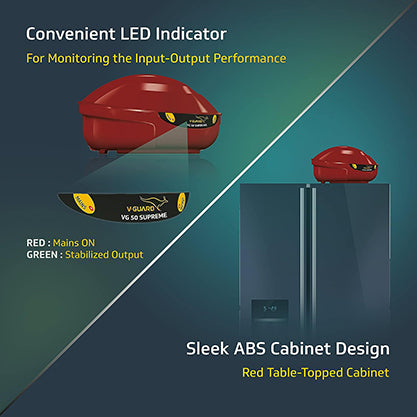
Most V Guard stabilizers have simple indicator lights for input, output, and sometimes specific warning states. The output red light usually tells you that the stabilizer is now sending regulated voltage to your device. If it’s off, it might mean the stabilizer is not supplying power, or it could simply be a faulty light.
The Meaning Of The Output Red Light
- Steady On: The stabilizer is working and supplying voltage.
- Off: There is no output, or the indicator is faulty.
- Blinking: Some models blink when stabilizing or during delay mode (refer to your model’s manual).
Why Is This Indicator Important?
Without the output light, you may not know if your stabilizer is actually working. It’s your main visual confirmation that the appliance is protected and getting power. If this light goes out, it’s not just about the bulb—it could signal larger issues.
How V Guard Stabilizers Work
Understanding how your stabilizer functions helps you see why the output light matters.
Basic Operation
- Voltage Detection: The stabilizer senses the incoming voltage.
- Correction: If the voltage is too high or too low, it adjusts to a safe level.
- Output Delivery: Once voltage is stable, the device supplies power to your appliance and turns on the output indicator.
Common Features
- Delay Timer: Protects appliances from sudden surges after power resumes.
- Thermal Overload Protection: Cuts power if the stabilizer overheats.
- Bypass Switch: Lets you supply unregulated power if needed.
Where The Output Red Light Fits In
When the output light is on, it means all safety checks have passed, and your appliance is receiving power through the stabilizer.
Common Reasons The Output Red Light Is Not Working
When you see the output red light not working, it may be due to several causes. Here are the most common:
- Burnt Out LED/Indicator Bulb: The most basic issue. The light itself has failed, but the stabilizer might still work.
- No Output Voltage: The stabilizer is not delivering power, possibly due to input issues, internal faults, or safety triggers.
- Delay Timer Mode: The stabilizer is waiting before resuming output. During this time, the output light is usually off.
- Thermal or Overload Protection Activated: If the stabilizer detects overheating or an overload, it cuts output and the red light goes off.
- Loose or Broken Wiring: Internal connections to the indicator or output circuit have failed.
- PCB or Component Failure: The electronic board inside the stabilizer may have a fault.
- Fuse Blown: Many stabilizers have a fuse inside. If this blows, the output shuts off and the light goes out.
- Input Power Issues: If there’s no power coming in, the stabilizer can’t output anything.
Non-obvious Insights
- On some models, a failed indicator may not affect protection, but on others, it can be a sign of deeper problems. Don’t assume it’s “just the light.”
- If your area has frequent voltage surges or dips, the indicator might go off more often due to the stabilizer’s protection features—not always a fault.
Step-by-step Troubleshooting Guide
If your V Guard stabilizer’s output red light is not working, use this practical troubleshooting sequence. Always prioritize safety—unplug the stabilizer before opening it.
1. Check The Basics
- Is the stabilizer plugged in properly?
- Is the wall socket working? Test with another device.
- Is the main power on?
If these are fine, move to the next step.
2. Inspect The Appliance
- Is your appliance working? Sometimes, the light is off, but the stabilizer is still outputting.
- Plug another device into the stabilizer to check if power is being supplied.
If appliances work, the issue is likely the indicator itself.
3. Look For Delay Timer Or Safety Mode
- Many V Guard models have a delay timer (often 3–5 minutes) after power resumes. During this time, the output light stays off.
- Wait for 5–7 minutes after turning on or after a power cut. If the light still does not come on, continue troubleshooting.
4. Check For Overload Or Overheat
- Some stabilizers have a reset button or auto-reset function.
- Unplug all connected devices, switch off the stabilizer, wait 10 minutes, then switch on again.
5. Inspect The Indicator Bulb Or Led
- If you are comfortable and the warranty has expired, open the front panel carefully.
- Look for a burnt or loose indicator bulb/LED. Replacement is usually cheap and quick.
6. Examine Internal Connections
- Check for any loose wires or disconnected terminals inside.
- If you see burnt marks or a strong smell, stop and seek professional help.
7. Test The Fuse
- Locate the fuse (usually at the back or inside).
- If blown, replace with the same rating. Do not use a higher-rated fuse.
8. Professional Help
If you still can’t find the issue, or if internal parts look damaged, contact V Guard service or a qualified technician. Opening the stabilizer further may void your warranty or be unsafe.
Troubleshooting Summary Table
Here’s a quick reference for common causes and what to check:
| Problem | What to Check | Possible Solution |
|---|---|---|
| Output red light off, appliance works | Indicator bulb/LED | Replace indicator |
| Output red light off, appliance off | Power, fuse, internal wiring | Check power, replace fuse, fix wiring |
| Light off after power resumes | Delay timer mode | Wait 3-5 minutes |
| Light flickers or blinks | Voltage fluctuations | Stabilizer working, monitor voltage |
| Light off, burnt smell inside | PCB/component failure | Call technician |
Model-specific Notes For V Guard Stabilizers
Different V Guard stabilizer models may have small variations in how the output red light works.
Common V Guard Models And Indicators
- VG 50, VG 100, VG 400, VG Crystal Plus: Use a simple output red LED. Behavior is usually steady when output is live.
- V Guard Mini Crystal: Some models use a multi-color LED or digital display. Output indication may differ.
- V Guard VG SD 50/100/400: Have delay and protection features, so the output red light may stay off during certain protection states.
Always refer to your model’s user manual for exact indicator behavior.
Table: Output Red Light Behavior By Model
| Model | Output Red Light Behavior | Special Features |
|---|---|---|
| VG 50 | Steady on when output is live | Basic protection |
| VG 400 | Steady or off during delay | Delay timer |
| Mini Crystal | Changes color or digital | Multi-indicator display |
| VG SD 100 | Steady, off during protection | Thermal/overload |
Should You Worry If The Output Red Light Is Not Working?
It depends on the situation:
- If your appliances work normally and the stabilizer does not show other warning signs, it may just be a burnt indicator.
- If appliances are not getting power, or you notice burnt smells, sounds, or other warning lights, there could be a serious internal problem.
When It’s Probably Not Serious
- Only the indicator is out, but everything else works.
- The stabilizer is old (LEDs can fail over time).
When It’s Serious
- No output to appliances.
- Other warning lights are on.
- Burnt smell or visible damage.
- Unusual noises from inside.
- Stabilizer feels hot to touch.
Non-obvious tip: Some users ignore a dead output light for months, but a failing indicator circuit can sometimes be an early sign of PCB trouble. Don’t ignore other symptoms.

Credit: www.mingchele.com
How To Replace The Output Red Light Indicator
If you’ve decided that the issue is just the indicator, you can replace it. Here’s a general guide.
Tools Needed
- Screwdriver (usually Philips)
- Replacement LED or indicator bulb (same rating as original)
- Soldering iron (for LED models)
- Insulation tape
Steps
- Unplug the stabilizer and wait for a few minutes.
- Remove the front panel screws.
- Locate the output red LED or bulb.
- Carefully disconnect the old indicator.
- Install the new LED or bulb (solder if needed).
- Reattach the panel and plug in.
- Test with a working appliance.
If you’re not confident with electronics, it’s best to ask a technician. Don’t risk electric shock or damaging your stabilizer.
Preventing Output Light Problems In The Future
Many output light issues are due to power surges, aging parts, or handling. Here’s how to reduce risks:
- Use a surge protector on your main supply if your area has unstable voltage.
- Don’t overload the stabilizer with high-wattage appliances.
- Clean dust from vents and panels every few months.
- Avoid moisture—keep the stabilizer in a dry place.
- Check wires and plugs for damage regularly.
- Replace fuses with the correct rating—never use higher-rated fuses.
A practical tip: Many people only think about their stabilizer when something fails. Add a quick visual check of the lights and casing to your monthly home maintenance routine.

Credit: www.youtube.com
Cost Comparison: Diy Vs. Professional Repair
Sometimes, people wonder whether they should fix the indicator themselves or call for service. Here’s a cost breakdown.
| Repair Option | Estimated Cost (USD/INR) | Pros | Cons |
|---|---|---|---|
| DIY (replace LED/bulb) | $1-3 / ₹80-250 | Cheap, fast if skilled | Risky if inexperienced |
| Professional (indicator only) | $5-10 / ₹400-800 | Safe, warranty stays | More expensive |
| Professional (internal repair) | $15-30 / ₹1200-2400 | Full checkup, safe | Costly, may take time |
Non-obvious insight: DIY is cost-effective only for simple indicator replacement. If you suspect a deeper issue, professional repair is safer and often comes with a service guarantee.
Warranty, Service, And Support
Most V Guard stabilizers come with a 1–3 year warranty. Opening the case yourself may void this warranty. Always check:
- Is the stabilizer still under warranty?
- Do you have proof of purchase?
- Is there an authorized service center nearby?
For warranty repairs, contact V Guard’s official customer care. They may offer free or discounted repairs for indicator or internal faults if it’s still covered.
V Guard customer care: You can find local service centers and contact information on the official website: V Guard Official Site.
When To Replace Your Stabilizer
Sometimes, repairing old stabilizers is not worth it. Here’s when you should consider buying a new one:
- The stabilizer is over 7–10 years old.
- Frequent faults and repairs are happening.
- Internal components (PCB, transformer) are damaged.
- Your appliances now need more wattage than the stabilizer can provide.
Modern stabilizers offer better features, such as digital displays, smart protection, and quieter operation.
Real-world Example: Troubleshooting A Dead Output Light
Let’s say you have a V Guard VG 400 and the output red light is off. Here’s how a real user might solve this:
- Checks wall socket with a phone charger—works fine.
- Waits 5 minutes after power resumes—still no light.
- Plugs in a lamp—no power, so it’s not just the indicator.
- Opens the back cover (out of warranty), finds a blown fuse.
- Replaces the fuse—output light and power restored.
Key insight: Many users panic when the indicator goes out but miss simple checks like the fuse or delay timer.
How To Choose A Good Replacement Indicator
If you need to buy a new output red light for your V Guard stabilizer, look for:
- Correct voltage rating: Most use 220V or 110V LEDs.
- Size and fit: Match the old part.
- Quality brand: Avoid cheap, unbranded parts.
You can find these at most electronics stores or online.
Safety Tips When Handling Stabilizers
- Always unplug before opening or checking inside.
- Discharge capacitors (if possible) to avoid electric shock.
- Don’t touch internal parts with wet hands.
- If you smell burning or see smoke, stop and call for help.
- Never use the stabilizer with the case open.
Credit: vguard.com
What If The Output Red Light Is Flickering?
A flickering light can mean:
- Loose internal connection.
- Unstable input voltage.
- Failing indicator circuit.
If the power output is also unstable, unplug the stabilizer and get it checked. Flickering usually means a developing fault.
Can You Use Your Appliance Without The Output Red Light?
Technically, if only the indicator is faulty and the stabilizer works, yes—you can use your appliance. However, you lose the easy confirmation that everything is fine. For safety, it’s best to fix the indicator as soon as possible.
The Role Of Input And Other Indicator Lights
Besides the output red light, stabilizers often have input, delay, or protection lights. Here’s what they mean:
- Input Light: Shows power is coming in.
- Delay/Timer Light: Turns on during startup delay.
- Protection/Warning Light: Signals overload or faults.
If all lights are out, the stabilizer has no power. If only the output light is out, follow the troubleshooting steps.
Signs It’s Time For An Upgrade
If you face these issues often, consider upgrading your stabilizer:
- Frequent indicator failures.
- Repeated output drop or voltage problems.
- Your stabilizer feels hot often.
- Appliances are getting damaged despite using a stabilizer.
Modern models offer better protection and reliability.
Where To Get Help
If you’re unsure or not comfortable with electronics, don’t risk it. Call the V Guard helpline or find a local technician. For more details on stabilizer technology and safety, you can check Wikipedia’s page on voltage regulators.
Frequently Asked Questions
Why Is My V Guard Stabilizer Output Red Light Not Turning On?
The most common reasons are a burnt indicator bulb/LED, delay timer mode, blown fuse, or a deeper internal fault. Check if your appliance is getting power; if yes, the light itself may need replacing.
Is It Safe To Use The Stabilizer If The Output Red Light Is Not Working?
If your appliances are working and there are no other warning signs, it’s usually safe. However, it’s best to fix the indicator soon to keep visual confirmation of stabilizer operation.
Can I Replace The Output Red Light Indicator Myself?
Yes, if you have some experience with electronics. Use the same rating and size as the original. If not, ask a technician—especially if your stabilizer is under warranty.
What Does It Mean If The Output Red Light Blinks Instead Of Staying On?
Blinking usually means the stabilizer is in delay timer mode or is adjusting to voltage changes. Check your model’s manual for specific indicator meanings.
How Long Does A V Guard Stabilizer’s Output Red Light Typically Last?
Most LED indicators last 5–10 years, but frequent voltage surges or poor quality parts can shorten this. If you replace it, use a quality brand for better durability.
If you ever feel unsure, or the problem seems bigger than a simple indicator, don’t hesitate to seek help. Your stabilizer is there to protect your valuable appliances—give it the care it deserves, and it will serve you well for years.