A Honeywell thermostat is a small but essential device in many homes and buildings. When the light on your Honeywell thermostat stops working, it can cause confusion and worry. The thermostat’s light is not just for show—it’s a sign that the unit is powered, functioning, and ready to adjust your heating or cooling as needed. If the light is off, you might wonder: Is my thermostat broken? Is my home’s heating or cooling system still working properly? These questions are common, and the answers can save you time, money, and frustration.
Let’s explore why the Honeywell thermostat light might not be working, how to troubleshoot the problem, and what steps you can take to restore comfort and control to your living space. Whether you’re a homeowner, a renter, or someone responsible for building maintenance, this guide will give you practical solutions and expert insights.
Understanding Your Honeywell Thermostat
Before troubleshooting, it helps to know how your Honeywell thermostat works. Most Honeywell thermostats have a small screen with a backlight. This backlight helps you read the display, especially in low light or at night. Some models have a “touch-to-wake” feature, while others stay lit as long as the thermostat is in use.
The light serves several important purposes:
- Shows the thermostat is receiving power
- Makes the display easy to read
- Indicates when the thermostat is actively adjusting the temperature
If the light goes out, it can mean a simple power issue—or a bigger problem with your heating or cooling system.
Common Reasons The Thermostat Light Stops Working
There are several reasons why the Honeywell thermostat light might not be working. Understanding these can help you quickly identify and fix the issue.
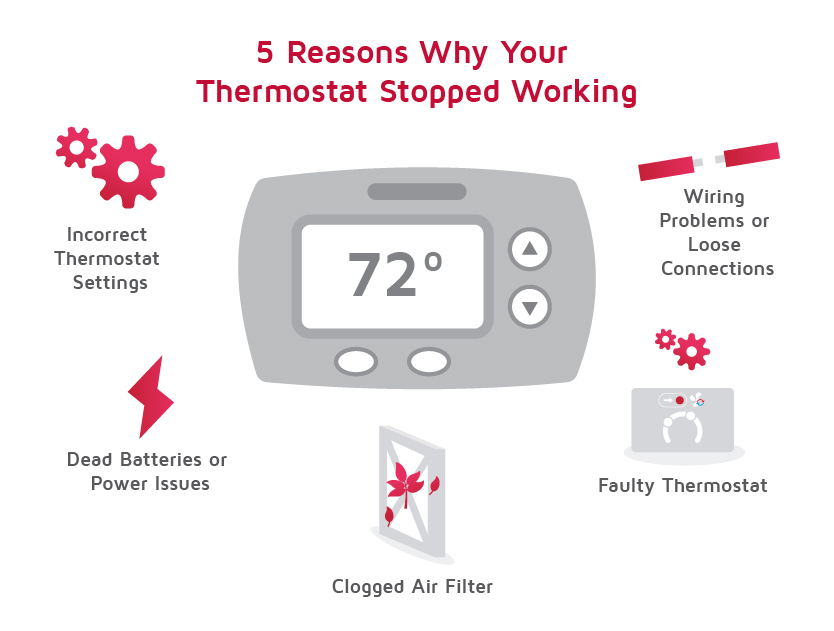
1. Power Supply Problems
The most common cause is a power supply issue. Your thermostat may be battery-operated, hardwired, or powered by a combination of both. If the power is interrupted, the light will go out.
- Dead batteries: Many Honeywell thermostats use AA or AAA batteries. If these run out, the screen and light go dark.
- Tripped circuit breaker: If your thermostat is hardwired, a tripped breaker can cut power.
- Blown fuse: Some HVAC systems have fuses that can blow, stopping electricity from reaching the thermostat.
2. Wiring Issues
Loose, corroded, or damaged wires behind your thermostat can cause the light to stop working. This is more common in older homes or after recent renovations.
3. Backlight Settings
Some thermostats allow you to adjust backlight settings. If the backlight is set to “off” or “energy save,” it may appear as if the light is not working.
4. Thermostat Malfunction
Like any electronic device, a Honeywell thermostat can sometimes malfunction. A failed backlight or screen can make the thermostat seem dead, even if it’s still controlling the temperature.
5. Hvac System Issues
If your furnace, air handler, or HVAC system has a problem, it can affect the thermostat. Issues like a blown transformer or disconnected wires at the furnace can cut power to the thermostat.
6. Environmental Factors
Extreme cold, heat, or moisture can affect thermostat performance. Condensation, dust, or insects inside the unit can interfere with the backlight.
Non-obvious insight: Sometimes, the thermostat’s light issue is a sign of a larger problem in your HVAC system, not just the thermostat itself.
How To Diagnose The Problem
Finding the cause of a non-working Honeywell thermostat light requires a step-by-step approach. Rushing or guessing can lead to unnecessary repairs or expenses.
Step 1: Check The Display
Is the screen completely blank, or is it just the backlight that’s out? If the display shows numbers or symbols but no light, the problem is likely with the backlight or settings. If the screen is completely blank, it’s usually a power issue.
Step 2: Test The Power Source
- Battery models: Remove the thermostat from the wall and replace the batteries with fresh ones. Pay attention to battery orientation.
- Hardwired models: Check your home’s breaker panel. Reset any tripped breakers. Look for fuses in the furnace panel and replace if blown.
Step 3: Inspect The Wiring
Turn off power to the thermostat at the breaker. Gently remove the thermostat from the wall. Look for:
- Loose or disconnected wires
- Corroded contacts
- Signs of moisture or insects
If you’re not comfortable doing this, call a professional.
Step 4: Adjust Backlight Settings
Some models have a menu for display brightness or backlight control. Check your owner’s manual or Honeywell’s website for instructions.
Step 5: Test The Hvac System
Try turning the heat or air conditioning on from the thermostat. Listen for the furnace or air handler to start. If the system does not respond, the problem may be in the HVAC unit, not the thermostat.
Non-obvious insight: A failed “C” wire connection (common wire) can cause the backlight to fail, especially in smart thermostats that rely on steady power.
Table: Honeywell Thermostat Power Source Comparison
Here is a comparison of typical Honeywell thermostat power options and how they impact backlight performance.
| Power Source | Backlight Behavior | Common Issues |
|---|---|---|
| Batteries Only | Backlight dims or turns off to save battery | Dead batteries, poor contacts |
| Hardwired (C wire) | Backlight stays bright, always powered | Loose wires, blown fuse, tripped breaker |
| Battery + Hardwired | Backlight stays on with C wire; battery as backup | C wire disconnected, battery failure |
Troubleshooting Steps: Fixing The Honeywell Thermostat Light
Now, let’s go through practical steps you can take to fix a non-working Honeywell thermostat light.
1. Change The Batteries
If your thermostat uses batteries, this is the simplest fix. Use high-quality alkaline batteries. Insert them in the correct orientation. Wait a minute after replacing the batteries; sometimes, the screen takes a few seconds to light up.
Tip: If the display comes back but the light is dim, it may help to clean the battery contacts with a cotton swab and rubbing alcohol.
2. Reset The Circuit Breaker
Find your home’s breaker panel and locate the breaker labeled for the furnace or HVAC system. Switch it off, wait 30 seconds, and turn it back on. This can reset both the HVAC system and the thermostat.
3. Check The Furnace Switch And Fuse
Many furnaces have a small on/off switch nearby—sometimes mistaken for a light switch. Make sure this is in the “on” position. If your furnace has a fuse panel, check for blown fuses and replace as needed.
4. Inspect And Reconnect Wires
With the power off, gently pull the thermostat from the wall plate. Check that all wires are tightly connected and free of corrosion. Re-seat any loose wires.
5. Adjust Display Settings
For thermostats with menu controls:
- Press the menu button
- Navigate to “Preferences” or “Display”
- Set “Backlight” to “On” or “Auto”
Settings can vary by model; consult your manual for details.
6. Clean The Thermostat
Dust and dirt can block the light or interfere with sensors. Use a soft, dry cloth to wipe the screen and outer case. Never use water or harsh cleaners.
7. Replace The Thermostat
If none of the above steps work, the backlight LED or screen may have failed. In this case, replacing the thermostat is usually the best solution.
Table: Common Problems And Solutions
This summary table can help you quickly match your problem with the right solution.
| Problem | Likely Cause | Solution |
|---|---|---|
| Screen blank, no light | No power or dead batteries | Replace batteries, check breaker/fuse |
| Display works, no backlight | Backlight setting off or LED failure | Change settings, replace thermostat |
| Backlight flickers | Loose wiring or weak power | Reconnect wires, check power supply |
| Thermostat unresponsive | System or wiring fault | Check HVAC system, call technician |
When To Call A Professional
While many thermostat light issues are easy to fix, some require a licensed technician. Call for help if:
- You notice burning smells, smoke, or melted wires
- The thermostat repeatedly loses power or resets itself
- Your HVAC system will not turn on, even after basic troubleshooting
- You are uncomfortable handling electrical components
A qualified HVAC professional can safely test the system, replace faulty parts, and ensure your thermostat is working correctly.
How Different Honeywell Thermostat Models Handle Backlighting
Honeywell has many thermostat models, each with unique features and display types. Understanding your model’s behavior can prevent unnecessary worries.
Honeywell T Series (t3, T5, T9)
These modern thermostats have full-color touchscreens. The backlight is usually “sleeping” when not in use and wakes when you touch the screen.
- If the light does not wake, check for firmware updates on the Honeywell website.
- Some models need the “C” wire connected for full backlight function.
Honeywell 8000 Series
This series has a large, always-on backlight if powered by a “C” wire. If the light is out but the display works, check the “C” wire connection.
Older Honeywell Models
Older digital thermostats use simple LCD screens. The backlight may only turn on when buttons are pressed, then turn off after a few seconds to save power.
Practical tip: Always check your thermostat’s manual for specifics on how the backlight should behave.
Energy Saving And Backlight Use
Some homeowners worry that a constantly lit thermostat wastes energy. The reality is the backlight uses very little electricity—usually less than 1 watt. Over a year, this is about the same as running an LED nightlight.
Smart thermostats sometimes dim or shut off the backlight when not needed. This can extend battery life but may make the screen harder to see in low light.
If you prefer a brighter display, adjust the settings if possible, and ensure the thermostat is powered by a “C” wire rather than batteries alone.
Table: Backlight Power Consumption Comparison
Here is a look at how much energy different thermostat display types use:
| Display Type | Backlight Power Use | Typical Power Source |
|---|---|---|
| Simple LCD | 0.1–0.2 watts | Batteries or hardwired |
| LED Backlit LCD | 0.5–1 watt | Hardwired preferred |
| Full Color Touchscreen | 1–2 watts | Requires C wire for best performance |

Credit: www.youtube.com
Preventing Future Thermostat Light Problems
Taking a few simple steps can reduce the chances of thermostat light issues in the future:
- Change batteries once a year (or when the low battery warning appears).
- Dust the thermostat gently every few months.
- Check wiring connections if you have work done on your HVAC system.
- Keep the area around the thermostat clear of moisture and extreme temperatures.
- Update firmware on smart thermostats as recommended by Honeywell.
Pro tip: When upgrading your thermostat, always install a “C” wire if possible. This ensures strong, steady power for backlights and Wi-Fi features.
Honeywell Thermostat Light Not Working: Real-world Examples
To better understand how these issues play out, let’s look at some real-life scenarios.
Example 1: The Battery Surprise
Maribel noticed her thermostat screen was blank and the house was getting cold. She thought the furnace was broken, but after replacing the batteries, the screen and backlight returned immediately. She set a reminder to replace batteries every fall.
Example 2: The Hidden Switch
James’s Honeywell thermostat went dark after a weekend away. He checked the breaker and batteries, but nothing helped. A technician found the furnace switch in the basement had been accidentally flipped off while cleaning. Turning it back on restored power.
Example 3: The C Wire Mystery
Priya upgraded to a smart Honeywell thermostat. The display worked, but the backlight was very dim. After some research, she learned her system was missing a “C” wire. An electrician installed one, and the backlight became bright and clear.
Example 4: The Aging Thermostat
An older Honeywell thermostat in a rental property had a backlight that flickered, then failed completely. The property manager replaced it with a new model, and the issue was solved.
Non-obvious insight: Sometimes, what looks like a thermostat problem is really a sign of an aging or overloaded HVAC system. Don’t ignore repeated electrical issues.

Credit: pluscolombia.com
Choosing The Right Replacement Thermostat
If your Honeywell thermostat light cannot be fixed, you may need to choose a new unit. Here’s what matters:
- Compatibility: Make sure the new thermostat works with your heating and cooling system.
- Power source: If you want a bright, always-on backlight, choose a model that uses a “C” wire.
- Features: Some thermostats offer Wi-Fi, touchscreens, and energy reports.
- Ease of use: For seniors or renters, a simple model with clear buttons may be best.
Common mistake: Buying a smart thermostat without checking if your system can provide enough power. Many older systems lack a “C” wire.
What To Avoid When Dealing With Thermostat Light Issues
Some mistakes can make things worse, not better:
- Don’t force or pry open the thermostat; this can damage delicate parts.
- Don’t ignore burnt smells, sparks, or repeated failures—these can be fire hazards.
- Don’t replace your thermostat without first checking your HVAC system.
Credit: www.lennox.com
Where To Find More Help
Honeywell’s official support page offers manuals, troubleshooting guides, and contact information for customer service. You can visit their site for model-specific advice and downloads.
For in-depth technical support, your local HVAC technician is often the best resource. They can test both your thermostat and HVAC system for hidden problems.
If you want to read more about how thermostats work and why the “C” wire is important, check out this Wikipedia page on thermostats.
Frequently Asked Questions
Why Is My Honeywell Thermostat Light Not Turning On After I Change The Batteries?
If the light does not come on after battery replacement, check that the batteries are installed correctly and are fresh. Also, look for corrosion in the battery compartment. If the display stays blank, there may be a wiring or power supply issue.
Does The Backlight Always Stay On In All Honeywell Thermostat Models?
No. Some models keep the backlight on all the time if powered by a “C” wire, while others only light up when you touch the screen or press a button. Check your model’s manual to understand what is normal.
Can A Blown Fuse In My Furnace Affect The Thermostat Light?
Yes. Many thermostats receive power from the furnace or air handler. If a fuse blows in the furnace, the thermostat may lose power and the light will go out. Replace the fuse to restore function.
Will Replacing The Thermostat Fix The Light If The Problem Is With My Hvac System?
No. If the HVAC system is not sending power to the thermostat, replacing the thermostat will not fix the light. Always check your HVAC system before buying a new thermostat.
Is It Safe To Use My Heating Or Cooling System If The Thermostat Display Is Dark But The System Still Runs?
It’s best to fix the display issue as soon as possible. While your system may still work, you won’t be able to change settings or see alerts. A dark display can also hide deeper electrical problems.
A working Honeywell thermostat light is more than just a convenience—it’s a sign that your comfort system is healthy and ready to respond. By following these steps and tips, you can quickly diagnose most light issues and keep your home comfortable and safe.
If in doubt, don’t hesitate to call a professional. Your peace of mind, and your heating and cooling system, are worth it.